
Our Short List of 3

- Best for: Mixers who want an honest midrange reference for vocal-forward music
- 5-inch cone woofer and 1-inch dome tweeter
- 70W bi-amplified power (45W low frequency, 25W high frequency)
- Frequency response: 54 Hz to 30 kHz
- Balanced XLR and quarter-inch TRS inputs

- Best for: Producers in untreated rooms who need placement EQ built in
- 5-inch woven Kevlar woofer and 1-inch tweeter
- 55W bi-amplified Class D power per speaker
- Frequency response: 54 Hz to 30 kHz
- Three voicing modes: Mix, Focus and Create

- Best for: Editors and mixers who care about a stable, detailed stereo image
- 5-inch woofer and 1-inch tweeter with Image Control Waveguide
- Dual 41W Class D amplifiers, 82W total per speaker
- Balanced XLR and quarter-inch TRS inputs
- Boundary EQ and HF Trim controls
All 5 Picks at a Glance
| Product | Specs | Action |
|---|---|---|
| Yamaha HS5 (Pair) |
| Check price on Amazon |
| KRK ROKIT 5 Generation Five (Pair) |
| Check price on Amazon |
| JBL 305P MkII (Pair) |
| Check price on Amazon |
 PreSonus Eris E3.5 (Pair) |
| Check price on Amazon |
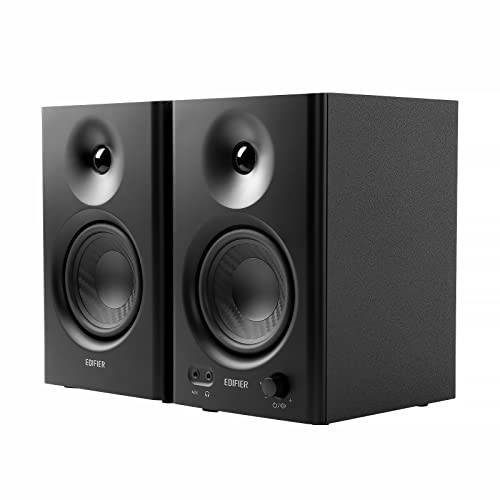 Edifier MR4 (Pair) |
| Check price on Amazon |
Key takeaways
- Five nearfield studio monitors compared on woofer size, tuning controls and inputs, from compact desktop pairs to honest 5-inch mixing references.
A studio monitor purchase is really a decision about trust: can you believe what the speakers tell you about your own mix? A pair that flatters the bass or sweetens the top end feels great while you work and then betrays you in the car, on earbuds, everywhere else. The honest pair is the one that exposes problems early, even when that honesty is less fun.
This roundup is for bedroom producers setting up a first desk, podcasters and video editors who cut dialogue all day, and hobbyist mixers upgrading from multimedia speakers. Every pick below is a powered nearfield monitor sold on Amazon, chosen from the driver sizes, tuning controls and input options printed on its product page rather than from reputation alone.
Quick Picks
As an Amazon Associate we earn from qualifying purchases
| Product | Best for | Key spec from title |
|---|---|---|
| Yamaha HS5 (Pair) | Mixers who want an unflinching midrange reference | 5-inch woofer, 70W bi-amplified |
| KRK ROKIT 5 Generation Five (Pair) | Untreated rooms that need on-screen EQ help | 5-inch Kevlar woofer, DSP voicing modes |
| JBL 305P MkII (Pair) | Wide, detailed stereo imaging on a desk | 5-inch woofer, Image Control Waveguide |
| PreSonus Eris E3.5 (Pair) | Small desks and first-time monitor buyers | 3.5-inch woofer, 50W Class AB pair |
| Edifier MR4 (Pair) | Budget desks that still need balanced inputs | 4-inch woofer, balanced TRS inputs |
How to Choose
Match Woofer Size to Your Room and Desk
Driver diameter decides how much low end a nearfield monitor can honestly produce at desk distance. A 3.5-inch or 4-inch pair suits a small bedroom desk where you sit close and listen at moderate levels, and it keeps kick drums from exciting every wall resonance in an untreated room. A 5-inch woofer reaches lower and plays cleaner at higher volume, which matters for electronic and hip-hop production. Going bigger than your space allows usually buys boom, not accuracy, so measure your desk depth and listening distance before chasing the largest cabinet.
Look for Tuning Controls You Will Actually Use
No bedroom is acoustically neutral, and rear-panel controls are how a monitor adapts to yours. Boundary EQ or room control switches tame the bass build-up that happens when speakers sit close to a wall or in a corner. High-frequency trim lets you soften a bright room full of hard surfaces or lift a dull, carpeted one. DSP voicing modes, like the ones on the KRK below, go further with preset curves for different placements. These switches are not decoration; set them once for your room and your mixes translate noticeably better.
Check Inputs Against Your Interface
Most home producers run an audio interface with balanced outputs, so a monitor with balanced XLR or quarter-inch TRS inputs is the clean path and resists hum from computer noise. If you work straight from a laptop or phone, unbalanced RCA and a front aux input matter more, and a front headphone jack saves you from unplugging cables for late-night checks. Look at what your source actually outputs before ordering, because an adapter chain adds noise and cost. Also confirm whether the listing is a pair or a single speaker, since studio brands sell both ways.
Read the Frequency Range With Suspicion
Every listing prints a frequency response, but the useful number is where the bass starts rolling off, not the lowest figure in the marketing line. A compact monitor rated down to 80 Hz will not reproduce sub-bass decisions, no matter how the headline reads, so plan on checking low end with headphones or adding a subwoofer later. Compare the rated range against the woofer size: physics keeps small drivers from moving deep bass at volume. Treat response figures as a rough map of intent, then weigh tuning controls and placement flexibility more heavily.
The 5 Best Options
Yamaha HS5 (Pair)
- Best for: Mixers who want an honest midrange reference for vocal-forward music
- 5-inch cone woofer and 1-inch dome tweeter
- 70W bi-amplified power (45W low frequency, 25W high frequency)
- Frequency response: 54 Hz to 30 kHz
- Balanced XLR and quarter-inch TRS inputs
Mixers who want an honest midrange reference for vocal-forward music
The lean low end means bass decisions still need a headphone cross-check
The HS5 is the pair engineers reach for when they want a mix checked rather than complimented. Its midrange is deliberately plain, which pushes vocals, guitars and snare mistakes into the open where you can fix them. Sold here as a matched pair, each cabinet runs a 5-inch cone woofer with a 1-inch dome tweeter on separate amplifiers, and the rear panel carries room control and high trim switches for wall placement. If your tracks survive the HS5 sounding balanced, they tend to hold up almost anywhere else.
KRK ROKIT 5 Generation Five (Pair)
- Best for: Producers in untreated rooms who need placement EQ built in
- 5-inch woven Kevlar woofer and 1-inch tweeter
- 55W bi-amplified Class D power per speaker
- Frequency response: 54 Hz to 30 kHz
- Three voicing modes: Mix, Focus and Create
Producers in untreated rooms who need placement EQ built in
The voicing modes change the sound a lot, so mix in one mode and stay there
KRK’s yellow cone is a fixture in electronic and hip-hop rooms, and the fifth generation adds the thing those rooms usually lack: real room correction help. An LCD screen on the back drives DSP room tuning with multiple EQ combinations, and three voicing modes let the same pair act as a flatter mixing reference or a livelier writing speaker. The woven Kevlar woofer keeps its composure when kick and bass parts stack up. For a producer working in an untreated bedroom, those presets can matter more than raw specifications.
JBL 305P MkII (Pair)
- Best for: Editors and mixers who care about a stable, detailed stereo image
- 5-inch woofer and 1-inch tweeter with Image Control Waveguide
- Dual 41W Class D amplifiers, 82W total per speaker
- Balanced XLR and quarter-inch TRS inputs
- Boundary EQ and HF Trim controls
Editors and mixers who care about a stable, detailed stereo image
The rear bass port needs a little clearance from the wall behind your desk
The 305P MkII earns its place on imaging. JBL’s Image Control Waveguide shapes the tweeter output so the stereo picture stays wide and stable even when your desk forces the speakers a little too close together or slightly off axis. Each cabinet is powered on its own with dual Class D amplifiers, and the rear panel includes boundary EQ for wall placement plus a high-frequency trim. Podcast editors and video cutters who live on dialogue clarity tend to like this pair, because voices sit in a clear, fixed centre position.
PreSonus Eris E3.5 (Pair)
- Best for: Small desks, streamers and first-time monitor buyers
- 3.5-inch woven composite woofer and 1-inch silk dome tweeter
- 50W Class AB power (25W per side)
- Frequency response: 80 Hz to 20 kHz
- Balanced quarter-inch TRS and unbalanced RCA inputs
Small desks, streamers and first-time monitor buyers
Bass rolls off early, so low-end checks belong on headphones
The Eris E3.5 is the smallest pair here, built for desks where a 5-inch cabinet simply will not fit. One speaker carries the amplifier and feeds the second through a speaker wire, which keeps cabling simple, and the front panel puts volume and a headphone output within reach. Rear high and low tuning controls let you trim the sound for a desk against a wall. Nobody should expect deep bass from a 3.5-inch woofer, but as a first step up from laptop speakers or a gaming headset, the clarity jump is immediate.
Edifier MR4 (Pair)
- Best for: Budget desks that need balanced inputs and a front headphone jack
- 4-inch woofer and 1-inch silk dome tweeter
- 42W RMS total power (21W per speaker)
- Frequency response: 60 Hz to 20 kHz
- Balanced TRS, unbalanced RCA and aux inputs
Budget desks that need balanced inputs and a front headphone jack
Power is modest, so it suits close listening rather than filling a room
The MR4 is the budget pair that still behaves like studio gear. It accepts balanced TRS cables from an interface, which many speakers at this level skip, and adds RCA and aux inputs for a phone or laptop. A front knob switches between a flatter monitor mode and a fuller music mode, so the same pair can mix a track and then play reference songs without touching the back panel. The 4-inch woofer will not move much air, yet the balance stays composed at the close distances a small desk demands.
Which One Fits Your Situation
Your Bedroom Studio Has No Acoustic Treatment
Start with the KRK ROKIT 5 G5 or the JBL 305P MkII. The KRK’s DSP presets and voicing modes directly target the bass build-up and reflections an untreated room creates, while the JBL’s boundary EQ handles the wall-behind-the-desk problem most bedrooms have. Either way, use the tuning controls before you judge the speakers, because an untuned pair in a bare room tells you more about the room than the mix.
You Mix Vocals and Acoustic Instruments
Choose the Yamaha HS5. Its plain, forward midrange is exactly the region where vocal level, guitar harshness and snare balance live, and it refuses to hide problems behind extra bass or sparkle. Work at moderate volume, keep the high trim flat until the room proves otherwise, and cross-check the lowest octave on headphones, since the 5-inch woofer rolls off before sub frequencies.
Your Desk Is Tiny and Shared With Everything Else
Take the PreSonus Eris E3.5 or the Edifier MR4. Both pairs fit beside a laptop without swallowing the desk, and both put volume and a headphone jack on the front for quick late-night switches. The Eris is the smaller footprint; the MR4 adds balanced inputs if your interface offers them. Neither will shake the room, and for a shared space that restraint is honestly a feature.
You Edit Podcasts and Video More Than Music
Look at the JBL 305P MkII first. Dialogue editing is mostly midrange work plus stereo placement, and the waveguide keeps voices anchored while background music stays spread and readable. The input sensitivity switch also helps if your source is a camera or a consumer recorder rather than a studio interface. If budget rules the decision, the MR4 covers the same workflow in a smaller, quieter package.
Common Mistakes
- Buying a single monitor because the listing photo showed one speaker, without checking whether the price covered a pair
- Placing monitors flat on the desk at ear-to-chest height, then blaming the speakers for a smeared stereo image
- Judging bass on a small nearfield pair and boosting low end that was never missing from the mix
- Leaving room tuning switches at their defaults when the speakers sit against a wall or in a corner
- Mixing loudly for hours, which fatigues your ears and pushes every balance decision in the wrong direction
Frequently Asked Questions
Are studio monitors better than regular speakers for listening to music?
They are different rather than simply better. A studio monitor aims for a flat, uncoloured balance so you hear the recording as it is, while most home speakers add bass weight and treble sparkle for excitement. Many people enjoy monitors for listening once they adjust, but if you only listen for pleasure, a good bookshelf pair may suit you more.
Do I need an audio interface to use these speakers?
Not always. Pairs like the Eris E3.5 and MR4 accept RCA and aux connections straight from a computer or phone. An interface still helps: it provides balanced outputs that match the TRS and XLR inputs on monitors like the HS5 and 305P MkII, which reduces hum and gives you a proper volume knob. Start direct if you must, and add the interface later.
How far should studio monitors be from my ears?
Nearfield monitors are designed for roughly one to one and a half metres of listening distance, with the tweeters aimed at ear height and the two speakers and your head forming a triangle. On a shallow desk, small pairs like the E3.5 and MR4 work closer than that. Raising the speakers on stands or foam pads so the tweeters reach ear level improves clarity more than most upgrades.
Can a small monitor pair handle bass-heavy music?
Only up to a point. A 3.5-inch or 4-inch woofer cannot reproduce deep sub-bass at useful volume, whatever the listing claims. Producers working on electronic or hip-hop tracks usually check the lowest frequencies on headphones, choose a 5-inch pair like the ROKIT 5 G5 for more reach, or add a studio subwoofer later once the room placement is sorted.
FAQ
Are studio monitors better than regular speakers for listening to music?
Do I need an audio interface to use these speakers?
How far should studio monitors be from my ears?
Can a small monitor pair handle bass-heavy music?
More from Amazon
Programs that pair well with the guide above. Offers and eligibility are set by Amazon and may change.
Free shipping on eligible items, Prime Video and more. Eligible new members can start with a free trial.
Start a Prime free trialA Prime membership for ages 18-24 with a trial period. Eligibility is set by Amazon.
See Prime for Young AdultsAudiobooks and podcasts to listen to on the go. Eligible new members can start with a free trial.
Try Audible freeAd-free music streaming. Eligible new subscribers can start with a free trial.
Try Music Unlimited freeAs an Amazon Associate we earn from qualifying purchases.









