Our Short List of 3

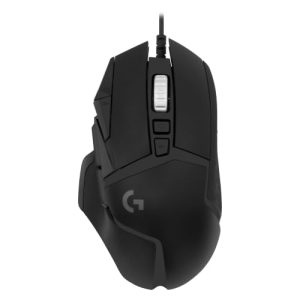
- Sensor: HERO 25K optical sensor, 200 to 25,600 DPI
- Buttons: 11 programmable buttons
- Scroll wheel: Dual-mode hyper-fast scroll wheel with tilt
- Weight: 121 grams, plus five removable 3.6-gram tuning weights

- Sensor: Razer Focus+ 26K optical sensor, up to 26,000 DPI
- Buttons: 11 programmable buttons
- Scroll wheel: Razer HyperScroll tilt wheel with free-spin mode
- Switches: Gen 2 optical switches, 0.2 ms actuation, up to 70 million clicks

- Sensor: HERO optical sensor, 200 to 12,000 DPI
- Buttons: 6 programmable buttons
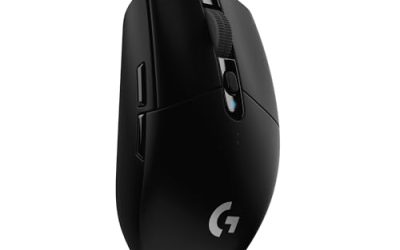
- Connectivity: LIGHTSPEED wireless, 2.4 GHz USB nano receiver
- Battery: 1 AA battery, up to 250 hours of continuous gameplay
All 4 Picks at a Glance
| Product | Specs | Action |
|---|---|---|
| Logitech G502 HERO |
| Check price on Amazon |
| Razer Basilisk V3 |
| Check price on Amazon |
| Logitech G305 LIGHTSPEED |
| Check price on Amazon |
 Razer DeathAdder Essential |
| Check price on Amazon |
Key takeaways
- Find the best mouse for casual gaming with five comfortable, reliable gaming mice compared on sensor, shape, buttons, and battery life for relaxed play.
Casual gaming covers a wide range of play: a few rounds of a shooter after work, a relaxed evening in an open-world game, a co-op session with friends, or a slow puzzle game on a Sunday afternoon. The best mouse for casual gaming does not need to chase the lightest shell or the highest sensitivity ceiling. It needs to feel comfortable in the hand, track steadily, and stay out of the way while you play.
A casual player uses one mouse for more than games. The same mouse handles web browsing, work documents, and video calls during the day, then switches to games in the evening. That means comfort over long sessions matters as much as sensor performance, and a shape that suits your grip matters more than a long list of extra buttons. A mouse that feels good after two hours is worth more than one that looks impressive on a specification sheet.
This guide compares five gaming mice that suit relaxed, everyday play. Every mouse below is a gaming mouse with a sensor and build made for play, and each one brings a different strength: a button-rich wired mouse, a comfortable ergonomic mouse, a wireless mouse with long battery life, a light wired mouse, and a simple ergonomic mouse. All five are listed on Amazon US, and each section gives the specifications from its listing so you can compare them directly.
Our top pick: Logitech G502 HERO. Runner-up: Razer Basilisk V3. The G502 HERO takes the top spot because it pairs a proven sensor with eleven programmable buttons and a weight system you can tune, which makes it a good fit for many kinds of games. The Basilisk V3 follows closely with a comfortable ergonomic shape, a Focus+ 26K sensor, and a HyperScroll tilt wheel that is handy for inventory lists and long web pages.
Quick Picks
As an Amazon Associate, we earn from qualifying purchases.
| Product | Best for | Key spec from listing |
|---|---|---|
| Logitech G502 HERO | Most casual players | HERO 25K sensor, up to 25,600 DPI, 11 buttons |
| Razer Basilisk V3 | Comfort and control | Focus+ 26K sensor, HyperScroll tilt wheel, 11 buttons |
| Logitech G305 LIGHTSPEED | Wireless freedom | HERO sensor up to 12,000 DPI, 250 hours on one AA battery |
| SteelSeries Rival 3 | Light and simple wired play | TrueMove Core sensor up to 8,500 CPI, 77 g |
| Razer DeathAdder Essential | Simple ergonomic comfort | 6,400 DPI optical sensor, 5 buttons, rubber side grips |
How to Choose
Comfort and Grip
Comfort is the first thing to get right, because a casual session can run for hours without a break. A mouse that pinches the ring finger, forces the wrist into an awkward angle, or feels too small in the hand will show its flaws long before the sensor does. Look at the shape before the specification sheet: a right-handed ergonomic shell suits palm and claw grips, while a symmetrical shell suits players who switch grips or share a mouse with someone else.
Weight matters too, and it is a matter of taste rather than a contest. A heavier mouse around 100 grams or more feels planted and steady, which suits slow aiming and relaxed play. A lighter mouse under 80 grams moves with less effort, which suits long sessions and players who move the mouse across a large pad. The G502 HERO lets you add or remove tuning weights, so you can find the balance that feels right instead of accepting a fixed weight.
Sensor and Sensitivity
Every mouse in this guide uses an optical sensor with more sensitivity than a casual player will ever need. The numbers on the box can look dramatic, but most players settle somewhere between 800 and 3,200 DPI for everyday play, and all five mice here cover that range with room to spare. What matters more is clean tracking: a sensor that follows the hand without smoothing, acceleration, or sudden jumps.
On-the-fly DPI buttons are useful for casual play, because they let you switch sensitivity without opening software. A lower setting helps with careful aiming in a shooter, while a higher setting helps with fast movement across a large monitor or two monitors. The G502 HERO, the Basilisk V3, and the Rival 3 all put DPI controls within easy reach, and the G305 and DeathAdder Essential keep the controls simple enough to learn in one evening.
Wired or Wireless
Wired mice never need charging and never run out of power in the middle of a game. That simplicity is a real advantage for a casual setup, where the mouse may sit unused for days and then get picked up for a quick session. A wired mouse is always ready, and the cable is the only thing to manage.
Wireless mice have closed the gap, and the G305 shows how far they have come. It runs for up to 250 hours on a single AA battery, and its LIGHTSPEED wireless connection reports at 1 ms, which matches a wired mouse for responsiveness. The trade is that you need to keep a spare battery nearby and remember that the receiver lives inside the mouse when you travel. If your desk is shared with other devices or you play from a couch, wireless is the more comfortable choice.
Buttons and Extras
Extra buttons are useful only when they are easy to reach and easy to remember. For casual play, two side buttons cover the most common needs: reloading, crouching, using an item, or moving forward and back in a browser. The G502 HERO and the Basilisk V3 go further with eleven programmable buttons each, which suits players who play many genres and want a different layout for each one.
Lighting, scroll wheel modes, and onboard memory are extras that add convenience rather than necessity. The Basilisk V3 has a HyperScroll tilt wheel with a free-spin mode that makes scrolling through long pages fast, and its eleven Chroma RGB zones can be set to a single calm colour if bright lighting is not your style. The G502 HERO and G305 store up to five profiles in onboard memory, so your settings travel with the mouse to another computer. The DeathAdder Essential keeps things simple with five buttons and no extras to learn, which is a strength in its own right.
Logitech G502 HERO
- Sensor: HERO 25K optical sensor, 200 to 25,600 DPI
- Buttons: 11 programmable buttons
- Scroll wheel: Dual-mode hyper-fast scroll wheel with tilt
- Weight: 121 grams, plus five removable 3.6-gram tuning weights
The Logitech G502 HERO is the top pick for casual gaming because it does everything well without asking the player to learn a complicated layout. Its HERO 25K sensor tracks up to 25,600 DPI with zero smoothing, filtering, or acceleration, which keeps aiming steady in shooters and smooth in open-world games. Eleven programmable buttons cover the actions a casual player uses most: reloading, using items, switching weapons, and opening menus, and the dual-mode hyper-fast scroll wheel switches between a notched mode for careful steps and a free-spin mode for long lists.
The weight system is the feature that sets the G502 HERO apart for relaxed play. Five 3.6-gram tuning weights let you add heft for a planted feel or remove them for a lighter touch, and the 121-gram base weight suits players who like a mouse with some presence in the hand. The right-handed ergonomic shape suits palm and claw grips, and onboard memory holds up to five profiles, so the mouse keeps your settings when you move it to a laptop or a second computer. RGB lighting can be set through Logitech G HUB software, and the wired connection means the mouse is always ready.
For a casual player who plays several genres in one week, the G502 HERO is the most flexible mouse in this guide. It handles a shooter on Monday, a farming game on Wednesday, and a co-op adventure on the weekend with the same layout, and the extra buttons mean the left hand can stay on the movement keys instead of reaching across the keyboard.
Razer Basilisk V3
- Sensor: Razer Focus+ 26K optical sensor, up to 26,000 DPI
- Buttons: 11 programmable buttons
- Scroll wheel: Razer HyperScroll tilt wheel with free-spin mode
- Switches: Gen 2 optical switches, 0.2 ms actuation, up to 70 million clicks
The Razer Basilisk V3 is the runner-up, and it earns that place with comfort. Its right-handed ergonomic shape has a pronounced thumb rest, which supports the thumb during long sessions and keeps the hand relaxed. The Focus+ 26K optical sensor tracks up to 26,000 DPI with zero smoothing, and its default sensitivity stages of 400, 800, 1600, 3200, and 6400 DPI cover the range a casual player actually uses.
The HyperScroll tilt wheel is the most useful extra on this mouse. It switches between a notched mode for careful steps and a free-spin mode for scrolling through long inventory lists, web pages, and documents, and it tilts left and right for two more inputs. Eleven programmable buttons give room for macros and secondary commands, and the Gen 2 optical switches actuate in 0.2 ms with a lifespan of up to 70 million clicks. Eleven Chroma RGB lighting zones can be set to a single colour for a calm desk, and Razer Synapse software handles profiles, button mapping, and lighting.
At 101 grams, the Basilisk V3 sits between the heavier G502 HERO and the lighter Rival 3, which makes it a good middle ground for players who want a mouse with some presence but not a heavy one. The wired connection keeps it simple, and the 6-foot braided SpeedFlex cable moves freely without dragging.
Logitech G305 LIGHTSPEED
- Sensor: HERO optical sensor, 200 to 12,000 DPI
- Buttons: 6 programmable buttons
- Connectivity: LIGHTSPEED wireless, 2.4 GHz USB nano receiver
- Battery: 1 AA battery, up to 250 hours of continuous gameplay
The Logitech G305 LIGHTSPEED is the wireless pick in this guide, and its strongest feature is battery life. A single AA battery runs it for up to 250 hours of continuous gameplay in performance mode, which means a casual player who games a few hours a week can go months between battery changes. The battery is a standard AA cell, so a replacement is always close at hand, and the USB receiver stores inside the mouse when you pack it away.
The HERO sensor tracks up to 12,000 DPI with zero smoothing, filtering, or acceleration, and the LIGHTSPEED wireless connection reports at 1 ms, which matches a wired mouse for responsiveness. Six programmable buttons cover the essentials, and onboard memory stores up to five profiles with up to five DPI levels each. The mouse weighs 99 grams with the battery installed, and its compact size of 116.6 x 62.15 x 38.2 mm suits smaller hands and players who like a nimble mouse. Logitech G HUB software handles button programming and DPI settings.
For casual play from a couch, a shared desk, or a laptop on the move, the G305 is the easiest mouse to live with. There is no cable to manage, no charging routine to remember, and the long battery life means the mouse is ready whenever you pick it up.
SteelSeries Rival 3
The SteelSeries Rival 3 is the lightest wired mouse in this guide at 77 grams, and its simple shape makes it a good fit for players who want a mouse that disappears in the hand. Its TrueMove Core optical sensor tracks from 100 to 8,500 CPI with true 1-to-1 tracking, 300 IPS, and 35G acceleration, which is more than enough for casual play across every genre. Six programmable buttons cover the essentials without a learning curve, and the mechanical switches are rated for 60 million clicks.
The Rival 3 is a symmetrical mouse, which suits players who switch between palm and claw grips or share the mouse with a left-handed family member. Its 120.6 x 58.3 x 37.9 mm body is a medium size that fits most hands, and the Prism RGB lighting has three zones that can be set to a calm colour or turned down. The wired USB connection keeps it always ready, and the 1,000 Hz polling rate keeps movement smooth.
For a casual player who wants a light, simple mouse that works the moment it is plugged in, the Rival 3 is the most straightforward choice here. It has no battery to manage, no wireless receiver to lose, and no extra buttons to learn, yet its sensor and switches match mice that cost far more.
Specs
- Sensor: SteelSeries TrueMove Core optical sensor, 100 to 8,500 CPI
- Tracking: 300 IPS, 35G acceleration
- Buttons: 6 programmable buttons
- Switches: Mechanical switches rated for 60 million clicks
- Weight: 77 grams
- Dimensions: 120.6 x 58.3 x 37.9 mm
- Connectivity: Wired USB
- Polling rate: 1,000 Hz
- Lighting: Prism RGB, 3 zones
- Model: 62513
Razer DeathAdder Essential
- Sensor: 6,400 DPI optical sensor
- Buttons: 5 programmable buttons
- Switches: Mechanical switches rated for up to 10 million clicks
- Scroll wheel: Ridged, rubberised scroll wheel
The Razer DeathAdder Essential is the simplest mouse in this guide, and that simplicity is its strength. Its ergonomic right-handed shape is the classic DeathAdder form, with rubber side grips that keep the hand steady during long sessions. The 6,400 DPI optical sensor gives on-the-fly sensitivity adjustment through dedicated DPI buttons, and five programmable buttons cover the actions a casual player needs without a long list of extras to memorise.
The mechanical switches are rated for up to 10 million clicks, and the ridged, rubberised scroll wheel gives controlled scrolling in games and documents alike. Buttons can be remapped and macros assigned through Razer Synapse software, so the mouse can grow with the player if they later want more control. Its wired connection means it is always ready, and its 5.01 x 2.86 x 1.69 inch body suits medium and large hands.
For a player who wants a comfortable mouse for relaxed gaming and everyday computer use, the DeathAdder Essential is the easiest recommendation in this guide. It has the shape and sensor for smooth play, the buttons for the most common actions, and nothing extra to get in the way.
Frequently Asked Questions
What DPI should a casual gamer use?
Most casual players settle between 800 and 3,200 DPI for everyday play. Lower settings give careful control for aiming, while higher settings move the cursor across a large monitor with less hand movement. Every mouse in this guide covers that range, and on-the-fly DPI buttons let you change sensitivity without opening software.
Is a wireless mouse good for casual gaming?
Yes. The Logitech G305 LIGHTSPEED in this guide runs for up to 250 hours on one AA battery and reports at 1 ms, which matches a wired mouse for responsiveness. Wireless suits a shared desk, a couch setup, or a laptop, while wired suits players who want a mouse that is always ready with no battery to think about.
How many buttons does a casual gamer need?
Two side buttons cover the most common needs, such as reloading, using an item, or moving forward and back in a browser. The G502 HERO and Basilisk V3 have eleven programmable buttons each, which suits players who play many genres, while the DeathAdder Essential and Rival 3 keep to five or six buttons for a simpler layout.
Does mouse weight matter for relaxed play?
Weight is a matter of taste. A heavier mouse feels planted and steady, which suits slow aiming, while a lighter mouse moves with less effort during long sessions. The G502 HERO lets you tune the weight with five removable 3.6-gram weights, the Rival 3 is light at 77 grams, and the Basilisk V3 sits in the middle at 101 grams.
A mouse for casual gaming should feel comfortable first, track cleanly second, and stay simple third. The G502 HERO covers the most ground with its sensor, buttons, and tuning weights, the Basilisk V3 brings comfort and a useful scroll wheel, the G305 brings wireless freedom with long battery life, the Rival 3 brings a light and simple wired shape, and the DeathAdder Essential brings the classic ergonomic form with nothing extra to learn. Pick the shape and connection that suit your desk and your grip, and the rest of the choice follows easily.
FAQ
What DPI should a casual gamer use?
Is a wireless mouse good for casual gaming?
How many buttons does a casual gamer need?
Does mouse weight matter for relaxed play?
More from Amazon
Programs that pair well with the guide above. Offers and eligibility are set by Amazon and may change.
Free shipping on eligible items, Prime Video and more. Eligible new members can start with a free trial.
Start a Prime free trialA Prime membership for ages 18-24 with a trial period. Eligibility is set by Amazon.
See Prime for Young AdultsAudiobooks and podcasts to listen to on the go. Eligible new members can start with a free trial.
Try Audible freeAd-free music streaming. Eligible new subscribers can start with a free trial.
Try Music Unlimited freeAs an Amazon Associate we earn from qualifying purchases.