Our Short List of 3

- HERO sensor, 200 to 12,000 DPI, 400 IPS precision
- LIGHTSPEED wireless, 1 ms report rate
- 99 g weight
- 250 hours of continuous gameplay on 1 AA battery

- HERO 2 sensor, 100 to 44,000 DPI, over 888 IPS
- 60 g weight
- LIGHTFORCE hybrid optical-mechanical switches
- 5 programmable buttons

- Focus Pro 30K optical sensor, up to 30,000 DPI, 750 IPS, 70 G
- 63 g weight
- Optical Mouse Switches Gen-3, 0.2 ms actuation, 90-million click lifecycle
- Up to 90 hours of battery life
All 4 Picks at a Glance
| Product | Specs | Action |
|---|---|---|
| Logitech G305 LIGHTSPEED Wireless Gaming Mouse |
| Check price on Amazon |
| Logitech G PRO X Superlight 2 Wireless Gaming Mouse |
| Check price on Amazon |
| Razer DeathAdder V3 Pro Wireless Gaming Mouse |
| Check price on Amazon |
 Logitech G502 HERO High Performance Wired Gaming Mouse |
| Check price on Amazon |
Key takeaways
- Find the best gaming mouse for osu with light weight, fast clicks and a precise sensor. Compare five mice built for rhythm play and rapid tapping on PC.
osu! asks a mouse to do one thing over and over at high speed: move to a circle, click, move to the next circle, and click again. A map can demand hundreds of those movements in a single song, and the rhythm never slows down to wait for a heavy shell, a sticky switch, or a sensor that skips. That is why the best gaming mouse for osu is not the mouse with the most buttons or the brightest lights. It is the mouse that stays light in the hand, clicks cleanly, and tracks every small flick without drift.
Players who come to osu! from other games often bring the wrong priorities with them. A shooter player may look for extra side buttons, and a strategy player may look for a dozen programmable controls. An osu! player needs far fewer controls and far more consistency, because two main buttons carry almost all of the work. Weight matters too, because a light mouse changes direction faster and tires the wrist less over a long session.
This guide compares five mice for osu! play using only what their listings state: sensor figures, DPI ranges, listed weight, connection type, button counts, and battery figures where given. Each one suits a different kind of osu! player, from a new player learning the timing to a ranked player chasing accuracy on dense maps.
Our top pick: Logitech G305 LIGHTSPEED Wireless Gaming Mouse. Runner-up: Logitech G PRO X Superlight 2 Wireless Gaming Mouse.
Quick Picks
As an Amazon Associate, we earn from qualifying purchases.
| Product | Best for | Key spec from listing |
|---|---|---|
| Logitech G305 LIGHTSPEED | Light wireless play on a simple setup | HERO sensor, 12,000 DPI, 99 g, 250 h battery |
| Logitech G PRO X Superlight 2 | Feather-light competitive play | HERO 2 sensor, 44,000 DPI, 60 g, 95 h battery |
| Razer DeathAdder V3 Pro | Comfortable palm grip with fast switches | Focus Pro 30K sensor, 63 g, 90 h battery |
| Logitech G502 HERO | Wired play with tunable weight | HERO 25K sensor, 25,600 DPI, 11 buttons, 121 g |
| SteelSeries Rival 3 | Simple wired play with a crisp click | TrueMove Core sensor, 8,500 CPI, 60M click switches |
How to Choose
Weight and shape
Weight is the first thing to check for osu! because the game is built on fast, repeated flicks. A light mouse changes direction with less effort, and the hand stays loose through long streams. The mice in this guide range from 60 g to 121 g, and that spread is easy to feel in play. A 60 g mouse like the Superlight 2 glides through jumps with almost no resistance, while a 121 g mouse like the G502 HERO feels planted and steady. The right choice depends on whether your hand tires first or your aim wanders first.
Shape matters as much as weight. A symmetrical mouse suits players who switch between grips or play with a fingertip hold. An ergonomic right-handed shape suits a palm grip, because it fills the hand and supports the fingers through long maps. A shorter shell lets the fingers curl into a claw grip, while a longer shell gives the palm a place to rest. Before settling on a mouse, compare its listed dimensions with the mouse you already use.
Sensor and DPI range
The sensor is the part of the mouse that turns hand movement into cursor movement, and osu! exposes a weak sensor quickly. A stream of circles at high speed leaves no room for a cursor that lags, skips, or drifts off the line the hand is drawing. Every mouse in this guide uses an optical sensor with a wide DPI range and a high polling rate. The G305 lists a HERO sensor with a 200 to 12,000 DPI range and a 1 ms report rate. The Superlight 2 lists a HERO 2 sensor with a 100 to 44,000 DPI range and up to an 8 kHz report rate. The DeathAdder V3 Pro lists a Focus Pro 30K sensor with up to 30,000 DPI and 750 IPS tracking.
High DPI numbers look impressive on a listing, but most osu! players use a modest DPI setting and let the in-game sensitivity do the fine tuning. What matters more is that the sensor tracks cleanly at the DPI you actually use, with no smoothing, filtering, or acceleration changing the cursor path. A mouse with a 44,000 DPI ceiling gives room to experiment with high sensitivity, while a mouse with an 8,500 CPI ceiling still covers every setting a typical osu! player uses.
Switches and click feel
In osu!, the left click is the most-used input in the game, and the right click handles the second button in alternating patterns. A switch that feels crisp and returns fast lets the finger tap again sooner, which matters in streams where notes arrive several times per second. The Superlight 2 lists LIGHTFORCE hybrid optical-mechanical switches. The DeathAdder V3 Pro lists Gen-3 optical switches with a 0.2 ms actuation and a 90-million click lifecycle. The Rival 3 lists 60-million click mechanical switches.
Click weight is a matter of taste. A light click suits fast alternating taps, because the finger does less work on every press. A firmer click suits players who rest a finger on the button between notes, because the extra resistance guards against accidental presses. No listing gives a click-force figure, so the practical test is the switch family: optical switches tend to feel snappy with a short travel, while mechanical switches tend to feel tactile with a defined press point. If you play with a relaxed hand and light taps, lean toward an optical switch. If you play with a firm grip and want feedback on every press, lean toward a mechanical switch.
Logitech G305 LIGHTSPEED Wireless Gaming Mouse
- HERO sensor, 200 to 12,000 DPI, 400 IPS precision
- LIGHTSPEED wireless, 1 ms report rate
- 99 g weight
- 250 hours of continuous gameplay on 1 AA battery
The G305 is the top pick because it covers every osu! requirement in a simple, light package. It weighs 99 g, which is light enough for fast flicks without feeling insubstantial under the hand. Its HERO sensor tracks from 200 to 12,000 DPI with a 1 ms report rate, so the cursor follows the hand with no lag the player can feel. LIGHTSPEED wireless keeps the cable off the desk entirely, which matters in osu! because a dragging cable can tug the mouse mid-stream. Six programmable buttons cover the two main clicks plus a few extras for menu navigation, and on-board memory stores the settings on the mouse itself.
Battery life is a quiet strength of the G305. The listing states 250 hours of continuous gameplay on a single AA battery, so a player can go weeks of regular sessions before the battery needs attention. The USB receiver stows inside the body of the mouse, which makes the G305 easy to carry to a different desk without hunting for a loose dongle.
The shape is ambidextrous and compact, which suits claw and fingertip grips and works for either hand. Players who use a palm grip may find the shell a little small, and the G305 has no RGB lighting. For osu! itself, neither point matters much. The G305 does the core job well: it stays light, tracks cleanly, and clicks without fuss.
Logitech G PRO X Superlight 2 Wireless Gaming Mouse
- HERO 2 sensor, 100 to 44,000 DPI, over 888 IPS
- 60 g weight
- LIGHTFORCE hybrid optical-mechanical switches
- 5 programmable buttons
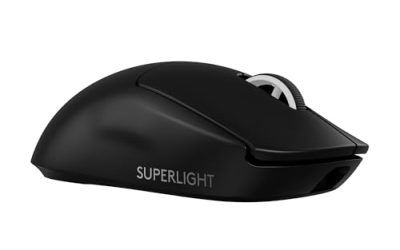
The Superlight 2 is the runner-up and the lightest mouse in this guide at 60 g. That weight is the headline for osu! players, because a 60 g shell changes direction with almost no inertia. Fast jumps feel effortless, and long streams tire the wrist far less than a heavier mouse. The HERO 2 sensor tracks from 100 to 44,000 DPI with no smoothing, acceleration, or filtering, and the report rate reaches up to 8 kHz. LIGHTFORCE hybrid optical-mechanical switches give the main clicks a crisp, fast feel.
Battery life is listed at up to 95 hours of constant motion, and the mouse charges over USB-C. POWERPLAY compatibility means the mouse can charge on a compatible mat, though the mat is a separate purchase. Five programmable buttons keep the layout clean, and the symmetrical shell measures 125.0 x 63.5 x 40.0 mm, a medium size that fits most hands.
The Superlight 2 has no DPI button on the shell, so DPI changes go through Logitech G HUB software rather than a quick press mid-game. It also has no RGB lighting and no left-handed version. For an osu! player, those are minor points next to the weight and the sensor.
Razer DeathAdder V3 Pro Wireless Gaming Mouse
- Focus Pro 30K optical sensor, up to 30,000 DPI, 750 IPS, 70 G
- 63 g weight
- Optical Mouse Switches Gen-3, 0.2 ms actuation, 90-million click lifecycle
- Up to 90 hours of battery life
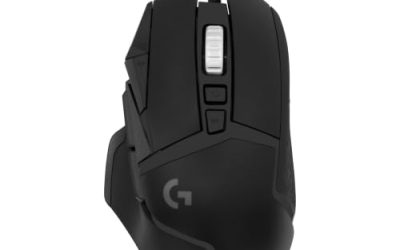
The DeathAdder V3 Pro suits osu! players who use a palm grip and want a comfortable shell for long sessions. It weighs 63 g, nearly as light as the Superlight 2, but its right-handed ergonomic shape fills the hand in a way a symmetrical shell does not. The Focus Pro 30K optical sensor tracks up to 30,000 DPI with 750 IPS and 70 G acceleration, and the listing states it tracks cleanly on a wide range of surfaces, including glass.
The Gen-3 optical switches are the other reason this mouse earns a place here. The listing states a 0.2 ms actuation with no debounce delay and a 90-million click lifecycle with no double-clicking issues. For osu!, that means each tap registers at once and the switch returns ready for the next tap. Battery life is listed at up to 90 hours of continuous play at 1,000 Hz polling, and the mouse recharges over USB-C. The HyperPolling Wireless Dongle raises polling to 8,000 Hz, though the dongle is a separate purchase.
The shape measures 128 x 68 x 44 mm and is right-handed only, so left-handed players need a different mouse. Five programmable buttons keep the layout simple. Players with medium to large hands will find the ergonomic curve supportive through long maps, while players with small hands may find the shell a little long.
Logitech G502 HERO High Performance Wired Gaming Mouse
- HERO 25K sensor, 200 to 25,600 DPI
- 121 g base weight, five 3.6 g tuning weights included
- 11 programmable buttons
- Dual-mode hyper-fast scroll wheel with tilt
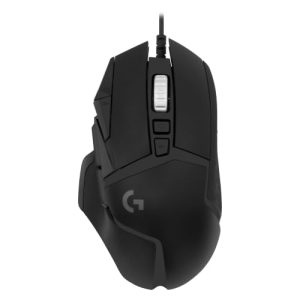
The G502 HERO is the wired pick in this guide and the heaviest mouse here at 121 g before weights. That weight is a feature for some osu! players, not a flaw: a heavier mouse resists small hand tremors and feels planted during slow, precise movements. The tunable weight system adds up to five 3.6 g weights, so a player can shift the balance until the mouse feels right. The HERO 25K sensor tracks from 200 to 25,600 DPI with no smoothing, filtering, or acceleration, and the wired connection removes any question about wireless latency.
Eleven programmable buttons give this mouse more controls than any other pick here, which suits a player who also uses the mouse for other games or desktop work. The dual-mode hyper-fast scroll wheel switches between a notched scroll and a free spin, and on-board memory stores up to five profiles. LIGHTSYNC RGB lighting is customizable through Logitech G HUB software, and the right-handed shape includes a thumb rest that supports a palm grip.
The trade-off is plain: at 121 g, the G502 HERO is nearly twice the weight of the Superlight 2, and fast jumps take more effort. But for a player who values a wired connection, a tunable weight, and a shape that locks the hand in place, the G502 HERO is a steady choice for osu! play.
SteelSeries Rival 3 Gaming Mouse
The Rival 3 is the simplest mouse in this guide and the pick for a player who wants a wired mouse with a crisp click and no extra setup. Its TrueMove Core optical sensor tracks from 100 to 8,500 CPI with 300 IPS and 35 g acceleration, and the listing states true 1-to-1 tracking with no hardware acceleration. That sensor range covers the settings most osu! players use, and the 1000 Hz polling rate keeps the cursor responsive during fast play. Six programmable buttons cover the main clicks plus a few extras.
The switches are rated for 60 million clicks and are described as crisp from the first click to the last, which is exactly what a rhythm game needs from its two main buttons. The shell weighs 77 g and measures 120.6 x 67 x 37.9 mm, a medium size that suits claw and palm grips. Prism RGB lighting covers three zones, and the 1.8 m rubber cable gives enough length for most desk setups.
The Rival 3 has no wireless option, so a player who wants to cut the cable will need a different mouse. Its 8,500 CPI ceiling is lower than the other mice here, though it still covers every sensitivity a typical osu! player uses. For a player who wants a straightforward wired mouse that clicks cleanly and tracks honestly, the Rival 3 is a solid choice.
Specs
- TrueMove Core optical sensor, 100 to 8,500 CPI, 300 IPS, 35 g acceleration
- 1000 Hz polling rate
- 60-million click mechanical switches
- 6 programmable buttons, split trigger buttons
- Prism RGB lighting, 3 zones
- 77 g weight
- 1.8 m rubber cable
- Model 62513
Frequently Asked Questions
What weight is best for an osu! mouse?
There is no single best weight, because the right weight depends on the grip and the hand. Light mice from 60 g to 77 g change direction fast and tire the wrist less during long streams. Heavier mice around 121 g feel planted and steady, which suits players whose aim wanders on a very light shell. If the current mouse feels tiring after a few songs, go lighter. If the cursor feels jumpy on small movements, a little more weight may help.
Should an osu! mouse be wired or wireless?
Both work well now, because modern wireless mice list a 1 ms report rate that matches a wired connection. Wireless removes the cable from the desk, which keeps the mouse free during fast flicks. Wired removes the battery from the equation entirely. The G305 and Superlight 2 use LIGHTSPEED wireless with long battery figures, while the G502 HERO and Rival 3 are wired. Pick the connection that fits the desk setup.
How many buttons does an osu! mouse need?
Two main buttons carry almost all of the work in osu!, plus a scroll wheel for menus. A mouse with five or six buttons covers that comfortably, and extra buttons are useful only for other games or desktop shortcuts. The mice in this guide have five to eleven buttons, and the extra controls on the G502 HERO suit a player who uses one mouse for several games. For osu! alone, a simple five-button layout is enough.
Does a higher DPI sensor help in osu!?
A higher DPI ceiling gives more room to experiment with sensitivity, but it does not make the cursor more accurate on its own. Most osu! players use a modest DPI setting and adjust the in-game sensitivity to taste. What matters more is clean tracking at the chosen DPI, with no smoothing or acceleration changing the cursor path. Every mouse in this guide lists a sensor that tracks without smoothing or acceleration, so the choice is about weight, shape, and click feel.
Closing
The best gaming mouse for osu is the one that disappears into the hand during a song. For most players, that is the Logitech G305 LIGHTSPEED: light, wireless, and simple, with a sensor and a battery that cover long sessions without fuss. A competitive player chasing the lightest shell will get more from the Superlight 2, a palm-grip player will get more comfort from the DeathAdder V3 Pro, and a player who wants a wired mouse with tunable weight will get more from the G502 HERO. Pick the mouse whose weight and shape match the way the hand already plays.
FAQ
What weight is best for an osu! mouse?
Should an osu! mouse be wired or wireless?
How many buttons does an osu! mouse need?
Does a higher DPI sensor help in osu!?
More from Amazon
Programs that pair well with the guide above. Offers and eligibility are set by Amazon and may change.
Free shipping on eligible items, Prime Video and more. Eligible new members can start with a free trial.
Start a Prime free trialA Prime membership for ages 18-24 with a trial period. Eligibility is set by Amazon.
See Prime for Young AdultsAudiobooks and podcasts to listen to on the go. Eligible new members can start with a free trial.
Try Audible freeAd-free music streaming. Eligible new subscribers can start with a free trial.
Try Music Unlimited freeAs an Amazon Associate we earn from qualifying purchases.