Key takeaways
- Find the best gaming mouse for Mac with native macOS software, plug-and-play setup, and sensors built for smooth, precise play on MacBook and Mac desktop.
Gaming on a Mac has changed a lot in recent years. Apple silicon Macs run modern games with real frame rates, and MacBook screens make fast movement look crisp. The mouse that comes with a Mac, however, was never built for gaming. It has one button layout, no extra controls, and no way to tune sensitivity for a shooter or a strategy game. A gaming mouse fixes all of that, but only if it actually works on macOS. Some gaming mice ship with software that runs on Windows only, which leaves Mac owners with a mouse that clicks and moves but cannot be configured at all.
The best gaming mouse for Mac is one that pairs plug-and-play movement with software that runs natively on macOS, so every button, DPI step, and lighting setting can be changed from the Mac itself. It also needs a sensor that tracks cleanly on a desk or a mouse pad, a shape that fits long sessions, and a connection that suits the ports on a modern Mac. The five mice in this guide meet those marks. Each one lists macOS in its system requirements, and each one is available on Amazon US.
Our top pick: Logitech G PRO X Superlight. Runner-up: Logitech G502 HERO.
Quick Picks
As an Amazon Associate, we earn from qualifying purchases.
| Product | Best for | Key spec from listing |
|---|---|---|
| Logitech G PRO X Superlight | Lightest wireless pick for Mac | Under 63 g, HERO 25K, 25,600 DPI, 70-hour battery |
| Logitech G502 HERO | Most buttons and tunable weight | HERO 25K, 25,600 DPI, 11 programmable buttons |
| Razer Basilisk V3 | Ergonomic palm grip with a tilt wheel | Focus+ 26K DPI, 11 programmable buttons, HyperScroll |
| Logitech G305 LIGHTSPEED | Long battery life on one AA cell | HERO sensor, 12,000 DPI, 250 hours, 99 g |
| SteelSeries Rival 3 | Simple wired pick for Mac and more | TrueMove Core, 8,500 CPI, 6 programmable buttons |
How to Choose
Mac software support
The single most important question for a Mac gamer is whether the mouse software runs on macOS. A mouse that only works with a Windows app can still move a cursor on a Mac, but its extra buttons stay locked to their default actions and its DPI steps cannot be changed. Logitech G HUB runs natively on macOS, so Logitech mice in this guide can be fully configured from a Mac, including button remapping, DPI steps, and lighting. SteelSeries Engine also runs on macOS, which covers the Rival 3. Razer Synapse 3 does not support macOS, so the Basilisk V3 relies on Synapse 2 on a Mac, and its onboard profile switching behaves differently there. Before buying, check the software page for the exact mouse and confirm that the macOS version is current.
Connection type and ports
Modern MacBooks ship with USB-C ports only, while many gaming mice still connect through a USB-A receiver or a USB-A cable. That mismatch is easy to solve with a USB-C hub or a USB-C to USB-A adapter, but it is worth planning for before the mouse arrives. Wireless mice that use a 2.4 GHz receiver, such as the G PRO X Superlight and the G305, connect through that receiver and do not need Bluetooth. Wired mice, such as the G502 HERO, the Basilisk V3, and the Rival 3, plug in directly and draw power from the Mac, so there is no battery to charge and no receiver to keep track of. A wired mouse is the simplest choice for a Mac desktop that sits on a desk, while a wireless mouse suits a MacBook that moves between rooms.
Shape, weight, and grip
Grip style matters more on a Mac than on a desktop PC, because Mac gamers often play at a kitchen table, on a couch, or in a small workspace where the mouse has limited room to move. A light mouse needs less effort to lift and reposition, which helps in fast games and in tight spaces. The G PRO X Superlight weighs under 63 g, and the Rival 3 weighs 77 g, so both feel quick in the hand. Heavier mice, such as the G502 HERO at 121 g, feel planted and steady, and the G502 HERO adds five 3.6 g weights that can be arranged inside the mouse to shift its balance. Palm-grip players should look at the ergonomic shapes of the Basilisk V3 and the G502 HERO, while claw and fingertip players tend to prefer the symmetrical shells of the G PRO X Superlight and the Rival 3.
Sensor and buttons
Every mouse in this guide uses an optical sensor, which tracks on cloth pads and hard desk surfaces without the drift of older laser sensors. Sensitivity is measured in DPI or CPI, and a higher ceiling gives more room to tune: the G PRO X Superlight and the G502 HERO reach 25,600 DPI, the Basilisk V3 reaches 26,000 DPI, the G305 reaches 12,000 DPI, and the Rival 3 reaches 8,500 CPI. Most Mac gamers will play well below those ceilings, so the ceiling matters less than clean tracking at the chosen setting. Buttons matter just as much. Five buttons cover the basics, while eleven buttons, found on the G502 HERO and the Basilisk V3, give room for weapon swaps, ability keys, and push-to-talk in games that reward extra controls.
Logitech G PRO X Superlight
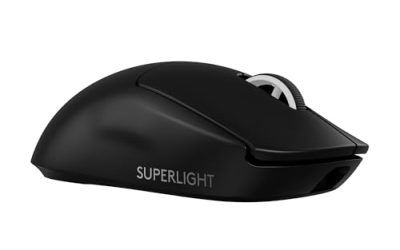
The Logitech G PRO X Superlight is the lightest wireless mouse in this guide, and that lightness is the reason it leads the list. At under 63 g it moves with very little effort, which makes fast flicks and repeated repositioning feel easy across a long session. The hyper-minimal shell has no holes and no RGB lighting, and the five programmable buttons keep the layout simple: left, right, middle, and two side buttons, each one remappable through Logitech G HUB on macOS.
The HERO 25K sensor tracks up to 25,600 DPI with the precision that competitive play demands, and the LIGHTSPEED wireless link reports at 1 ms, so the wireless connection feels as immediate as a cable. The rechargeable battery averages 70 hours of play, and the mouse charges over a cable when it runs low. Large PTFE feet help it glide across a mouse pad with very little friction, and the receiver stores inside the mouse for travel. For a Mac gamer who wants a flagship wireless mouse with full macOS software support, this is the most complete package in the guide.
Specs
- Weight: under 63 g
- Sensor: HERO 25K, up to 25,600 DPI
- Buttons: 5 programmable buttons
- Battery: 70 hours average life, rechargeable lithium polymer
- Connection: LIGHTSPEED wireless, 1 ms report rate, USB receiver
- System requirements: Windows 8 or later, macOS 10.11 or later
- Model number: 910-005878
Logitech G502 HERO
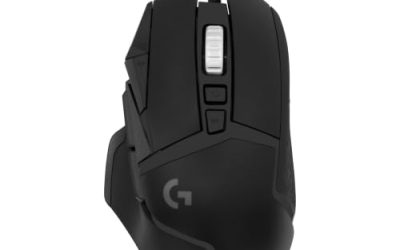
The Logitech G502 HERO is the most versatile mouse in this guide, and it is the runner-up for a simple reason: it does everything well, and it does it on a Mac with full G HUB support. The HERO 25K sensor reaches 25,600 DPI, and the mouse carries eleven programmable buttons, including two side buttons, a DPI shift button, and a dual-mode scroll wheel that can switch between smooth scrolling and notched steps. That layout suits games with many commands, from strategy titles to shooters with several gadgets.
The tunable weight system sets the G502 HERO apart. Five 3.6 g weights sit in a case under the mouse, and they can be added, removed, or arranged to change the total weight and the balance point. The mouse weighs 121 g with no weights installed, and the shape is a right-handed ergonomic shell with a thumb rest that supports the hand during long sessions. LIGHTSYNC RGB lighting on the logo and the DPI indicator can be tuned in G HUB, and on-board memory stores profiles on the mouse itself. It connects through a wired USB cable, so there is no battery to manage and no receiver to lose.
Specs
- Weight: 121 g, with five 3.6 g tunable weights
- Sensor: HERO 25K, up to 25,600 DPI
- Buttons: 11 programmable buttons
- Lighting: LIGHTSYNC RGB
- Memory: on-board memory for profiles
- Connection: wired USB
- System requirements: Windows 7 or later, macOS 10.11 or later, Chrome OS
- Model number: 910-005469
Razer Basilisk V3
The Razer Basilisk V3 is the ergonomic pick in this guide, built for palm-grip players who want a full-size mouse with a thumb rest and a scroll wheel that does more than scroll. The HyperScroll tilt wheel switches between free-spin scrolling and tactile notched steps, and it tilts left and right for extra commands. Eleven programmable buttons include a multi-function trigger on the side, and Chroma RGB lighting runs across eleven zones that can be tuned in software.
The Focus+ optical sensor reaches 26,000 DPI, and the mouse uses optical switches rated for fast actuation with no double-click debounce delay. At 101 g it sits between the ultralight picks and the heavier G502 HERO, with a shape that fills a medium or large hand comfortably. One point to note for Mac owners: the mouse works on a Mac as a plug-and-play device, and its hardware platform lists Mac and PC, but Razer Synapse 3 does not support macOS. Mac users configure it through Synapse 2, which allows profiles to be created but does not store them on the mouse in the same way, so the onboard profile cycle button behaves differently on a Mac. For players who mainly want a comfortable ergonomic mouse with a strong sensor, that limit is easy to live with.
Specs
- Weight: 101 g
- Sensor: Focus+ optical, up to 26,000 DPI
- Buttons: 11 programmable buttons
- Scroll wheel: HyperScroll tilt wheel with free-spin and tactile modes
- Lighting: Chroma RGB, 11 zones
- Connection: wired USB with Speedflex cable
- Hardware platform: Mac, PC
- Model number: RZ01-04000100-R3U1
Logitech G305 LIGHTSPEED
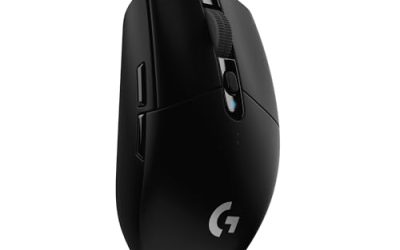
The Logitech G305 LIGHTSPEED is the endurance pick in this guide, and it earns that place with a single AA battery that lasts up to 250 hours of continuous play. That figure matters on a MacBook, where a mouse that needs charging every few days becomes one more cable to manage. The G305 runs for months of regular play on one cell, and when the battery finally runs low, a fresh AA cell restores it in seconds. An endurance mode in G HUB extends battery life even further, up to nine months of regular use.
The HERO sensor covers 200 to 12,000 DPI, which is more than enough for every common Mac game, and the LIGHTSPEED wireless link reports at 1 ms through the included nano receiver. The receiver stores inside the mouse, so it travels with the MacBook rather than sitting loose in a bag. Six programmable buttons cover the essentials, and on-board memory keeps DPI settings on the mouse. At 99 g it is light enough for fast movement without feeling fragile, and the compact shape suits smaller hands and laptop setups. The G305 lists macOS 10.11 or later in its system requirements, and G HUB runs on macOS for full configuration.
Specs
- Weight: 99 g with AA battery installed
- Sensor: HERO, 200 to 12,000 DPI
- Buttons: 6 programmable buttons
- Battery: up to 250 hours on 1 AA battery, endurance mode up to 9 months
- Connection: LIGHTSPEED wireless, 1 ms report rate, USB nano receiver with onboard storage
- Memory: on-board memory
- System requirements: Windows 7 or later, macOS 10.11 or later, Chrome OS
- Model number: 910-005280
SteelSeries Rival 3
The SteelSeries Rival 3 is the simplest mouse in this guide, and simplicity is its strength. It is a wired mouse with no battery, no receiver, and no charging cable to think about. Plug it into a Mac and it works, with SteelSeries Engine available on macOS for tuning sensitivity, buttons, and lighting. The Amazon listing names Windows, Mac, Linux, and Xbox as supported operating systems, so the same mouse also works across the other machines in a household.
The TrueMove Core optical sensor tracks at 8,500 CPI with 300 IPS tracking speed and 35 g acceleration, which covers fast flicks in shooters and precise movement in strategy games. Six programmable buttons include split trigger buttons designed for a crisp click, and the mechanical switches are built for 60 million clicks. Prism RGB lighting runs along the lower edge of the mouse, and the ergonomic right-handed shape weighs 77 g, light enough for quick movement with a shape that supports the palm. The 1000 Hz polling rate keeps the cursor responsive, and the wired connection means the mouse never needs a battery swap or a charge.
Specs
- Weight: 77 g
- Sensor: TrueMove Core optical, 100 to 8,500 CPI, 300 IPS, 35 g acceleration
- Buttons: 6 programmable buttons, split trigger buttons
- Switches: 60 million click mechanical switches
- Polling rate: 1000 Hz
- Lighting: Prism RGB
- Connection: wired USB
- Operating system: Windows, Mac, Linux, and Xbox, USB port required
- Model number: 62513
Frequently Asked Questions
Do gaming mice work on a Mac?
Yes. Every gaming mouse works on a Mac as a basic pointing device as soon as it is plugged in or its receiver is connected, because macOS supports standard USB mice without extra drivers. The difference between mice is in the software: Logitech G HUB and SteelSeries Engine run natively on macOS, so Logitech and SteelSeries mice in this guide can be fully configured from a Mac. Razer Synapse 3 does not support macOS, so Razer mice rely on Synapse 2, with fewer features available on a Mac.
Can I change DPI and remap buttons on a Mac?
Yes, when the mouse software supports macOS. With G HUB on a Mac, Logitech mice can change DPI steps, remap buttons, and tune lighting, and those settings can be stored in on-board memory where the mouse supports it. SteelSeries Engine on macOS provides the same kind of control for the Rival 3. For the Basilisk V3, Synapse 2 on a Mac allows profiles to be created, but the onboard profile cycle button does not behave the same way it does on Windows.
Do I need an adapter to use a gaming mouse with a MacBook?
Many MacBooks have USB-C ports only, while gaming mice use USB-A receivers or USB-A cables. In that case a USB-C hub or a USB-C to USB-A adapter connects the mouse to the MacBook. Wired mice need the adapter whenever they are plugged in, while wireless mice need it only for the receiver. Some hubs also add extra USB ports, which helps when a MacBook also connects a keyboard, a headset, or an external drive.
Should I choose a wired or a wireless gaming mouse for a Mac?
Both work well, and the choice comes down to how the Mac is used. A wired mouse never needs charging and never needs a receiver, which suits a Mac desktop or a MacBook that stays on one desk. A wireless mouse suits a MacBook that moves between rooms, because there is no cable to manage. LIGHTSPEED wireless mice in this guide report at 1 ms, so their responsiveness matches a wired connection in normal play.
A Mac gamer does not need to settle for a mouse that only half works. The right pick pairs a sensor built for fast play with software that runs on macOS, and every mouse in this guide does exactly that, from the ultralight Superlight to the simple wired Rival 3. Choose the shape and connection that fit the way the Mac is used, confirm the software situation for that exact model, and the mouse will be ready for the next game.
FAQ
Do gaming mice work on a Mac?
Can I change DPI and remap buttons on a Mac?
Do I need an adapter to use a gaming mouse with a MacBook?
Should I choose a wired or a wireless gaming mouse for a Mac?
More from Amazon
Programs that pair well with the guide above. Offers and eligibility are set by Amazon and may change.
Free shipping on eligible items, Prime Video and more. Eligible new members can start with a free trial.
Start a Prime free trialA Prime membership for ages 18-24 with a trial period. Eligibility is set by Amazon.
See Prime for Young AdultsAudiobooks and podcasts to listen to on the go. Eligible new members can start with a free trial.
Try Audible freeAd-free music streaming. Eligible new subscribers can start with a free trial.
Try Music Unlimited freeAs an Amazon Associate we earn from qualifying purchases.