Our Short List of 3
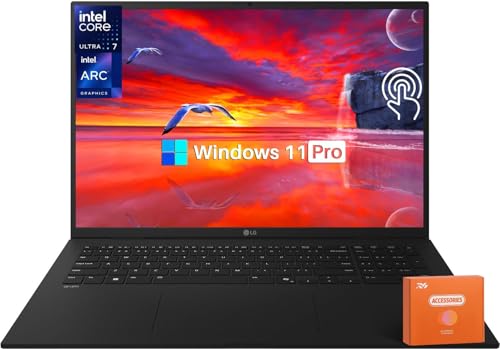
- Best for: Travel, work on the go, students, and anyone who wants a big screen in a light body.
- 17-inch high-resolution touchscreen display
- Intel Core processor with integrated graphics
- Windows 11 Pro
- Lightweight magnesium-alloy chassis

- Best for: Business users, professionals, and anyone who wants a touchscreen and Windows 11 Pro in a big-screen laptop.
- 17.3-inch HD+ IPS touchscreen display
- Intel Core Ultra 7 processor with AI Boost NPU
- 32GB DDR5 RAM and 2TB SSD
- Windows 11 Pro, backlit keyboard, fingerprint reader

- Best for: Budget buyers, students, and anyone who wants a big screen for everyday tasks.
- 17.3-inch Full HD (1920 x 1080) IPS display
- Intel Core i5-1335U processor with Intel Iris Xe graphics
- 16GB LPDDR5 RAM and 512GB Gen 4 SSD
- Wi-Fi 6E, Thunderbolt 4, backlit keyboard
All 3 Picks at a Glance
| Product | Specs | Action |
|---|---|---|
| 1. LG gram 17 (2025) — Best Lightweight 17-Inch Laptop |
| Check price on Amazon |
| 3. HP 17 Touchscreen (Intel Core Ultra 7) — Best Premium Productivity Laptop |
| Check price on Amazon |
| 4. Acer Aspire 5 17 Slim (A517-58M-59R9) — Best Budget 17-Inch Laptop |
| Check price on Amazon |
Key takeaways
- Looking for the best 17 inch laptops not for gaming? Compare lightweight, everyday, and budget 17.3-inch laptops built for work, school, and home use.
The best 17 inch laptops not for gaming are built for people who want a big, comfortable screen without paying for a graphics card they will never use. A 17.3-inch display gives you room for two documents side by side, a full-size keyboard with a number pad, and a workspace that feels closer to a desktop than a cramped ultraportable. For office work, school, video calls, photo editing, and everyday browsing, that extra screen space is a genuine quality-of-life upgrade.
The catch is that the 17-inch category has been shrinking. Several major manufacturers have shifted their focus toward 16-inch and 18-inch panels, which means the pool of true 17.3-inch laptops is smaller than it used to be. That makes it more important to choose carefully: the right non-gaming 17-inch laptop should be light enough to carry, quiet enough for a meeting room, and strong enough on battery life to survive a workday away from an outlet. The four picks below are all everyday and productivity machines, not gaming rigs, and each one fits a different kind of buyer.
How to Choose a 17-Inch Laptop That Is Not for Gaming
Start with the screen, not the processor
The whole point of a 17-inch laptop is the display, so check the resolution and panel type before anything else. A Full HD (1920 x 1080) IPS panel is the baseline for comfortable reading and sharp text. Higher-resolution panels, such as the 2560 x 1600 display on the LG gram 17, give you more room for spreadsheets and photo work, and they make small text noticeably crisper. Avoid dim TN panels if you can; brightness around 300 nits or better keeps the screen usable near a window or in a bright office. A touchscreen is a nice bonus for some buyers, especially on 2-in-1 style workflows, but it is not essential for most office and school use.
Pick a processor built for efficiency
Non-gaming laptops do not need a discrete graphics card. Modern integrated graphics handle video calls, streaming, office apps, and light photo editing with ease. What matters is a current-generation efficient processor: Intel Core Ultra chips and AMD Ryzen 5 or Ryzen 7 mobile processors both deliver strong everyday performance while keeping fan noise and heat down. A laptop that stays quiet during a video call is worth more than one that wins a benchmark by a few percentage points and sounds like a hair dryer.
Get enough memory and storage
For a laptop you plan to keep for several years, 16GB of RAM is the sensible minimum. It keeps dozens of browser tabs, office apps, and video calls running smoothly at the same time. If you regularly work with large spreadsheets, virtual machines, or photo libraries, 32GB gives you comfortable headroom. For storage, a 512GB SSD is the practical floor, and 1TB or 2TB is better if you keep a lot of photos, videos, or project files locally. Solid-state storage is non-negotiable at this point; it is what makes a laptop feel fast when opening apps and waking from sleep.
Mind the weight and the battery
A 17-inch laptop will never be as light as a 13-inch ultrabook, but the difference between models is dramatic. Some 17-inch machines weigh close to three pounds, while others push past six. If the laptop will travel with you, weight matters more than almost anything else. Battery life matters too: look for a battery in the 70Wh range or better, and check real-world reviews rather than the manufacturer’s headline figure. A big screen uses more power, so a laptop that promises all-day battery life on paper may deliver far less in practice.
Do not pay for gaming features you will not use
High-refresh displays, RGB keyboards, and powerful discrete graphics cards all add cost, weight, heat, and noise. If you are not playing demanding games, skip them. The money is better spent on a better screen, more memory, a larger SSD, or a lighter chassis. That is the core logic of this guide: every pick below spends its budget on the things that make everyday work better.
Check the keyboard and ports
A 17-inch laptop should have a full-size keyboard with a dedicated number pad, which is a real advantage for data entry, accounting, and spreadsheet work. Backlit keys are worth having if you ever work in dim rooms. On ports, look for at least one USB-C port, a couple of USB-A ports, an HDMI output for an external monitor, and a headphone jack. A fingerprint reader is a useful security and convenience feature on a work laptop.
Top Picks: The Best 17 Inch Laptops Not for Gaming
1. LG gram 17 (2025) — Best Lightweight 17-Inch Laptop
- Best for: Travel, work on the go, students, and anyone who wants a big screen in a light body.
- 17-inch high-resolution touchscreen display
- Intel Core processor with integrated graphics
- Windows 11 Pro
- Lightweight magnesium-alloy chassis
Travel, work on the go, students, and anyone who wants a big screen in a light body.
The LG gram 17 is the standout choice if you want a big screen in a genuinely portable package. At around three pounds, it is lighter than many 14-inch laptops, which is remarkable for a machine with a 17-inch display. That makes it the easiest 17-inch laptop to carry to class, to a client meeting, or around the house.
The 2025 gram 17 pairs a sharp high-resolution touchscreen display with a current Intel processor, generous memory, and fast SSD storage, all running Windows 11 Pro. The screen is the star: the higher resolution gives you more usable space for documents and creative work, and the touchscreen adds flexibility for annotating PDFs or navigating with a tap. Battery life is another strength, with a large battery that helps offset the power demands of the big display.
This is the pick for professionals, students, and creators who want a large screen without a heavy bag. It costs more than the budget options in this guide, but the combination of light weight, screen quality, and battery life is hard to match. If portability is your top priority, start here.
Key specs:
2. HP 17 (AMD Ryzen 5, 32GB RAM, 1TB SSD) — Best Everyday Value
The HP 17 is the workhorse pick in this guide. This configuration pairs an AMD Ryzen 5 processor with 32GB of RAM and a 1TB SSD, which is a generous combination for everyday multitasking. You can keep a browser full of tabs open alongside office apps, video calls, and a music stream without the machine slowing down.
The 17.3-inch Full HD anti-glare display is bright enough for comfortable indoor use, and the full-size keyboard with a numeric keypad makes it a natural fit for home office work, school assignments, and small business tasks. It runs Windows 11 Home, includes Wi-Fi 6 for fast wireless connections, and comes with Microsoft Office web apps for getting started right away.
This is the pick for buyers who want maximum everyday capability for their money. It is not the lightest laptop here, and it does not have the premium screen of the LG gram, but for desk-based work, study, and home use, it covers the essentials with room to spare.
HP 17 Laptop (AMD Ryzen 5, 32GB RAM, 1TB SSD) on Amazon
Best for: Home office, students, and families who want a capable big-screen laptop at a sensible value.
Key specs:
- 17.3-inch Full HD (1920 x 1080) anti-glare display
- AMD Ryzen 5 7430U processor
- 32GB RAM and 1TB PCIe SSD
- Windows 11 Home with Microsoft Office web apps
3. HP 17 Touchscreen (Intel Core Ultra 7) — Best Premium Productivity Laptop
- Best for: Business users, professionals, and anyone who wants a touchscreen and Windows 11 Pro in a big-screen laptop.
- 17.3-inch HD+ IPS touchscreen display
- Intel Core Ultra 7 processor with AI Boost NPU
- 32GB DDR5 RAM and 2TB SSD
- Windows 11 Pro, backlit keyboard, fingerprint reader
Business users, professionals, and anyone who wants a touchscreen and Windows 11 Pro in a big-screen laptop.
If you want a 17-inch laptop that feels like a modern premium productivity machine, the touchscreen HP 17 with an Intel Core Ultra 7 processor is the strongest option in this guide. The Core Ultra 7 chip includes a built-in neural processing unit for AI-assisted features, and the Copilot key on the keyboard gives quick access to Windows AI tools.
The 17.3-inch HD+ IPS touchscreen is responsive and well suited to tapping, scrolling, and annotating, while the Windows 11 Pro operating system adds business-friendly features such as enhanced security and remote desktop support. This configuration comes with 32GB of DDR5 memory and a 2TB SSD, so storage and multitasking headroom are generous. A backlit keyboard, fingerprint reader, and numeric keypad round out a package that is clearly aimed at serious work.
This is the pick for professionals who want a big touchscreen, strong multitasking performance, and the extra features of Windows 11 Pro. It is heavier and more expensive than the budget picks, but it is also the most complete productivity machine on this list.
HP 17 Touchscreen Laptop (Intel Core Ultra 7) on Amazon
Key specs:
4. Acer Aspire 5 17 Slim (A517-58M-59R9) — Best Budget 17-Inch Laptop
- Best for: Budget buyers, students, and anyone who wants a big screen for everyday tasks.
- 17.3-inch Full HD (1920 x 1080) IPS display
- Intel Core i5-1335U processor with Intel Iris Xe graphics
- 16GB LPDDR5 RAM and 512GB Gen 4 SSD
- Wi-Fi 6E, Thunderbolt 4, backlit keyboard
Budget buyers, students, and anyone who wants a big screen for everyday tasks.
The Acer Aspire 5 17 Slim is the budget pick, and it earns its place by covering the basics well without the bulk that usually comes with a low-cost 17-inch laptop. The slim design keeps it more portable than most budget big-screen machines, and the Full HD IPS display is clear and comfortable for reading and office work.
Under the hood, an Intel Core i5 processor with Iris Xe integrated graphics handles everyday tasks smoothly, and 16GB of fast LPDDR5 memory and a 512GB Gen 4 SSD keep the machine responsive. Wi-Fi 6E, Thunderbolt 4, and a backlit keyboard are welcome extras at this level, and the slim chassis makes it a reasonable choice for carrying between rooms or to a study session.
This is the pick for buyers who want the biggest screen for the least money while still getting a modern, responsive laptop. It is best suited to desk-based use and lighter workloads, but for browsing, documents, streaming, and video calls, it does the job well.
Acer Aspire 5 17 Slim Laptop on Amazon
Key specs:
Comparison Table
| Laptop | Display | Processor | RAM | Storage | Best For |
|---|---|---|---|---|---|
| LG gram 17 (2025) | 17-inch high-resolution touchscreen | Intel Core | 16GB or more | 512GB SSD or more | Lightweight travel and work on the go |
| HP 17 (Ryzen 5) | 17.3-inch Full HD anti-glare | AMD Ryzen 5 7430U | 32GB | 1TB SSD | Everyday value and home office |
| HP 17 Touchscreen (Core Ultra 7) | 17.3-inch HD+ IPS touchscreen | Intel Core Ultra 7 | 32GB DDR5 | 2TB SSD | Premium productivity and business |
| Acer Aspire 5 17 Slim | 17.3-inch Full HD IPS | Intel Core i5-1335U | 16GB LPDDR5 | 512GB SSD | Budget big-screen computing |
Which 17-Inch Laptop Should You Buy?
If you carry your laptop often, the LG gram 17 is the clear winner: it is the only pick here that feels like a portable machine despite its large screen. If the laptop will mostly live on a desk at home, the HP 17 with Ryzen 5 gives you the most memory and storage for everyday work. If you want a touchscreen, Windows 11 Pro, and the most complete feature set, the HP 17 with Core Ultra 7 is the premium choice. And if budget is the deciding factor, the Acer Aspire 5 17 Slim delivers the big-screen experience for the least money.
There is no single best answer, because the right choice depends on how you will use the laptop. Think about where it will live, what you will run on it, and how often it will travel. Then match those needs to the pick above that fits best.
Frequently Asked Questions
Are 17-inch laptops good for non-gaming use?
Yes. A 17-inch laptop is an excellent choice for office work, school, video calls, streaming, and photo editing. The large screen makes multitasking easier, and the full-size keyboard with a number pad is a genuine advantage for spreadsheet and data-entry work. The main trade-offs are weight and battery life, so choose a lighter model if you travel often.
Why are 17-inch laptops becoming harder to find?
Several manufacturers have shifted production toward 16-inch and 18-inch display panels, which means fewer new 17.3-inch models are being released. The models in this guide are still available, but the category is shrinking, so it is worth buying while good options remain on the market.
Do I need a discrete graphics card if I am not gaming?
No. Integrated graphics in modern Intel and AMD processors handle everyday tasks, video playback, video calls, and light photo editing without any trouble. A discrete graphics card adds cost, weight, heat, and fan noise, and it is only necessary for demanding games or heavy 3D and video work.
How much RAM do I need in a 17-inch laptop for work?
For most office and school use, 16GB of RAM is the right minimum, and it will keep the laptop feeling fast for years. If you regularly run many apps at once, work with large files, or want extra headroom, 32GB is a worthwhile upgrade and is available on two of the picks in this guide.
Is a 17-inch laptop too big to carry every day?
It depends on the model. A lightweight 17-inch laptop like the LG gram 17, at around three pounds, is easy to carry in a standard laptop bag. Heavier budget models are better suited to desk use or occasional travel. Check the weight before buying, and make sure your bag fits a 17.3-inch machine.
Conclusion
The best 17 inch laptops not for gaming prove that a big screen does not have to mean a gaming machine. Whether you want the featherweight portability of the LG gram 17, the everyday value of the HP 17, the premium touchscreen productivity of the HP 17 with Core Ultra 7, or the budget-friendly Acer Aspire 5 17 Slim, there is a 17-inch laptop here that fits how you actually work. Pick the one that matches your priorities, and enjoy the extra screen space every time you open the lid.
Disclosure: As an Amazon Associate, we earn from qualifying purchases.
FAQ
Which 17-Inch Laptop Should You Buy?
Are 17-inch laptops good for non-gaming use?
Why are 17-inch laptops becoming harder to find?
Do I need a discrete graphics card if I am not gaming?
How much RAM do I need in a 17-inch laptop for work?
Is a 17-inch laptop too big to carry every day?
More from Amazon
Programs that pair well with the guide above. Offers and eligibility are set by Amazon and may change.
Free shipping on eligible items, Prime Video and more. Eligible new members can start with a free trial.
Start a Prime free trialA Prime membership for ages 18-24 with a trial period. Eligibility is set by Amazon.
See Prime for Young AdultsAudiobooks and podcasts to listen to on the go. Eligible new members can start with a free trial.
Try Audible freeAd-free music streaming. Eligible new subscribers can start with a free trial.
Try Music Unlimited freeAs an Amazon Associate we earn from qualifying purchases.