Our Short List of 3


All 4 Picks at a Glance
| Product | Specs | Action |
|---|---|---|
| 1. Sony ZV-E10 with 16-50mm Lens — Best Overall 4K Vlogging Camera | Check price on Amazon | |
 2. DJI Osmo Pocket 3 — Best Pocket 4K Video Camera | Check price on Amazon | |
| 3. Canon EOS R50 with RF-S 18-45mm Lens — Best Hybrid Photo and Video Camera | Check price on Amazon | |
 4. Panasonic Lumix G100 with 12-32mm Lens — Best Lightweight Travel 4K Camera | Check price on Amazon |
Key takeaways
- Find the best 4k video cameras for vlogging, travel, and YouTube in 2026, with top picks for every creator and expert tips on choosing the right one for you.
Introduction
The best 4k video cameras make it easy to record sharp, detailed footage whether you are filming a YouTube video, documenting a trip, or starting a vlogging channel. Four times the resolution of Full HD, 4K gives you room to crop, stabilize, and reframe in editing without losing clarity, and it keeps your videos looking crisp on large screens and modern phones.
But not every camera that records in 4K is a good video camera. Some overheat after a few minutes, some crop heavily into the frame when 4K is enabled, and some have autofocus that hunts at exactly the wrong moment. A good 4K video camera combines a capable sensor, reliable continuous autofocus, usable stabilization, clean audio options, and a screen you can actually see yourself on while recording.
This guide walks through what matters when choosing a 4K video camera, then rounds up four strong picks that cover different styles of shooting: a dedicated vlogging camera, a pocket-sized gimbal camera, a versatile hybrid mirrorless camera, and a lightweight travel-friendly option. Every pick below records in 4K, is widely available, and suits a different kind of creator.
How to Choose a 4K Video Camera
Sensor Size and Image Quality
Sensor size shapes low-light performance, depth of field, and dynamic range. Larger sensors, such as APS-C and Micro Four Thirds, generally produce cleaner footage in dim rooms and at dusk than the tiny sensors in most phones and action cameras. A 1-inch sensor, like the one in a premium pocket camera, is a meaningful step up from a phone sensor and a good middle ground for portability. For most creators, an APS-C or Micro Four Thirds sensor hits the sweet spot between image quality and a body that is still easy to carry.
Resolution alone is not the whole story. Look for 4K recording that uses the full width of the sensor rather than a heavy crop, and check whether the camera offers 4K at 30 frames per second as a baseline, with 4K at 60 frames per second if you want smooth slow motion. Oversampled 4K, where the camera reads a higher-resolution image and scales it down, usually looks sharper than native 4K.
Autofocus That Stays Locked On
Video autofocus matters more than still-photo autofocus because your subject keeps moving. Eye detection and subject tracking are the features that make the biggest difference in practice. A camera that can lock onto a face and hold it while you walk, gesture, or move through a scene saves hours of reshoots. Before buying, look for real-world footage and reviews that test autofocus while the subject moves toward and away from the camera, not just static test charts.
Stabilization
If you film handheld, stabilization is essential. In-body image stabilization, lens stabilization, and electronic stabilization all help, and many cameras combine two of the three. A camera with strong stabilization lets you walk and talk without the shaky, seasick look that screams amateur footage. For the smoothest walking shots, a camera with a built-in gimbal is hard to beat, though it trades some versatility for that smoothness.
Audio Options
Built-in microphones have improved a lot, and some cameras now include directional microphone arrays that track the person speaking. Even so, a microphone jack or a digital audio interface matters if you plan to use an external microphone, which is the single biggest upgrade most creators can make to perceived video quality. Check whether the camera has a 3.5 mm microphone input and a headphone jack for monitoring audio while you record.
Screen, Battery, and Recording Limits
A flip-out or vari-angle screen is almost a requirement for vlogging, since you need to see your framing while facing the camera. Battery life varies widely, and 4K recording drains batteries faster than stills, so check how long the camera can record continuously and whether it can charge over USB while filming. Some cameras also have recording time limits, often around 30 minutes per clip, which matters if you record long interviews, events, or live sessions. If you film long takes, confirm the limit before you buy.
Lenses and Ecosystem
For interchangeable-lens cameras, the lens system matters as much as the body. A camera with a large, affordable lens ecosystem gives you room to grow from a kit zoom to a fast prime for low light or a wide lens for tight spaces. Fixed-lens cameras are simpler and lighter, but you give up that flexibility. Think about what you will film most: talking-head videos need a different lens than travel footage or product close-ups.
Top Picks
1. Sony ZV-E10 with 16-50mm Lens — Best Overall 4K Vlogging Camera
The Sony ZV-E10 is built from the ground up for video creators, and it shows in almost every design choice. Its 24.2-megapixel APS-C sensor records oversampled 4K video with the kind of detail and low-light performance that smaller-sensor cameras cannot match, and the large sensor gives your footage a pleasing depth that helps subjects stand out from the background.
Autofocus is a standout. Real-time Eye autofocus for humans and animals locks on and stays locked, even when you move around the frame, and the camera rarely loses its subject during a take. The flip-out vari-angle screen makes self-recording straightforward, the large red record button is easy to find without looking, and the built-in directional three-capsule microphone with a supplied wind screen captures surprisingly clean voice audio outdoors.
The included 16-50mm power zoom lens covers a useful range for vlogging and general shooting, and the E-mount system opens the door to a huge range of Sony and third-party lenses when you want to upgrade. It also works well as a webcam over USB, which is handy if your video work spans both recorded and live content. The main trade-offs are the lack of in-body stabilization, so you will want a stabilized lens or a small tripod for walking shots, and a battery that runs down faster during long 4K sessions. For most creators, though, the ZV-E10 is the most capable and flexible 4K video camera in its class.
2. DJI Osmo Pocket 3 — Best Pocket 4K Video Camera
The DJI Osmo Pocket 3 is the camera to reach for when you want smooth, stabilized 4K footage from something that fits in a jacket pocket. Its three-axis mechanical gimbal keeps the horizon level and the footage steady while you walk, run, or climb stairs, producing a gliding look that would otherwise require a separate stabilizer and a much larger camera.
Inside is a 1-inch CMOS sensor that records 4K at up to 120 frames per second, so you get both excellent detail and buttery slow motion from the same tiny device. The 2-inch rotatable touchscreen flips to face you for selfies and vlogging, and subject tracking keeps you centered in the frame as you move. Battery life is strong for its size, and the whole setup is ready to shoot in seconds, which means you actually capture the moments you would miss while assembling a bigger rig.
The trade-off is the fixed 20 mm equivalent lens. You cannot zoom optically or swap lenses, so framing is limited to what that wide lens sees, and the small sensor will not match an APS-C camera in very dim light. But for travel, daily vlogging, and anyone who values portability above all else, the Pocket 3 delivers stabilized 4K footage that is difficult to match at its size.
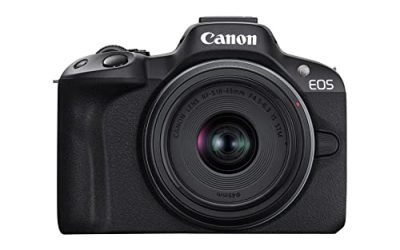
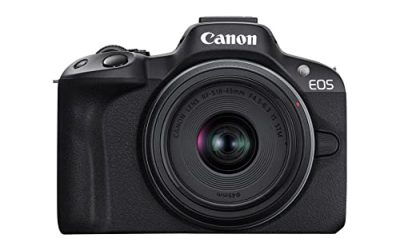
3. Canon EOS R50 with RF-S 18-45mm Lens — Best Hybrid Photo and Video Camera
The Canon EOS R50 is a strong choice if you want one camera that handles both 4K video and still photography well. Its 24.2-megapixel APS-C sensor records 4K video oversampled from 6K, producing sharp, detailed footage, and Canon’s Dual Pixel CMOS AF II with subject detection tracks people, animals, and vehicles reliably.
The R50 is light and compact for a mirrorless camera, and the vari-angle touchscreen makes it easy to film yourself or shoot from low and high angles. The included RF-S 18-45mm kit lens is small and covers the most useful focal lengths for everyday video, and the RF mount gives you access to Canon’s growing range of RF-S and RF lenses. The camera also offers 6K oversampled 4K at 30 frames per second and 4K at 60 frames per second with a crop, plus a dedicated movie mode and vertical video support for social platforms.
One thing to note is that 4K at 60 frames per second uses a cropped area of the sensor, which narrows your field of view, so creators who shoot a lot of slow motion should plan their framing accordingly. Battery life is modest, so a spare battery is a sensible accessory. For creators who want a single camera for YouTube, travel, and family photos, the R50 is a well-rounded pick.
4. Panasonic Lumix G100 with 12-32mm Lens — Best Lightweight Travel 4K Camera
The Panasonic Lumix G100 is the lightest interchangeable-lens 4K camera in this roundup, and it is designed with solo creators in mind. Its 20.3-megapixel Micro Four Thirds sensor records 4K video, and the camera’s built-in microphone system uses OZO Audio with face tracking to focus on the voice of the person in frame, which helps your audio stay clear when you move around.
The 5-axis hybrid image stabilization steadies handheld shots, the flip-out screen and frame markers for social media aspect ratios make it easy to compose for different platforms, and the camera supports V-Log L recording for creators who want more flexibility in color grading. The included 12-32mm lens is compact and covers a useful wide-to-normal range for travel and vlogging.
The smaller Micro Four Thirds sensor does not gather as much light as the APS-C sensors in the Sony and Canon picks, so low-light footage is a step behind them, and 4K recording has a crop that narrows the field of view compared with stills. But the G100’s combination of light weight, creator-focused features, and the large Micro Four Thirds lens ecosystem makes it an excellent travel companion for creators who want a real camera without the bulk.
Comparison Table
| Camera | Sensor | 4K Video | Stabilization | Best For |
|---|---|---|---|---|
| Sony ZV-E10 | 24.2MP APS-C | 4K30 oversampled | Lens-based, no IBIS | Vlogging and YouTube |
| DJI Osmo Pocket 3 | 1-inch CMOS | 4K120 | 3-axis gimbal | Travel and walking shots |
| Canon EOS R50 | 24.2MP APS-C | 4K30 oversampled, 4K60 cropped | Lens-based, no IBIS | Hybrid photo and video |
| Panasonic Lumix G100 | 20.3MP Micro Four Thirds | 4K30 | 5-axis hybrid IS | Lightweight travel |
Frequently Asked Questions
Is 4K worth it over 1080p for YouTube?
For most creators, yes. 4K gives you sharper footage, more room to crop and stabilize in editing, and a more future-proof archive of your work. Viewers may watch on small screens, but the extra detail is visible on larger displays, and 4K source footage downscaled to 1080p often looks cleaner than footage shot natively in 1080p.
Do I need a 4K camera if I mostly film on my phone?
A phone is a capable video tool, but a dedicated 4K camera offers a larger sensor, better low-light performance, optical zoom, longer recording times without overheating, and proper microphone inputs. If you film regularly or want more control over depth of field and audio, a dedicated camera is a worthwhile step up.
What frame rate should I shoot 4K video at?
Shoot 4K at 30 frames per second for most talking-head videos, vlogs, and general content, since it matches the look viewers expect and keeps file sizes manageable. Use 4K at 60 frames per second when you want smooth slow motion or are filming fast action, and 4K at 120 frames per second for dramatic slow-motion sequences.
How much storage do I need for 4K video?
4K video files are large, often several gigabytes per hour depending on the bitrate and codec. A fast UHS-I or UHS-II SD card with at least 128 GB of capacity is a sensible starting point, and creators who film regularly should budget for multiple cards and an external drive for archiving footage.
Can these cameras be used as webcams for streaming?
The Sony ZV-E10, Canon EOS R50, and Panasonic Lumix G100 can all function as webcams over USB, which makes them useful for live streaming and video calls as well as recorded content. The DJI Osmo Pocket 3 can also serve as a webcam with the appropriate connection. Using a dedicated camera as a webcam noticeably improves image quality over a built-in laptop camera.
Conclusion
The best 4k video cameras balance image quality, autofocus, stabilization, and ease of use, and the right choice depends on how you shoot. The Sony ZV-E10 is the most versatile pick for vloggers and YouTube creators, the DJI Osmo Pocket 3 is unmatched for smooth footage from a pocket-sized device, the Canon EOS R50 is the best all-rounder for photo and video, and the Panasonic Lumix G100 is the lightest option for travel.
Before you buy, think about where you will film, how long your takes run, and whether you need interchangeable lenses or the simplicity of a fixed-lens camera. Any of the four picks above will record excellent 4K video, but the one that matches your shooting style is the one you will actually reach for every time you press record.
Disclosure: As an Amazon Associate, we earn from qualifying purchases.
FAQ
Is 4K worth it over 1080p for YouTube?
Do I need a 4K camera if I mostly film on my phone?
What frame rate should I shoot 4K video at?
How much storage do I need for 4K video?
Can these cameras be used as webcams for streaming?
More from Amazon
Programs that pair well with the guide above. Offers and eligibility are set by Amazon and may change.
Free shipping on eligible items, Prime Video and more. Eligible new members can start with a free trial.
Start a Prime free trialA Prime membership for ages 18-24 with a trial period. Eligibility is set by Amazon.
See Prime for Young AdultsAudiobooks and podcasts to listen to on the go. Eligible new members can start with a free trial.
Try Audible freeAd-free music streaming. Eligible new subscribers can start with a free trial.
Try Music Unlimited freeAs an Amazon Associate we earn from qualifying purchases.