Our Short List of 3
All 3 Picks at a Glance
| Product | Specs | Action |
|---|---|---|
 Jabra Evolve2 65 MS Stereo with Link 380c | Check price on Amazon | |
 Poly Voyager Focus 2 UC USB-C | Check price on Amazon | |
 Logitech Zone Wireless 2 ES | Check price on Amazon |
Key takeaways
- Compare the best wireless headsets for work by microphone quality, noise cancelling, battery life and connection type, with three verified office picks.
As an Amazon Associate we earn from qualifying purchases.
A work headset has one job that matters more than everything else: the people on your calls need to hear your voice clearly, and you need to hear them, for hours at a time, without a cable tying you to the desk. The best wireless headsets for work are built around that job. They pair a proper boom or multi-microphone array with noise reduction tuned for voices, they connect to a computer reliably through Bluetooth or a USB adapter, and they stay comfortable through a full day of meetings.
This guide compares three wireless headsets designed specifically for office and home-office work: the Jabra Evolve2 65, the Poly Voyager Focus 2, and the Logitech Zone Wireless 2 ES. All three are stereo headsets with microphones, all three connect wirelessly to a PC or Mac, and all three are framed by their makers for calls, meetings and focused work rather than for gaming or travel. They differ in how they cancel noise, how long the battery lasts, and how they connect, and those differences are what the sections below are organised around.
Disclosure: This article contains affiliate links. If you buy through these links, we may earn a commission at no additional cost to you.
How to Choose a Wireless Headset for Work
Start with the microphone
Call quality is decided at the microphone, not the speakers. A headset can sound wonderful to you and still send a muddy, echoing voice to everyone else. Look for a microphone system that is described in terms of background-noise reduction: multiple microphones working together, a boom that places the pickup close to your mouth, or a named noise-reduction technology. A boom microphone generally gives the most consistent voice pickup because its position relative to your mouth stays fixed, while microphone arrays built into the earcups depend more on signal processing.
Decide how it connects
Most work headsets connect in one of two ways. A USB Bluetooth adapter, sometimes called a dongle, gives a pre-paired, dedicated connection to one computer, which tends to be the most reliable option for softphone calls because the computer treats the headset as its audio device from the moment it is plugged in. Native Bluetooth pairing connects directly to laptops, phones and tablets without an adapter, and multipoint Bluetooth lets the headset stay connected to two devices at once, so a call on the phone can follow a meeting on the laptop. Check which style each model uses, and whether the adapter is USB-A or USB-C, because that decides whether it fits your machine without a hub.
Match the noise cancelling to your room
There are two different kinds of noise cancelling in a work headset, and they solve different problems. Active noise cancellation in the earcups reduces the sound reaching your ears, which helps you concentrate in a shared office or a busy home. Microphone noise cancelling reduces the sound your callers hear, which helps them concentrate on you. Passive isolation, from sealed cushions and an angled earcup design, sits between the two: it blocks some ambient sound physically, with no battery cost. A quiet home office may need none of this; a desk near a kitchen, a call-centre floor or a shared workspace benefits from both directions of cancelling.
Check talk time, not just battery life
Headline battery figures are usually music or listening time. Talk time, with the microphone and often the noise cancelling active, is shorter, and it is the figure that decides whether the headset survives a heavy meeting day. Compare the stated talk time for each model, check the charging time, and note whether a short top-up charge returns a useful amount of talk time, because that feature rescues the day the headset starts a morning of calls nearly empty.
Fit and controls for a full day
An on-ear headset presses on the ears and stays light; an over-ear design surrounds the ears and usually isolates more sound. Either way, weight, cushion material and headband padding decide whether the headset is still comfortable in hour six. On-ear controls for answering calls, muting and volume matter more than app features for most workers, and a visible busy light, which signals to people nearby that you are on a call, is a genuinely useful office feature rather than a gimmick.
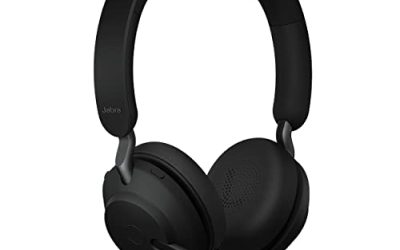
Jabra Evolve2 65 MS Stereo with Link 380c
The Jabra Evolve2 65 in this configuration, model number 26599-999-899, is a stereo on-ear headset supplied with the Jabra Link 380c USB-C Bluetooth adapter, and this listing is the Microsoft Teams variant. The Amazon product page describes it as a wireless Bluetooth headset for calls and music, and the box contents listed on the page are the headset, the Link 380 adapter, a USB-C to USB-A cable, a carry case and the warranty leaflets, so the adapter connection to a work computer is included rather than sold separately.
The call side of the Evolve2 65 is built on a three-microphone system. The product page describes enhanced three-microphone call technology working with an advanced digital chipset, and 40mm speakers handle what you hear, with the page describing them as leak-tolerant drivers intended to keep sound rich for both calls and music. Noise control at your ears is passive rather than active on this model: the page credits the memory foam cushions and the angled earcup design with isolating the sound around you, which suits a moderately busy room and carries no battery penalty.
Battery life is the headline strength here. The page states up to 37 hours of battery life on a single charge, a full charge time of about one and a half hours, and a short charge of 15 minutes returning up to eight hours of use. Bluetooth is version 5.0, and the listed wireless range is about 30 metres, which covers movement around a home or a small office floor. The integrated busylight is visible from all directions according to the page, lighting automatically during calls and meetings and switchable manually, which is the feature that protects a focused worker from walk-up interruptions.
Choose the Evolve2 65 if battery life is your first priority, if your workplace runs on Microsoft Teams and you want the Teams variant of the headset, or if you prefer passive isolation and a long-running battery to active cancellation. Confirm on the product page that the adapter in the box is the USB-C Link 380c version, because the Evolve2 65 family is also sold with a USB-A adapter and in a mono single-ear version under different listings.
Poly Voyager Focus 2 UC USB-C
The Poly Voyager Focus 2 in this configuration, item model number 214432-02, is a stereo on-ear Bluetooth headset supplied with the BT700 USB-C adapter. The Amazon product page describes it as a dual-ear headset with a boom microphone, USB-C compatibility for PC and Mac, active noise cancelling, and certification for Microsoft Teams, with Zoom and other platforms also named. The listed box contents are the headset, a carry case, the BT700 USB adapter and a charging cable.
Noise cancelling works in both directions on this model. For your ears, the page describes three levels of advanced digital hybrid active noise cancelling, with high, low and off settings, so the strength can be matched to the room. For your callers, the boom microphone uses Poly Acoustic Fence technology, a multi-microphone arrangement intended to build a zone in which your voice is captured and the noise beyond it is reduced, and the page also describes a dynamic mute alert that tells you if you speak while muted. That pairing of adjustable cancellation for you and a fenced microphone for them is the defining idea of this headset.
The connection and battery figures are stated plainly on the page. Bluetooth is version 5.1, the wireless range is listed as up to 50 metres with the UC version and its BT700 adapter, and talk time is up to 19 hours, with the headset also usable as a corded headset over its USB cable when the battery runs down. Charging time is listed as two hours. The headset weighs 129 grams, which is light for a stereo model with a boom, and the page lists call control and voice control among its control types.
Choose the Voyager Focus 2 if your workspace is noisy in both directions, if you want to choose between cancellation levels rather than accept a single fixed setting, or if the corded fallback over USB appeals to you as insurance against a flat battery mid-day. Confirm the adapter version on the page before ordering, because this family is also sold with a USB-A adapter and with a charging stand under separate listings.
Logitech Zone Wireless 2 ES
The Logitech Zone Wireless 2 ES in this configuration, model number 981-001516, is an on-ear stereo headset in black, described on its Amazon listing as a noise-cancelling wireless headset with adaptive hybrid active noise cancellation and Bluetooth. It is the business edition of the Zone line, aimed at open offices and shared workspaces, and it connects over Bluetooth, with the family also offering receiver-based versions under other listings.
The cancellation system is the adaptive part of the name: the hybrid active noise cancellation adjusts its level in real time to the sound around you, rather than holding one fixed setting, and it can be managed through the Logi Tune software, where the adaptive mode is enabled and microphone equaliser settings can be adjusted. The drivers are custom-designed 40mm units on each side. For your voice, the headset uses two noise-canceling microphones with AI-based algorithms, intended to keep your speech clear in noisy spaces without a long boom in front of your face.
Battery figures are given for both directions of use. Talk time is up to 20 hours with cancellation on and up to 25 hours with it off, while listening time reaches up to 25 hours with cancellation on and up to 48 hours with it off. A five-minute quick charge returns up to one hour of talk time, and a full charge takes about two hours over USB-C. The stated wireless range is up to 50 metres, the headset can hold two simultaneous device connections, and it weighs 212 grams, with a strap design intended to distribute that weight evenly for long sessions.
Choose the Zone Wireless 2 ES if you work in an open-plan office where the noise level changes through the day, if you prefer software control over cancellation and microphone settings, or if you want the longest stated listening time of the three headsets here for days that mix calls with focused solo work. Check the listing carefully for the exact version, because the Zone Wireless 2 ES is sold in Teams and UC variants, with and without a receiver, and in several colours, each under its own listing.
Comparison Table
| Headset | ASIN | Connection | Noise cancelling for your ears | Microphone system | Stated talk time | Wireless range |
|---|---|---|---|---|---|---|
| Jabra Evolve2 65 MS Stereo | B08B8XX6XP | Bluetooth 5.0 with Link 380c USB-C adapter | Passive isolation, memory foam cushions | 3-microphone call technology | Up to 37 hours battery life stated | About 30 metres |
| Poly Voyager Focus 2 UC USB-C | B092TDVB8V | Bluetooth 5.1 with BT700 USB-C adapter | Hybrid active, three levels | Boom microphone with Acoustic Fence | Up to 19 hours | Up to 50 metres |
| Logitech Zone Wireless 2 ES | B0FKK799BR | Bluetooth, two simultaneous connections | Adaptive hybrid active | 2 noise-canceling microphones with AI algorithms | Up to 20 hours with cancellation on | Up to 50 metres |
Frequently Asked Questions
Do I need a USB adapter, or is Bluetooth alone enough?
Bluetooth alone works, and all three headsets here can pair directly with a computer or phone. The adapter earns its place when call reliability matters most: it gives the computer a dedicated audio device, it is pre-paired with its headset, and it usually holds a steadier connection than a laptop’s built-in Bluetooth radio in a crowded wireless environment. If your meetings run through a softphone all day, the adapter versions listed here are the safer choice.
What is the difference between active and passive noise cancelling in a work headset?
Active cancelling uses microphones and processing to reduce ambient sound electronically, and it is the stronger tool against steady noise such as air conditioning, traffic hum and office chatter. Passive isolation is physical: sealed cushions and earcup shape block sound without electronics. The Jabra in this guide relies on passive isolation and returns the longest battery life; the Poly and Logitech add active cancelling and give up some running time to power it.
Does microphone noise cancelling help in a home office?
Yes, and it is often the more important direction at home. Your callers hear the doorbell, the dog and the kitchen through an unprotected microphone. The boom and Acoustic Fence arrangement on the Poly, the three-microphone system on the Jabra and the AI-assisted microphones on the Logitech are all designed to keep your voice forward and the room behind it quiet, each by a different method.
How long should a work headset battery last?
A full working day of calls is roughly six to eight hours of talk time, so any headset stating 19 hours or more of talk time covers a heavy day with room to spare and can stretch across several lighter days. The practical differences are the top-up speed and what happens when the battery is empty: a fast short charge, as on the Jabra and Logitech here, or a corded USB fallback, as on the Poly, decides whether a flat morning is a problem or a pause.
Are these headsets suitable for Microsoft Teams and Zoom?
Yes. The Jabra listing here is the Microsoft Teams variant of the Evolve2 65, the Poly Voyager Focus 2 listing states Teams certification and names Zoom, and the Logitech Zone Wireless 2 ES is a business headset sold in Teams and UC versions. Whichever you choose, confirm the platform variant on the product page for the exact ASIN, because the certification follows the variant, not the model family.
Conclusion
The three headsets in this guide solve the same problem with different priorities. The Jabra Evolve2 65, ASIN B08B8XX6XP, is the battery and simplicity pick: passive isolation, a three-microphone system, the Link 380c adapter in the box and up to 37 hours of stated battery life. The Poly Voyager Focus 2, ASIN B092TDVB8V, is the noise-control pick, with three levels of hybrid active cancelling for your ears and an Acoustic Fence boom microphone for your callers. The Logitech Zone Wireless 2 ES, ASIN B0FKK799BR, is the adaptive pick, adjusting its cancellation to the room and adding software control and the longest stated listening time.
Decide which of those priorities matches your room and your meeting load, then confirm the variant, adapter type and box contents on the Amazon page for the ASIN you choose, because every one of these model families is sold in several configurations that look alike at a glance.
FAQ
Do I need a USB adapter, or is Bluetooth alone enough?
What is the difference between active and passive noise cancelling in a work headset?
Does microphone noise cancelling help in a home office?
How long should a work headset battery last?
Are these headsets suitable for Microsoft Teams and Zoom?
More from Amazon
Programs that pair well with the guide above. Offers and eligibility are set by Amazon and may change.
Free shipping on eligible items, Prime Video and more. Eligible new members can start with a free trial.
Start a Prime free trialA Prime membership for ages 18-24 with a trial period. Eligibility is set by Amazon.
See Prime for Young AdultsAudiobooks and podcasts to listen to on the go. Eligible new members can start with a free trial.
Try Audible freeAd-free music streaming. Eligible new subscribers can start with a free trial.
Try Music Unlimited freeAs an Amazon Associate we earn from qualifying purchases.