
Our Short List of 3

- Best for: Players replacing a desktop tower who want the strongest graphics in the Alienware range.
- Display: 18-inch 2.5K WQXGA anti-glare
- Processor: Intel Core Ultra 9 275HX
- Graphics: NVIDIA GeForce RTX 5090
- Memory: 64GB DDR5

- Best for: High-refresh 1440p gaming in a 16-inch flagship that still moves between rooms.
- Display: 16-inch WQXGA 240Hz
- Processor: Intel Core Ultra 9 275HX (24 cores, up to 5.4GHz)
- Graphics: NVIDIA GeForce RTX 5070 Ti 12GB GDDR7
- Memory: 32GB DDR5
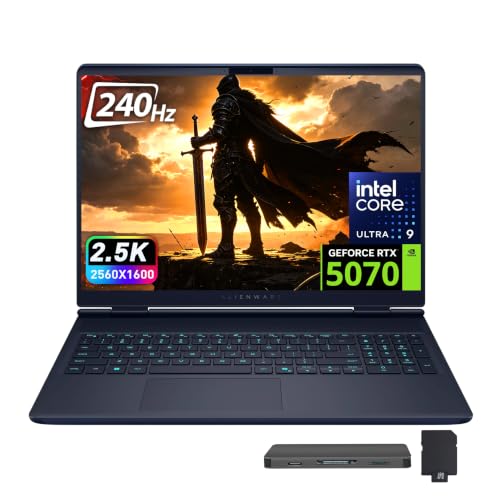
- Best for: Players who want HX-class power and a 240Hz screen in the lighter Aurora chassis.
- Display: 16-inch WQXGA 240Hz
- Processor: Intel Core Ultra 9 275HX
- Graphics: NVIDIA GeForce RTX 5070 8GB GDDR7
- Memory: 32GB DDR5
All 5 Picks at a Glance
| Product | Specs | Action |
|---|---|---|
| Alienware 18 Area-51 Gaming Laptop |
| Check price on Amazon |
| Alienware 16 Area-51 Gaming Laptop |
| Check price on Amazon |
| Alienware 16X Aurora Gaming Laptop |
| Check price on Amazon |
 Alienware 16 Aurora Gaming Laptop |
| Check price on Amazon |
 Alienware x16 R2 Gaming Laptop |
| Check price on Amazon |
Key takeaways
- Compare five Alienware laptops on Amazon, from the RTX 5090 18 Area-51 flagship to the 16 Aurora, by GPU, screen, memory and storage before you buy.
Buying an Alienware is less about whether the brand is fast enough and more about which tier of the range fits your desk. The same glowing logo covers an entry 16-inch Aurora with an RTX 5060 and an 18-inch Area-51 flagship with an RTX 5090, and those two machines suit completely different buyers. The real decision is how much graphics power, screen size and cooling bulk you actually need, because every step up the range adds weight as well as speed.
This roundup is for players who have already settled on Alienware and want the current Amazon range laid out plainly. Every model below is an Alienware gaming laptop, picked from the configuration named in its own Amazon listing title, with specifications taken from that listing rather than from a configurator page.
Quick Picks
As an Amazon Associate we earn from qualifying purchases
| Product | Best for | Key spec from title |
|---|---|---|
| Alienware 18 Area-51 Gaming Laptop | Desktop replacement at a fixed desk | RTX 5090, 18-inch WQXGA display |
| Alienware 16 Area-51 Gaming Laptop | High-refresh 1440p play in a 16-inch body | RTX 5070 Ti, 16-inch 240Hz display |
| Alienware 16X Aurora Gaming Laptop | HX power with a slimmer Aurora chassis | RTX 5070, 16-inch 240Hz display |
| Alienware 16 Aurora Gaming Laptop | First step into the current Alienware range | RTX 5060, 16-inch 120Hz display |
| Alienware x16 R2 Gaming Laptop | A thinner Alienware you can carry daily | RTX 4070, 16-inch QHD+ 240Hz display |
How to Choose
Start With the Graphics Card, Not the Badge
The GPU tier is the single biggest performance gap in this range. The RTX 5060 in the 16 Aurora carries 8GB of GDDR7 memory and is aimed at 1080p and lighter 1440p play, while the RTX 5070 Ti in the 16 Area-51 steps up to 12GB and is the comfortable choice for high settings at the native 2560 x 1600 resolution. The RTX 5090 in the 18 Area-51 sits in a different class again. Compare the graphics line of each listing first, because two laptops with the same Alienware name can be several performance tiers apart.
Match the Processor Class and Chassis to Your Desk
Listings here split between HX processors and H processors, and that letter matters. The Core Ultra 9 275HX in the Area-51 models and the 16X Aurora is a 24-core desktop-class chip that needs the bigger cooling systems those chassis carry. The Core 7 240H in the 16 Aurora and the Core Ultra 7 155H in the x16 R2 are efficiency-leaning parts in thinner bodies. If the laptop lives on one desk, HX power is worth the bulk. If it travels in a backpack, the lighter H-class machines make more sense.
Check Whether Memory and Storage Can Grow
Not every Alienware in this list treats memory the same way. The x16 R2 listing states its 16GB of LPDDR5X memory is integrated, which means the capacity you order is the capacity you keep. Other listings in the range use DDR5 configurations that sellers offer in several sizes, and some Amazon listings are seller-upgraded builds where the seal was opened to fit larger memory or storage. Read the exact configuration in the title, check which warranty covers upgraded parts, and decide whether 16GB is enough for the years you plan to keep the machine.
Read the Display Line Carefully
Every model here uses a 16:10 WQXGA or QHD+ panel, but the refresh rate splits the range. The 16 Aurora runs at 120Hz, which is fine for single-player games and everyday use, while the Area-51, 16X Aurora and x16 R2 listings all run at 240Hz for competitive play. The x16 R2 also lists full DCI-P3 color coverage with G-SYNC and Advanced Optimus, which matters if you edit video or photos on the same screen. Match the panel to your games rather than assuming every Alienware screen is identical.
The 5 Best Options
Alienware 18 Area-51 Gaming Laptop
- Best for: Players replacing a desktop tower who want the strongest graphics in the Alienware range.
- Display: 18-inch 2.5K WQXGA anti-glare
- Processor: Intel Core Ultra 9 275HX
- Graphics: NVIDIA GeForce RTX 5090
- Memory: 64GB DDR5
Players replacing a desktop tower who want the strongest graphics in the Alienware range.
The 18-inch chassis and its power brick are bulky, so confirm your desk depth and bag size before ordering.
The 18 Area-51 is the flagship of the current Alienware range and the closest thing here to a desktop in a folding chassis. Its listing pairs an RTX 5090 with the Core Ultra 9 275HX, 64GB of DDR5 memory and a 2TB PCIe SSD, fronted by an 18-inch WQXGA anti-glare display. That combination suits a fixed battlestation where the laptop drives demanding games at native resolution and rarely leaves the desk. Expect a large, heavy machine with a big power supply; portability is the price of this much cooling and screen.
Alienware 16 Area-51 Gaming Laptop
- Best for: High-refresh 1440p gaming in a 16-inch flagship that still moves between rooms.
- Display: 16-inch WQXGA 240Hz
- Processor: Intel Core Ultra 9 275HX (24 cores, up to 5.4GHz)
- Graphics: NVIDIA GeForce RTX 5070 Ti 12GB GDDR7
- Memory: 32GB DDR5
High-refresh 1440p gaming in a 16-inch flagship that still moves between rooms.
Storage starts at 1TB, which fills quickly with modern game installs, so plan for an upgrade or external drive.
The 16 Area-51 keeps the flagship formula but trims it into a 16-inch body that is easier to live with. The listing runs an RTX 5070 Ti with 12GB of GDDR7 memory, the same Core Ultra 9 275HX processor, 32GB of DDR5 memory and a 1TB SSD, with a 240Hz WQXGA panel for fast-paced games. In Liquid Teal with onsite service named in the title, it is the pick for players who want high settings at 2560 x 1600 without stepping up to the 18-inch chassis and its RTX 5090.
Alienware 16X Aurora Gaming Laptop
- Best for: Players who want HX-class power and a 240Hz screen in the lighter Aurora chassis.
- Display: 16-inch WQXGA 240Hz
- Processor: Intel Core Ultra 9 275HX
- Graphics: NVIDIA GeForce RTX 5070 8GB GDDR7
- Memory: 32GB DDR5
Players who want HX-class power and a 240Hz screen in the lighter Aurora chassis.
This listing is a seller-upgraded bundle whose storage total includes a docking station with its own SSD, so confirm what is fitted inside the laptop itself.
The 16X Aurora is the middle path of the range: HX processing and a 240Hz screen in the slimmer Aurora design. Its listing combines the Core Ultra 9 275HX with an RTX 5070, 32GB of DDR5 memory and a 1TB SSD, finished in Interstellar Indigo at just under six pounds. That makes it a sensible choice for players who split time between a desk setup and taking the laptop elsewhere. This particular listing is a seller bundle, so read the configuration details in the research notes before buying.
Alienware 16 Aurora Gaming Laptop
- Best for: First-time Alienware buyers who want the current generation for esports and everyday gaming.
- Display: 16-inch WQXGA (2560 x 1600) 120Hz
- Processor: Intel Core 7 240H
- Graphics: NVIDIA GeForce RTX 5060 8GB GDDR7
- Memory: 16GB DDR5
First-time Alienware buyers who want the current generation for esports and everyday gaming.
The 120Hz panel and RTX 5060 are the entry tier of this range, so demanding games at native resolution will need reduced settings.
The 16 Aurora is the entry point of the current Alienware line and the simplest way into the brand’s latest design. The listing pairs a Core 7 240H processor with an RTX 5060, 16GB of DDR5 memory and a 1TB SSD behind a 16-inch WQXGA screen running at 120Hz. That is a balanced specification for esports titles, older games and everyday work, with the same 16:10 display shape as the flagship models. Buyers who mainly play competitive games at moderate settings will not miss the higher tiers as much as the spec sheet suggests.
Alienware x16 R2 Gaming Laptop
- Best for: Players who want a slim Alienware with a color-accurate 240Hz screen for mixed gaming and creative work.
- Display: 16-inch QHD+ 240Hz, 3ms, 100 percent DCI-P3
- Processor: Intel Core Ultra 7 155H (16 cores, up to 4.8GHz)
- Graphics: NVIDIA GeForce RTX 4070 8GB GDDR6
- Memory: 16GB LPDDR5X (integrated)
Players who want a slim Alienware with a color-accurate 240Hz screen for mixed gaming and creative work.
The LPDDR5X memory is integrated and cannot be upgraded later, so 16GB has to be enough for the life of the laptop.
The x16 R2 is the previous generation’s thin flagship, still on sale with a specification that holds up well. Its listing combines a Core Ultra 7 155H with an RTX 4070, 16GB of LPDDR5X memory and a 1TB SSD, and the QHD+ screen runs at 240Hz with full DCI-P3 coverage, G-SYNC and Advanced Optimus. In Lunar Silver it is noticeably slimmer than the Area-51 models, which makes it the Alienware here that best suits daily carrying. The trade-off is fixed memory and an older platform than the RTX 50-series machines above.
Which One Fits Your Situation
Your Laptop Replaces a Desktop Tower
Choose the 18 Area-51. Its RTX 5090, 64GB of memory and 18-inch screen are built for a permanent desk where size and weight stop mattering once the lid is open. The larger chassis also gives the top-tier graphics the cooling room they need for long sessions, which smaller bodies cannot match.
You Want Fast 1440p Play Without the Biggest Chassis
Look at the two 16-inch RTX 5070-class models. The 16 Area-51 with its RTX 5070 Ti is the stronger pick for high settings and includes onsite service in its listing, while the 16X Aurora trades a little graphics power for the lighter Aurora body. Both run 240Hz panels that suit competitive games.
You Are Buying Your First Alienware
Start with the 16 Aurora. It carries the current design, a 16:10 WQXGA screen and RTX 5060 graphics that handle esports and mainstream games comfortably, without paying for HX processing you may never use. If your library grows more demanding later, the rest of this list shows exactly what each step up buys you.
You Carry Your Laptop Every Day
Pick the x16 R2. The thin Lunar Silver chassis is the easiest Alienware here to live with in a backpack, and the 240Hz DCI-P3 screen doubles well for photo and video work. Accept the fixed 16GB of memory as the compromise, and it remains a capable machine for gaming away from home.
Common Mistakes
- Comparing Alienware models by name alone when the graphics tier, not the badge, decides gaming performance.
- Assuming every Amazon listing is a factory Dell configuration, when some are seller-upgraded bundles with their own warranty terms.
- Buying a model with integrated LPDDR5X memory and expecting to add more RAM later.
- Overlooking the refresh rate gap between the 120Hz Aurora panel and the 240Hz screens in the rest of the range.
- Forgetting the size and weight of the power adapter when judging whether a flagship model really suits travel.
Frequently Asked Questions
Are Alienware laptops made by Dell?
Yes. Alienware is Dell’s gaming brand, which is why Amazon listings for the same machines appear under both the Dell and Alienware names. Support, warranty and onsite service run through Dell, and several listings in this roundup state onsite service in their titles. Check the individual listing to see which service terms apply to that configuration.
Which Alienware laptop here has the strongest graphics?
The 18 Area-51, with its RTX 5090, sits at the top of this range. Below it, the RTX 5070 Ti in the 16 Area-51 is the next step down, followed by the RTX 5070, RTX 5060 and the previous-generation RTX 4070. Match the tier to the resolution and settings you actually play at.
Can I upgrade the memory in these laptops later?
It depends on the model. The x16 R2 listing states its LPDDR5X memory is integrated, so its 16GB is fixed for life. Other listings here are sold in several DDR5 configurations, including seller-upgraded builds, which tells you those machines accept memory changes. Confirm the exact configuration and warranty position on the listing before relying on an upgrade path.
Is 16GB of memory enough for gaming on these models?
For current esports and mainstream games, 16GB remains workable, and both the 16 Aurora and x16 R2 ship with it. Players who stream, keep many applications open or plan to keep the laptop for many years are better served by the 32GB and 64GB configurations listed on the Area-51 and 16X Aurora models above.
FAQ
Are Alienware laptops made by Dell?
Which Alienware laptop here has the strongest graphics?
Can I upgrade the memory in these laptops later?
Is 16GB of memory enough for gaming on these models?
More from Amazon
Programs that pair well with the guide above. Offers and eligibility are set by Amazon and may change.
Free shipping on eligible items, Prime Video and more. Eligible new members can start with a free trial.
Start a Prime free trialA Prime membership for ages 18-24 with a trial period. Eligibility is set by Amazon.
See Prime for Young AdultsAudiobooks and podcasts to listen to on the go. Eligible new members can start with a free trial.
Try Audible freeAd-free music streaming. Eligible new subscribers can start with a free trial.
Try Music Unlimited freeAs an Amazon Associate we earn from qualifying purchases.









