
Our Short List of 3
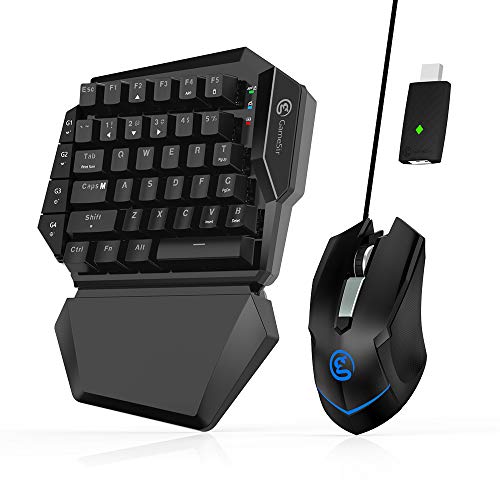
- Best for: Shooter players who want mouse aim in controller-based games without giving up their console setup.
- 34 mechanical keys plus 4 silicone keys
- TTC Blue mechanical switches
- GameSir GM190 mouse with 5 adjustable DPI levels and configurable side buttons
- 2.4GHz Agility X wireless connection with up to 32.8 ft of range

- Best for: Players who want one full-size wireless set that moves between the Xbox One and a PC.
- 2.4G wireless through one shared USB receiver
- 3000mAh keyboard battery and 800mAh mouse battery
- Up to 8 hours of continuous use with lighting on, with auto sleep after 2 minutes idle
- 7-button mouse with up to 3200 DPI
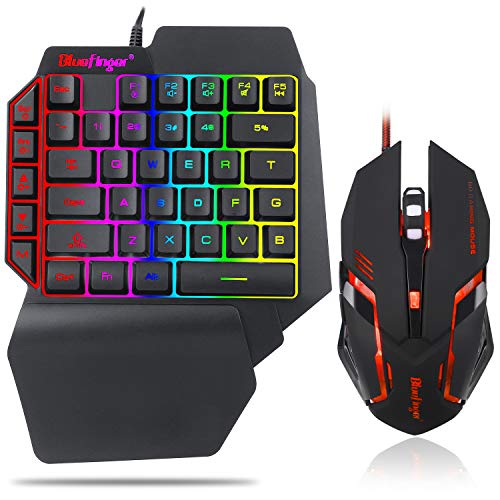
- Best for: Players with a small desk or lap tray who only need the movement and action cluster.
- 39 anti-ghosting keys with a mechanical feel
- Wrist rest built into the keypad
- 6-button mouse with 4 DPI levels from 800 to 2000
- LED breathing light on the mouse and glowing letter keys
All 5 Picks at a Glance
| Product | Specs | Action |
|---|---|---|
| GameSir VX AimSwitch Keypad and Mouse Combo |
| Check price on Amazon |
| RedThunder K10 Wireless Gaming Keyboard and Mouse Combo |
| Check price on Amazon |
| BlueFinger One Hand RGB Gaming Keyboard and Mouse Combo |
| Check price on Amazon |
 CHONCHOW Wired Gaming Keyboard and Mouse Combo |
| Check price on Amazon |
 CHONCHOW 1910 White Gaming Keyboard and Mouse Combo |
| Check price on Amazon |
Key takeaways
- Five keyboard and mouse combos that work on Xbox One, from the GameSir VX AimSwitch keypad set to full-size wired and wireless sets, compared.
The real decision with an Xbox One keyboard and mouse set is not switch feel or lighting. It is whether the games you actually play accept keyboard input at all, because Xbox One support is switched on title by title, and whether the set reaches the console in a form the console accepts: a plain USB plug, a single wireless dongle, or a keypad kit that routes through your controller. Get either answer wrong and a well-made combo sits in a drawer.
This roundup is for Xbox One owners who play supported shooters and strategy titles at a desk, players setting up in front of a TV, and households that want one set the kids can also use on the family PC. Every pick is a keyboard and mouse sold together in one listing that names Xbox or Xbox One in its compatibility details, checked against the product page information for that listing.
Quick Picks
As an Amazon Associate we earn from qualifying purchases
| Product | Best for | Key spec from title |
|---|---|---|
| GameSir VX AimSwitch Keypad and Mouse Combo | Shooter players who want a console-first keypad set | 34 mechanical keys plus GM190 mouse, 2.4GHz wireless |
| RedThunder K10 Wireless Gaming Keyboard and Mouse Combo | A full-size wireless set for desk or couch | 2.4G single receiver, mouse up to 3200 DPI |
| BlueFinger One Hand RGB Gaming Keyboard and Mouse Combo | The smallest wired footprint for tight setups | 39 keys, mouse with 4 DPI levels up to 2000 |
| CHONCHOW Wired Gaming Keyboard and Mouse Combo | A full-size wired set with a mouse pad in the box | Mouse up to 4800 DPI with 2 side buttons |
| CHONCHOW 1910 White Gaming Keyboard and Mouse Combo | A white full-size set shared between Xbox and PC | 104 keys, mouse up to 4800 DPI |
How to Choose
Start With the Games You Actually Play
Xbox One never opened keyboard and mouse input to the whole library. Each publisher decides for its own titles, so a combo that feels perfect in one shooter may do nothing at all in the game you boot up next. Before choosing hardware, check the input settings of the two or three games you play most, and expect the controller to stay nearby regardless: text chat, menus, and the dashboard still lean on it. Buyers who check game support first rarely regret the purchase; buyers who assume universal support often do.
Know Which Connection Route You Are Buying
Combos reach an Xbox One by two different routes, and they behave differently. Plain USB and dongle sets present themselves as a standard keyboard and mouse, which works in games with native support. Keypad kits such as the GameSir VX instead connect through your official controller and translate your inputs into controller signals, which can bring keyboard control to games built around a gamepad. That route adds setup steps: the controller stays cabled to the keypad, and some controllers, including the Xbox Elite controller on the GameSir listing, are called out as unsupported.
Full Keyboard or One-Hand Keypad
A full-size board earns its desk space when you type in chat, search in apps, or share the set with a PC, and it gives you a number pad and full function row. A one-hand keypad takes the opposite trade: it keeps only the movement and action cluster under your left hand, which suits a small desk, a lap tray, or a player who never types. The catch is that a keypad cannot pinch-hit as a real keyboard, so households with one shared setup usually do better with a full board.
Wired, Dongle Wireless, and the Ports You Have
The Xbox One has a small number of USB ports, and headsets, drives, and charging cables already compete for them. A single-dongle wireless set such as the RedThunder K10 uses one port for both devices and frees you from cable reach, at the cost of batteries to charge. Wired sets never need charging and cost you nothing in ports beyond their plugs, but the cable fixes how far from the console you can sit. Count your free ports and measure your seating distance before picking a side.
The 5 Best Options
GameSir VX AimSwitch Keypad and Mouse Combo
- Best for: Shooter players who want mouse aim in controller-based games without giving up their console setup.
- 34 mechanical keys plus 4 silicone keys
- TTC Blue mechanical switches
- GameSir GM190 mouse with 5 adjustable DPI levels and configurable side buttons
- 2.4GHz Agility X wireless connection with up to 32.8 ft of range
Shooter players who want mouse aim in controller-based games without giving up their console setup.
Your official controller must stay connected to the keypad, and the listing states the set does not work with the Xbox Elite controller; the mouse is wired to the keypad rather than wireless.
GameSir built the VX AimSwitch for consoles first and PCs second, which shows in how it connects: the keypad links wirelessly to its dongle while your official Xbox controller plugs into the keypad, so the set speaks to the console in controller language. That makes it the natural pick for shooter players who want mouse aim in games designed around a gamepad. The TTC Blue switches feel properly mechanical, the palm rest slides to fit your hand position, and the G-Crux phone app lets you remap keys and tune the bundled GM190 mouse.
RedThunder K10 Wireless Gaming Keyboard and Mouse Combo
- Best for: Players who want one full-size wireless set that moves between the Xbox One and a PC.
- 2.4G wireless through one shared USB receiver
- 3000mAh keyboard battery and 800mAh mouse battery
- Up to 8 hours of continuous use with lighting on, with auto sleep after 2 minutes idle
- 7-button mouse with up to 3200 DPI
Players who want one full-size wireless set that moves between the Xbox One and a PC.
The listing advises an 8-hour charge before first use, and the keys are mechanical-feel membrane rather than true mechanical switches; keep track of the receiver, since both devices are useless without it.
The K10 is the only full-size wireless set in this roundup, and it keeps the arrangement simple: one USB receiver, stored in the bottom of the mouse, runs both devices. The keyboard carries a 3000mAh battery and the mouse an 800mAh cell, so the set suits a couch or desk where a cable run would be a nuisance. Pudding keycaps let the RGB backlight spill through the legends, and the seven-button mouse covers the extra binds most players want. It also works across Windows, Mac, Linux, and PS4, so it can double as the household spare set.
BlueFinger One Hand RGB Gaming Keyboard and Mouse Combo
- Best for: Players with a small desk or lap tray who only need the movement and action cluster.
- 39 anti-ghosting keys with a mechanical feel
- Wrist rest built into the keypad
- 6-button mouse with 4 DPI levels from 800 to 2000
- LED breathing light on the mouse and glowing letter keys
Players with a small desk or lap tray who only need the movement and action cluster.
With 39 keys there is no way to type messages or use full keyboard shortcuts, and the mouse tops out at 2000 DPI, which competitive players may find low.
BlueFinger trims the keyboard down to the 39 keys your left hand actually uses in a match and pairs them with a compact six-button mouse, all over plain wired USB. There is nothing to charge, no receiver to lose, and no software to install, which makes this the easiest set to leave permanently plugged into the console. The built-in wrist rest helps during longer sessions, and the mouse steps through four DPI levels so you can slow it down for aiming or speed it up for menus. It is a focused little kit for players short on space.
CHONCHOW Wired Gaming Keyboard and Mouse Combo
- Best for: A first full-size set for a shared Xbox One, especially for younger players.
- Full-size wired USB keyboard with rainbow backlight
- Mechanical-feel keys with emitting characters
- Mouse up to 4800 DPI with 2 side buttons
- Mouse pad included in the box
A first full-size set for a shared Xbox One, especially for younger players.
The keyboard uses mechanical-feel membrane keys rather than mechanical switches, and the wired connection means your seating distance is set by the cable length.
This CHONCHOW set is the straightforward option: a full-size rainbow-backlit board, a mouse that reaches 4800 DPI with two side buttons, and a mouse pad folded into the same box. The listing names Xbox One directly in its compatibility line, and because everything is wired USB there is no pairing step between unboxing and playing. The mechanical-feel keys have emitting characters so the legends stay readable in a dark room. For a first keyboard and mouse set on a family Xbox One, it covers the basics without asking you to learn a keypad layout or manage batteries.
CHONCHOW 1910 White Gaming Keyboard and Mouse Combo
- Best for: A shared desk where one wired set covers Xbox One gaming and everyday PC typing.
- 104 keys, full size with number pad
- Anti-ghosting keys with multimedia keys
- WIN key lock for gaming sessions
- 6-button mouse, up to 4800 DPI
A shared desk where one wired set covers Xbox One gaming and everyday PC typing.
The white finish shows dust and wear faster than black sets, and like the other wired picks it cannot move to the couch without an extension cable.
The 1910 is CHONCHOW’s full-size white set, built for desks where the Xbox One sits next to a work or school computer. You get a complete 104-key layout with a number pad and multimedia keys, a WIN key lock for gaming sessions, and a six-button mouse that adjusts up to 4800 DPI. The listing’s system support line includes Xbox One alongside PC, laptop, and PS4, and the wired USB connection keeps setup to a single plug. In a bright room or a shared family space, the white finish also looks less out of place than a glowing black board.
Which One Fits Your Situation
You Play Shooters and Want Mouse Aim at a Desk
Start with the GameSir VX AimSwitch. Its controller-routed connection was designed for console shooters, the mechanical keypad keeps movement keys tight under your left hand, and the bundled mouse offers five DPI levels for tuning aim. If your desk is tiny and you prefer a cable, the BlueFinger one-hand set covers the same left-hand cluster for less desk space.
The Xbox One Lives Under the TV
Choose the RedThunder K10. One dongle in a front or side port connects both devices, the batteries are sized for long sessions, and there is no cable stretched across the living room floor. Keep the controller within reach for the dashboard, and store the receiver in the mouse when you move the set so it does not vanish into the couch.
One Set Has to Cover the Console and a Family PC
Take the CHONCHOW 1910. A full 104-key layout with a number pad handles homework and office work properly, the multimedia keys earn their keep at a desk, and the same single USB plug serves the Xbox One when game time starts. The white finish also blends into a shared room better than most gaming boards.
You Are Buying a First Set for a Younger Player
The CHONCHOW wired combo with the included mouse pad is the gentle starting point. Everything needed is in one box, there are no batteries to manage and no receiver to lose, and the full-size layout means the same set works for school typing later. If it gets outgrown, the RedThunder K10 is the natural wireless step up.
Common Mistakes
- Assuming every Xbox One game accepts keyboard and mouse input, when support is decided separately for each title.
- Expecting the mouse pointer to work on the Xbox Home screen and in Settings, where it does not operate.
- Buying a Bluetooth-only keyboard or combo, since the Xbox One does not take Bluetooth keyboards.
- Forgetting that controller-routed keypad kits need an official controller plugged in, and that some controllers are unsupported.
- Losing the shared USB receiver of a wireless combo, which leaves both the keyboard and the mouse unusable.
Frequently Asked Questions
Do all Xbox One games work with a keyboard and mouse?
No. Xbox One leaves the decision to each game’s publisher, so support varies title by title and can change with updates. Many well-known shooters and strategy games accept keyboard and mouse input, while others ignore it completely. Check the control settings inside each game you care about before assuming a combo will work there.
Can I use the mouse to move around the Xbox dashboard?
Not in the way you would on a PC. Mouse input is aimed at gameplay inside supported titles, and it does not drive the pointer across the Home screen or through Settings. Plan on keeping a controller nearby for navigation, downloads, and system menus, even if you play entire matches on the keyboard and mouse.
Do any of these combos need a separate adapter to buy?
No separate purchase is required. The GameSir VX AimSwitch builds its controller connection into the kit itself, although it does need your official controller plugged in. The RedThunder, BlueFinger, and CHONCHOW sets connect directly by USB cable or, in the K10’s case, by the included wireless receiver.
Will these sets also work on a PC or a newer Xbox?
Every set here lists PC support, and several also list PS4, so they can move between a console and a computer desk freely. Support for Xbox Series X or S is a different question: it is named on some listings and absent on others, so check the compatibility line of the exact set you are buying if a newer console is part of the plan.
FAQ
Do all Xbox One games work with a keyboard and mouse?
Can I use the mouse to move around the Xbox dashboard?
Do any of these combos need a separate adapter to buy?
Will these sets also work on a PC or a newer Xbox?
More from Amazon
Programs that pair well with the guide above. Offers and eligibility are set by Amazon and may change.
Free shipping on eligible items, Prime Video and more. Eligible new members can start with a free trial.
Start a Prime free trialA Prime membership for ages 18-24 with a trial period. Eligibility is set by Amazon.
See Prime for Young AdultsAudiobooks and podcasts to listen to on the go. Eligible new members can start with a free trial.
Try Audible freeAd-free music streaming. Eligible new subscribers can start with a free trial.
Try Music Unlimited freeAs an Amazon Associate we earn from qualifying purchases.









