
Our Short List of 3
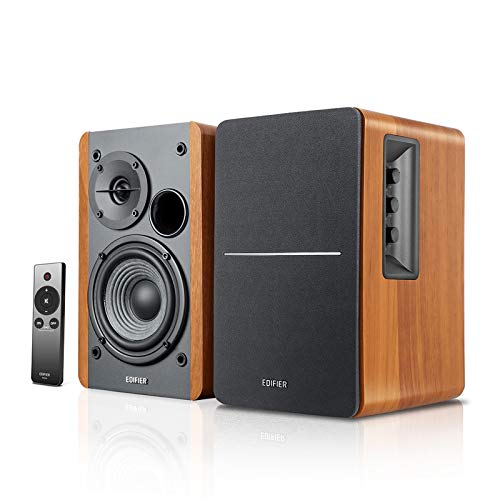
- Best for: listeners running a computer plus one more wired source at the same desk.
- Total power: 42W RMS (21W + 21W)
- Drivers: 4-inch woofer, 13mm silk dome tweeter
- Inputs: dual RCA line inputs
- Output: subwoofer line out
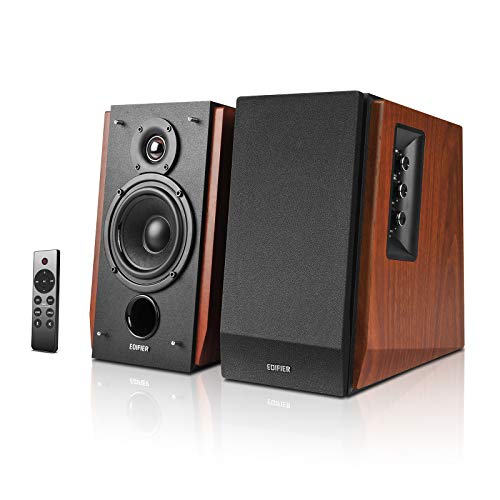
- Best for: listeners who split time between a PC and phone streaming and want more volume headroom.
- Total power: 66W RMS
- Drivers: 4-inch woofer, 19mm silk dome tweeter
- Wireless: Bluetooth 5.0
- Inputs: dual RCA line inputs

- Best for: small desks where a clean USB feed and good Bluetooth matter more than raw output.
- Power: 60W peak total
- Wireless: Bluetooth 5.3 with aptX-HD, up to 100 ft range per the listing
- Inputs: USB-C (24-bit audio), RCA, 3.5 mm AUX
- Cabinets: wood, high-gloss finish
All 5 Picks at a Glance
| Product | Specs | Action |
|---|---|---|
| Edifier R1280Ts |
| Check price on Amazon |
| Edifier R1700BTs |
| Check price on Amazon |
| Audioengine A2+ |
| Check price on Amazon |
 Kanto YU2 |
| Check price on Amazon |
 Creative Pebble V3 |
| Check price on Amazon |
Key takeaways
- Five powered desktop speaker pairs chosen for music first, with USB DAC, Bluetooth and subwoofer outputs compared so your PC sounds like a stereo.
Most computer speakers are tuned to make game explosions and video dialogue sound exciting, which is exactly the wrong voicing for music. The real decision is whether a pair can hold a stereo image at arm’s length, keep vocals clear at low volume, and take a clean signal from your PC without hiss. Everything after that, cabinet size, Bluetooth, a subwoofer output, is about fitting that goal around your desk and your other sources.
This roundup is for desk listeners who play albums more than games, laptop users tired of thin built-in sound, and anyone feeding speakers from a turntable or phone as a second source. Every pick is a powered 2.0 pair sold for desktop use, chosen from the names and specifications on its Amazon listing, with the connection types and driver sizes that actually shape how music sounds up close.
Quick Picks
As an Amazon Associate we earn from qualifying purchases
| Product | Best for | Key spec from title |
|---|---|---|
| Edifier R1280Ts | Two wired sources on one desk | 42W RMS with subwoofer line out |
| Edifier R1700BTs | Stronger output plus phone streaming | 66W RMS with Bluetooth 5.0 |
| Audioengine A2+ | Small desks that still want hi-fi inputs | 60W with 24-bit USB-C and Bluetooth 5.3 |
| Kanto YU2 | Compact footprint with a real USB DAC | 100W Class D with built-in USB DAC |
| Creative Pebble V3 | One-cable laptop setups | 8W RMS over USB-C with Bluetooth 5.0 |
How to Choose
Start With the Input Path, Not the Wattage
How the signal leaves your computer matters more than the number printed on the box. A USB connection hands the conversion to a DAC inside the speaker, which sidesteps the noisy headphone output many laptops ship with. Analog RCA or 3.5 mm inputs are fine when the source is decent, and they are the only way to connect a turntable or CD player. Bluetooth is the convenience option for a phone. Decide which sources you actually own first, then check the pair has those inputs, because adapters and dongles pile up fast on a small desk.
Driver Size Sets the Bass Ceiling
Physics is blunt here: a 4-inch woofer in a wooden cabinet moves more air than a 2.25-inch full-range driver in a plastic shell, and no processing trick changes that. For nearfield listening at a desk you do not need deep bass, but you do need enough low-end body that kick drums and bass guitars keep their weight. If your music leans on electronic or hip-hop low end, either pick the larger drivers or make sure the pair has a subwoofer output so a sub can join later without replacing the whole system.
Read Power Ratings the Right Way
Speaker listings mix two different numbers. RMS wattage describes continuous output and is the figure worth comparing; peak wattage is a brief maximum and always looks bigger. A 42W RMS pair will play louder and cleaner at a desk than an 8W RMS pair, yet both can be right, because at one meter from your ears even a few clean watts get loud. What low power really limits is headroom: small USB-powered speakers compress and harden when pushed, so match the rating to how loud you honestly listen, not to a spec-sheet contest.
Plan for Controls and a Subwoofer Output
Living with a pair daily comes down to small things. A remote saves reaching behind a monitor every time a track runs hot. Bass and treble knobs on the speaker itself let you tame a desk placed against a wall, where low frequencies build up. A subwoofer line out is cheap insurance: it keeps the upgrade path open without a new amplifier. Also measure the gap between your monitor and the desk edge before ordering, since the cable linking the two speakers sets how far apart the stereo pair can sit.
The 5 Best Options
Edifier R1280Ts
- Best for: listeners running a computer plus one more wired source at the same desk.
- Total power: 42W RMS (21W + 21W)
- Drivers: 4-inch woofer, 13mm silk dome tweeter
- Inputs: dual RCA line inputs
- Output: subwoofer line out
listeners running a computer plus one more wired source at the same desk.
there is no Bluetooth or digital input, so a phone needs a cable or a different pick.
The R1280Ts is the straightforward wired choice for a desk that hosts more than a computer. Two RCA inputs mean a PC and a turntable, CD player, or TV can stay plugged in at once, and the 4-inch woofers give music more body than USB-powered speakers manage. Bass, treble, and volume dials sit on the side of the active speaker, with an infrared remote for couch-distance adjustments. A subwoofer line out keeps the door open if the low end ever feels light in a bigger room.
Edifier R1700BTs
- Best for: listeners who split time between a PC and phone streaming and want more volume headroom.
- Total power: 66W RMS
- Drivers: 4-inch woofer, 19mm silk dome tweeter
- Wireless: Bluetooth 5.0
- Inputs: dual RCA line inputs
listeners who split time between a PC and phone streaming and want more volume headroom.
there is no USB or optical input, so a computer connects over analog or Bluetooth only.
Stepping up within the same family buys output and wireless freedom. The R1700BTs pushes 66W RMS through a 4-inch woofer and a larger 19mm silk dome tweeter, and Bluetooth 5.0 lets a phone or tablet take over when the computer is off. Dual RCA inputs still cover wired sources, and the subwoofer line out mirrors its smaller sibling. The cabinets angle upward slightly, which aims the drivers toward your ears when the pair sits flat on a desk rather than on stands, a small detail that helps stereo focus.
Audioengine A2+
- Best for: small desks where a clean USB feed and good Bluetooth matter more than raw output.
- Power: 60W peak total
- Wireless: Bluetooth 5.3 with aptX-HD, up to 100 ft range per the listing
- Inputs: USB-C (24-bit audio), RCA, 3.5 mm AUX
- Cabinets: wood, high-gloss finish
small desks where a clean USB feed and good Bluetooth matter more than raw output.
the compact cabinets limit bass depth compared with the 4-inch pairs here, and the high-gloss finish shows dust and fingerprints quickly on a busy desk.
The A2+ is the compact answer for people who care about the digital side of the chain. Its USB-C input carries 24-bit audio from a computer, and Bluetooth 5.3 with aptX-HD covers wireless listening from a phone at better quality than basic Bluetooth codecs. At 60 watts of peak power in small wood cabinets with a high-gloss finish, it suits desks where full-size bookshelf boxes would crowd out the monitor. RCA and 3.5 mm inputs round out the wired options for older gear.
Kanto YU2
- Best for: tidy desks that want a USB DAC and a subwoofer upgrade path in a small cabinet.
- Drivers: 3-inch composite drivers, 3/4-inch silk dome tweeter
- Amplifier: Class D, 100W peak
- Input: built-in USB DAC, 3.5 mm AUX
- Output: subwoofer output
tidy desks that want a USB DAC and a subwoofer upgrade path in a small cabinet.
3-inch drivers cannot match the low-end weight of the 4-inch Edifier pairs, so bass-heavy libraries lean on that sub output.
Kanto built the YU2 specifically as a computer speaker, and the spec sheet shows it. A built-in USB DAC takes the digital feed straight from a PC or laptop, the Class D amplifier is rated at 100 watts peak, and a subwoofer output waits at the back for anyone who outgrows the 3-inch composite drivers. The 3/4-inch silk dome tweeters keep the top end smooth at close range. In matte black the pair nearly disappears beside a monitor, which is part of the appeal for tidy setups.
Creative Pebble V3
- Best for: laptop listeners who want one cable, minimal clutter, and sound that still beats built-in speakers.
- Drivers: 2.25-inch full-range, angled at 45 degrees
- Power: 8W RMS, 16W peak; gain switch for amplified output
- Connection: USB-C for audio and power; USB-A converter included
- Wireless: Bluetooth 5.0
laptop listeners who want one cable, minimal clutter, and sound that still beats built-in speakers.
output is modest, so it suits nearfield listening at a desk rather than filling a room.
The Pebble V3 takes the opposite approach: one USB-C cable carries both audio and power, so a laptop needs nothing else on the desk. The 2.25-inch full-range drivers tilt upward at 45 degrees toward your ears, and a gain switch unlocks the full 8W RMS when the port can supply 10W. Bluetooth 5.0 and a 3.5 mm input cover phones and older machines, while Clear Dialog processing helps spoken content. For pure music it is the lightest hitter here, but also the easiest to live with.
Which One Fits Your Situation
Your Desk Doubles as a Listening Corner
If the same desk holds a computer and a turntable or CD player, the Edifier R1280Ts is the natural fit. Its dual RCA inputs keep both sources connected, the tone dials help when the speakers sit close to a wall, and the remote means volume changes happen from the chair. Listeners building a small all-purpose music corner around a PC get the fewest compromises here.
You Split Listening Between PC and Phone
Choose the Edifier R1700BTs when half your listening starts on a phone. Bluetooth 5.0 hands over cleanly when the computer sleeps, the extra RMS output covers a bedroom or small living room better than the smaller pairs, and wired sources still have RCA inputs waiting. The Audioengine A2+ is the alternative when the desk is smaller and aptX-HD support matters to you.
Your Desk Is Too Small for Bookshelf Boxes
The Kanto YU2 earns its place where monitor arms and notebooks eat the available space. It keeps a genuine USB DAC and a subwoofer output despite the small cabinets, so the setup can grow later. The Audioengine A2+ competes for the same spot with a glossier finish and Bluetooth 5.3, trading the Kanto’s sub output focus for stronger wireless.
You Want One Cable and Nothing Else
For a laptop that docks and undocks all day, the Creative Pebble V3 removes every friction point. One USB-C lead handles sound and power, Bluetooth covers the phone, and the angled drivers point at your ears without stands. It gives up low-end weight and volume, but for background listening while you work, that trade is often the right one.
Common Mistakes
- Buying a 2.1 gaming set with a boomy floor subwoofer for music, then fighting the bass balance on every album.
- Comparing peak wattage across brands instead of RMS figures, which makes small USB speakers look stronger than they are.
- Setting speakers flat behind the monitor where the screen blocks the tweeters, instead of raising or angling them toward ear level.
- Feeding good speakers from a noisy laptop headphone jack when a USB input on the same pair would bypass the problem.
- Ignoring the length of the cable between the two speakers, then discovering the pair cannot spread wide enough for a proper stereo image.
Frequently Asked Questions
Do these speakers need a separate amplifier?
No. Every pair in this roundup is powered, meaning the amplifier is built into one of the cabinets and the speakers connect directly to a computer, phone, or turntable with a line-level output. That is the main difference from passive bookshelf speakers, which need a receiver or stereo amplifier between the source and the speakers to work at all.
Is USB or 3.5 mm better for music from a computer?
USB usually wins on a typical laptop because the speaker’s own DAC does the conversion, avoiding the hiss and interference that budget headphone jacks can add. A good 3.5 mm or RCA output from a quality source can sound just as clean, though. The practical rule: use USB when the speaker offers it, and keep analog for sources that have no digital output.
Can I add a subwoofer to a 2.0 desktop pair later?
Yes, if the pair has a subwoofer line out, as the Edifier R1280Ts, R1700BTs, and Kanto YU2 do. You connect a powered subwoofer with a single cable and set its crossover and level to blend under the main pair. Without that output, adding a sub gets complicated, so it is worth choosing a pair with the port even if you never use it.
Will desktop speakers fill a whole room with music?
They are designed for nearfield listening, roughly an arm’s length away, where they sound full and detailed at modest volume. In a bedroom or small office the stronger pairs here carry a room comfortably. For a large living room or party volume, small drivers run out of headroom, and a bigger bookshelf system or a subwoofer pairing becomes the better tool.
FAQ
Do these speakers need a separate amplifier?
Is USB or 3.5 mm better for music from a computer?
Can I add a subwoofer to a 2.0 desktop pair later?
Will desktop speakers fill a whole room with music?
More from Amazon
Programs that pair well with the guide above. Offers and eligibility are set by Amazon and may change.
Free shipping on eligible items, Prime Video and more. Eligible new members can start with a free trial.
Start a Prime free trialA Prime membership for ages 18-24 with a trial period. Eligibility is set by Amazon.
See Prime for Young AdultsAudiobooks and podcasts to listen to on the go. Eligible new members can start with a free trial.
Try Audible freeAd-free music streaming. Eligible new subscribers can start with a free trial.
Try Music Unlimited freeAs an Amazon Associate we earn from qualifying purchases.









