
Our Short List of 3

- Best for: Students who carry their laptop everywhere and want the strongest specification here in the lightest package.
- Processor: AMD Ryzen 9 8945HS (8 cores, up to 5.2 GHz)
- Graphics: NVIDIA GeForce RTX 4060, 8 GB GDDR6
- Display: 14-inch OLED, 2880×1800, 120 Hz
- Memory: 16 GB LPDDR5X (soldered, non-upgradeable)

- Best for: Students who want a larger, sharper screen and strong desk connectivity without stepping up to a 15.6-inch machine.
- Processor: Intel Core Ultra 7 155H
- Graphics: NVIDIA GeForce RTX 4060
- Display: 14.5-inch WQXGA IPS, 2560×1600, 120 Hz
- Memory: 16 GB LPDDR5X
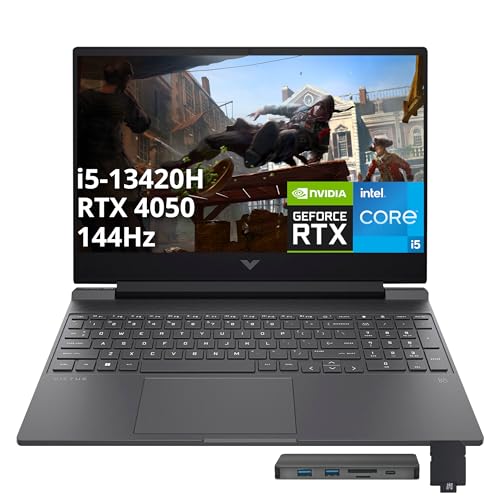
- Best for: Students who study and game mainly at one desk and prefer a larger screen over the lightest possible carry.
- Display: 15.6-inch FHD IPS, 144 Hz
- Processor: Intel Core i5-13420H
- Graphics: NVIDIA GeForce RTX 4050, 6 GB GDDR6
- Memory: 16 GB RAM
All 3 Picks at a Glance
| Product | Specs | Action |
|---|---|---|
| ASUS ROG Zephyrus G14 (2024) |
| Check price on Amazon |
| Acer Predator Helios Neo 14 |
| Check price on Amazon |
| HP Victus 15 |
| Check price on Amazon |
Key takeaways
- Compare three RTX laptops picked for student life first: light enough for lectures, discrete graphics for gaming, and bundle checks before ordering.
A laptop that has to survive a full day of lectures and still run modern games at night is a different purchase from a pure gaming rig. Weight matters because the machine rides in a backpack for hours, battery life matters because lecture halls rarely offer a spare outlet, and the screen has to fit a narrow desk — yet the graphics card still needs to be a real discrete GPU, not integrated graphics dressed up for coursework.
This guide is built for students who game after class, and it deliberately skips both extremes: coursework-only machines with integrated graphics, and heavy gaming-first laptops that treat portability as an afterthought. The three picks below were chosen from their Amazon listing names and specifications — each pairs an NVIDIA GeForce RTX 4050 or RTX 4060 with a 14- to 15.6-inch chassis a student can actually carry, with memory and storage sized for a degree’s worth of files.
Quick Picks
As an Amazon Associate we earn from qualifying purchases.
| Product | Best for | Key spec |
|---|---|---|
| ASUS ROG Zephyrus G14 (2024) | Carrying one machine all day without giving up gaming power | RTX 4060 in a 3.31 lb 14-inch chassis |
| Acer Predator Helios Neo 14 | A sharper screen for both note-taking and games | 14.5-inch WQXGA 2560×1600 120 Hz display |
| HP Victus 15 | The biggest screen here, plus a desk-ready bundle | 15.6-inch FHD 144 Hz display with RTX 4050 |
How to Choose
Start with weight and footprint, not raw power
A gaming laptop that stays in a dorm room can be as heavy as it likes; one that travels to four lectures a day cannot. Every extra pound is felt on a long walk across campus, and a wide 17-inch chassis simply will not sit comfortably on a fold-down lecture desk. The Zephyrus G14 in this guide weighs 3.31 lb, which is closer to an ultrabook than to a traditional gaming rig. Before comparing graphics cards, decide honestly how far and how often the machine will travel, then let that answer set your size ceiling.
Insist on a discrete GPU, then pick your tier
Integrated graphics handle documents, slides and video calls perfectly well, but they are the wrong tool for modern games — that gap is exactly why coursework-only student laptops disappoint buyers who also play. A discrete NVIDIA GeForce RTX card is the entry ticket for this guide. Within the picks here, the RTX 4060 in the Zephyrus G14 and Predator Helios Neo 14 sits a tier above the RTX 4050 in the HP Victus 15, so heavier titles and higher settings favour the two 14-inch machines, while the Victus trades some graphics headroom for a larger screen.
Treat memory as a decision you make once
On slim gaming laptops, memory is frequently soldered to the board, and that is the case with the LPDDR5X in both 14-inch picks here: the 16 GB fitted at the factory is the 16 GB you graduate with. That makes the configuration on the listing a long-term commitment rather than a starting point. Check the stated memory and storage against your real workload — a 1 TB SSD absorbs game installs, lecture recordings and project files far more comfortably than a smaller drive you will be pruning every semester.
Read bundle listings line by line
Two of the three listings in this guide are seller bundles rather than bare laptops: one includes an external mouse, another pairs the laptop with a headset, and the third adds a docking station set. A bundle can be good value, but only if you verify what the featured offer actually contains, who the seller is, and who stands behind the warranty. Model names repeat across dozens of listings with different extras and configurations, so the bundle contents on the exact listing — not the headline model name — are what you are really buying.
The 3 Best Options
ASUS ROG Zephyrus G14 (2024)
- Best for: Students who carry their laptop everywhere and want the strongest specification here in the lightest package.
- Processor: AMD Ryzen 9 8945HS (8 cores, up to 5.2 GHz)
- Graphics: NVIDIA GeForce RTX 4060, 8 GB GDDR6
- Display: 14-inch OLED, 2880×1800, 120 Hz
- Memory: 16 GB LPDDR5X (soldered, non-upgradeable)
Students who carry their laptop everywhere and want the strongest specification here in the lightest package.
This listing’s reproduced details are months old and no current price could be pinned, even though November 2026 roundups describe this model as currently sold on Amazon US — confirm a live featured offer for ASIN B0D9JH9CW3 before ordering. This variant is also a seller bundle that includes an external mouse, so check the seller and the exact configuration on the offer you pin.
The Zephyrus G14 is the pick that asks the fewest compromises of a student. At 3.31 lb it carries like a coursework ultrabook, yet the listing pairs an AMD Ryzen 9 8945HS with an NVIDIA GeForce RTX 4060, so evening gaming does not feel like an afterthought. The 14-inch OLED panel at 2880×1800 and 120 Hz is equally suited to dense lecture slides and fast games, and the port mix — USB4, USB-C, two USB-A, HDMI and a microSD reader — covers projectors, drives and camera cards without a pocketful of adapters.
Watch out for: This listing’s reproduced details are months old and no current price could be pinned, even though November 2026 roundups describe this model as currently sold on Amazon US — confirm a live featured offer for ASIN B0D9JH9CW3 before ordering. This variant is also a seller bundle that includes an external mouse, so check the seller and the exact configuration on the offer you pin.
Acer Predator Helios Neo 14
- Best for: Students who want a larger, sharper screen and strong desk connectivity without stepping up to a 15.6-inch machine.
- Processor: Intel Core Ultra 7 155H
- Graphics: NVIDIA GeForce RTX 4060
- Display: 14.5-inch WQXGA IPS, 2560×1600, 120 Hz
- Memory: 16 GB LPDDR5X
Students who want a larger, sharper screen and strong desk connectivity without stepping up to a 15.6-inch machine.
The listing sighted for this ASIN is a bundle of two items — the laptop plus a Predator Galea 311 headset — so confirm exactly what the current offer contains before ordering. Its listing reproduction is also about a year old; the model has recently moved through Amazon channels via Woot, but no current Amazon featured-offer price was pinned, so confirm a live featured offer for ASIN B0D3WKYDRY first.
The Predator Helios Neo 14 suits students who split their time between lectures and a desk setup. Its 14.5-inch WQXGA IPS screen at 2560×1600 and 120 Hz gives more working room than a typical 14-inch panel, which helps when notes and a document sit side by side. Underneath, the listing combines an Intel Core Ultra 7 155H with an RTX 4060 and a 1 TB Gen 4 SSD, while Thunderbolt 4 and HDMI 2.1 make it easy to drive a dorm monitor or TV for bigger-screen gaming at night.
Watch out for: The listing sighted for this ASIN is a bundle of two items — the laptop plus a Predator Galea 311 headset — so confirm exactly what the current offer contains before ordering. Its listing reproduction is also about a year old; the model has recently moved through Amazon channels via Woot, but no current Amazon featured-offer price was pinned, so confirm a live featured offer for ASIN B0D3WKYDRY first.
HP Victus 15
- Best for: Students who study and game mainly at one desk and prefer a larger screen over the lightest possible carry.
- Display: 15.6-inch FHD IPS, 144 Hz
- Processor: Intel Core i5-13420H
- Graphics: NVIDIA GeForce RTX 4050, 6 GB GDDR6
- Memory: 16 GB RAM
Students who study and game mainly at one desk and prefer a larger screen over the lightest possible carry.
This is a seller bundle listing, so confirm the contents, the seller and who holds the warranty before you buy. Its reproduced details are also months old with no current price pinned, so confirm a live featured offer for ASIN B0FX95JBBJ before ordering — and do not confuse this listing with other Victus 15 listings sold under different ASINs.
The Victus 15 is the roomiest option here, built around a 15.6-inch FHD IPS panel with a 144 Hz refresh rate that suits fast-paced games. The listing specification — an Intel Core i5-13420H, an RTX 4050 with 6 GB of GDDR6, 16 GB of RAM and a 512 GB PCIe SSD — covers coursework and mainstream gaming without the slimmer machines’ emphasis on carry weight. This particular listing also bundles a 1 TB docking station set, which leans into a desk-based routine: plug in at your study space, unplug when you head to class.
Watch out for: This is a seller bundle listing, so confirm the contents, the seller and who holds the warranty before you buy. Its reproduced details are also months old with no current price pinned, so confirm a live featured offer for ASIN B0FX95JBBJ before ordering — and do not confuse this listing with other Victus 15 listings sold under different ASINs.
Which One Fits Your Situation
You walk across campus with your laptop all day
Choose the Zephyrus G14. At 3.31 lb it is the only pick here that disappears into a backpack, and its 14-inch footprint fits lecture-hall desks that defeat wider machines. You give up nothing important for that portability: the RTX 4060 and Ryzen 9 inside still handle evening gaming properly, and the 1 TB SSD means you are not deleting games to make room for coursework files.
You split time between lectures and a dorm desk setup
Choose the Predator Helios Neo 14. The 14.5-inch 2560×1600 screen gives your notes and documents more room during the day, and Thunderbolt 4 plus HDMI 2.1 let you connect a monitor, storage and peripherals when you sit down at night. Its RTX 4060 matches the strongest graphics in this guide, so the desk half of your routine gets full gaming performance too.
You mostly study and play at one desk
Choose the HP Victus 15. The 15.6-inch 144 Hz screen is the most comfortable here for long sessions, and the bundled docking station set suits a fixed study space where the laptop lives plugged in. The RTX 4050 is a step below the other picks, but for mainstream titles at 1080p it remains a sensible pairing with this panel — and shorter walks to class make the bigger chassis easier to accept.
You need one machine to last a whole degree
Prioritise configuration over model. The two 14-inch picks carry 16 GB of soldered LPDDR5X memory that can never be upgraded, so the specification on the listing is the specification you graduate with. Both also include 1 TB of storage, double the Victus 15’s 512 GB, which matters once game installs and project archives pile up. Pick the screen size you will enjoy daily, then buy the memory and storage you need on day one.
Common Mistakes
- Buying a coursework laptop with integrated graphics and expecting it to run modern games — the student-laptop shelf and the gaming shelf solve different problems.
- Assuming you can add memory later; on slim machines with soldered LPDDR5X, the fitted 16 GB is permanent, so the listing configuration is the decision.
- Ordering from a bundle listing without checking what the featured offer actually contains, who sells it, and who holds the warranty.
- Treating every listing for the same model name as identical — configurations, extras and sellers differ, and only the exact ASIN’s page describes what you will receive.
- Choosing a big, heavy gaming chassis for a lecture-hall life without checking its weight and footprint against your daily carry.
Frequently Asked Questions
Can one laptop genuinely handle both gaming and studying?
Yes, provided it pairs a discrete graphics card with a chassis you can carry comfortably. The three listings here all use RTX 4050 or RTX 4060 graphics, so gaming is properly covered, while their 14- to 15.6-inch sizes and student-friendly port selections handle lectures, libraries and group work without the bulk of a desktop-replacement rig.
Is the RTX 4050 enough, or should I hold out for an RTX 4060?
For 1080p gaming at sensible settings, the RTX 4050 in the Victus 15 is a workable choice, especially paired with its 144 Hz screen. The RTX 4060 in the two 14-inch picks offers more headroom for demanding titles and higher settings, and it better protects a machine you plan to keep for a full degree — worth prioritising if your budget stretches.
Can I upgrade the memory in these laptops later?
Not on the two 14-inch picks: both the Zephyrus G14 and the Predator Helios Neo 14 use LPDDR5X memory soldered to the board, and the G14’s listing states a 16 GB maximum. Treat the memory figure on any slim gaming laptop’s listing as final, and choose a configuration with enough RAM for your whole course at the moment you buy.
Why do these listings mention bundles, and what should I check?
Sellers often package a laptop with extras — here, an external mouse, a headset, and a docking station set appear across the three listings. Before ordering, open the exact ASIN’s page and confirm the featured offer is live, the bundle contents match the description, and the seller and warranty holder are who you expect. Bundles vary between listings for the same model.
FAQ
Can one laptop genuinely handle both gaming and studying?
Is the RTX 4050 enough, or should I hold out for an RTX 4060?
Can I upgrade the memory in these laptops later?
Why do these listings mention bundles, and what should I check?
More from Amazon
Programs that pair well with the guide above. Offers and eligibility are set by Amazon and may change.
Free shipping on eligible items, Prime Video and more. Eligible new members can start with a free trial.
Start a Prime free trialA Prime membership for ages 18-24 with a trial period. Eligibility is set by Amazon.
See Prime for Young AdultsAudiobooks and podcasts to listen to on the go. Eligible new members can start with a free trial.
Try Audible freeAd-free music streaming. Eligible new subscribers can start with a free trial.
Try Music Unlimited freeAs an Amazon Associate we earn from qualifying purchases.









