
Our Short List of 3

- Best for: Students and note-takers who want a first-party pen included from day one.
- Display: 10.9″ with 2304 × 1440 resolution
- Processor: Exynos 1580
- Storage: 128GB
- Refresh rate: 90 Hz
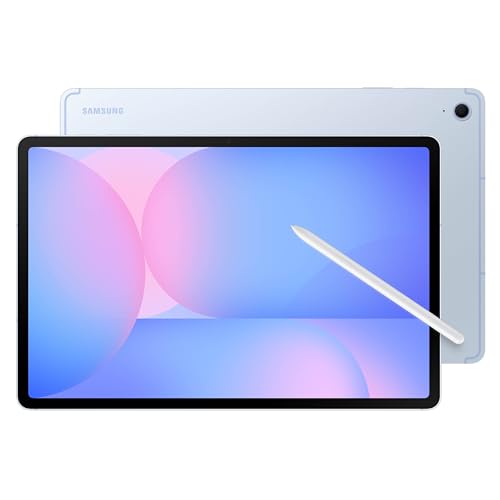
- Best for: Desk-based students and reviewers who write beside an open document.
- Display: 13.1″
- Processor: Exynos 1580
- Storage: 128GB
- Refresh rate: 90 Hz

- Best for: Buyers who want the tablet, pen and case in one purchase.
- Display: 12.7″ 3K LCD
- Processor: MediaTek Dimensity 8300
- Memory: 8GB
- Storage: 128GB
All 3 Picks at a Glance
| Product | Specs | Action |
|---|---|---|
| Samsung Galaxy Tab S10 FE 128GB WiFi |
| Check price on Amazon |
| Samsung Galaxy Tab S10 FE+ 13.1″ 128GB WiFi |
| Check price on Amazon |
| Lenovo Idea Tab Pro 12.7″ with Pen and Folio Case |
| Check price on Amazon |
Key takeaways
- Four tablets with a stylus for note-taking and sketching, compared on pen inclusion, screen size and storage, from Samsung, Apple and Lenovo picks.
The real decision with a stylus tablet is not the screen or the chip — it is where the pen comes from. Some tablets ship with a first-party active pen in the box, ready for notes the moment you unbox them. Others treat the pen as an accessory you buy later, and only certain pen models fit. Picking the wrong way round means either paying for a pen you never needed to buy separately, or opening a new tablet with no way to write on it.
This roundup suits students, meeting note-takers and casual sketchers who want to write on the screen from day one. The four picks were chosen from their Amazon listing names and specifications: two Samsung Galaxy Tab S10 FE models and a Lenovo Idea Tab Pro, each with a pen included, plus the 11-inch iPad, whose listing supports the Apple Pencil (USB-C) and first-generation Pencil as separate purchases. Screen sizes run from 10.9 to 13.1 inches across the group.
Quick Picks
As an Amazon Associate we earn from qualifying purchases.
| Product | Best for | Key spec |
|---|---|---|
| Samsung Galaxy Tab S10 FE 128GB WiFi | Note-takers who want the pen in the box | S Pen included, 10.9″ display |
| Samsung Galaxy Tab S10 FE+ 13.1″ 128GB WiFi | Big-screen notes and split-screen work | S Pen included, 13.1″ display |
| Apple iPad 11-inch (A16) 128GB Wi-Fi | iPad buyers adding a Pencil later | Supports Apple Pencil (USB-C), pen sold separately |
| Lenovo Idea Tab Pro 12.7″ with Pen and Folio Case | A pen and case bundle in one box | Lenovo Tab Pen Plus and folio case included |
How to Choose
Check Whether the Pen Is in the Box
Start with the simplest question: does a pen come in the box? The Galaxy Tab S10 FE, Tab S10 FE+ and Lenovo Idea Tab Pro all list a first-party pen among their included items, so handwriting starts as soon as the tablet is charged. The 11-inch iPad takes the opposite route — its listing supports the Apple Pencil (USB-C) and the first-generation Pencil, but neither pen is included. If your budget assumes one purchase, the in-box pens remove a second order entirely; if you already own a compatible Pencil, the iPad’s separate-pen model stops being a drawback.
Match the Pen Generation to the Tablet
Pens are not interchangeable across brands, and sometimes not even within one brand’s range. Samsung’s S Pen works with the Tab S10 FE line, while Lenovo’s Idea Tab Pro pairs with the Lenovo Tab Pen Plus listed in its box. Apple’s side is stricter: the 11-inch iPad (A16) supports only the Apple Pencil (USB-C) and the first-generation Pencil, and it does not support Apple Pencil Pro. Before ordering, match the exact pen name on the tablet’s listing against the pen you plan to use, because a wrong-generation Pencil simply will not pair or charge.
Pick a Screen Size for How You Write
Screen size changes how a notebook page feels. The 10.9-inch Tab S10 FE and 11-inch iPad suit one app at a time — a lecture slide, a PDF, a page of handwriting. The 12.7-inch Idea Tab Pro and 13.1-inch Tab S10 FE+ give split-screen work real room, with notes beside a document or a browser window. Resolution matters alongside size: the Tab S10 FE lists 2304 × 1440, the iPad lists 2360-by-1640 at 264 ppi, and the Lenovo panel is described as 3K. Bigger panels also mean a heavier bag, so commuters should weigh portability against writing space.
Storage and Protection for Daily Carry
All four picks here carry 128GB of storage, which covers note apps, PDFs and a modest photo library, but heavy video downloads will fill any of them. The two Samsung tablets add IP68 water resistance on their listings, a genuine plus for anyone who takes notes near a kitchen sink, a lab bench or a poolside table. The Lenovo bundle answers a different daily-carry question by including a folio case alongside the pen. Think about where the tablet will actually live — desk, backpack or workbench — and let that decide which protection matters.
The 4 Best Options
Samsung Galaxy Tab S10 FE 128GB WiFi
- Best for: Students and note-takers who want a first-party pen included from day one.
- Display: 10.9″ with 2304 × 1440 resolution
- Processor: Exynos 1580
- Storage: 128GB
- Refresh rate: 90 Hz
Students and note-takers who want a first-party pen included from day one.
Availability signals for this exact ASIN are mixed, so confirm a live featured offer for ASIN B0DVZYQT3T before ordering — and order this Blue 128GB listing specifically rather than a sibling colour listing.
The Tab S10 FE is the straightforward pick for handwritten notes: its listing puts the S Pen in the box, so there is no second accessory order before you can write. The 10.9-inch screen at 2304 × 1440 keeps text and ink sharp, the Exynos 1580 handles note apps and split-screen study work, and the listing’s IP68 water resistance suits a tablet that travels between lectures, kitchens and commutes. At 128GB in the US Version Blue listing, it fits buyers who want Samsung’s pen experience in the most portable size here.
Watch out for: Availability signals for this exact ASIN are mixed, so confirm a live featured offer for ASIN B0DVZYQT3T before ordering — and order this Blue 128GB listing specifically rather than a sibling colour listing.
Samsung Galaxy Tab S10 FE+ 13.1″ 128GB WiFi
- Best for: Desk-based students and reviewers who write beside an open document.
- Display: 13.1″
- Processor: Exynos 1580
- Storage: 128GB
- Refresh rate: 90 Hz
Desk-based students and reviewers who write beside an open document.
This ASIN is the 128GB Blue listing; the 256GB Silver and Gray versions are separate listings, so check the configuration on the page matches before ordering.
Choose the FE+ when the standard FE screen feels cramped for your working style. Its 13.1-inch display gives split-screen notes genuine room — handwriting on one side, source material on the other — while keeping the same Exynos 1580 processor, 128GB storage, 90 Hz refresh and IP68 water resistance as its smaller sibling. The listing title includes S Pen note-taking, and the FE line ships the S Pen in the box, so the writing setup is complete on arrival. This is the pick for desk-based study and document markup.
Watch out for: This ASIN is the 128GB Blue listing; the 256GB Silver and Gray versions are separate listings, so check the configuration on the page matches before ordering.
Apple iPad 11-inch (A16) 128GB Wi-Fi
The 11-inch iPad (A16) is the pick for buyers already settled on Apple’s tablet for reading, classes and apps, who also want handwriting in the mix. Its listing supports the Apple Pencil (USB-C) and the first-generation Pencil, and the 11-inch Liquid Retina display at 2360-by-1640 with True Tone keeps notes and PDFs easy on the eyes. Be clear about the trade-off before ordering: no Pencil is included in the box, so the pen is a separate purchase on top of the tablet, unlike the Samsung and Lenovo picks here.
Specs
- Display: 11″ Liquid Retina, 2360-by-1640 at 264 ppi, True Tone, 500 nits
- Chip: A16 (5-core CPU, 4-core GPU, 16-core Neural Engine)
- Storage: 128GB
- Connectivity: Wi-Fi 6, USB-C
- Cameras: 12MP front, 12MP back
- Security: Touch ID
- Stylus support: Apple Pencil (USB-C) and Apple Pencil (1st generation), sold separately
Best for: Apple users who already own a compatible Pencil or plan to add one.
Watch out for: No pen is included, and this iPad does not support Apple Pencil Pro — budget for the Apple Pencil (USB-C) or first-generation Pencil as a separate purchase.
Lenovo Idea Tab Pro 12.7″ with Pen and Folio Case
- Best for: Buyers who want the tablet, pen and case in one purchase.
- Display: 12.7″ 3K LCD
- Processor: MediaTek Dimensity 8300
- Memory: 8GB
- Storage: 128GB
Buyers who want the tablet, pen and case in one purchase.
Availability signals for this exact ASIN are mixed, so confirm a live featured offer for ASIN B0F1NGFSNY before ordering, and check the box contents on the listing still show the pen and folio case.
Lenovo’s Idea Tab Pro is the bundle pick: the listing includes the Lenovo Tab Pen Plus and a folio case alongside the tablet itself, so protection and pen arrive together. The 12.7-inch 3K LCD sits between the two Samsung sizes for split-screen notes, the MediaTek Dimensity 8300 drives the Android software, and 8GB of memory with 128GB of storage covers note apps, documents and media. The listing title also names Google Gemini features. For buyers who dislike assembling accessories piece by piece, this is the most complete single order here.
Watch out for: Availability signals for this exact ASIN are mixed, so confirm a live featured offer for ASIN B0F1NGFSNY before ordering, and check the box contents on the listing still show the pen and folio case.
Which One Fits Your Situation
You Take Handwritten Notes Every Day
Pick the Galaxy Tab S10 FE. The S Pen is in the box, so note-taking starts with the first charge, and the 10.9-inch 2304 × 1440 screen keeps a full page of ink legible without constant zooming. IP68 water resistance on the listing also suits a tablet carried between classes, cafés and commutes in all weather. It is the lowest-friction route here from unboxing to a working notebook.
You Study With Notes Beside Your Reading
Go with the Galaxy Tab S10 FE+. The 13.1-inch display is the largest here, and it makes split-screen study practical: lecture slides or a textbook on one side, your handwritten notes on the other. The S Pen comes with the FE line’s box contents, and the same Exynos 1580, 90 Hz refresh and IP68 rating carry over from the smaller model. Choose it if your tablet mostly lives on a desk or study table.
You Are Already in Apple’s Ecosystem
The 11-inch iPad (A16) fits if your phone, laptop and apps already live with Apple and you want notes to sit alongside them. Its listing supports the Apple Pencil (USB-C) and the first-generation Pencil, so an existing Pencil from an older iPad may already work. Just plan the purchase honestly: the Pencil is not in the box, so add one to the order unless you already own a supported model.
You Want Everything in One Box
Order the Lenovo Idea Tab Pro. Its listing bundles the tablet with the Lenovo Tab Pen Plus and a folio case, so there is no separate case hunt after delivery. The 12.7-inch 3K screen sits comfortably for split-screen notes, and 8GB of memory keeps note apps and documents moving. It suits buyers setting up a complete writing kit in a single order for school, work or home.
Common Mistakes
- Assuming every stylus tablet includes the pen — on the iPad, the Apple Pencil is a separate purchase.
- Buying Apple Pencil Pro for the 11-inch iPad (A16) — its listing supports only the Pencil (USB-C) and the first-generation Pencil.
- Ordering a sibling colour or storage listing and expecting the same configuration — each colour and storage size is a separate listing.
- Mixing up the Tab S10 FE’s resolution — the figure to look for is 2304 × 1440, not 1920 × 1200.
- Assuming one brand’s pen works on another brand’s tablet — S Pen, Tab Pen Plus and Apple Pencil are separate systems.
Frequently Asked Questions
Does the iPad 11-inch (A16) come with an Apple Pencil?
No. The listing for this iPad supports the Apple Pencil (USB-C) and the Apple Pencil (1st generation), but neither pen is included in the box. You need to buy a supported Pencil separately, and Apple Pencil Pro is not supported on this model. The Samsung and Lenovo picks in this roundup include their pens.
Which tablets here include a stylus in the box?
Three of the four: the Galaxy Tab S10 FE lists the S Pen among its included items, the Tab S10 FE+ carries S Pen note-taking in its listing for the same line, and the Lenovo Idea Tab Pro includes the Lenovo Tab Pen Plus. Only the iPad treats its pen as a separate purchase.
Can I use one brand’s pen on another brand’s tablet?
No — each pen system belongs to its own tablets. The S Pen pairs with Samsung’s Tab S10 FE line, the Lenovo Tab Pen Plus belongs to the Idea Tab Pro, and the Apple Pencil (USB-C) and first-generation Pencil fit the iPad. A pen bought for one of these tablets will not write on the others.
Which screen size is best for split-screen notes?
The larger panels work best: the 13.1-inch Tab S10 FE+ gives notes and source material the most room side by side, and the 12.7-inch Idea Tab Pro is close behind. The 10.9-inch Tab S10 FE and 11-inch iPad handle split-screen too, but each app gets a narrower column, which suits shorter notes better than long study sessions.
FAQ
Does the iPad 11-inch (A16) come with an Apple Pencil?
Which tablets here include a stylus in the box?
Can I use one brand’s pen on another brand’s tablet?
Which screen size is best for split-screen notes?
More from Amazon
Programs that pair well with the guide above. Offers and eligibility are set by Amazon and may change.
Free shipping on eligible items, Prime Video and more. Eligible new members can start with a free trial.
Start a Prime free trialA Prime membership for ages 18-24 with a trial period. Eligibility is set by Amazon.
See Prime for Young AdultsAudiobooks and podcasts to listen to on the go. Eligible new members can start with a free trial.
Try Audible freeAd-free music streaming. Eligible new subscribers can start with a free trial.
Try Music Unlimited freeAs an Amazon Associate we earn from qualifying purchases.









