Our Short List of 3

- Best for: Business professionals, writers, and anyone who types all day and travels light.

- Best for: macOS users, students, creators, and anyone who wants a silent laptop with excellent battery life.
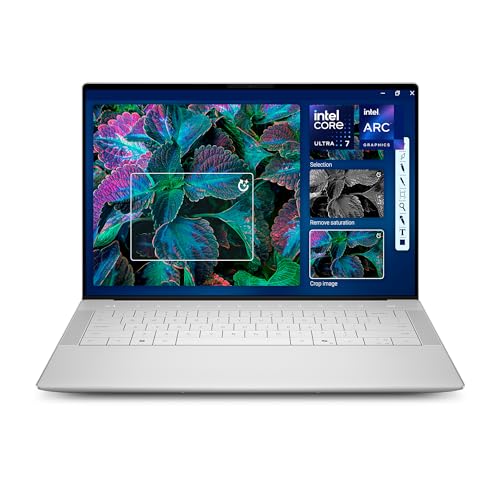
- Best for: Photo and video editors, designers, and anyone who wants the best screen in a Windows laptop.
All 4 Picks at a Glance
| Product | Specs | Action |
|---|---|---|
| 1. Lenovo ThinkPad X1 Carbon Gen 12 — Best Overall Business Laptop |
| Check price on Amazon |
| 2. Apple MacBook Air 15-inch with M4 Chip — Best for macOS Users |
| Check price on Amazon |
| 3. Dell XPS 14 (DA14250) — Best Display for Creative Work |
| Check price on Amazon |
 4. ASUS Zenbook Duo (UX8406MA-PS99T) — Best for Multitaskers |
| Check price on Amazon |
Key takeaways
- The best 32GB RAM laptops non gaming give you room for heavy multitasking, editing and coding without a gaming GPU. Compare four top picks to find your fit.
The best 32GB RAM laptops non gaming are built for people who push a machine hard without ever launching a game. If your day involves dozens of browser tabs, large spreadsheets, photo editing, video calls, code editors, virtual machines, or 4K video timelines, 16GB of memory starts to feel cramped. A laptop with 32GB of RAM gives you breathing room: apps stay responsive, switching between projects is instant, and the machine stays useful for years longer.
Non-gaming laptops with 32GB of RAM look different from gaming machines. They skip the bulky discrete graphics card and the aggressive styling, and instead invest in a sharp, color-accurate display, a comfortable keyboard, long battery life, and a slim chassis you can actually carry. The four laptops below fit that description. Each one ships with 32GB of memory, integrated graphics, and a design aimed squarely at work, study, and creative projects.
Why 32GB of RAM Matters for Non-Gaming Work
Memory is the workspace your laptop uses while it runs. Every open app, browser tab, document, and background process occupies a slice of it. When memory runs out, the system starts swapping data to the storage drive, which is far slower, and everything stutters.
For everyday browsing and office work, 16GB is still fine. But 32GB earns its place as soon as your workload grows:
- Heavy multitasking: Running a browser with 30 or more tabs alongside email, a chat app, a spreadsheet, and a presentation no longer slows the machine down.
- Creative work: Photo editors, video editors, and design tools load large files into memory. A 4K video timeline or a layered Photoshop file can easily use more than 16GB on its own.
- Development: Running a local server, a database, a code editor, and a virtual machine at the same time is a normal day for many developers, and each of those tools wants its own share of memory.
- Data work: Large spreadsheets, data analysis notebooks, and business intelligence dashboards become noticeably smoother with more memory available.
- Longevity: Software grows heavier every year. A laptop bought with 32GB today is far more likely to feel fast in four or five years than one bought with 16GB.
The key point is that you do not need a gaming graphics card to benefit from 32GB of RAM. Modern integrated graphics handle 4K video playback, photo editing, and even light video editing well. What matters for productivity is memory, a fast processor, a quick SSD, and a good screen.
How to Choose a 32GB RAM Laptop for Non-Gaming Use
1. Check whether the memory is soldered or upgradeable
Many thin ultrabooks solder the RAM directly to the motherboard, which means the amount you buy is the amount you keep forever. That makes choosing 32GB at purchase time important. A few larger business laptops still offer upgradeable memory slots, which gives you more flexibility later, but the trend is clearly toward soldered memory in slim designs. Either way, confirm the exact configuration before ordering, because the same model name is often sold in 16GB and 32GB versions.
2. Match the processor to your work
For office work, writing, and browsing, a modern Intel Core Ultra 7 or Apple M4 chip is more than enough. If you edit video, compile code, or run virtual machines, look for a chip with more cores and a higher boost speed, such as an Intel Core Ultra 9 or an Apple M4 Pro. The processor and the memory work together: a fast chip with too little memory still stalls, and plenty of memory cannot rescue a weak chip.
3. Prioritize the display
You will stare at this screen for hours every day. A bright, sharp display with good color accuracy matters more for productivity than a high refresh rate. An OLED panel offers deep blacks and vivid color that photo and video editors love, while a high-resolution IPS panel is easier on the eyes for long reading sessions. A 14-inch screen balances portability and workspace; a 15-inch screen gives you more room for side-by-side windows.
4. Storage: 512GB is the minimum, 1TB is better
With 32GB of RAM you will be working on large files, so storage fills up fast. A 512GB SSD is workable if you keep most files in the cloud, but 1TB is the safer choice for photo libraries, video projects, and virtual machines. Make sure the drive is a fast NVMe SSD rather than an older, slower type.
5. Keyboard, trackpad, and ports
A comfortable keyboard matters when you type all day, so look for well-spaced keys with decent travel and a backlit layout. A large, precise trackpad reduces the need for a mouse. For ports, at least one Thunderbolt or USB-C port with charging support is essential, and an HDMI port or a full-size USB-A port is a welcome bonus for connecting monitors and accessories without dongles.
6. Battery life and weight
A non-gaming laptop should last a full workday away from an outlet. Apple silicon laptops and modern Intel Core Ultra machines both deliver strong battery life, but the screen brightness and workload make a big difference. Weight matters too: anything under three pounds disappears into a bag, while machines over four pounds are better suited to a desk.
Our Top Picks
1. Lenovo ThinkPad X1 Carbon Gen 12 — Best Overall Business Laptop
- Best for: Business professionals, writers, and anyone who types all day and travels light.
Business professionals, writers, and anyone who types all day and travels light.
The ThinkPad X1 Carbon Gen 12 is the classic choice for professionals who want a light, durable, no-nonsense work machine. It pairs an Intel Core Ultra 7 155U processor with 32GB of soldered LPDDR5x memory running at 6400 MHz and a 512GB PCIe 4.0 NVMe SSD. The 14-inch WUXGA display runs at 1920 by 1200 pixels, and the whole machine weighs around 2.37 pounds.
What sets the X1 Carbon apart is the keyboard. ThinkPad keyboards have been the benchmark for laptop typing for years, with well-shaped keys, satisfying travel, and the red TrackPoint nub for precise cursor control without lifting your hands. The chassis is carbon fiber, so it is both light and tough, and it carries the MIL-STD durability testing that ThinkPads are known for.
This configuration runs Windows 11 Pro and uses integrated Intel graphics, which is exactly right for a non-gaming machine: quiet, cool, and power efficient. It handles video calls, large documents, and dozens of browser tabs without breaking a sweat. Security features such as a fingerprint reader, an infrared camera for Windows Hello, and a physical webcam privacy shutter make it a natural fit for office and remote work.
Key specs: Intel Core Ultra 7 155U, 32GB LPDDR5x-6400 RAM, 512GB NVMe SSD, 14-inch 1920 x 1200 IPS display, Windows 11 Pro, about 2.37 pounds.
Check the Lenovo ThinkPad X1 Carbon Gen 12 on Amazon
2. Apple MacBook Air 15-inch with M4 Chip — Best for macOS Users
- Best for: macOS users, students, creators, and anyone who wants a silent laptop with excellent battery life.
macOS users, students, creators, and anyone who wants a silent laptop with excellent battery life.
The 15-inch MacBook Air with the Apple M4 chip is the easiest recommendation for anyone already living in the Apple ecosystem. This configuration pairs the 10-core M4 chip with 32GB of unified memory and a 512GB SSD, in the Midnight finish. Unified memory means the processor and graphics share one fast pool of memory, so the full 32GB is available wherever it is needed most.
The 15.3-inch Liquid Retina display, at 2880 by 1864 pixels, is one of the best screens in any laptop at this size: bright, sharp, and accurate enough for photo work. The machine is completely fanless, so it stays silent even under sustained load, and battery life is outstanding, comfortably covering a full day of work and then some.
Where the MacBook Air shines is the overall experience. It wakes instantly, the trackpad is the best in the business, and the speakers are remarkably good for a laptop this thin. The M4 chip handles 4K video editing in Final Cut Pro, large Lightroom catalogs, and software development with ease, and it does so without the heat and fan noise that used to come with that kind of performance.
The main limitation is connectivity: two Thunderbolt ports and a MagSafe charging connector, with no USB-A or HDMI port, so a small hub is worth adding to your desk setup. Storage is also fixed at purchase, so the 512GB drive in this configuration is something to plan around if you keep large media libraries locally.
Key specs: Apple M4 10-core chip, 32GB unified memory, 512GB SSD, 15.3-inch 2880 x 1864 Liquid Retina display, fanless design, Midnight finish.
Check the Apple MacBook Air 15-inch with M4 on Amazon
3. Dell XPS 14 (DA14250) — Best Display for Creative Work
- Best for: Photo and video editors, designers, and anyone who wants the best screen in a Windows laptop.
Photo and video editors, designers, and anyone who wants the best screen in a Windows laptop.
The Dell XPS 14 is the pick for anyone who cares most about the screen. This configuration, model DA14250, pairs an Intel Core Ultra 7 255H processor with 32GB of LPDDR5X memory and a 1TB SSD. The headline feature is the 14.5-inch touch display: a 3.2K OLED panel running at up to 120Hz, with the deep blacks and rich color that make photo and video work look its best.
OLED is a genuine advantage for creative work. Colors are vivid and accurate, contrast is effectively infinite, and dark scenes in video show detail that washed-out IPS panels hide. The 3.2K resolution gives you plenty of room for editing timelines and toolbars, and the touch layer is handy for scrolling and quick navigation.
Beyond the display, the XPS 14 is a premium machine through and through: a machined aluminum chassis, a large haptic trackpad, a backlit keyboard with a fingerprint reader, and Intel Arc integrated graphics that handle 4K playback and light creative workloads well. The 1TB SSD is the largest in this roundup, which matters if you store photo libraries or video projects on the machine itself.
The XPS 14 is the heaviest and most power-hungry pick here, and the OLED panel uses more battery at high brightness than an IPS screen, so it is best suited to someone who works mostly at a desk or near an outlet. For that trade-off you get the most impressive display of the four.
Key specs: Intel Core Ultra 7 255H, 32GB LPDDR5X RAM, 1TB SSD, 14.5-inch 3.2K OLED touch display up to 120Hz, Intel Arc graphics, fingerprint reader.
Check the Dell XPS 14 on Amazon
4. ASUS Zenbook Duo (UX8406MA-PS99T) — Best for Multitaskers
- Best for: Researchers, analysts, writers, and multitaskers who want a portable dual-screen setup.
Researchers, analysts, writers, and multitaskers who want a portable dual-screen setup.
The ASUS Zenbook Duo is the most unusual laptop on this list, and for the right person it is the most productive. Instead of one screen, it has two: a pair of 14-inch OLED touch displays, each running at 3K resolution and 120Hz. The second screen sits where the keyboard usually goes, and the detachable keyboard can be placed on top of it when you want a traditional laptop, or removed entirely when you want a dual-screen workspace.
Under the hood, this configuration runs an Intel Core Ultra 9 185H processor with 32GB of RAM and a 1TB SSD, with Intel Arc integrated graphics. That is serious horsepower for a non-gaming machine, and the dual-screen setup is genuinely useful: keep your main document on the top screen and your research, chat, or reference material on the bottom one, with no need for an external monitor.
The Zenbook Duo is a productivity machine through and through. It is heavier and more complex than a standard ultrabook, and running two bright OLED screens draws more power, so battery life is shorter than the MacBook Air or the ThinkPad. But if your work involves constant switching between applications, or you regularly wish you had a second monitor, this laptop brings that second monitor with you everywhere.
Key specs: Intel Core Ultra 9 185H, 32GB RAM, 1TB SSD, dual 14-inch 3K OLED touch displays at 120Hz, Intel Arc graphics, detachable keyboard, Windows 11.
Check the ASUS Zenbook Duo on Amazon
Comparison Table
| Laptop | RAM | Storage | Display | Processor | Weight | Best For |
|---|---|---|---|---|---|---|
| Lenovo ThinkPad X1 Carbon Gen 12 | 32GB LPDDR5x | 512GB NVMe SSD | 14-inch 1920 x 1200 IPS | Intel Core Ultra 7 155U | About 2.37 pounds | Business and travel |
| Apple MacBook Air 15-inch (M4) | 32GB unified | 512GB SSD | 15.3-inch 2880 x 1864 Liquid Retina | Apple M4 10-core | About 3.3 pounds | macOS and battery life |
| Dell XPS 14 (DA14250) | 32GB LPDDR5X | 1TB SSD | 14.5-inch 3.2K OLED touch, 120Hz | Intel Core Ultra 7 255H | About 3.8 pounds | Creative work and display quality |
| ASUS Zenbook Duo (UX8406MA) | 32GB | 1TB SSD | Dual 14-inch 3K OLED touch, 120Hz | Intel Core Ultra 9 185H | About 3.6 pounds | Multitasking and dual-screen work |
Frequently Asked Questions
Is 32GB of RAM overkill for a non-gaming laptop?
For basic browsing and office work, yes, 16GB is enough. But 32GB is not overkill if you multitask heavily, edit photos or video, run virtual machines, or work with large datasets. It also future-proofs the laptop: software demands grow every year, and memory is often soldered in thin laptops, so you cannot add more later. If you plan to keep the machine for four or five years, 32GB is a sensible investment.
Do I need a dedicated graphics card if I am not gaming?
No. Modern integrated graphics from Intel and Apple handle 4K video playback, photo editing, and even light video editing without trouble. A dedicated graphics card only becomes necessary for 3D rendering, heavy video effects work, or gaming. Skipping it keeps the laptop thinner, quieter, cooler, and longer-lasting on battery.
Can I upgrade the RAM later on these laptops?
In most cases, no. The ThinkPad X1 Carbon, MacBook Air, and XPS 14 all use soldered memory that cannot be upgraded after purchase, which is why choosing the 32GB configuration up front matters. Some larger business laptops still have upgradeable memory slots, but thin ultrabooks almost never do. Always confirm the memory type in the listing before you buy.
Is 32GB of RAM better than a faster processor?
They solve different problems. The processor determines how fast a single task runs, while memory determines how many tasks can run at once without slowing down. For multitasking, memory is usually the bigger bottleneck. The ideal is a balanced machine: a modern mid-range or high-end processor paired with 32GB of RAM, which is exactly what all four picks here offer.
How much storage should I get with 32GB of RAM?
A 512GB SSD is the practical minimum, and it works well if you store most files in the cloud. A 1TB SSD is the better choice if you keep photo libraries, video projects, or virtual machines on the laptop. Both the Dell XPS 14 and the ASUS Zenbook Duo in this roundup include 1TB of storage, while the ThinkPad and MacBook Air configurations here ship with 512GB.
Conclusion
The best 32GB RAM laptops non gaming prove that you do not need a gaming machine to get serious performance. The Lenovo ThinkPad X1 Carbon Gen 12 is the best all-round business laptop, with a superb keyboard and a featherweight chassis. The Apple MacBook Air 15-inch with M4 is the pick for macOS users who want silence and all-day battery life. The Dell XPS 14 delivers the most impressive display for creative work, and the ASUS Zenbook Duo gives multitaskers a second screen wherever they go.
Whichever you choose, the important thing is to buy the 32GB configuration now, since the memory in these thin laptops cannot be upgraded later. Check the exact specifications in the listing, make sure the screen size and operating system fit your workflow, and pick the machine that matches how you actually work.
Disclosure: As an Amazon Associate, we earn from qualifying purchases.
FAQ
Is 32GB of RAM overkill for a non-gaming laptop?
Do I need a dedicated graphics card if I am not gaming?
Can I upgrade the RAM later on these laptops?
Is 32GB of RAM better than a faster processor?
How much storage should I get with 32GB of RAM?
More from Amazon
Programs that pair well with the guide above. Offers and eligibility are set by Amazon and may change.
Free shipping on eligible items, Prime Video and more. Eligible new members can start with a free trial.
Start a Prime free trialA Prime membership for ages 18-24 with a trial period. Eligibility is set by Amazon.
See Prime for Young AdultsAudiobooks and podcasts to listen to on the go. Eligible new members can start with a free trial.
Try Audible freeAd-free music streaming. Eligible new subscribers can start with a free trial.
Try Music Unlimited freeAs an Amazon Associate we earn from qualifying purchases.