Our Short List of 3

- Best for: Players who want the highest listed sensor ceiling in an ergonomic right-handed shell.
- Sensor: Razer Focus Pro 45K Optical Sensor Gen-2
- Maximum DPI: 45,000
- Tracking speed: 900 IPS
- Acceleration: 85 G

- Best for: Competitive players who value consistent, unfiltered tracking in a proven symmetrical shape.
- Sensor: Logitech HERO 2
- Maximum DPI: 44,000
- Tracking speed: 888 IPS
- Polling rate: Up to 8,000 Hz (LIGHTSPEED wireless)

- Best for: Claw-grip players who want PAW3950 tracking and true 8,000 Hz polling with no battery limits.
- Sensor: Custom PixArt PAW3950 (U+1F95A)
- Maximum CPI: 30,000
- Tracking speed: 750 IPS
- Acceleration: 50 G
All 4 Picks at a Glance
| Product | Specs | Action |
|---|---|---|
| Razer DeathAdder V4 Pro |
| Check price on Amazon |
| Logitech G PRO X Superlight 2 |
| Check price on Amazon |
| Endgame Gear OP1 8k v2 |
| Check price on Amazon |
 LAMZU Maya X |
| Check price on Amazon |
Key takeaways
- Compare five gaming mice by sensor alone, with max DPI, tracking speed, acceleration and polling rate, from Razer's Focus Pro 45K to PixArt PAW3950.
Choosing a gaming mouse by its sensor sounds simple until every flagship box leads with a five-figure DPI number. The real decision is which sensor package holds tracking together at your sensitivity: the ceiling matters less than tracking speed in inches per second, the acceleration the sensor tolerates before it spins out, and how cleanly it reports movement at high polling rates. Two mice can share a headline DPI and feel different on a hard flick, which is why this guide compares sensors first and shells second.
The five mice below cover the three sensor families that dominate play in 2026. Razer’s Focus Pro line appears in the DeathAdder V4 Pro at 45,000 DPI and the Viper V3 Pro at 35,000 DPI, Logitech’s HERO 2 sits in the G PRO X Superlight 2, and PixArt’s PAW3950 powers both the wired Endgame Gear OP1 8k v2 and the wireless LAMZU Maya X. FPS players, low-sensitivity arm aimers and glass-desk users will find a sensor here matched to how they move.
Quick Picks
As an Amazon Associate we earn from qualifying purchases.
| Product | Best for | Key spec from title |
|---|---|---|
| Razer DeathAdder V4 Pro | Highest sensor ceiling | Focus Pro 45K Optical Sensor Gen-2, 900 IPS |
| Logitech G PRO X Superlight 2 | Consistent HERO 2 tracking | HERO 2 sensor, 44,000 DPI |
| Razer Viper V3 Pro | Symmetrical esports shape | Focus Pro 35K Optical Sensor Gen-2, 750 IPS |
| Endgame Gear OP1 8k v2 | Wired 8,000 Hz polling | Custom PixArt PAW3950, 30,000 CPI |
| LAMZU Maya X | Lightest PAW3950 wireless | PixArt PAW3950 sensor, 47 g |
How to Choose
Maximum DPI and Resolution Accuracy
The DPI ceiling tells you how far the sensor’s resolution range extends, not how fast you should play. Most competitive players sit between 400 and 3,200 DPI, so a 45,000 ceiling is really headroom for high-sensitivity players and 4K or 8K displays, where a low setting can skip pixels. What separates flagships is granularity and consistency: Razer’s Focus Pro sensors adjust in single-DPI steps and quote 99.8 percent resolution accuracy, while PixArt’s PAW3950 adjusts in fine CPI steps. A sensor that holds its stated DPI evenly across speeds keeps muscle memory portable between mice.
Tracking Speed and Acceleration
Tracking speed, rated in inches per second, is the fastest hand movement a sensor can follow before it loses the surface. Acceleration, rated in G, marks how abruptly that speed can change. These two figures decide flick shots: a hard arm swipe can exceed 300 IPS, so the 750 to 900 IPS ceilings in this guide leave deep headroom for low-sensitivity players. Older or budget sensors spin out or skip long before these limits, which shows up as the crosshair stalling mid-flick. If your game is built on fast 180-degree turns, IPS deserves more weight than DPI.
Polling Rate and Sensor Frame Rate
Polling rate is how often the mouse reports position: 1,000 Hz means a report every millisecond, and 8,000 Hz cuts that to an eighth of a millisecond. The sensor has to feed that stream, which is where frame rate matters; the PAW3950 in the OP1 8k v2 samples at 20,500 frames per second, keeping each report fed with fresh movement data. Higher polling smooths micro-movements on high-refresh monitors, but it costs battery on wireless mice and CPU time on any PC, so treat 8,000 Hz as a setting to enable deliberately, not a default.
Lift-Off Distance and Surface Tuning
Lift-off distance is the height at which a sensor stops tracking when you raise the mouse to recenter it. Low-sensitivity players lift constantly, so a short, adjustable lift-off keeps the cursor parked during resets instead of dragging it across the pad. Flagship sensors expose this setting in fine steps, and some add surface calibration or glass tracking: Razer’s Focus Pro line tracks on glass, which most optical sensors cannot read at all. Match the setting to your surface, because a lift-off tuned for cloth can feel sticky on a hard pad and unstable on a desk.
The 5 Best Options
Razer DeathAdder V4 Pro
- Best for: Players who want the highest listed sensor ceiling in an ergonomic right-handed shell.
- Sensor: Razer Focus Pro 45K Optical Sensor Gen-2
- Maximum DPI: 45,000
- Tracking speed: 900 IPS
- Acceleration: 85 G
Players who want the highest listed sensor ceiling in an ergonomic right-handed shell.
Battery life drops sharply at 8,000 Hz polling, and the ergonomic shape suits palm and relaxed claw grips better than fingertip grips.
The DeathAdder V4 Pro carries the highest sensor ceiling in this guide: Razer’s Focus Pro 45K Optical Sensor Gen-2 reaches 45,000 DPI, tracks at up to 900 IPS and tolerates 85 G of acceleration, figures no current rival listing matches. It adjusts in single-DPI steps with a quoted 99.8 percent resolution accuracy and tracks on surfaces including glass. The sensor feeds Razer’s HyperSpeed Wireless Gen-2 link at up to 8,000 Hz, so the tracking headroom survives the jump to maximum polling without the report stream starving for fresh data.
Logitech G PRO X Superlight 2
- Best for: Competitive players who value consistent, unfiltered tracking in a proven symmetrical shape.
- Sensor: Logitech HERO 2
- Maximum DPI: 44,000
- Tracking speed: 888 IPS
- Polling rate: Up to 8,000 Hz (LIGHTSPEED wireless)
Competitive players who value consistent, unfiltered tracking in a proven symmetrical shape.
There is no dedicated DPI button, so sensitivity changes go through Logitech’s software or a remapped button.
Logitech’s HERO 2 takes a different route to the top: instead of chasing the largest DPI figure, it pairs a 44,000 DPI ceiling with 888 IPS tracking and a reputation for holding calibration with zero smoothing, acceleration or filtering added in processing. The current listing rates the Superlight 2 for an 8 kHz report rate over LIGHTSPEED wireless, matching the Razer flagships on polling while keeping the symmetrical 60 g shell that tournament players already know. If consistent, unprocessed tracking matters more than headline numbers, HERO 2 is the benchmark here.
Razer Viper V3 Pro
The Viper V3 Pro runs the earlier Focus Pro generation at 35,000 DPI, and the gap to the 45K sensor is smaller in play than on paper: 750 IPS tracking and 70 G acceleration still exceed what a human arm can produce, and the sensor keeps the same single-DPI adjustment steps and glass tracking as its newer sibling. Razer ships the HyperPolling dongle in the box, so the full 8,000 Hz wireless rate is available without a separate purchase. It remains the symmetrical FPS reference in Razer’s line.
Specs
- Sensor: Razer Focus Pro 35K Optical Sensor Gen-2
- Maximum DPI: 35,000
- Tracking speed: 750 IPS
- Acceleration: 70 G
- Polling rate: Up to 8,000 Hz (HyperPolling dongle included)
- Weight: 54 g
- Battery life: Up to 95 hours
- Switches: Razer Optical Mouse Switches Gen-3
- Buttons: 8 programmable
Best for: Symmetrical-shape FPS players who want flagship sensor numbers with the 8K dongle included.
Watch out for: Battery life falls steeply at 8,000 Hz, and the shape runs small for palm grips and large hands.
ASIN: B0CW25XR5R
Endgame Gear OP1 8k v2
- Best for: Claw-grip players who want PAW3950 tracking and true 8,000 Hz polling with no battery limits.
- Sensor: Custom PixArt PAW3950 (U+1F95A)
- Maximum CPI: 30,000
- Tracking speed: 750 IPS
- Acceleration: 50 G
Claw-grip players who want PAW3950 tracking and true 8,000 Hz polling with no battery limits.
It is wired only, and the compact shell can feel cramped for large hands or full palm grips.
Endgame Gear’s custom PixArt PAW3950 is the wired purist’s sensor: a 30,000 CPI ceiling, 750 IPS tracking and a 20,500 frames-per-second sample rate, driven by a high-speed MCU so the 8,000 Hz polling stream never waits on processing. Lift-off distance adjusts from 0.7 to 1.7 mm in fine steps, and CPI changes land in 10-step increments at the settings most players use. Because the mouse is wired, the sensor runs at full rate indefinitely with no battery trade-off, which makes this the most consistent tracking package in the guide.
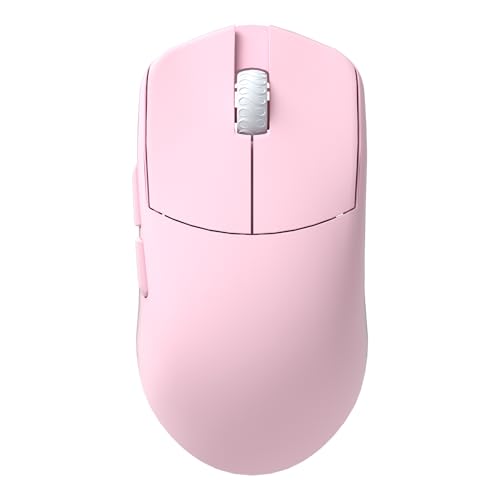
LAMZU Maya X
- Best for: Players who want PAW3950 tracking and included 8K wireless in the lightest shell here.
- Sensor: PixArt PAW3950
- Maximum DPI: 30,000
- Tracking speed: 750 IPS
- Polling rate: Up to 8,000 Hz wireless (8K dongle included)
Players who want PAW3950 tracking and included 8K wireless in the lightest shell here.
Battery life drops to roughly 20 hours at 8,000 Hz, and this listing is the pink colorway; other colors are separate listings.
The Maya X puts the same PixArt PAW3950 sensor family within reach of the lightest wireless shell in this guide at 47 g. The sensor is rated to 30,000 DPI and 750 IPS, and the 8K wireless dongle is included in the box, so the full 8,000 Hz polling rate works out of the box rather than as an add-on. A Nordic 52840 MCU runs the wireless link, and battery life is quoted at up to 80 hours at 1,000 Hz. For medium and large hands, it is the value route into flagship PixArt tracking.
Which One Fits Your Situation
You Aim With Your Arm at Low Sensitivity
Arm aimers sweep the mouse in long arcs and lift to recenter several times a minute, so tracking speed and lift-off behavior decide their matches. The DeathAdder V4 Pro’s 900 IPS ceiling means a full-speed swipe never outruns the sensor, and its adjustable lift-off keeps the cursor parked during resets. The OP1 8k v2 is the wired alternative, trading the ergonomic shell for a symmetrical shape and unlimited full-rate runtime.
You Flick and Track in Fast Arena Shooters
Wrist and fingertip players live on short, violent movements where acceleration tolerance and polling smoothness show up first. The Viper V3 Pro pairs 750 IPS tracking with the included 8,000 Hz dongle in a 54 g symmetrical shell, and the Maya X matches that polling rate at 47 g for players who want even less mass to start and stop. Both sensors hold fine adjustments in single steps, which helps when one sensitivity covers several games.
You Want Wired Consistency for Ranked Play
If a battery curve or a wireless hiccup is unacceptable, the OP1 8k v2 is the only wired mouse here and the most repeatable sensor package in the guide. Its PAW3950 runs at a locked 20,500 frames per second with 8,000 Hz polling for as long as the session lasts, and the hot-swappable main switches mean a worn click never retires the sensor you are used to. The trade is a cable and a small shell.
You Play on Glass or Swap Surfaces Often
Glass desks defeat most optical sensors, which need surface texture to read movement. Razer’s Focus Pro sensors in the DeathAdder V4 Pro and Viper V3 Pro are the picks here because both are listed as tracking on glass, and their single-step DPI adjustment makes it easy to recalibrate when you move between a glass desk, a cloth pad and a hard mat. The PixArt and HERO 2 mice track superbly on pads but are not the choice for bare glass.
Common Mistakes
- Playing at the maximum DPI because the box advertises it. Sensitivity that high makes the cursor jump pixels at a touch; most players aim better far below the ceiling, where the sensor’s fine steps matter more than its peak.
- Judging a sensor by DPI alone. Tracking speed in IPS and acceleration in G decide whether fast flicks stay accurate, and a lower-DPI sensor with higher IPS can out-track a headline flagship on hard swipes.
- Leaving 8,000 Hz polling on everywhere. It drains wireless batteries fast and adds CPU load, and many games and older PCs gain nothing from it; enable it for the titles that reward it.
- Ignoring lift-off distance. A sensor still tracking while you lift to recenter drags the crosshair off target, and the fix is a setting, not a new mouse; every pick here exposes lift-off or surface tuning.
- Buying the sensor and ignoring the shell. A flagship sensor in a shape that fights your grip will aim worse than a mid-range sensor in a mouse that fits; check size and grip style before the spec sheet.
Frequently Asked Questions
Does a higher maximum DPI make a mouse more accurate?
Not by itself. Maximum DPI is the top of the sensor’s resolution range, while accuracy in play comes from how evenly the sensor holds its setting, its tracking speed and its resolution consistency. Most players use a small fraction of a flagship ceiling. The high ceiling helps on very high-resolution displays and for high-sensitivity players, but a 30,000 DPI sensor with strong tracking will out-aim a poorly behaved higher-DPI one.
Is 8,000 Hz polling noticeably better than 1,000 Hz?
It shortens the gap between reports from one millisecond to an eighth of a millisecond, which mainly shows as smoother micro-movement on high-refresh monitors. The gain is subtle and shrinks further if the game engine or CPU cannot keep up. On wireless mice it also cuts battery life hard, so most players enable it for competitive sessions and drop back to 1,000 Hz for everyday play.
Can a gaming sensor track on a glass desk?
Most cannot, because optical sensors read surface texture and glass offers almost none. Razer’s Focus Pro sensors are the exception in this guide and are listed as tracking on glass, which is why the DeathAdder V4 Pro and Viper V3 Pro suit glass desks. The PAW3950 and HERO 2 mice expect a pad or a textured surface, so pair them with a mat if your desk is glass or glossy.
What changed between the PAW3395 and the PAW3950?
The PAW3950 is PixArt’s newer flagship: it raises the ceiling to 30,000 CPI against the 26,000 of the PAW3395, lifts tracking to 750 IPS, and samples at a higher frame rate, which lets it feed 8,000 Hz polling in wired and wireless mice. In play, the difference is headroom, not a new feel, and a well-shaped PAW3395 mouse still beats a PAW3950 mouse that does not fit your hand.
FAQ
Does a higher maximum DPI make a mouse more accurate?
Is 8,000 Hz polling noticeably better than 1,000 Hz?
Can a gaming sensor track on a glass desk?
What changed between the PAW3395 and the PAW3950?
More from Amazon
Programs that pair well with the guide above. Offers and eligibility are set by Amazon and may change.
Free shipping on eligible items, Prime Video and more. Eligible new members can start with a free trial.
Start a Prime free trialA Prime membership for ages 18-24 with a trial period. Eligibility is set by Amazon.
See Prime for Young AdultsAudiobooks and podcasts to listen to on the go. Eligible new members can start with a free trial.
Try Audible freeAd-free music streaming. Eligible new subscribers can start with a free trial.
Try Music Unlimited freeAs an Amazon Associate we earn from qualifying purchases.