Our Short List of 3
All 5 Picks at a Glance
| Product | Specs | Action |
|---|---|---|
 Creative Pebble V3 Minimalistic 2.0 USB-C Desktop Speakers | Check price on Amazon | |
 Logitech Z207 2.0 Stereo Computer Speakers with Bluetooth | Check price on Amazon | |
 Amazon Basics Stereo 2.0 Speakers for PC or Laptop | Check price on Amazon | |
 Logitech S150 USB Speakers with Digital Sound | Check price on Amazon | |
 Cyber Acoustics USB Speaker Bar CA-2890 | Check price on Amazon |
Key takeaways
- Compare the best lap top speakers for laptops, from USB and Bluetooth pairs to a clip-on bar, with clear specs on power, connections, and desk fit.
Most laptops ship with small built-in speakers that point down at the desk or up through the keyboard, and the result is thin, quiet sound that struggles with voices in meetings, dialogue in videos, and any music with real body. An external speaker set fixes that problem directly, because the drivers are larger, they face the listener, and they can sit on either side of the screen for genuine stereo separation. For anyone who works, studies, or watches content on a laptop every day, external speakers are one of the simplest upgrades available.
This guide covers external speakers made for laptops, not replacement parts for built-in laptop speakers. The five picks below include USB-powered stereo pairs that run from the laptop itself, a Bluetooth pair that can also take a wired connection, and a clip-on speaker bar that saves desk space entirely. Every pick is a complete, ready-to-use speaker product sold on Amazon US, and each section lists its published specifications, its connection type, and the kind of laptop setup it suits best, so the choice comes down to desk space, ports, and listening habits rather than guesswork.
As an Amazon Associate, we earn from qualifying purchases.
How to Choose Laptop Speakers
Start with the connection, because it decides both convenience and sound quality. USB audio speakers carry sound and power over one cable, so setup is a single plug and there is no separate audio jack to find. That matters on modern thin laptops that have dropped the headphone jack entirely. USB-powered speakers that use a 3.5mm plug for audio are different: the USB port supplies power only, while the sound still travels through the headphone jack, so the laptop needs both ports free. Bluetooth speakers remove the audio cable altogether and can also play from a phone, but they still need power from a wall outlet or a USB port, and wireless playback can add a small delay that is noticeable in fast-paced games.
Power output, listed in watts RMS, gives a rough sense of volume and fullness. Small USB pairs in the one to three watt range are built for clear speech and casual listening at a desk, close to the listener. Sets rated around eight watts RMS or higher fill a room more easily and handle music with more weight. Peak power figures are always higher than RMS figures for the same product, so compare RMS to RMS when two products list both numbers.
Size and shape matter just as much as output. A stereo pair needs a little desk space on each side of the laptop, and in return it delivers real left and right separation that makes movies and games feel wider. A single speaker bar takes almost no desk space, and a clip-on bar takes none at all, but a bar cannot spread sound as wide as two separated speakers. Check the listed dimensions against the space beside the laptop, and check cable length too, since a short cable can force an awkward layout on a wide desk.
Controls are worth a quick look. A volume knob or buttons on the speaker itself are faster than reaching for on-screen controls during a call, and a headphone jack on the speaker lets a listener switch to private listening without unplugging anything. A mute button is genuinely useful for people who join video meetings often. Finally, think about what the speakers are mainly for. Speech clarity matters most for calls and lectures, balanced sound matters most for mixed daily use, and stronger bass output matters most for music and films, though no compact laptop speaker replaces a dedicated subwoofer for deep low end.
Creative Pebble V3 Minimalistic 2.0 USB-C Desktop Speakers
The Creative Pebble V3 is the most complete all-rounder in this guide. It is a 2.0 stereo pair with rounded enclosures and drivers angled upward at 45 degrees, a tilt that points sound toward the ears of someone sitting at a laptop rather than straight across the desk. One USB-C cable carries both audio and power, and a USB-A adapter is included for laptops with only the older rectangular ports. Bluetooth 5.0 adds a wireless option for playing audio from a phone or from a laptop without a cable, and a 3.5mm input covers older devices as well.
Output is rated at 8 watts RMS with 16 watts of peak power, which is strong for a USB-powered pair of this size and enough for music and films in a bedroom, dorm room, or home office. Creative also includes a Clear Dialog feature, which is designed to make voices stand out in shows and video calls without raising the overall volume. A single knob on the right speaker handles volume and power, keeping daily adjustment simple.
Who It Suits
The Pebble V3 suits laptop users who want one set of speakers for everything: calls, videos, and music. The mix of USB-C audio, Bluetooth, and an aux input means it keeps working when the laptop changes, and the upward-angled drivers make it a natural fit for a fixed desk where the listener sits in one place.
Logitech Z207 2.0 Stereo Computer Speakers with Bluetooth
The Logitech Z207 is built for people who switch between devices during the day. This 2.0 stereo pair connects to a laptop through Bluetooth or a 3.5mm cable, and Logitech Easy-Switch technology is designed to make moving between two connected sources straightforward, such as pausing audio on one device and starting it on another. That makes the Z207 practical for a desk where a laptop and a phone both play audio at different times.
Each speaker combines an active driver with a passive radiator, a design that helps a compact enclosure produce fuller low-frequency sound than its size suggests. Total output is rated at 10 watts peak and 5 watts RMS. The front of the right speaker carries the controls that matter day to day, including power, volume, and Bluetooth pairing, and a headphone jack allows a quick switch to private listening. Unlike the USB-powered pairs in this guide, the Z207 runs from a wall outlet, so it does not draw power from the laptop battery.
Who It Suits
The Z207 suits laptop users who regularly alternate between a computer and a phone, and who prefer physical controls and a headphone jack within easy reach. It fits a settled desk with a free wall outlet better than a travel bag, since it needs mains power rather than running from the laptop.
Amazon Basics Stereo 2.0 Speakers for PC or Laptop
The Amazon Basics Stereo 2.0 pair keeps the formula as simple as it gets. Two compact speakers plug into a laptop with a USB cable for power and a 3.5mm plug for audio, with no software, no pairing, and no wall adapter involved. An in-line volume control on the cable lets the listener adjust level or mute quickly, and a blue LED accent at the base of each speaker shows at a glance that the pair is powered.
Total output is 2.4 watts RMS, split as 1.2 watts per speaker, with a listed frequency range of 80 hertz to 20 kilohertz. A bottom radiator is included to give the low end a springier character than the small enclosures would otherwise manage. Each speaker measures about 3.9 inches tall, 2.88 inches wide, and 2.6 inches deep, and the pair weighs about 1.4 pounds, so the set fits easily beside a laptop on a narrow desk, a dorm workspace, or a kitchen counter.
Who It Suits
This pair suits laptop users who want a straightforward, inexpensive-feeling upgrade for calls, lectures, and casual video without any setup beyond two plugs. It is a sensible pick for a second workspace, a shared family laptop, or a student desk where compact size and simple controls matter more than room-filling volume.
Logitech S150 USB Speakers with Digital Sound
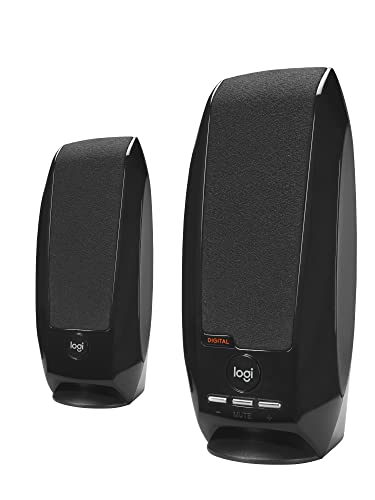
The Logitech S150 takes the single-cable idea further than any other pick here. One USB-A cable, about four feet long, carries both digital audio and power, so there is no headphone jack connection, no wall adapter, and no Bluetooth pairing step. Plugging the cable into a laptop is the entire setup, which makes the S150 easy to move between rooms, classrooms, and temporary workspaces.
Output is modest on paper, at 1.2 watts RMS and 2 watts peak, delivered by 2-inch drivers with a listed frequency response of 90 hertz to 20 kilohertz. That output level is aimed at clear speech and everyday media at close range rather than loud music playback. Buttons on the front of the right speaker adjust volume and mute the sound, and an orange LED shows when the speakers are powered. Unplugging the USB cable turns the pair off completely.
Who It Suits
The S150 suits travelers, students, and anyone who sets up a laptop in different places and wants better-than-built-in sound with zero fuss. It also fits older laptops and shared machines where a dependable wired connection is preferable to wireless pairing, and where speech clarity matters more than bass or volume.
Cyber Acoustics USB Speaker Bar CA-2890
The Cyber Acoustics CA-2890 solves a different problem: a desk with no spare surface at all. Instead of two separate speakers, it is a single stereo bar that clamps onto the bottom edge of a laptop screen or a monitor, fitting panels up to one inch thick. Because the bar rides on the screen itself, it leaves the desk completely clear and travels with the laptop when the lid moves to another room.
A single USB cable carries both power and audio, keeping the setup to one plug. Output is rated at 10 watts, and controls mounted on the bar cover volume, mute, and playback, which is handy during videos and calls when reaching for the mouse would interrupt the flow. As a single enclosure, the bar cannot match the wide stereo spread of a separated pair, and that trade is the honest cost of its space-saving design. For a crowded desk, it is usually a trade worth making.
Who It Suits
The CA-2890 suits laptop users with small or crowded desks, including dorm rooms, shared workspaces, and standing desks where every inch of surface is already used. It also suits anyone who dislikes cable clutter, since one USB connection and a screen-mounted position keep the whole setup tidy.
Frequently Asked Questions
Do external speakers work with any laptop?
Most do, as long as the connection matches the ports available. USB audio speakers work with Windows, macOS, and ChromeOS laptops that have a free USB port, and USB-C models include or support adapters for older USB-A ports. Speakers that use a 3.5mm plug for audio need a headphone jack, which some thin laptops no longer include, so checking the port list before buying avoids the most common mismatch.
Are USB speakers loud enough for a room?
Compact USB pairs are designed for listening at a desk, and at that distance even a low wattage rating sounds clearly louder and fuller than built-in laptop speakers. Higher RMS ratings, such as the eight watt rating of the Creative Pebble V3 in this guide, carry further and suit small rooms for music and films. For a large living room or a group watching together, a larger powered speaker system remains the better tool.
Is Bluetooth or a wired connection better for laptop speakers?
A wired connection is simpler and avoids any wireless delay, which keeps sound in step with video and games. Bluetooth adds freedom to play audio from a phone and removes the audio cable from the desk, and it works well for music, podcasts, and casual video. Speakers that offer both, such as the Logitech Z207 and the Creative Pebble V3, let the listener choose per situation instead of committing to one method.
Can laptop speakers improve video call sound?
Yes, and for many buyers that is the main reason to upgrade. External speakers place larger drivers facing the listener, which makes voices easier to follow than small downward-firing built-in speakers, and features such as the Clear Dialog mode on the Pebble V3 are designed specifically to lift speech. A headphone jack on the speaker also helps, since it allows a fast switch to a headset for private calls without replugging cables at the laptop.
Final Verdict
For most laptop users, the Creative Pebble V3 is the strongest overall choice in this guide, combining the highest RMS output of the pairs listed, three ways to connect, and a voice clarity feature that helps with daily calls and dialogue. The Logitech Z207 is the better fit for a fixed desk where switching between a laptop and a phone happens often, while the Amazon Basics pair covers the basics with the least setup and the smallest footprint. The Logitech S150 is the travel-friendly option, with one cable doing everything, and the Cyber Acoustics CA-2890 is the answer when there is simply no desk space to spare. Any of the five is a clear step up from built-in laptop sound, so the right pick is the one whose connection, size, and power source match the desk it will live on.
Product and ASIN Reference
| Product | ASIN |
|---|---|
| Creative Pebble V3 Minimalistic 2.0 USB-C Desktop Speakers | B08F57GSJ7 |
| Logitech Z207 2.0 Stereo Computer Speakers with Bluetooth | B074KJ6JQW |
| Amazon Basics Stereo 2.0 Speakers for PC or Laptop | B07DDK3W5D |
| Logitech S150 USB Speakers with Digital Sound | B000ZH98LU |
| Cyber Acoustics USB Speaker Bar CA-2890 | B09DJ1ZM5W |
FAQ
Do external speakers work with any laptop?
Are USB speakers loud enough for a room?
Is Bluetooth or a wired connection better for laptop speakers?
Can laptop speakers improve video call sound?
More from Amazon
Programs that pair well with the guide above. Offers and eligibility are set by Amazon and may change.
Free shipping on eligible items, Prime Video and more. Eligible new members can start with a free trial.
Start a Prime free trialA Prime membership for ages 18-24 with a trial period. Eligibility is set by Amazon.
See Prime for Young AdultsAudiobooks and podcasts to listen to on the go. Eligible new members can start with a free trial.
Try Audible freeAd-free music streaming. Eligible new subscribers can start with a free trial.
Try Music Unlimited freeAs an Amazon Associate we earn from qualifying purchases.