
Our Short List of 3
All 4 Picks at a Glance
| Product | Specs | Action |
|---|---|---|
 Acer Nitro V 15 ANV15-51-51H9 — The Entry Point Into RTX Gaming | Check price on Amazon | |
 ASUS TUF Gaming A15 FA507NV-EH74 — The Balanced All-Rounder | Check price on Amazon | |
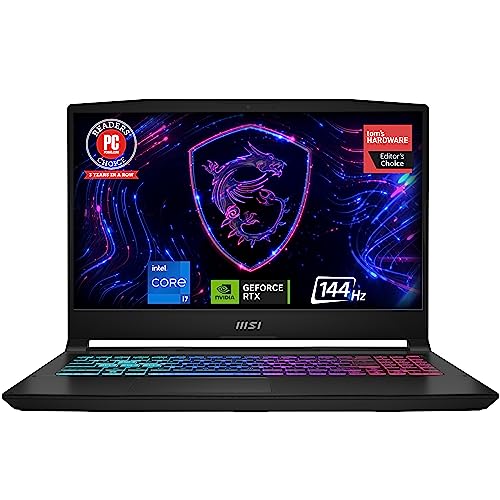 MSI Katana 15 B13VGK-484US — RTX 4070 in a 15.6-Inch Chassis | Check price on Amazon | |
 Lenovo Legion Pro 5i Gen 8 — The High-End Pick With the Big Screen | Check price on Amazon |
Key takeaways
- Compare the best gaming laptops by GPU, display, memory and cooling, from an entry-level RTX 4050 pick to RTX 4070 machines built for fast, smooth play.
As an Amazon Associate we earn from qualifying purchases.
The best gaming laptops share one defining trait: a dedicated graphics processor that is built for games, not borrowed from the processor itself. Integrated graphics can run older titles and esports games at modest settings, but a modern gaming laptop earns the name by pairing a discrete NVIDIA GeForce RTX graphics card with a fast processor, enough memory for today’s games, solid-state storage, and a display that refreshes quickly enough to show what the graphics card is actually producing. Every laptop in this guide meets that bar, and each one does it in a slightly different way.
This roundup stays deliberately in the general gaming lane. These are full gaming machines with RTX-class discrete graphics, high-refresh displays, and cooling systems designed for sustained play. They are not ultra-cheap general-purpose laptops, not slim student notebooks chosen for battery life and weight above all else, and not business machines chosen for security features and office docks. If your priority is gaming first, with everyday computing handled comfortably as a secondary job, the four picks below cover the main decision points: an entry point into RTX gaming, a balanced all-rounder with a full-power RTX 4060, and two RTX 4070 options that differ mainly in screen size, resolution, and how much memory they give you from the factory.
A quick note on how these picks were chosen. Each model was matched to its exact Amazon listing and configuration, and its specifications were cross-checked against manufacturer information for the same model family. Gaming laptops are sold in many configurations under one name, so the details below describe the specific configuration tied to each listing, not every version that has ever carried the badge. Always confirm the processor, graphics card, memory, storage, and display on the live listing before you buy, because sellers sometimes group several configurations under a single product page.
How to Choose the Best Gaming Laptop for You
Start with the graphics card
The graphics card, or GPU, does most of the work in games, so it is the first specification to settle. In this guide the range runs from the GeForce RTX 4050 at the entry end to the GeForce RTX 4070 at the top end, with the RTX 4060 in the middle. All three are based on NVIDIA’s Ada Lovelace architecture, support DLSS upscaling, and include hardware ray tracing. The practical differences are frame rates at a given resolution, how high you can push settings, and how much headroom you keep as games get heavier over the next few years.
An RTX 4050 with 6GB of video memory is a sensible starting point for 1080p play, especially in esports titles and well-optimised games. An RTX 4060 with 8GB is the sweet spot for most players: it handles demanding games at 1080p with high settings and can stretch to higher resolutions with DLSS helping. An RTX 4070, also with 8GB, adds a clear step in raw throughput that suits higher refresh rates, higher resolutions, and heavier settings. One caution applies to every tier: laptop GPUs are configured by each manufacturer within a power range, so two laptops with the same GPU name can perform differently. Where a maker states a maximum graphics power figure, as ASUS does for the TUF pick below, that is useful context rather than a detail to ignore.
Match the processor to the GPU
The processor, or CPU, feeds the GPU with game logic, physics, and background tasks. For gaming, a recent Intel Core i5 or i7 H-series chip, or an AMD Ryzen 5 or Ryzen 7 HS or HX chip, is the normal pairing for an RTX laptop. The picks here range from an eight-core Intel Core i5-13420H and an AMD Ryzen 7 7735HS up to a sixteen-core Intel Core i7-13700HX in the Legion. You do not need the strongest CPU for GPU-limited games at high settings, but a stronger CPU helps in strategy games, simulation titles, streaming while playing, and general multitasking. Buy balance: a modest CPU beside a strong GPU is usually fine, while a flagship CPU beside an entry GPU is money spent in the wrong place for a gaming machine.
Get memory and storage right the first time
Sixteen gigabytes of DDR5 memory is the comfortable baseline for a gaming laptop today. It lets a game, voice chat, a browser, and background software coexist without constant swapping to disk. One pick in this guide ships with 8GB, and that is called out plainly in its section: it remains a real gaming laptop thanks to its RTX 4050, but the memory is its weakest specification, and buyers should treat a memory upgrade as part of the plan if the model’s slots allow it, and confirm slot details on the listing. At the other end, the Legion configuration here includes 32GB from the factory, which suits players who also edit video, run virtual machines, or keep many applications open.
For storage, a PCIe solid-state drive is standard in this class. A 512GB drive fills quickly once a few large games are installed, so 1TB is the more relaxed choice for most libraries. All four picks use SSD storage, and three of the four include 1TB in the listed configuration. Check whether a second drive slot is mentioned for the exact model if you expect your library to grow.
Read the display specification properly
Resolution, refresh rate, and panel quality matter as much as raw power, because the display is what you actually see. All four picks use IPS or IPS-level panels with refresh rates of at least 144Hz, which is the point where motion in fast games looks clearly smoother than on a standard 60Hz screen. Three picks are 15.6-inch Full HD models at 1920 by 1080, a resolution that matches well with RTX 4050 and RTX 4060 graphics and with an RTX 4070 chasing high frame rates. The Legion steps up to a 16-inch WQXGA panel at 2560 by 1600 with a 165Hz refresh rate in the listed configuration, giving more screen space and sharper detail, and asking more of its RTX 4070 in return. Colour coverage also differs: the TUF listing states full sRGB coverage, which helps if you edit photos or video on the same machine. If you play competitively, prioritise refresh rate; if you play slower, visually rich games, resolution and colour deserve more weight.
Cooling, size, and everyday practicalities
Gaming laptops convert a lot of power into heat, so cooling design affects how consistently a machine performs during long sessions. Each brand names its own system, such as MSI’s Cooler Boost 5 or Lenovo’s Legion ColdFront approach, but the buyer’s check is simpler: look for dual fans, generous vents, and a chassis that is not trying to be an ultrabook. These are 15.6-inch and 16-inch machines that typically weigh around five pounds before the power adapter, so they are transportable rather than truly light. Battery life under gaming load is short across the whole category, so plan to play plugged in for full performance. Finally, check the ports on the exact listing: HDMI for an external monitor, USB-C with display output where stated, wired Ethernet if you want the most stable connection for online play, and Wi-Fi 6 or Wi-Fi 6E for wireless.
Disclosure
Disclosure: This article contains affiliate links. If you buy through those links, a commission may be earned at no additional cost to you. Product information was taken from the listings and manufacturer details available at the time of writing, and specifications should be confirmed on the live listing before purchase.
The Picks at a Glance
| Pick | Processor | Graphics | Display | Memory / Storage |
|---|---|---|---|---|
| Acer Nitro V 15 ANV15-51-51H9 | Intel Core i5-13420H | GeForce RTX 4050 | 15.6-inch FHD 144Hz IPS | 8GB DDR5 / 512GB SSD |
| ASUS TUF Gaming A15 FA507NV-EH74 | AMD Ryzen 7 7735HS | GeForce RTX 4060 | 15.6-inch FHD 144Hz, full sRGB | 16GB DDR5 / 1TB SSD |
| MSI Katana 15 B13VGK-484US | Intel Core i7-13620H | GeForce RTX 4070 | 15.6-inch FHD 144Hz | 16GB DDR5 / 1TB SSD |
| Lenovo Legion Pro 5i Gen 8 | Intel Core i7-13700HX | GeForce RTX 4070 | 16-inch WQXGA 165Hz | 32GB DDR5 / 1TB SSD |
Acer Nitro V 15 ANV15-51-51H9 — The Entry Point Into RTX Gaming
The Acer Nitro V 15 in this ANV15-51-51H9 configuration is the most accessible way into this roundup, and it is a genuine gaming laptop rather than a general laptop with gaming styling. Its NVIDIA GeForce RTX 4050 Laptop GPU brings DLSS and ray tracing support to a class of machine that used to rely on older, weaker graphics, and it pairs that GPU with a 13th-generation Intel Core i5-13420H processor. That eight-core chip is well matched to the GPU: for 1080p gaming in esports titles and mainstream games, the graphics card will be the limiting factor long before the processor is.
The display supports the gaming brief properly. The 15.6-inch Full HD IPS panel runs at 144Hz, so fast movement stays clear and the screen can keep up with the frame rates the RTX 4050 produces in lighter games. A high-refresh panel at this tier matters, because a 60Hz screen would waste much of what the GPU can do in competitive titles. The listing also notes a backlit keyboard and Wi-Fi 6, both expected touches that are present rather than cut to reach the tier.
The honest weakness of this exact configuration is memory. It ships with 8GB of DDR5, which is below the 16GB that most players should target for modern games plus background apps. Storage is a 512GB Gen 4 SSD, which is fast but will require some library management once several large titles are installed. Neither point disqualifies the machine, and both are common at the entry end of gaming laptops, but they shape who should buy it. Choose this Nitro V if you want the lowest-step route into RTX gaming and are comfortable managing storage and, where the exact unit allows, planning a memory upgrade. If you want a machine that needs nothing changed on day one, the next pick is the cleaner answer.
ASUS TUF Gaming A15 FA507NV-EH74 — The Balanced All-Rounder
The ASUS TUF Gaming A15 FA507NV-EH74 is the pick that gets the fundamentals right in a single factory configuration. Its AMD Ryzen 7 7735HS processor has eight cores, and it drives an NVIDIA GeForce RTX 4060 Laptop GPU with 8GB of GDDR6 memory. ASUS states a maximum graphics power of up to 140W with Dynamic Boost for this GPU configuration, which is significant because it means this is not a heavily power-limited implementation of the RTX 4060. The listing also notes a MUX switch, which lets the discrete GPU drive the display more directly and can help performance in games that are sensitive to that path.
Memory and storage need no apology here: 16GB of DDR5-4800 and a 1TB PCIe SSD are exactly the combination most players should look for, giving room for a healthy game library and comfortable multitasking without an immediate upgrade plan. The 15.6-inch Full HD display runs at 144Hz and, according to the listing, covers the full sRGB colour range, with G-Sync support. That makes the same screen credible for photo and video work in a way that a narrow-gamut gaming panel is not, which broadens the machine’s usefulness beyond play without moving it out of the gaming lane.
Connectivity is rounded out with Wi-Fi 6, HDMI 2.1, USB-C with display output, a USB4 Type-C port, and wired Ethernet, according to the listing details for this model. The TUF line is also built around durability as a design theme, and the A15 uses dual Arc Flow fans in ASUS’s cooling arrangement for this generation. Taken together, this is the easiest recommendation in the guide for a first serious gaming laptop: strong GPU implementation, the right memory and storage, a fast and colour-accurate screen, and no single specification that undercuts the rest.
MSI Katana 15 B13VGK-484US — RTX 4070 in a 15.6-Inch Chassis
The MSI Katana 15 B13VGK-484US is built around a simple proposition: put a GeForce RTX 4070 into a 15.6-inch gaming laptop with the supporting specifications it needs, and keep the focus on the game performance rather than on premium extras. Its Intel Core i7-13620H processor has ten cores, split between performance and efficiency cores, and the RTX 4070 carries 8GB of GDDR6 memory. Compared with the RTX 4060 picks, that GPU step is what you are choosing here: more throughput for higher settings at 1080p, more headroom for high frame rates, and a better starting point if you later connect a higher-resolution external monitor.
The supporting configuration is sound. The listing specifies 16GB of DDR5 memory and a 1TB NVMe SSD, which is the combination that lets the stronger GPU breathe without the system tripping over memory or storage limits. The 15.6-inch Full HD display runs at 144Hz. Some buyers may wish an RTX 4070 machine shipped with a higher-resolution built-in panel, but there is a real argument for this pairing: at 1920 by 1080, the RTX 4070 can prioritise frame rate and settings rather than spending its power on pixels, which suits competitive and fast-paced play. If your goal is maximum detail on the built-in screen itself, the Legion below takes the other path.
MSI fits its Cooler Boost 5 cooling, with dual fans and multiple heat pipes in this Katana generation, and the port selection in the listing includes USB-C, multiple USB-A ports, HDMI, and wired networking, plus Wi-Fi 6. The chassis is a conventional gaming design rather than a thin-and-light one, which is the right trade for a machine of this power. Choose the Katana if you want RTX 4070 performance in the familiar 15.6-inch form factor and your priority is frame rates at Full HD, at home or on an external display, rather than a bigger or sharper built-in panel.
Lenovo Legion Pro 5i Gen 8 — The High-End Pick With the Big Screen
The Lenovo Legion Pro 5i Gen 8 configuration listed here is the most complete package in this guide, and the one aimed at players who want the laptop itself, not an external monitor, to deliver the premium experience. Its Intel Core i7-13700HX processor has sixteen cores, the strongest CPU in this roundup, and it is paired with an NVIDIA GeForce RTX 4070 Laptop GPU with 8GB of GDDR6 memory. That combination suits demanding games, CPU-heavy strategy and simulation titles, and players who stream or create content alongside gaming.
Two specifications separate this configuration from the Katana despite the shared GPU name. First, memory: this listing includes 32GB of DDR5, double the other RTX 4070 pick, alongside a 1TB PCIe NVMe SSD. Second, the display: a 16-inch WQXGA panel at 2560 by 1600 with a 165Hz refresh rate. The taller 16:10 aspect ratio gives more vertical space for work as well as play, the resolution is visibly sharper than Full HD at this size, and the refresh rate keeps motion fluid. The trade-off is that driving that many pixels asks more of the GPU, so in the heaviest games you may balance resolution, settings, and DLSS differently than on a 1080p screen. For many players that is a worthwhile exchange, because the screen is excellent every time you open the lid, including outside games.
The Legion Pro line adds Lenovo’s ColdFront cooling approach in this generation, a full set of ports including multiple USB-A and USB-C connections, HDMI 2.1, and Ethernet, and Wi-Fi 6E, per the model family’s published specifications. It is the largest and most desktop-replacement-like machine here. Choose it if you want the strongest overall configuration in this guide, plan to play mainly on the built-in display, and value the sharper, larger screen and doubled memory enough to pick it over a Full HD RTX 4070 alternative.
Which One Should You Buy?
Work from your games outward. If you mainly play esports and mainstream titles at 1080p and want the simplest entry into RTX gaming, the Acer Nitro V 15 does that job, provided you accept its 8GB of memory as the compromise to plan around. If you want one machine that needs no caveats for most players, the ASUS TUF Gaming A15 is the balanced choice, with a full-power RTX 4060 implementation, 16GB of memory, 1TB of storage, and a colour-accurate 144Hz screen.
If frame rates and settings matter more than screen resolution, the MSI Katana 15 puts RTX 4070 power behind a Full HD 144Hz panel. If you want the fullest built-in experience and the strongest processor and memory configuration in this guide, the Lenovo Legion Pro 5i Gen 8 is the high-end answer. Whichever you choose, confirm the exact configuration on the live listing before purchase, because gaming laptop model names cover many builds, and the right GPU beside the wrong memory or display is still the wrong laptop for you.
FAQ
Which One Should You Buy?
More from Amazon
Programs that pair well with the guide above. Offers and eligibility are set by Amazon and may change.
Free shipping on eligible items, Prime Video and more. Eligible new members can start with a free trial.
Start a Prime free trialA Prime membership for ages 18-24 with a trial period. Eligibility is set by Amazon.
See Prime for Young AdultsAudiobooks and podcasts to listen to on the go. Eligible new members can start with a free trial.
Try Audible freeAd-free music streaming. Eligible new subscribers can start with a free trial.
Try Music Unlimited freeAs an Amazon Associate we earn from qualifying purchases.









