Our Short List of 3

- Best for: Commuters who want armored protection around a 17-inch gaming laptop.
- Laptop fit: up to 17.3 inches
- Dimensions: 14.17 x 7.09 x 19.88 inches
- Weight: from 3.18 pounds
- Exterior: 60 percent polyester, 40 percent PU
- Best for: Travelers and commuters who charge devices from their bag and pass airport checkpoints often.
- Laptop fit: 17 to 18 inches
- Dimensions: 9.0 x 17.0 x 19.5 inches
- Molded front panel
- External USB 3.0 quick-charge port with built-in charging cable
- Best for: Owners of oversized 18-inch gaming laptops and anyone flying with a full setup.
- Laptop fit: up to 18.4 inches
- Capacity: 40 liters
- Laptop pocket: 20.5 x 13 x 2 inches
- Weight: 4.3 pounds
All 4 Picks at a Glance
| Product | Specs | Action |
|---|---|---|
| Lenovo Legion 17-Inch Armored Backpack II |
| Check price on Amazon |
| Mobile Edge Core Gaming Backpack (MECGBP1) |
| Check price on Amazon |
| Everki Business 120 Laptop Backpack (Titan, EKP120) |
| Check price on Amazon |
 Dell Alienware Horizon 17-Inch Gaming Backpack (AW423P) |
| Check price on Amazon |
Key takeaways
- Four backpacks built for 17-inch gaming laptops, compared on measured fit, padding, capacity and carry comfort for commutes, campus and LAN travel.
A gaming laptop is heavier, thicker and more expensive than the machines most laptop bags are drawn around, so the real decision is not which backpack looks right but which compartment actually closes over your machine without straining the zipper or crushing a corner. Screen size alone misleads: two 17-inch laptops can differ by a centimeter of thickness, and that gap decides whether a bag fits or fights you. Padding matters just as much, because one dropped bag puts cooling vents, ports and display corners at risk.
The four backpacks below serve three kinds of buyers: daily commuters who want armored protection around a valuable rig, travelers who need checkpoint-friendly layouts, and owners of oversized desktop-replacement machines that fit almost nothing else. Each pick was chosen from its Amazon listing for a clearly stated laptop fit, a measured compartment or capacity figure, and carry features a gaming setup genuinely uses, from dedicated headset pockets to luggage trolley straps.
Quick Picks
As an Amazon Associate we earn from qualifying purchases.
| Product | Best for | Key spec |
|---|---|---|
| Lenovo Legion 17-Inch Armored Backpack II | Armored daily commuting | Fits laptops up to 17.3 inches |
| Mobile Edge Core Gaming Backpack (MECGBP1) | Charging on the move | Fits laptops 17 to 18 inches |
| Everki Business 120 Laptop Backpack (Titan) | Oversized machines and travel | Fits laptops up to 18.4 inches |
| Dell Alienware Horizon 17-Inch Gaming Backpack | The lightest carry | Fits laptops up to 17 inches |
How to Choose
Measure Your Laptop, Not the Headline Size
A bag advertised for 17-inch laptops is not automatically a bag for your 17-inch laptop. Gaming machines run thicker than office notebooks because of their cooling hardware, and thickness is where compartments fail. Before ordering, measure your laptop’s width, depth and thickness, then compare those numbers against the compartment dimensions on the listing rather than the screen-size claim. The Dell pick below states a hard compatibility limit of 400 x 303 x 25 mm, which quietly excludes thick desktop replacements despite its 17-inch headline. A tape measure takes two minutes and prevents the commonest return in this category.
Padding and Shell Protection
Gaming laptops concentrate value in fragile places: display corners, fan intakes and the ports along each side. Look for a suspended or double-layered laptop compartment, dense padding at the base where the machine lands when you set the bag down, and some structure in the front panel so a bump does not transfer straight through. Molded front shields, like the EVA shell on the Lenovo pick, add crush resistance that soft fabric cannot match. Check also whether the compartment closes with the laptop isolated from the main cargo area, so chargers and bottles never press against the lid.
Capacity for the Whole Gaming Kit
A gaming setup travels as more than a laptop. The power brick alone is often the size of a paperback, and a headset, mouse, keyboard and controller add real volume. Judge capacity in liters where the listing states it, and look for dedicated pockets sized for accessories rather than one open cavern where everything shifts. The Everki below carries 40 liters with a separate tablet pocket, while the Dell manages 28 liters in a lighter frame. If your brick and headset already fill a trial bag at home, choose the larger figure rather than hoping the fabric stretches.
Carry Comfort and Travel Features
A loaded gaming backpack can weigh more than a carry-on suitcase, so strap design decides whether a commute feels fine or punishing. Padded shoulder straps, a chest buckle and a ventilated back panel spread the load and stop the bag sliding as you walk. Frequent flyers should look for checkpoint-friendly compartments that open flat for screening and a trolley strap or pass-through that slides over a suitcase handle. Small details earn their keep too: an external water bottle sleeve keeps liquid away from the electronics, and an RFID-safe pocket protects cards in crowded stations.
The 4 Best Options
Lenovo Legion 17-Inch Armored Backpack II
- Best for: Commuters who want armored protection around a 17-inch gaming laptop.
- Laptop fit: up to 17.3 inches
- Dimensions: 14.17 x 7.09 x 19.88 inches
- Weight: from 3.18 pounds
- Exterior: 60 percent polyester, 40 percent PU
Commuters who want armored protection around a 17-inch gaming laptop.
The listing states no USB charging port, so if charging a phone from the bag matters to you, pick 2 is the one to look at instead.
This is the protection-first pick for riders and commuters whose laptop rides buses, bike racks and crowded platforms. A high-density EVA molded front shield sits over a double-layered laptop compartment sized for machines up to 17.3 inches, so the bag takes the knock instead of the lid. Lenovo adds dedicated pockets for a headset, keyboard and mouse, which keeps a full gaming kit organized instead of stacked. A ventilated back panel and chest buckle help on longer walks, and the luggage trolley strap covers the occasional trip. There is no USB charging port, so charging on the move means opening the bag.
Watch out for: The listing states no USB charging port, so if charging a phone from the bag matters to you, pick 2 is the one to look at instead.
Mobile Edge Core Gaming Backpack (MECGBP1)
- Best for: Travelers and commuters who charge devices from their bag and pass airport checkpoints often.
- Laptop fit: 17 to 18 inches
- Dimensions: 9.0 x 17.0 x 19.5 inches
- Molded front panel
- External USB 3.0 quick-charge port with built-in charging cable
Travelers and commuters who charge devices from their bag and pass airport checkpoints often.
Order the MECGBP1 molded-panel version named here; a separate Velcro-panel variant exists under a different listing, and its details are not interchangeable with this one.
Mobile Edge builds this one around charging and checkpoints. The external USB 3.0 quick-charge port, fed by a built-in charging cable, lets a power bank inside top up a phone without opening the bag, and the ScanFast checkpoint-friendly design speeds up airport screening. The molded front panel gives the main compartment some crush resistance, and the stated fit covers laptops from 17 to 18 inches, which takes in most current gaming machines. Black with red trim keeps the styling gaming-adjacent without shouting. Per Mobile Edge, the construction is ballistic nylon with a lifetime warranty, which is the maker’s claim rather than a listing measurement.
Watch out for: Order the MECGBP1 molded-panel version named here; a separate Velcro-panel variant exists under a different listing, and its details are not interchangeable with this one.
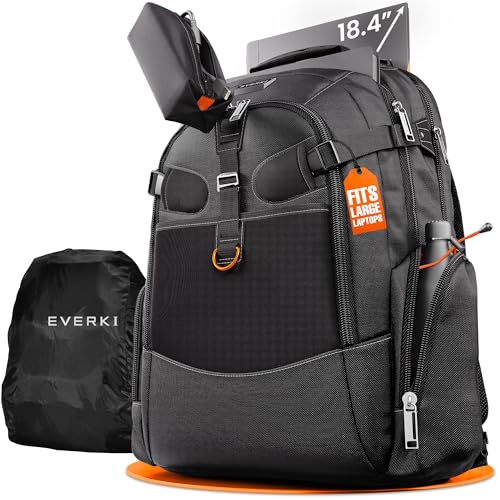
Everki Business 120 Laptop Backpack (Titan, EKP120)
- Best for: Owners of oversized 18-inch gaming laptops and anyone flying with a full setup.
- Laptop fit: up to 18.4 inches
- Capacity: 40 liters
- Laptop pocket: 20.5 x 13 x 2 inches
- Weight: 4.3 pounds
Owners of oversized 18-inch gaming laptops and anyone flying with a full setup.
At 4.3 pounds empty it is the heaviest option in this roundup; with a large laptop and brick aboard, check your own comfort limit for long carries.
Despite the business name, this is the big-machine pick: the laptop pocket measures 20.5 x 13 x 2 inches and the stated fit runs to 18.4 inches, which swallows desktop-replacement gaming laptops that defeat most bags. Total capacity is 40 liters, the checkpoint-friendly compartment opens a full 180 degrees, and a five-point balance strap system keeps a heavy load centered. A felt-lined tablet pocket, trolley handle pass-through and an included rain cover round out a travel-ready spec. Be honest with yourself about the trade: at 4.3 pounds empty, it is the heaviest bag here before the laptop goes in.
Watch out for: At 4.3 pounds empty it is the heaviest option in this roundup; with a large laptop and brick aboard, check your own comfort limit for long carries.
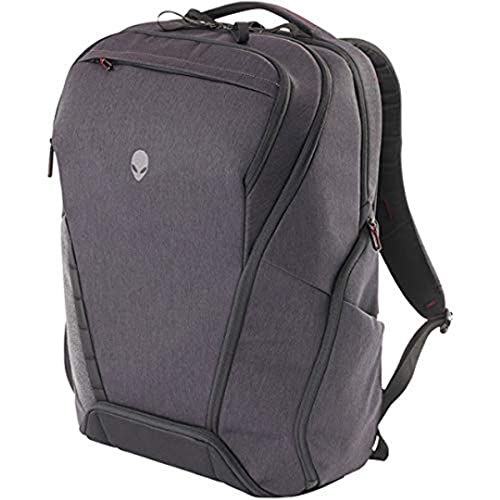
Dell Alienware Horizon 17-Inch Gaming Backpack (AW423P)
- Best for: Students and commuters with a slim 17-inch gaming laptop who want the lightest carry.
- Laptop fit: up to 17 inches
- Capacity: 28 liters
- Dimensions: 12.6 x 6.69 x 18.7 inches
- Weight: 1.95 pounds
Students and commuters with a slim 17-inch gaming laptop who want the lightest carry.
The listing limits compatible laptops to 25 mm thick, so measure your machine first; thick 17-inch models may not close. Availability signals for this listing conflict, so confirm a live featured offer for the exact ASIN before ordering.
Dell’s Horizon is the lightweight answer: 1.95 pounds empty, the lightest bag in this group, with 28 liters of capacity for a 17-inch machine. The GalaxyWeave fabric with EcoLoop keeps the shell tidy, the lining is soft Nylex against the laptop, and an RFID-safe pocket covers cards and a passport. It suits slimmer 17-inch gaming laptops carried across campus or between office and home, where every extra pound of bag is felt by the end of the day. What it will not do is swallow a thick desktop replacement, so its measurements deserve a careful read before ordering.
Watch out for: The listing limits compatible laptops to 25 mm thick, so measure your machine first; thick 17-inch models may not close. Availability signals for this listing conflict, so confirm a live featured offer for the exact ASIN before ordering.
Which One Fits Your Situation
You Commute Daily With a 17-Inch Rig
Choose the Lenovo Legion Armored Backpack II. Its molded EVA front shield and double-layered compartment are built for the knocks of buses, platforms and office floors, and the dedicated headset, keyboard and mouse pockets keep a working gaming kit separated and reachable. The chest buckle and ventilated back panel make the walk at either end easier to live with.
You Fly to LAN Events and Tournaments
Take the Everki Business 120 if your machine is large, or the Mobile Edge Core if it is a standard 17-inch model. The Everki opens flat for screening, carries 40 liters and includes a rain cover; the Mobile Edge answers with its ScanFast design and the USB charging port for long layovers. Both slide over a suitcase handle, so the airport walk stays one-handed.
Your Laptop Is an Oversized Desktop Replacement
The Everki Business 120 is the only pick here sized for you. Its pocket measures 20.5 x 13 x 2 inches and the stated fit reaches 18.4 inches, where the other three bags stop at 17 or 17.3 inches. Accept the heavier empty weight as the price of a compartment that actually closes over the machine.
You Want the Lightest Possible Campus Carry
Pick the Dell Alienware Horizon. At 1.95 pounds empty it adds the least to a slim 17-inch laptop, and the RFID-safe pocket suits crowded transit. The soft Nylex lining also keeps the lid free of scuffs when the bag is packed tight. Just confirm your laptop is no thicker than the stated 25 mm limit before you order, because that ceiling is firm.
Common Mistakes
- Buying by screen size alone and never measuring laptop thickness, which is where gaming machines outgrow nominally correct bags.
- Assuming every gaming backpack has a charging port; the Lenovo pick here has none, and ports need your own power bank anyway.
- Ignoring empty weight, then carrying a 4.3-pound bag plus a heavy laptop and brick across campus every day.
- Treating variant listings as interchangeable, when a different panel or size version carries its own dimensions and details.
- Packing the power brick loose against the laptop lid instead of in its own pocket, which presses on the display.
Frequently Asked Questions
Will a 17-inch gaming laptop fit a backpack rated for 17 inches?
Not always. Screen size describes the display diagonal, while fit depends on the compartment’s width, depth and thickness allowance. Gaming laptops run thick, so compare your machine’s measured dimensions with the compartment figures on the listing. The Dell pick in this article, for example, caps compatible thickness at 25 mm despite its 17-inch rating.
Are gaming laptop backpacks worth it over a regular laptop bag?
For most owners, yes. Gaming machines are heavier and thicker than office notebooks, and their value is concentrated in one bag. Bags in this category add molded or double-layered protection, pockets sized for headsets and power bricks, and straps built for heavier loads. A regular bag can work for a slim machine, but check its compartment dimensions first.
What does a checkpoint-friendly backpack actually do?
It lets the laptop compartment open flat, usually a full 180 degrees, so the machine can pass through airport screening without being removed from the bag, depending on the airport’s rules. The Everki and Mobile Edge picks here both offer this layout. It saves time and reduces the chance of a laptop being dropped or left behind at the belt.
How much empty weight should I accept in a laptop backpack?
Work backwards from your total load. A large gaming laptop and its power brick can already pass ten pounds, so every pound of bag matters on a long walk. The picks here range from 1.95 to 4.3 pounds empty. If your commute is short or wheeled, capacity can win; if you walk far, favor the lighter end.
FAQ
Will a 17-inch gaming laptop fit a backpack rated for 17 inches?
Are gaming laptop backpacks worth it over a regular laptop bag?
What does a checkpoint-friendly backpack actually do?
How much empty weight should I accept in a laptop backpack?
More from Amazon
Programs that pair well with the guide above. Offers and eligibility are set by Amazon and may change.
Free shipping on eligible items, Prime Video and more. Eligible new members can start with a free trial.
Start a Prime free trialA Prime membership for ages 18-24 with a trial period. Eligibility is set by Amazon.
See Prime for Young AdultsAudiobooks and podcasts to listen to on the go. Eligible new members can start with a free trial.
Try Audible freeAd-free music streaming. Eligible new subscribers can start with a free trial.
Try Music Unlimited freeAs an Amazon Associate we earn from qualifying purchases.