Key takeaways
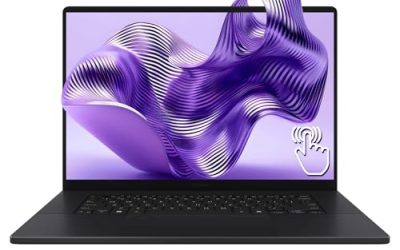
- College workstation laptops for engineering students who game: three ThinkPad P16 Gen 2 configurations compared on CPU, GPU, screen, memory and storage.
Choosing a laptop for an engineering degree is two purchases argued into one chassis. Coursework in CAD, simulation and rendering wants a mobile workstation: a high-core-count processor, professional graphics and enough memory to keep a large assembly open. Evenings, the same machine gets asked to run games. Consumer gaming laptops answer the second demand well and the first only partly, which is why this roundup looks at the workstation shelf — and why the honest choice it offers is between configurations of one verified family rather than between brands.


Three buyer groups land here: students whose degree is built around 3D CAD, students who split time between code, documents and lighter modelling, and students who want one machine to survive the course. Every pick below is a Lenovo ThinkPad P16 Gen 2, selected from its Amazon listing page — the processor, graphics, screen, memory and storage printed there are what separate them. Where a listing leaves a specification unstated, this article says so instead of filling the gap.
Quick Picks
As an Amazon Associate we earn from qualifying purchases.
| Product | Best for | Key spec |
|---|---|---|
| Lenovo ThinkPad P16 Gen 2 (21FA002TUS) | Screen-first engineering coursework | WQXGA 2560 x 1600 display |
| Lenovo ThinkPad P16 Gen 2 (Core i9-13980HX) | Heaviest CAD, simulation and gaming loads | NVIDIA RTX 2000 Ada 8GB |
| Lenovo ThinkPad P16 Gen 2 (Core i7-14700HX) | Buyers who want the newer-generation processor configuration | Intel Core i7-14700HX |
How to Choose
Start with the graphics card, not the badge
Coursework decides this section. Large SolidWorks assemblies, finite-element runs and rendered walkthroughs lean on the graphics processor far harder than lectures or essay work ever will, so the GPU named on the listing page matters more than the word workstation in the title. Two of the three configurations here state an NVIDIA RTX 2000 Ada; the sharpest-screened configuration states no graphics card at all, which is a genuine gap to weigh rather than a detail to gloss over. Match the stated graphics to your heaviest module, then check gaming second.
Count cores against your actual modules
All three processors are HX-class Intel chips, built for sustained workloads rather than short bursts. The 24-core Core i9-13980HX suits simulation, compiling and rendering queues that genuinely spread across cores. The Core i7-13700HX configuration is listed with sixteen cores, ample for most undergraduate CAD and MATLAB work, while the i7-14700HX configuration pairs a newer-generation chip with stated RTX 2000 Ada graphics. Plenty of modelling tasks run single-threaded and cap the benefit of extra cores, so pay for core count only when your course names the heavy applications that use it.
Memory and storage are a four-year decision
Every configuration here lists 32 GB of memory and a 1 TB SSD, and that pairing is the sensible floor for this job. CAD assemblies, simulation scratch files, a virtual machine for one awkward module and a games library all compete for the same drive, while memory pressure shows up the moment a large model shares the screen with lecture notes and a browser full of datasheets. Because listings in this family do not state upgrade paths, treat the fitted memory and storage as what you will graduate with, and confirm the exact figures on the page of the configuration you choose.
Weigh the screen against the walk across campus
A 16-inch mobile workstation is a serious backpack load once the power supply joins it, so the screen has to earn its place in the bag. The WQXGA 2560 x 1600 panel on the first configuration gives drawings, schematics and code extra sharpness at a desk. The FHD+ IPS anti-glare panel on the i9 configuration trades some of that resolution for glare resistance that suits bright lecture halls and library windows. Decide where you will actually work most days, then let that answer pick the panel rather than chasing the largest number on the page.
The 3 Best Options
Lenovo ThinkPad P16 Gen 2 (21FA002TUS)
This is the configuration for students whose days are spent reading their screen closely. Its WQXGA 2560 x 1600 display is the sharpest panel in this roundup, well suited to drawings, schematics and dense documents, and the 16-core Core i7-13700HX with 32 GB of memory and a 1 TB SSD covers mainstream undergraduate CAD and MATLAB workloads. One honesty point shapes the recommendation: the listing block for this model states no graphics card, so its case rests on the screen and processor. Students whose gaming or GPU-accelerated modules come first should weigh the two configurations below.
Specs
- Display: 16-inch WQXGA, 2560 x 1600
- Processor: Intel Core i7-13700HX (13th Gen, 16 cores)
- Memory: 32 GB RAM
- Storage: 1 TB SSD
- Model number: 21FA002TUS
- Colour: Villi Black / Storm Gray
Best for: Engineering students who prioritise screen sharpness for drawings, code and documents.
Watch out for: The listing for this exact model states no graphics card. If gaming or GPU-accelerated coursework matters to you, confirm the graphics specification on the product page before ordering instead of assuming the RTX card fitted to other P16 Gen 2 configurations.
Lenovo ThinkPad P16 Gen 2 (Core i9-13980HX)
The heavy lifter of the three, this configuration pairs a 24-core Core i9-13980HX with a stated NVIDIA RTX 2000 Ada carrying 8 GB of GDDR6 memory — the fullest graphics specification any listing in this roundup prints. That combination is aimed squarely at simulation, rendering and large-assembly work, and the listing itself markets the machine for engineers, designers and architects. The FHD+ IPS anti-glare screen gives up resolution to the first pick in exchange for glare resistance, while 32 GB of memory, a 1 TB SSD and Windows 11 Pro complete a specification that also games on the same hardware after class.
Specs
- Display: 16-inch FHD+ IPS anti-glare
- Processor: Intel Core i9-13980HX, 24 cores
- Memory: 32 GB RAM
- Storage: 1 TB SSD
- Graphics: NVIDIA RTX 2000 Ada, 8 GB GDDR6
- Operating system: Windows 11 Pro
Best for: Students running the heaviest CAD, simulation and rendering coursework who also game.
Watch out for: Its FHD+ panel is noticeably lower in resolution than the WQXGA screen on the first configuration. If fine drawing detail matters more to you than core count, the cheaper-feeling screen here is the trade you are making, so compare the two pages side by side before deciding.
Lenovo ThinkPad P16 Gen 2 (Core i7-14700HX)
Sitting between the other two, this configuration pairs the newer-generation Core i7-14700HX with a stated NVIDIA RTX 2000 Ada, 32 GB of memory and a 1 TB SSD. On paper it is the balanced route: current processor silicon and named workstation graphics without stepping up to the 24-core i9. It suits students whose courses mix modelling, code and moderate simulation and who expect to game on the same machine in the evenings. Availability evidence for this exact listing is thinner than for the other two, though, so the check in the Watch out for line below is part of the recommendation, not a footnote.
Specs
- Processor: Intel Core i7-14700HX
- Graphics: NVIDIA RTX 2000 Ada
- Memory: 32 GB RAM
- Storage: 1 TB SSD
- Display: 16-inch
Best for: Students who want the newer-generation processor with stated workstation graphics.
Watch out for: Availability signals for this exact ASIN conflict — a current buy link and configuration summary exist, but no tracker price point or in-stock record backs them up. Confirm a live featured offer for the exact ASIN B0D8MVHPZ8 before ordering, and check that the page’s configuration matches the processor, graphics, memory and storage listed here; the captured summary states no panel resolution, so verify the screen on the page as well.
Which One Fits Your Situation
Your degree is built around heavy 3D CAD and simulation
Choose the Core i9-13980HX configuration. Twenty-four cores keep simulation and rendering queues moving, and its listing states the RTX 2000 Ada with 8 GB of GDDR6 memory in full, which is the graphics specification your heaviest modules will lean on. It is the pick built for the hardest coursework on this page, and the same hardware handles evening gaming without a second machine.
You read drawings, datasheets and code all day
Choose the 21FA002TUS configuration. The WQXGA 2560 x 1600 panel is the sharpest screen here, and text, schematics and line work benefit from it every single day. Its 16-core processor, 32 GB of memory and 1 TB SSD cover mainstream coursework comfortably. Accept the trade knowingly: this listing states no graphics card, so heavily GPU-driven modules are not its strength.
You want the newest processor generation in the family
Choose the Core i7-14700HX configuration. It pairs the newer-generation chip with stated RTX 2000 Ada graphics, 32 GB of memory and a 1 TB SSD, which lands between the screen-first pick and the 24-core flagship. Treat the pre-purchase check as mandatory rather than optional: confirm a live featured offer for its exact ASIN and verify the configuration on the page before paying.
Gaming matters as much as the coursework
Choose the Core i9-13980HX configuration, because its listing is the only one here that states the graphics memory in full — an RTX 2000 Ada with 8 GB of GDDR6. The first configuration states no graphics card at all and the third leaves the memory figure unstated, so the i9 machine is the one whose gaming hardware you can verify from the page before buying.
Common Mistakes
- Buying a consumer gaming laptop for an engineering degree and discovering during CAD modules that it was never the workstation class the course assumed.
- Assuming every ThinkPad P16 Gen 2 listing shares one specification, when processor, graphics and screen all change between configurations — read the exact ASIN’s page.
- Ordering the Core i7-14700HX configuration without first confirming a live featured offer for its exact ASIN, since its availability signals conflict.
- Underestimating the daily carry: a 16-inch workstation plus its power supply is a real backpack load across a full timetable.
- Paying for the highest core count when your software runs mostly single-threaded, while skimping on the screen you will stare at for four years.
Frequently Asked Questions
Can a workstation laptop like this actually play games?
Two of the three configurations state an NVIDIA RTX 2000 Ada graphics card, which is real gaming-capable hardware, and the i9 configuration lists its 8 GB of GDDR6 memory in full. The first configuration’s listing states no graphics card, so gaming expectations there should wait until you confirm the specification on its product page.
Why are all three picks the same laptop family?
Because that is the mobile-workstation shelf on Amazon US whose listings could be verified in full for this roundup. Rather than pad the list with unverified models from other brands, the article compares the three ThinkPad P16 Gen 2 configurations that check out, and treats the choice honestly as picking a configuration instead of a badge.
Is 32 GB of memory and a 1 TB SSD enough for a full degree?
For most undergraduate engineering work, yes — all three configurations list exactly that pairing. Large assemblies, simulation files and a games library fit comfortably at the start of a course. The pressure point arrives later, when project archives grow, so archive finished coursework to external storage each term instead of letting the internal drive fill.
Which configuration should a first-year student pick?
Start from your course, not the catalogue. If the degree is heavy on 3D CAD and simulation, the i9 configuration earns its place. If your days are mostly reading, code and documents, the WQXGA-screened configuration serves you better. The i7-14700HX configuration splits the difference, provided its pre-purchase availability check comes back clean.
FAQ
Can a workstation laptop like this actually play games?
Why are all three picks the same laptop family?
Is 32 GB of memory and a 1 TB SSD enough for a full degree?
Which configuration should a first-year student pick?
More from Amazon
Programs that pair well with the guide above. Offers and eligibility are set by Amazon and may change.
Free shipping on eligible items, Prime Video and more. Eligible new members can start with a free trial.
Start a Prime free trialA Prime membership for ages 18-24 with a trial period. Eligibility is set by Amazon.
See Prime for Young AdultsAudiobooks and podcasts to listen to on the go. Eligible new members can start with a free trial.
Try Audible freeAd-free music streaming. Eligible new subscribers can start with a free trial.
Try Music Unlimited freeAs an Amazon Associate we earn from qualifying purchases.