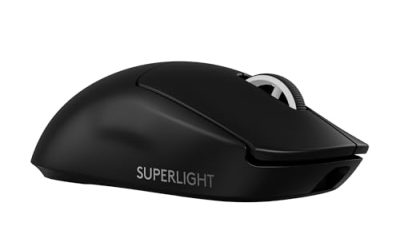
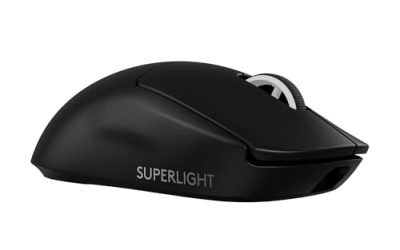
Our Short List of 3

- Best for: Competitive players who want a proven symmetrical shape for fast shooters.
- 60 grams
- HERO 2 sensor, 44,000 DPI
- 8,000 Hz wireless report rate
- LIGHTSPEED wireless
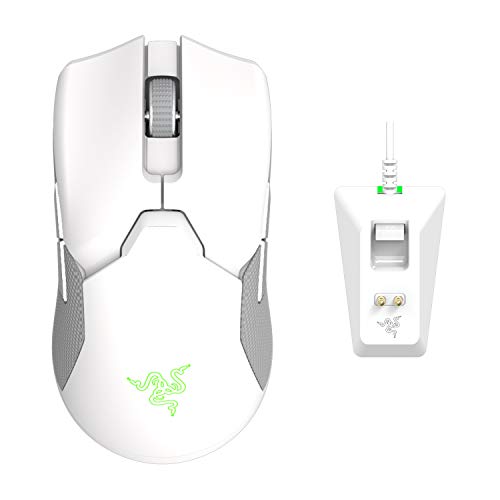
- Best for: Left-handed players and anyone who wants a dock on the desk instead of a cable.
- Ambidextrous shape with side buttons on both edges
- 74 grams
- Focus+ 20K DPI optical sensor
- HyperSpeed wireless

- Best for: First-time wireless buyers who want long battery life and a simple symmetrical shape.
- HERO 12K sensor, 12,000 DPI
- 250 hour battery life on one AA battery
- 6 programmable buttons
- LIGHTSPEED wireless
All 4 Picks at a Glance
| Product | Specs | Action |
|---|---|---|
| Logitech G PRO X Superlight 2 |
| Check price on Amazon |
| Razer Viper Ultimate |
| Check price on Amazon |
| Logitech G305 Lightspeed |
| Check price on Amazon |
 Razer Viper V2 Pro |
| Check price on Amazon |
Key takeaways
- Compare 5 ambidextrous wireless gaming mice for left- and right-handed players, from featherweight esports shapes to a dock-ready classic pick.
An ambidextrous wireless gaming mouse has to solve a shape problem before anything else. A right-handed shell locks left-handed players out and punishes anyone who swaps hands during long sessions, so the shell has to feel neutral in either hand while the sensor, switches and wireless link still keep up with fast flicks. That is the real decision here: which symmetrical shape disappears under your palm, and which set of trade-offs around weight, battery life and side-button layout you are willing to live with.
This guide is for left-handed players, right-handed players who prefer a neutral shape, and anyone who swaps hands or shares a mouse between two people. Every mouse below is a symmetrical wireless model picked for ambidextrous use, chosen from the name and specifications on its Amazon product page.
Quick Picks
As an Amazon Associate we earn from qualifying purchases
| Product | Best for | Key spec from title |
|---|---|---|
| Logitech G PRO X Superlight 2 | Competitive players who want a proven 60-gram shape | 60g, 44k DPI sensor, 8kHz report rate |
| Razer Viper V3 Pro | Featherweight esports play with an 8,000 Hz link | Symmetrical, 54g, 8K polling, 35K DPI sensor |
| Razer Viper Ultimate | Left-handed players and a tidy desk with a dock | 74g, 20K DPI sensor, RGB charging dock |
| Logitech G305 Lightspeed | A first wireless mouse with a long battery life | 12,000 DPI, 250h battery life, 6 programmable buttons |
| Razer Viper V2 Pro | A lighter Viper with on-mouse controls | 58g, 30K DPI sensor, 90 hour battery |
How to Choose
Shape and grip come before sensor numbers
A symmetrical shell does not feel the same in every hand, so length, hump position and side-button placement matter more than the sensor on the box. A low, flat shell suits fingertip players who steer with their fingers, while a taller hump fills a palm grip and supports the hand during long sessions. Check where the side buttons sit: most symmetrical mice put them on the left edge only, which suits right-handed players and leaves left-handed players with buttons under the wrong thumb. If you play left-handed and want thumb buttons, look for a model with buttons on both edges.
Sensor range and polling rate are not the same thing
A high DPI ceiling looks impressive on a listing, yet most players settle somewhere between 400 and 3,200 DPI and never touch the top of the range. Polling rate is the number that changes how a mouse feels: a 1,000 Hz link reports position a thousand times per second, while an 8,000 Hz link reports eight times as often and can feel smoother in fast flicks. The catch is battery life, since a higher polling rate drains the cell far faster. Treat 8,000 Hz as a tournament setting rather than an always-on default.
Weight and balance change aim more than marketing suggests
A 54-gram mouse and a 99-gram mouse feel like different tools in the hand, and the difference shows up first in long flicks and fast resets. Lighter shells reward fingertip and claw grips, where the fingers do most of the steering, while a heavier mouse can feel steadier for palm players who anchor their wrist. Balance matters as much as the number on the listing: a battery placed toward the rear shifts the center of gravity and can make a mouse feel tail-heavy. If possible, compare the listed weight with the grip you use before settling.
Battery, charging and what is in the box
Wireless mice solve the cable problem in three different ways, and each one changes daily use. A built-in rechargeable cell charges over USB-C and needs a cable on the desk, a charging dock keeps the mouse topped up between sessions with no cable handling, and a single AA battery runs for months but adds weight and needs spares. Read the included-components list on the product page before buying: some listings sell the mouse alone while others bundle a dock, a receiver extender or a charging cable. Confirm the receiver type too, since a few models need a separate adapter for the fastest polling rate.
The 5 Best Options
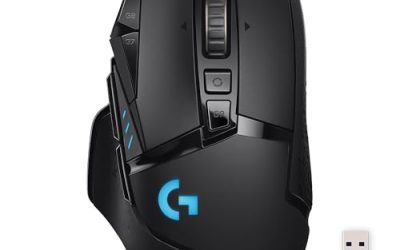
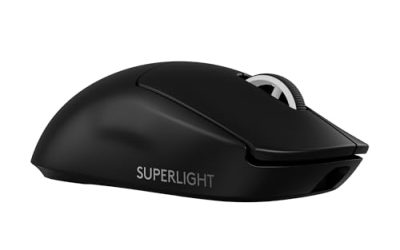
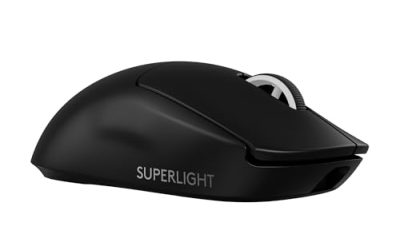
Logitech G PRO X Superlight 2
- Best for: Competitive players who want a proven symmetrical shape for fast shooters.
- 60 grams
- HERO 2 sensor, 44,000 DPI
- 8,000 Hz wireless report rate
- LIGHTSPEED wireless
Competitive players who want a proven symmetrical shape for fast shooters.
Side buttons sit on the left edge only, so left-handed players get no thumb buttons. Confirm the listing is the symmetrical Superlight 2, not the right-handed DEX version.
The Superlight 2 is the safe pick for competitive players who want a symmetrical shape with a long track record at the top level. At 60 grams it sits between the featherweight class and heavier all-rounders, and the HERO 2 sensor tracks cleanly at high speeds without the jitter that cheaper sensors show during fast flicks. The shell is plain and symmetrical, with two side buttons on the left edge and a scroll wheel that feels precise rather than loose. It is a mouse that gets out of the way, which is exactly what most competitive players ask for.
Watch out for: Side buttons sit on the left edge only, so left-handed players get no thumb buttons. Confirm the listing is the symmetrical Superlight 2, not the right-handed DEX version.
Razer Viper V3 Pro
The Viper V3 Pro is the lightest mouse in this guide and the one built most clearly around esports. Its symmetrical shell weighs 54 grams, and the Focus Pro 35K sensor pairs with a true 8,000 Hz wireless polling rate through the included HyperPolling dongle. The shape is low and narrow, which suits fingertip and claw grips, and the Gen-3 optical switches remove the double-click faults that mechanical switches can develop. There is no RGB lighting and no charging dock, so every gram and every dollar goes into the sensor, the switches and the wireless link.
Specs
- Symmetrical shape, 54 grams
- Focus Pro 35K DPI optical sensor
- 8,000 Hz wireless polling rate
- Gen-3 optical switches
- 8 programmable buttons
- 95 hour battery life
Best for: Esports players who want the lightest symmetrical wireless mouse with an 8,000 Hz link.
Watch out for: Battery life drops sharply at 8,000 Hz polling, so plan on the lower rate for everyday play. There is no RGB lighting and no charging dock in the box.
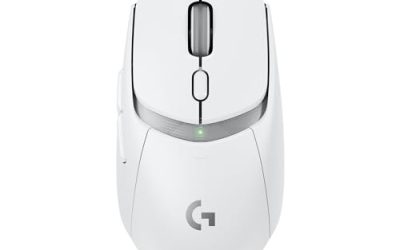
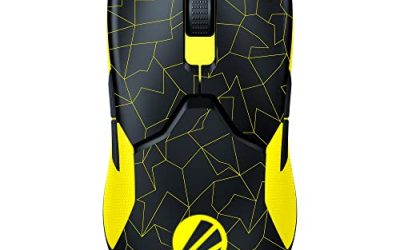
Razer Viper Ultimate
- Best for: Left-handed players and anyone who wants a dock on the desk instead of a cable.
- Ambidextrous shape with side buttons on both edges
- 74 grams
- Focus+ 20K DPI optical sensor
- HyperSpeed wireless
Left-handed players and anyone who wants a dock on the desk instead of a cable.
The 20K sensor and 1,000 Hz polling rate are a step behind newer flagships. Confirm the listing includes the RGB charging dock, since some listings sell the mouse alone.
The Viper Ultimate is the pick for players who want a symmetrical mouse with side buttons on both edges and a charging dock on the desk. Its ambidextrous shell carries thumb buttons on each side, which makes it the most genuinely left-hand friendly mouse in this guide, and the included RGB charging dock keeps it charged between sessions without a cable. The Focus+ 20K sensor and HyperSpeed wireless link are a generation behind the newest flagships, yet they still track cleanly for most competitive play. White Mercury finish aside, this is a complete desk setup in one box.
Watch out for: The 20K sensor and 1,000 Hz polling rate are a step behind newer flagships. Confirm the listing includes the RGB charging dock, since some listings sell the mouse alone.
Logitech G305 Lightspeed
- Best for: First-time wireless buyers who want long battery life and a simple symmetrical shape.
- HERO 12K sensor, 12,000 DPI
- 250 hour battery life on one AA battery
- 6 programmable buttons
- LIGHTSPEED wireless
First-time wireless buyers who want long battery life and a simple symmetrical shape.
It runs on a single AA battery rather than a rechargeable cell, and at 99 grams it is the heaviest mouse in this guide. There is no USB-C charging.
The G305 is the sensible entry point into wireless gaming mice and the longest-lasting battery in this guide. A single AA battery runs it for up to 250 hours, so it suits players who hate charging cables and do not want another device on a nightly routine. The symmetrical shell is compact and light enough for most grips, and the HERO 12K sensor tracks reliably at the sensitivity most players actually use. Six programmable buttons cover the basics without cluttering the shell, and on-board memory keeps your settings when you move between computers.
Watch out for: It runs on a single AA battery rather than a rechargeable cell, and at 99 grams it is the heaviest mouse in this guide. There is no USB-C charging.
Razer Viper V2 Pro
- Best for: Players who want a light Viper with on-mouse controls and a long battery life.
- Symmetrical shape, 58 grams
- Focus Pro 30K DPI optical sensor
- Gen-3 optical switches
- 90 hour battery life
Players who want a light Viper with on-mouse controls and a long battery life.
Some Amazon offers come from third-party sellers, so check the seller on the listing before ordering. Side buttons sit on the left edge only.
The Viper V2 Pro sits between the Viper Ultimate and the V3 Pro: lighter than the Ultimate, with a newer sensor and longer battery life, yet less extreme than the V3 Pro. Its symmetrical shell weighs 58 grams, and the Focus Pro 30K sensor with Gen-3 optical switches handles fast flicks without the mushy feel that older switches develop. On-mouse DPI controls let you change sensitivity without opening software, which suits players who switch between games with different aiming needs. The 90-hour battery life keeps it going through a full week of evening sessions.
Watch out for: Some Amazon offers come from third-party sellers, so check the seller on the listing before ordering. Side buttons sit on the left edge only.
Which One Fits Your Situation
You play competitive shooters and want the lightest setup
Pick the Razer Viper V3 Pro. At 54 grams with an 8,000 Hz wireless link and the Focus Pro 35K sensor, it is the fastest-feeling mouse in this guide, and the low symmetrical shell suits the fingertip and claw grips that most competitive players use. Keep the polling rate at 1,000 Hz for everyday play and switch to 8,000 Hz for matches, since the higher rate drains the battery much faster.
You play left-handed and need thumb buttons
Pick the Razer Viper Ultimate. It is the only mouse here with side buttons on both edges, so left-handed players get working thumb buttons instead of a blank right edge. The included RGB charging dock also keeps the mouse charged without a cable, which matters when the mouse is your daily driver rather than a tournament-only tool.
You want a tidy desk and no charging routine
Pick the Razer Viper Ultimate for its dock, or the Logitech G305 Lightspeed if you would rather swap a battery twice a year than plug anything in. The dock keeps the Viper Ultimate topped up between sessions, while the G305 runs for up to 250 hours on a single AA battery. Either way, you stop thinking about charging altogether.
You are buying your first wireless gaming mouse
Pick the Logitech G305 Lightspeed. It costs far less than the flagships, its battery lasts for months, and its symmetrical shape works for most grips without demanding a change in how you hold a mouse. The HERO 12K sensor is more than enough at the sensitivity most players use, and the six programmable buttons cover the basics.
Common Mistakes
- Buying the right-handed DEX version of the Superlight 2 when you meant to buy the symmetrical model.
- Assuming ambidextrous means side buttons on both edges — most symmetrical mice put them on the left only.
- Running 8,000 Hz polling all day and wondering why the battery drains in a few sessions.
- Judging a mouse by its DPI ceiling instead of its shape, weight and switch feel.
- Ignoring grip style: a low, narrow shell that suits fingertip players can cramp a palm grip within an hour.
Frequently Asked Questions
Can left-handed players use these mice?
Yes, all five have symmetrical shells that work in either hand, but side buttons are the catch. Only the Razer Viper Ultimate puts thumb buttons on both edges. The other four place them on the left edge, which suits right-handed players and leaves left-handed players with no thumb buttons. If you play left-handed and rely on thumb buttons, the Viper Ultimate is the practical choice.
Does ambidextrous mean side buttons on both sides?
Not always. Ambidextrous usually describes the shell shape: a symmetrical body that fits either hand. Most makers still place side buttons on the left edge only, since most buyers are right-handed. True two-sided buttons are rare, so check the product page photos and the button count before buying if you need buttons under your left thumb.
Is wireless fast enough for competitive play?
Yes, for the mice in this guide. Modern wireless links report position at 1,000 Hz or higher, which matches wired mice in everyday play, and the 8,000 Hz models report even faster. The real difference is battery life at high polling rates and the need to keep a receiver close to the mouse. Keep the dongle on a short extender or a front USB port for the most stable link.
What weight should I look for in an ambidextrous wireless mouse?
It depends on your grip. Fingertip and claw players usually prefer 54 to 60 grams, since a lighter shell makes fast flicks and resets easier. Palm players often prefer 70 to 99 grams, since a little extra weight steadies the hand and the palm carries the shell anyway. Try the lightest option first if you play fast shooters, and move heavier only if the light shell feels twitchy.
FAQ
Can left-handed players use these mice?
Does ambidextrous mean side buttons on both sides?
Is wireless fast enough for competitive play?
What weight should I look for in an ambidextrous wireless mouse?
More from Amazon
Programs that pair well with the guide above. Offers and eligibility are set by Amazon and may change.
Free shipping on eligible items, Prime Video and more. Eligible new members can start with a free trial.
Start a Prime free trialA Prime membership for ages 18-24 with a trial period. Eligibility is set by Amazon.
See Prime for Young AdultsAudiobooks and podcasts to listen to on the go. Eligible new members can start with a free trial.
Try Audible freeAd-free music streaming. Eligible new subscribers can start with a free trial.
Try Music Unlimited freeAs an Amazon Associate we earn from qualifying purchases.