Our Short List of 3

- Best for: Competitive gamers who want OLED blacks and a 240Hz refresh rate on one wide screen.
- 49-inch QD-OLED display
- 5120×1440 DQHD resolution
- 240Hz refresh rate
- 0.03ms GtG response time

- Best for: Gamers who want a deeply curved, bright HDR screen for an immersive gaming desk.
- 49-inch display
- 5120×1440 DQHD resolution
- 240Hz refresh rate
- 1ms GtG response time

- Best for: Mixed gaming and work desks where a 144Hz panel is fast enough and the wide workspace matters most.
- 49-inch display
- DQHD resolution
- 144Hz refresh rate
- DisplayHDR 600
All 5 Picks at a Glance
| Product | Specs | Action |
|---|---|---|
| Samsung 49-Inch Odyssey G93SC QD-OLED Gaming Monitor |
| Check price on Amazon |
| Samsung 49-Inch Odyssey G9 G95C Gaming Monitor |
| Check price on Amazon |
| Samsung 49-Inch Odyssey G9 G91F Gaming Monitor |
| Check price on Amazon |
 MSI MPG 491CQPX QD-OLED Gaming Monitor |
| Check price on Amazon |
 INNOCN 49C1R Super Ultrawide Monitor |
| Check price on Amazon |
Key takeaways
- Compare five 49-inch super ultrawide monitors for gaming, multitasking, and work. Find the right 32:9 screen for your desk in November 2026.
A 49-inch monitor is not a bigger version of a normal screen. It is a different kind of desk setup, because one 32:9 panel replaces two monitors and changes your sitting distance and how much desk depth you need. The real decision is not which brand to pick first. It is whether you want the deep curve and fast panel of a gaming screen, or the calmer refresh rate and stronger connectivity of a work screen, because the two look identical in a product photo and behave very differently once they are on your desk.
This guide is for gamers who want one wide view instead of a dual-monitor seam, for people who work with several windows open at once, and for anyone replacing two screens with a single panel. Every monitor below was chosen from its name and specifications on its Amazon listing, and each one is a true 49-inch screen with a 5120 by 1440 resolution, so you can compare them on equal terms.
Quick Picks
As an Amazon Associate we earn from qualifying purchases.
| Product | Best for | Key spec from title |
|---|---|---|
| Samsung Odyssey G93SC | Fast competitive gaming on a wide screen | 49-inch QD-OLED, 5120×1440, 240Hz |
| Samsung Odyssey G9 G95C | Bright HDR gaming with a deep curve | 49-inch, 5120×1440, 240Hz, 1000R |
| Samsung Odyssey G9 G91F | Gaming and everyday use at a calmer pace | 49-inch DQHD, 144Hz, DisplayHDR 600 |
| MSI MPG 491CQPX | OLED gaming with a second device attached | 49-inch QD-OLED, 5120×1440, 240Hz, KVM |
| INNOCN 49C1R | Work and multitasking with a laptop | 49-inch 5K2K, 5120×1440, 120Hz, USB-C 65W |
How to Choose
Panel Type Sets the Picture
A 49-inch monitor comes with one of two panel families, and the choice shapes everything you see. QD-OLED panels give deep blacks and quick pixel response, which suits dark games and fast motion, while VA panels give strong contrast at a lower cost and hold up well for general use. OLED panels can also show image retention if a static taskbar or menu stays on screen for many hours every day, so a work-heavy desk may suit a VA panel better. Check the panel type in the listing before anything else, because refresh rate and curve mean little if the panel itself does not match how you use the screen.
Refresh Rate Should Match Your Games
Refresh rate is measured in hertz, and it tells you how many new frames the screen can show each second. A 240Hz panel suits fast first-person games where smooth motion helps you track movement, while a 144Hz panel is enough for slower games and everyday work. A 120Hz panel still feels smooth for office tasks and video, and it often comes with better connectivity for a laptop. Do not pay for 240Hz if your computer cannot reach high frame rates at 5120 by 1440, because the panel can only show what your graphics card can draw.
Curve and Desk Depth Matter More Than You Think
Most 49-inch monitors are curved, and the curve is given as a radius such as 1000R or 1800R, where a smaller number means a tighter bend. A tighter curve wraps the edges of the screen toward you, which helps when you sit close, while a gentler curve suits a deeper desk where you sit further back. Measure your desk depth before ordering, because a 49-inch screen needs roughly an arm’s length of space between your eyes and the panel, plus room for the stand. If your desk is shallow, look for a monitor arm mount or a stand with a small footprint.
Ports Decide How Many Devices You Can Attach
A 49-inch screen often serves two devices at once, such as a gaming computer and a work laptop, so the port list deserves a close look. DisplayPort is the usual connection for high refresh rates on a desktop computer, while HDMI works for consoles and many laptops. USB-C with power delivery lets a laptop connect with one cable and charge at the same time, which keeps the desk tidy. A built-in KVM switch lets one keyboard and mouse control two connected computers, and picture-by-picture mode shows both computers side by side on the same wide screen.
The 5 Best Options
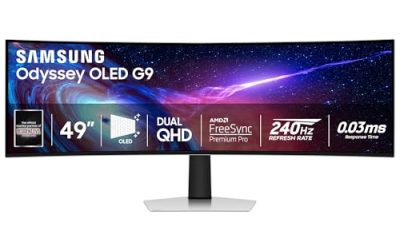
Samsung 49-Inch Odyssey G93SC QD-OLED Gaming Monitor
- Best for: Competitive gamers who want OLED blacks and a 240Hz refresh rate on one wide screen.
- 49-inch QD-OLED display
- 5120×1440 DQHD resolution
- 240Hz refresh rate
- 0.03ms GtG response time
Competitive gamers who want OLED blacks and a 240Hz refresh rate on one wide screen.
Static menus and taskbars left on screen for long hours can leave a faint retained image on OLED panels, so vary what you display during work sessions.
The Samsung Odyssey G93SC is the pick for gamers who want the fastest-feeling picture in this group. Its QD-OLED panel pairs a 240Hz refresh rate with a 0.03ms response time, so fast motion stays sharp and dark scenes keep their depth. The 1800R curve is gentler than the tightest curves here, which suits a desk where you sit a little further back. It is a strong match for competitive play and for games with dark, moody visuals, where the OLED blacks make a visible difference.
Watch out for: Static menus and taskbars left on screen for long hours can leave a faint retained image on OLED panels, so vary what you display during work sessions.
Samsung 49-Inch Odyssey G9 G95C Gaming Monitor
- Best for: Gamers who want a deeply curved, bright HDR screen for an immersive gaming desk.
- 49-inch display
- 5120×1440 DQHD resolution
- 240Hz refresh rate
- 1ms GtG response time
Gamers who want a deeply curved, bright HDR screen for an immersive gaming desk.
The tight 1000R curve needs enough desk depth to sit at a comfortable distance, so measure your desk before ordering.
The Samsung Odyssey G9 G95C is the pick for gamers who want a bright, deeply curved screen. Its 1000R curve wraps the panel around your field of view more tightly than the other monitors here, which makes the wide screen feel closer and more immersive when you sit at a normal desk distance. DisplayHDR 1000 support gives bright highlights in supported games and video, and the 240Hz refresh rate keeps fast motion smooth. It suits a dedicated gaming desk where the monitor is the centerpiece of the setup.
Watch out for: The tight 1000R curve needs enough desk depth to sit at a comfortable distance, so measure your desk before ordering.
Samsung 49-Inch Odyssey G9 G91F Gaming Monitor
- Best for: Mixed gaming and work desks where a 144Hz panel is fast enough and the wide workspace matters most.
- 49-inch display
- DQHD resolution
- 144Hz refresh rate
- DisplayHDR 600
Mixed gaming and work desks where a 144Hz panel is fast enough and the wide workspace matters most.
Fast competitive players may notice the step down from 240Hz in rapid games, so check your own frame rates first.
The Samsung Odyssey G9 G91F is the pick for buyers who want a 49-inch screen without paying for the fastest panel in the group. Its 144Hz refresh rate is still smooth for most games and more than enough for everyday work, and DisplayHDR 600 support gives solid brightness for games and video. As a 2025 model in the Odyssey G9 line, it covers the same wide 32:9 workspace as its faster siblings, so spreadsheets, timelines, and side-by-side windows all fit comfortably. It is a sensible middle ground for a mixed gaming and work desk.
Watch out for: Fast competitive players may notice the step down from 240Hz in rapid games, so check your own frame rates first.
MSI MPG 491CQPX QD-OLED Gaming Monitor
- Best for: Gamers with a second computer who want OLED speed plus KVM switching on one screen.
- 49-inch QD-OLED display
- 5120×1440 DQHD resolution
- 240Hz refresh rate
- 0.03ms response time
Gamers with a second computer who want OLED speed plus KVM switching on one screen.
Confirm your second device connects through the ports the KVM expects, and check the cable types you will need before the monitor arrives.
The MSI MPG 491CQPX is the pick for gamers who switch between two computers on one screen. Its QD-OLED panel matches the fastest monitors here with a 240Hz refresh rate and a 0.03ms response time, and it adds a KVM switch, so one keyboard and mouse can control a gaming desktop and a second device without swapping cables. MSI also covers the panel with a three-year burn-in warranty, which is a real consideration for an OLED screen that will show static windows during work hours. It suits a desk that serves both play and productivity.
Watch out for: Confirm your second device connects through the ports the KVM expects, and check the cable types you will need before the monitor arrives.
INNOCN 49C1R Super Ultrawide Monitor
- Best for: Laptop users who want one-cable docking, wired networking, and a wide workspace for multitasking.
- 49-inch 5K2K display
- 5120×1440 resolution
- 120Hz refresh rate
- USB-C with 65W power delivery
Laptop users who want one-cable docking, wired networking, and a wide workspace for multitasking.
A 120Hz panel will not match the gaming monitors here in fast competitive titles, so treat it as a work screen first.
The INNOCN 49C1R is the pick for work-first buyers who want a 49-inch screen built around a laptop. Its USB-C port delivers 65W of power, so a laptop connects and charges through a single cable, and the RJ45 Ethernet port gives a wired network connection without a separate dock. The 120Hz refresh rate is calmer than the gaming panels here, but it is smooth for office work, video, and light games. The 1800R curve keeps the edges of the wide panel readable from a normal sitting distance.
Watch out for: A 120Hz panel will not match the gaming monitors here in fast competitive titles, so treat it as a work screen first.
Which One Fits Your Situation
You Play Fast Competitive Games
Choose the Samsung Odyssey G93SC if your games reward quick reactions and dark scenes. Its QD-OLED panel and 240Hz refresh rate give the sharpest motion and deepest blacks in this group, and the gentler 1800R curve suits a desk where you sit a little further back. Keep your graphics settings realistic for 5120 by 1440, because the panel can only show the frames your computer can draw.
You Want the Most Immersive Gaming Desk
Choose the Samsung Odyssey G9 G95C if you want the screen to wrap around you. Its tight 1000R curve and DisplayHDR 1000 brightness make games and video feel larger than on any other monitor here. Give it a deep desk and a chair position that lets the curve do its work, and it becomes the centerpiece of a dedicated gaming setup.
You Mix Gaming With a Full Workday
Choose the MSI MPG 491CQPX if your desk serves two purposes. The KVM switch lets one keyboard and mouse control two computers, the OLED panel stays fast for evening games, and the three-year burn-in warranty covers the panel through long workdays with static windows. It is the most flexible pick in this group for a shared gaming and work desk.
You Work From a Laptop and Want One Cable
Choose the INNOCN 49C1R if your laptop is your main computer. USB-C with 65W power delivery connects and charges the laptop through one cable, the RJ45 port adds wired networking, and the wide 5120 by 1440 workspace holds several windows side by side. It is the only pick here built around docking a laptop rather than driving a desktop.
Common Mistakes
- Buying a 49-inch monitor without measuring desk depth, then sitting too close to a screen that needs an arm’s length of space.
- Paying for a 240Hz panel when the graphics card cannot reach high frame rates at 5120 by 1440.
- Choosing an OLED panel for a desk where the same static taskbar and menus stay on screen all day without varying the display.
- Forgetting to check whether the monitor has USB-C power delivery before planning a one-cable laptop setup.
- Assuming any HDMI port can drive 5120 by 1440 at full refresh rate, when DisplayPort is often the connection that reaches it.
Frequently Asked Questions
Is a 49-inch monitor the same as two 27-inch monitors?
A 49-inch 32:9 monitor has the same total width as two 27-inch 16:9 screens placed side by side, with the same 5120 by 1440 resolution. The difference is the missing seam in the middle and the curved panel, which makes the wide view feel like one continuous workspace. Window management software can still split the screen into zones that act like separate monitors.
What graphics card do I need for a 49-inch monitor?
A 49-inch monitor at 5120 by 1440 has roughly the pixel count of a 4K screen cut down in height, so it needs a capable graphics card for demanding games at high settings. For office work, video, and web browsing, almost any modern computer with DisplayPort or HDMI will drive it. Check the refresh rate your connection supports, because older ports may limit the panel below its maximum.
Do 49-inch monitors work with a laptop?
Yes, many 49-inch monitors work with a laptop, and the INNOCN 49C1R in this guide is built for exactly that, with USB-C power delivery and an Ethernet port. Check that your laptop supports the resolution and refresh rate you want over its USB-C or HDMI port, and confirm the USB-C power output is enough to charge your laptop while you work.
Should I choose OLED or VA for a 49-inch monitor?
Choose OLED if you play games with dark scenes and want the deepest blacks and fastest pixel response, and if you vary what is on screen daily. Choose VA if your desk is work-heavy with windows shown for many hours, or if you want contrast at a lower cost. Both types come in 49-inch sizes, so the choice depends on how you use the screen, not on size alone.
FAQ
Is a 49-inch monitor the same as two 27-inch monitors?
What graphics card do I need for a 49-inch monitor?
Do 49-inch monitors work with a laptop?
Should I choose OLED or VA for a 49-inch monitor?
More from Amazon
Programs that pair well with the guide above. Offers and eligibility are set by Amazon and may change.
Free shipping on eligible items, Prime Video and more. Eligible new members can start with a free trial.
Start a Prime free trialA Prime membership for ages 18-24 with a trial period. Eligibility is set by Amazon.
See Prime for Young AdultsAudiobooks and podcasts to listen to on the go. Eligible new members can start with a free trial.
Try Audible freeAd-free music streaming. Eligible new subscribers can start with a free trial.
Try Music Unlimited freeAs an Amazon Associate we earn from qualifying purchases.