Our Short List of 3

- Best for: Gamers who want a fast QD-OLED 49-inch panel for competitive and immersive play.
- 49-inch QD-OLED display
- 5120×1440 resolution
- 240Hz refresh rate
- 0.03ms response time

- Best for: Gamers who want a bright HDR picture and a deep, immersive curve.
- 49-inch display
- 5120×1440 resolution
- 240Hz refresh rate
- 1ms GtG response time

- Best for: People who switch between a gaming PC and a work laptop on one monitor.
- 49-inch QD-OLED display
- 5120×1440 resolution
- 240Hz refresh rate
- 0.03ms response time
All 5 Picks at a Glance
| Product | Specs | Action |
|---|---|---|
| Samsung 49″ Odyssey G93SC QD-OLED |
| Check price on Amazon |
| Samsung 49″ Odyssey G9 G95C |
| Check price on Amazon |
| MSI MPG 491CQPX QD-OLED |
| Check price on Amazon |
 INNOCN 49C1R |
| Check price on Amazon |
 Samsung 57″ Odyssey Neo G9 G95NC |
| Check price on Amazon |
Key takeaways
- Compare five 32:9 super ultrawide monitors, from 49-inch QD-OLED panels to a 57-inch Dual 4K display, and pick the right one for gaming and work.
A super ultrawide monitor is not a bigger version of a normal screen. One 32:9 panel replaces two monitors side by side, with no bezel in the middle. The real decision is whether that wide canvas fits your desk, your graphics card, and the way you use a screen. A 49-inch panel is over a metre wide, and a 57-inch panel is wider still, so the wrong choice leaves you with a screen that overwhelms a small desk or a panel your computer cannot drive properly.
This guide is for gamers who want a wider field of view, sim racers who want the track to wrap around them, and people who keep a dozen windows open for work. The five monitors below were chosen from their Amazon titles and specifications, so every detail here comes from the product listing itself. Read the panel type, the refresh rate, and the ports first, because those three things decide whether a super ultrawide feels fast, sharp, and easy to live with.
Quick Picks
As an Amazon Associate we earn from qualifying purchases.
| Product | Best for | Key spec from title |
|---|---|---|
| Samsung 49″ Odyssey G93SC QD-OLED | Fast competitive gaming on a 49-inch panel | 5120×1440, 240Hz, 0.03ms response |
| Samsung 49″ Odyssey G9 G95C | Bright HDR gaming with a deep curve | 5120×1440, 240Hz, 1000R curve |
| MSI MPG 491CQPX QD-OLED | QD-OLED gaming with a KVM switch | 5120×1440, 240Hz, 0.03ms response |
| INNOCN 49C1R | Work and multitasking over one cable | 5120×1440, 120Hz, USB-C 65W |
| Samsung 57″ Odyssey Neo G9 G95NC | The widest Dual 4K workspace | 7680×2160, 240Hz, Mini-LED |
How to Choose
Panel type decides the picture
A super ultrawide panel is usually QD-OLED, OLED, VA, or Mini-LED, and the choice changes contrast, colour, and how the screen handles dark scenes. QD-OLED panels such as the Samsung G93SC and the MSI MPG 491CQPX switch pixels almost instantly and show deep blacks, which suits dark games and films, while Mini-LED panels such as the 57-inch Neo G9 use hundreds of dimming zones to push brightness higher for HDR scenes. VA panels are cheaper and still look good in a bright room, but their viewing angles and response times are weaker. Pick the panel for the content you watch most, not for the specification sheet, because a fast panel means little if you mostly read documents and spreadsheets.
Resolution and refresh rate must match your computer
Almost every 49-inch super ultrawide runs at 5120×1440, which is two 2560×1440 screens joined together, while the 57-inch Neo G9 runs at 7680×2160, which is two 4K screens joined together. The wider the resolution, the harder your graphics card works, and a 240Hz panel only feels smooth if your games can actually reach high frame rates at that resolution. Check your graphics card and its outputs before you buy, because driving 7680×2160 at 240Hz needs a modern card and a DisplayPort 2.1 connection. If your computer is older, a 120Hz panel such as the INNOCN 49C1R is a kinder match.
Curve and size decide comfort
Super ultrawide monitors are curved so the far edges stay at a similar distance from your eyes, and the curve is measured as a radius, with a smaller number meaning a tighter bend. A 1000R curve wraps around you more aggressively than an 1800R curve, which suits sim racing and immersive games, while a gentler curve feels calmer for office work and video editing. Size matters just as much, because a 49-inch panel needs a deep desk and a strong monitor arm, and a 57-inch panel needs even more room. Measure your desk depth and width before ordering, because a panel that is too close forces you to turn your head constantly.
Ports and extras decide daily use
A super ultrawide is often the hub of a desk, so its ports decide how many devices you can connect without a separate dock. Look for DisplayPort and HDMI inputs that support the full resolution and refresh rate, and check whether a USB-C port carries video, data, and charging in one cable, because that single cable can connect a laptop and charge it at the same time. A built-in KVM switch lets one keyboard and mouse control two computers through the same monitor, which matters if you share a desk between a gaming PC and a work laptop. Check the stand too, because height, tilt, and VESA mounting decide whether the panel sits at eye level on your desk.
The 5 Best Options
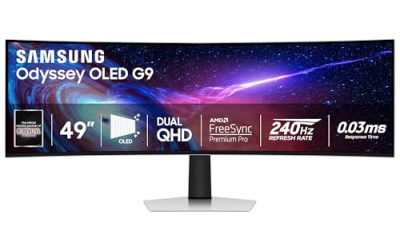
Samsung 49″ Odyssey G93SC QD-OLED
- Best for: Gamers who want a fast QD-OLED 49-inch panel for competitive and immersive play.
- 49-inch QD-OLED display
- 5120×1440 resolution
- 240Hz refresh rate
- 0.03ms response time
Gamers who want a fast QD-OLED 49-inch panel for competitive and immersive play.
Measure your desk first, because a 49-inch panel needs far more width and depth than a standard monitor.
The Samsung Odyssey G93SC is the pick for gamers who want the fastest 49-inch panel in this guide without stepping up to the much larger 57-inch model. Its QD-OLED panel pairs a 240Hz refresh rate with a 0.03ms response time, so motion stays sharp in fast games, and its 5120×1440 resolution gives you the full width of two 1440p screens in one seamless picture. The 1800R curve is gentle enough for everyday use while still pulling the edges of the screen toward you during games.
Watch out for: Measure your desk first, because a 49-inch panel needs far more width and depth than a standard monitor.
Samsung 49″ Odyssey G9 G95C
- Best for: Gamers who want a bright HDR picture and a deep, immersive curve.
- 49-inch display
- 5120×1440 resolution
- 240Hz refresh rate
- 1ms GtG response time
Gamers who want a bright HDR picture and a deep, immersive curve.
A 1000R curve is very pronounced, so check that you like a strong wrap before choosing it over a gentler panel.
The Samsung Odyssey G9 G95C suits gamers who care about brightness and HDR impact as much as speed, because its DisplayHDR 1000 rating means bright highlights stand out far more than on a standard panel. It runs at the same 5120×1440 resolution and 240Hz refresh rate as the G93SC, but its tighter 1000R curve wraps the screen further around you, which makes racing games and open-world games feel more immersive. The 1ms response time keeps motion clean, and the deep curve pulls the far edges of the picture into your field of view.
Watch out for: A 1000R curve is very pronounced, so check that you like a strong wrap before choosing it over a gentler panel.
MSI MPG 491CQPX QD-OLED
- Best for: People who switch between a gaming PC and a work laptop on one monitor.
- 49-inch QD-OLED display
- 5120×1440 resolution
- 240Hz refresh rate
- 0.03ms response time
People who switch between a gaming PC and a work laptop on one monitor.
Confirm the KVM setup matches your two computers, because the switch is only useful if both machines connect to the monitor.
The MSI MPG 491CQPX is the QD-OLED option for people who share one monitor between two computers, because its built-in KVM switch lets a single keyboard and mouse control both machines. It matches the G93SC on the headline numbers, with a 49-inch QD-OLED panel, 5120×1440 resolution, 240Hz refresh rate, and 0.03ms response time, so games look and feel just as fast. The three-year burn-in warranty listed for this model also gives extra reassurance for a panel that will show static windows and taskbars during long work sessions.
Watch out for: Confirm the KVM setup matches your two computers, because the switch is only useful if both machines connect to the monitor.
INNOCN 49C1R
- Best for: Office work and multitasking where one cable connects and charges a laptop.
- 49-inch 5K2K display
- 5120×1440 resolution
- 120Hz refresh rate
- USB-C with 65W charging
Office work and multitasking where one cable connects and charges a laptop.
At 120Hz it is slower than the 240Hz gaming panels, so competitive gamers should choose one of the faster models above.
The INNOCN 49C1R is the work-first pick in this guide, because it trades the 240Hz refresh rates of the gaming panels for a 120Hz panel and a set of connections built around a single cable. Its USB-C port delivers 65W of charging alongside video, so a laptop can connect with one cable and stay charged through the working day, and its RJ45 Ethernet port gives a wired network connection without a separate dock. The 5120×1440 resolution still gives you the full super ultrawide workspace, and the 1800R curve keeps the edges comfortable during long sessions.
Watch out for: At 120Hz it is slower than the 240Hz gaming panels, so competitive gamers should choose one of the faster models above.
Samsung 57″ Odyssey Neo G9 G95NC
- Best for: People who want the widest possible workspace, equivalent to two 4K monitors in one panel.
- 57-inch Mini-LED display
- 7680×2160 Dual 4K resolution
- 240Hz refresh rate
- Mini-LED with 2392 dimming zones
People who want the widest possible workspace, equivalent to two 4K monitors in one panel.
Check your graphics card and desk space first, because 7680×2160 at 240Hz and a 57-inch panel demand a powerful computer and a very wide desk.
The Samsung Odyssey Neo G9 G95NC is the largest and widest monitor in this guide, and it is the pick when one screen must replace two 4K monitors. Its 7680×2160 resolution is Dual 4K, which means two 3840×2160 screens side by side with no bezel between them, and its Mini-LED backlight uses 2392 dimming zones to control brightness across that huge panel. It still runs at 240Hz, so the extra width does not mean giving up speed, and its DisplayPort 2.1 input is the connection that carries the full resolution and refresh rate.
Watch out for: Check your graphics card and desk space first, because 7680×2160 at 240Hz and a 57-inch panel demand a powerful computer and a very wide desk.
Which One Fits Your Situation
You play fast competitive games
Choose the Samsung Odyssey G93SC, because its QD-OLED panel and 0.03ms response time keep motion sharp when the action speeds up, and its 240Hz refresh rate matches high frame rates at 5120×1440. The 1800R curve is gentle enough for everyday tasks between matches, so it does not feel like a single-purpose screen. If you also want a KVM switch for a second computer, the MSI MPG 491CQPX offers the same speed with that extra feature.
You race in a simulator
Choose the Samsung Odyssey G9 G95C, because its tight 1000R curve wraps the track around you more than any other panel here, and its bright HDR picture makes daylight circuits and night races easier to read. The 240Hz refresh rate and 1ms response time keep the road ahead smooth, and the 49-inch width fills your peripheral vision without the desk demands of the 57-inch model. Mount it on a solid arm, because a sim rig shakes the desk.
You work with many windows open
Choose the INNOCN 49C1R, because its USB-C port connects and charges a laptop with one cable, and its RJ45 port adds a wired network connection without a dock. The 5120×1440 resolution holds a browser, a document, a spreadsheet, and a chat window side by side, and the 120Hz refresh rate is smooth enough for office work and video. If your work also involves colour-critical editing, the QD-OLED panels offer richer contrast, but the INNOCN is the simpler desk setup.
You want one screen instead of two 4K monitors
Choose the Samsung 57-inch Odyssey Neo G9 G95NC, because its 7680×2160 Dual 4K resolution is exactly two 4K screens joined together, with no bezel splitting the middle of your work. Its Mini-LED backlight with 2392 dimming zones handles bright and dark areas across that huge canvas, and the 240Hz refresh rate means the panel still suits gaming after work. Only buy it if your desk is wide enough and your graphics card supports DisplayPort 2.1 at full resolution.
Common Mistakes
- Buying a 49-inch or 57-inch panel without measuring desk width and depth, then finding the screen overhangs the desk or sits too close to your eyes.
- Choosing a 240Hz panel when your graphics card cannot reach high frame rates at 5120×1440, so the extra refresh rate goes unused.
- Ignoring the curve, and picking a tight 1000R panel for calm office work or a gentle 1800R panel when you wanted a sim racing screen that wraps around you.
- Assuming every port supports the full resolution and refresh rate, when some HDMI ports and older DisplayPort versions cap the panel below its headline numbers.
- Calling the 57-inch Neo G9 an 8K monitor, when its 7680×2160 resolution is Dual 4K, not the 7680×4320 resolution of a true 8K panel.
Frequently Asked Questions
Is a super ultrawide monitor the same as two monitors side by side?
A 49-inch super ultrawide at 5120×1440 has the same pixel count as two 2560×1440 monitors joined together, and a 57-inch panel at 7680×2160 matches two 4K monitors. The difference is the single seamless picture with no bezel in the middle and one stand instead of two. The trade-off is less flexibility, because you cannot angle two separate screens independently or turn one upright for reading long documents.
Do I need a powerful graphics card for a super ultrawide monitor?
Yes, more than for a standard monitor, because 5120×1440 has far more pixels than 2560×1440, and 7680×2160 has far more again. A mid-range card handles office work and older games, but reaching high frame rates at 240Hz needs a strong modern card. Check your card against the games you play, and remember that the 57-inch panel needs DisplayPort 2.1 for its full resolution and refresh rate.
What does the curve number mean on a super ultrawide monitor?
The number is the radius of the curve in millimetres, so 1000R means a circle with a one-metre radius and 1800R means a circle with a 1.8-metre radius. A smaller number means a tighter, more pronounced curve that wraps around you, which suits racing games and immersive play. A larger number means a gentler curve that feels calmer for office work, video editing, and reading.
Can I use a super ultrawide monitor for work as well as gaming?
Yes, and many buyers do, because the wide canvas holds several windows side by side without a second monitor. The INNOCN 49C1R is the most work-focused pick here, with USB-C charging and an Ethernet port for a laptop, while the MSI MPG 491CQPX adds a KVM switch for two computers. Check the stand height, because a screen this wide must sit at eye level to stay comfortable.
FAQ
Is a super ultrawide monitor the same as two monitors side by side?
Do I need a powerful graphics card for a super ultrawide monitor?
What does the curve number mean on a super ultrawide monitor?
Can I use a super ultrawide monitor for work as well as gaming?
More from Amazon
Programs that pair well with the guide above. Offers and eligibility are set by Amazon and may change.
Free shipping on eligible items, Prime Video and more. Eligible new members can start with a free trial.
Start a Prime free trialA Prime membership for ages 18-24 with a trial period. Eligibility is set by Amazon.
See Prime for Young AdultsAudiobooks and podcasts to listen to on the go. Eligible new members can start with a free trial.
Try Audible freeAd-free music streaming. Eligible new subscribers can start with a free trial.
Try Music Unlimited freeAs an Amazon Associate we earn from qualifying purchases.