Our Short List of 3

- Best for: Gamers who want a comfortable, well-supported keypad for daily play.
- Mecha-membrane key switches
- 32 programmable keys
- Customizable Chroma RGB lighting
- Programmable macros

- Best for: Competitive players who want adjustable actuation and the fastest key resets.
- Analog-optical key switches
- Rapid Trigger
- Adjustable actuation
- 32 programmable keys
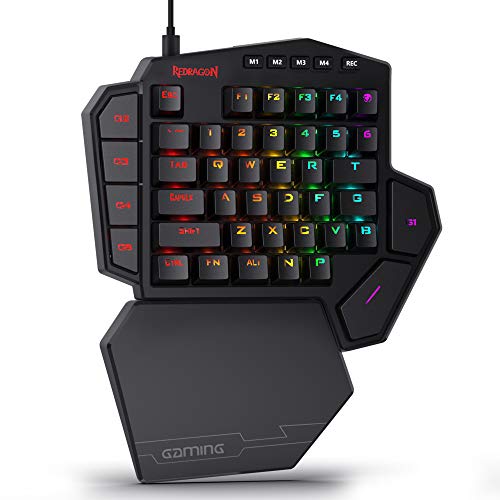
- Best for: Players who want mechanical switches and the most keys in a compact pad.
- 42 keys
- Type-C connection
- Hot-swappable socket
- 7 onboard macro keys
All 4 Picks at a Glance
| Product | Specs | Action |
|---|---|---|
| Razer Tartarus V2 |
| Check price on Amazon |
| Razer Tartarus Pro |
| Check price on Amazon |
| Redragon K585 DITI |
| Check price on Amazon |
 Koolertron 23-Key Macro Keyboard |
| Check price on Amazon |
Key takeaways
- The best one handed keyboards put your most-used keys under one hand. Compare Razer, Redragon, and Koolertron keypads for gaming and macros before you buy.
A full keyboard spreads your most-used keys across both hands, which is fine for typing but wasteful for gaming. A one-handed keyboard, also called a gaming keypad, gathers the keys you actually press during a game into a compact pad under your left hand, leaving your right hand free for the mouse. The result is a shorter reach, a cleaner desk, and a layout you can tune key by key. Some players use one for competitive shooters, others for macros in creative software, and some simply want a smaller setup that still feels mechanical.
This guide is for gamers and power users who want their commands closer together and their desk less crowded. It covers people who play fast shooters, who run long macro chains in editing software, and who want a second input device beside a full keyboard. Each keypad below was picked from the name and specifications shown on its Amazon page.
Quick Picks
As an Amazon Associate we earn from qualifying purchases
| Product | Best for | Key spec from title |
|---|---|---|
| Razer Tartarus V2 | Best all-round gaming keypad | 32 programmable keys |
| Razer Tartarus Pro | Adjustable key actuation | Analog-optical key switches |
| Redragon K585 DITI | Mechanical keys on a budget | 42 keys |
| Koolertron 23-Key Macro Keyboard | Compact macro pad | 23 fully programmable keys |
How to Choose
Switch Type and Feel
The switches decide how each key press feels and how fast it registers. Mecha-membrane switches blend a rubber dome with a mechanical click, which gives a soft landing and a clear tactile bump. Mechanical switches give a sharper and more consistent press, and hot-swappable sockets let you change them without soldering. Analog-optical switches add adjustable actuation, so you can set a key to trigger with a light touch or a deep press, and Rapid Trigger resets the key the moment you lift your finger. Choose the switch that matches your games, since fast shooters reward light actuation and long sessions reward a softer landing.
Programmable Keys and Macros
Programmable keys are the whole point of a one-handed keyboard, so count them before you buy. A pad with 32 programmable keys can hold a full ability bar plus movement keys, while a 23-key pad suits a tighter set of commands or a macro workflow. Onboard macro keys let you record a chain of actions and fire it with one press, which saves time in editing software and in games with repeated sequences. Profiles let you switch layouts between games without reprogramming, and onboard memory keeps your layout when you move the pad to another computer. Check how many profiles the software supports.
Ergonomics and Palm Rest
A one-handed keyboard lives under your left hand for hours, so the shape matters more than the looks. An adjustable palm rest lets you raise or lower your wrist to a neutral angle, which reduces strain during long sessions. A thumb module with a joystick or a small cluster of buttons gives your thumb a job beyond the spacebar, which is useful for movement or jumping. The pad should sit flat and stay put, with rubber feet that grip the desk when you press keys hard. If you play for hours at a time, try the palm rest angle first and set the keys second.
Software and Compatibility
The software decides how much of the hardware you can actually use. Razer Synapse, Redragon software, and Koolertron tools all let you remap keys, build macros, and tune lighting, but they differ in how easy they are to learn. Check that the software runs on your operating system, since some tools are Windows-only. A wired USB connection gives the lowest latency and never needs charging, while a wireless pad needs a battery and a dongle. If you switch between a desktop and a laptop, onboard memory matters, because it carries your layout without reinstalling anything.
The 4 Best Options
Razer Tartarus V2
- Best for: Gamers who want a comfortable, well-supported keypad for daily play.
- Mecha-membrane key switches
- 32 programmable keys
- Customizable Chroma RGB lighting
- Programmable macros
Gamers who want a comfortable, well-supported keypad for daily play.
Mecha-membrane switches feel softer than full mechanical switches, which some players dislike.
The Tartarus V2 is the best all-round one-handed keyboard for most gamers, because it balances feel, programmability, and comfort in one familiar shape. Its mecha-membrane switches give a soft landing with a clear tactile bump, which suits long sessions better than a stiff mechanical switch. The 32 programmable keys cover a full ability bar, and the Chroma RGB lighting syncs with your other Razer gear through Synapse. Snap Tap helps with counter-strafing in shooters by prioritizing the most recent directional input. The detachable palm rest adjusts to two angles, so you can set your wrist before you set your keys.
Watch out for: Mecha-membrane switches feel softer than full mechanical switches, which some players dislike.
Razer Tartarus Pro
- Best for: Competitive players who want adjustable actuation and the fastest key resets.
- Analog-optical key switches
- Rapid Trigger
- Adjustable actuation
- 32 programmable keys
Competitive players who want adjustable actuation and the fastest key resets.
Adjustable actuation takes time to set up, so expect a tuning session before your first match.
The Tartarus Pro is the pick for competitive players who want to tune every key press. Its analog-optical switches let you adjust the actuation point for each key, so a movement key can trigger with a feather touch while an ability key needs a firmer press. Rapid Trigger resets a key the instant you lift your finger, which makes repeated presses faster in fast shooters. The 32 programmable keys match the V2, and the Chroma RGB lighting and macro support carry over unchanged. The wrist rest adjusts to two positions, and the whole pad feels built for players who notice small differences in timing.
Watch out for: Adjustable actuation takes time to set up, so expect a tuning session before your first match.
Redragon K585 DITI
- Best for: Players who want mechanical switches and the most keys in a compact pad.
- 42 keys
- Type-C connection
- Hot-swappable socket
- 7 onboard macro keys
Players who want mechanical switches and the most keys in a compact pad.
Outemu Blue switches are loud, so they suit a private room more than a shared one.
The K585 DITI is the strongest mechanical keypad at this level, and it is the pick for players who want real mechanical switches without paying for a premium brand. Its 42 keys use Outemu Blue switches, which give a loud click and a firm tactile bump, and the hot-swappable socket lets you change switches later without tools. Seven onboard macro keys sit along the edges, and the detachable wrist rest keeps your hand level during long games. The Type-C connection keeps the cable tidy, and the RGB backlighting gives each key a clear glow in a dark room. It is the most keys for the least fuss in this guide.
Watch out for: Outemu Blue switches are loud, so they suit a private room more than a shared one.
Koolertron 23-Key Macro Keyboard
- Best for: Editors and gamers who want a small macro pad with layered profiles.
- 23 fully programmable keys
- RGB LED backlighting
- Mechanical key switches
- Onboard memory with 4 configuration layers
Editors and gamers who want a small macro pad with layered profiles.
With only 23 keys, it suits a focused set of commands rather than a full ability bar.
The Koolertron 23-key pad is the simplest device in this group, and that is its strength. It gives you 23 fully programmable mechanical keys in a compact rectangle, with RGB LED backlighting and onboard memory that stores four configuration layers. The small size leaves your desk clear and your mouse hand free, and the pad works as a macro board for editing software just as well as it works for games. Each key can hold a single command or a long macro chain, and the four layers multiply the 23 keys into far more commands than the size suggests.
Watch out for: With only 23 keys, it suits a focused set of commands rather than a full ability bar.
Which One Fits Your Situation
You Want the Best All-Round Keypad
Choose the Razer Tartarus V2 when you want a keypad that does everything well without a steep learning curve. Its mecha-membrane switches feel comfortable for hours, the 32 programmable keys cover most games, and Synapse makes macros easy to build. The adjustable palm rest and Chroma lighting round out a pad that works the moment you plug it in. It is the safe first keypad.
You Play Competitive Shooters
Choose the Razer Tartarus Pro when milliseconds matter to you. Adjustable actuation lets you set movement keys to trigger early and ability keys to trigger late, and Rapid Trigger makes repeated presses faster than a standard switch. The 32 programmable keys give you room for a full loadout, and the two-position wrist rest keeps your hand steady. It is the pick for ranked play and fast reaction games.
You Want Mechanical Switches
Choose the Redragon K585 DITI when you want the feel of a mechanical keyboard in a one-handed shape. Its 42 Outemu Blue keys give a firm click and a clear bump, and the hot-swappable socket lets you try other switches later. The seven macro keys and detachable wrist rest make it a complete setup on its own. It is the pick for players who type hard and like to hear it.
You Want a Compact Macro Pad
Choose the Koolertron 23-key pad when you want a small board for macros rather than a full gaming keypad. Its four onboard layers turn 23 keys into a large command set, and the compact size fits beside any keyboard or laptop. It suits video editors, streamers, and gamers who run a focused set of commands. It is the pick when desk space matters most.
Common Mistakes
- Buying a keypad with too few keys for the game you play most.
- Ignoring the palm rest angle, then wondering why your wrist aches after an hour.
- Choosing loud clicky switches for a shared room or a late-night setup.
- Skipping the software check and finding it does not run on your system.
- Forgetting that a wireless pad needs charging while a wired pad never does.
Frequently Asked Questions
Can I use a one-handed keyboard instead of a full keyboard?
Yes, for gaming and macros a one-handed keypad can replace a full keyboard, since it holds the keys you use most. You will still want a full keyboard for typing long messages or documents. Many players keep both on the desk and switch between them as the task changes.
Do I need software to use a gaming keypad?
No, a keypad works as a basic input device without software, but you need the maker’s software to remap keys and build macros. The software also controls lighting and profiles. Check that it runs on your operating system before you buy, since some tools are Windows-only.
Are mechanical switches better than mecha-membrane switches?
Mechanical switches give a sharper and more consistent press, while mecha-membrane switches feel softer and quieter. Neither is better for everyone, since the choice depends on your games and your tolerance for noise. Competitive players often prefer mechanical or analog-optical switches, while casual players often prefer the softer feel.
Can I use a gaming keypad with a laptop?
Yes, a wired keypad plugs into any USB port and works alongside a laptop keyboard. It is useful when the laptop sits on a stand or when you want a better key layout than the built-in board. A compact pad also travels well, since it takes up little room in a bag.
FAQ
Can I use a one-handed keyboard instead of a full keyboard?
Do I need software to use a gaming keypad?
Are mechanical switches better than mecha-membrane switches?
Can I use a gaming keypad with a laptop?
More from Amazon
Programs that pair well with the guide above. Offers and eligibility are set by Amazon and may change.
Free shipping on eligible items, Prime Video and more. Eligible new members can start with a free trial.
Start a Prime free trialA Prime membership for ages 18-24 with a trial period. Eligibility is set by Amazon.
See Prime for Young AdultsAudiobooks and podcasts to listen to on the go. Eligible new members can start with a free trial.
Try Audible freeAd-free music streaming. Eligible new subscribers can start with a free trial.
Try Music Unlimited freeAs an Amazon Associate we earn from qualifying purchases.