
Our Short List of 3
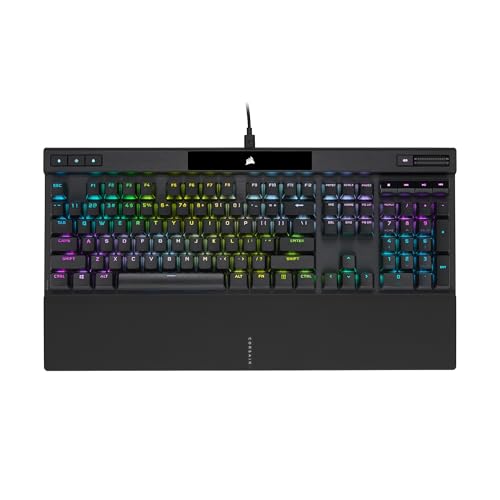
- Best for: Competitive players who want a fast wired full-size board.
- Cherry MX Red mechanical switches
- 8,000 Hz hyper-polling
- PBT double-shot keycaps
- Aircraft-grade anodized aluminium frame

- Best for: Small desks and players who want wireless freedom with a compact layout.
- 75 percent layout with hot-swappable switches
- Pre-lubricated MLX Red linear switches
- 2.4 GHz wireless and Bluetooth connectivity
- Up to 266 hours battery life with lighting off

- Best for: Players who want a flagship board with optical switches and macro keys.
- OPX optical-mechanical switches
- 4,000 Hz polling rate
- 44-zone LightEdge RGB
- PBT double-shot keycaps
All 4 Picks at a Glance
| Product | Specs | Action |
|---|---|---|
| Corsair K70 RGB PRO |
| Check price on Amazon |
| Corsair K65 PLUS Wireless |
| Check price on Amazon |
| Corsair K100 RGB |
| Check price on Amazon |
 Corsair K55 RGB PRO |
| Check price on Amazon |
Key takeaways
- Compare five Corsair keyboards for gaming and typing, from the wired K70 RGB PRO to the slim K100 AIR, with switch types, layouts, and wireless explained.
A keyboard decides how every hour at a desk feels. Corsair builds its boards around fast optical and mechanical switches, thick PBT keycaps, and aluminium frames, so the choice comes down to layout, switch feel, and whether the board stays wired or goes wireless. The five models below cover full-size, 75 percent, and ultra-thin designs, each with a different balance of speed, sound, and desk space.
This guide is written for PC gamers who want a Corsair board that matches their setup, whether that means a wired flagship for competitive play, a compact wireless board for a tidy desk, or a quiet membrane board for mixed work and play. Every pick below comes from the Amazon listing for that exact model, with switch type, layout, and connectivity taken from the product page.
Quick Picks
As an Amazon Associate we earn from qualifying purchases
| Product | Best for | Key spec from title |
|---|---|---|
| Corsair K70 RGB PRO | Competitive play on a full-size board | Cherry MX Red switches |
| Corsair K65 PLUS Wireless | A compact wireless setup | 75 percent layout, hot-swappable |
| Corsair K100 RGB | A flagship with optical switches | OPX optical-mechanical switches |
| Corsair K55 RGB PRO | Quiet typing on a budget board | Membrane keys, six-zone RGB |
| Corsair K100 AIR Wireless | The thinnest wireless board | Cherry MX Ultra-Low Profile switches |
How to Choose
Switch Type Sets the Feel
Corsair sells three switch families, and each one changes how the board feels under your fingers. Cherry MX Red switches travel smoothly with a light, linear press, which suits fast double-taps in shooters. Optical-mechanical OPX switches actuate with light and register sooner, so they suit players who want the shortest possible response. Membrane keys, found on the K55 RGB PRO, press softer and quieter, which suits shared rooms and mixed work. Try to match the switch to the way you actually play, not to the switch with the longest feature list.
Layout Decides Desk Space
A full-size board keeps the number pad and every function key, which helps if you type numbers often or bind macros to the extra keys. A 75 percent board drops the number pad and tightens the spacing, which frees room for wide mouse movements and fits smaller desks. An ultra-thin board like the K100 AIR sits lower and takes up less vertical space, which suits a laptop-style setup. Measure the desk first, then check how much room the mouse needs at your usual sensitivity before choosing a layout.
Wired or Wireless
Wired boards poll faster and never need charging, which makes them the safe pick for competitive play. Corsair wireless boards use a 2.4 GHz Slipstream connection with low latency, plus Bluetooth for a second device, so they work well for casual play and everyday typing. Battery life varies a lot: a 75 percent wireless board can run for weeks with lighting off, while a slim wireless flagship lasts days with lighting on. If the board will sit on one desk all day, wired is simpler; if it moves between a desk and a living room, wireless earns its keep.
Build, Keycaps, and Software
Keycaps and frames decide how long a board stays pleasant to use. PBT double-shot keycaps resist shine and keep their legends readable after years of typing, while ABS caps wear smooth sooner. An aluminium frame stops the board flexing during heavy play and adds weight that keeps it planted. Corsair iCUE software controls per-key lighting, macros, and profiles, so check that the board you pick supports the features you actually want before assuming every model does everything. A detachable cable also helps, since a damaged cable can be swapped instead of replacing the whole board.
The 5 Best Options
Corsair K70 RGB PRO
- Best for: Competitive players who want a fast wired full-size board.
- Cherry MX Red mechanical switches
- 8,000 Hz hyper-polling
- PBT double-shot keycaps
- Aircraft-grade anodized aluminium frame
Competitive players who want a fast wired full-size board.
No wireless mode, so it stays tethered to the desk.
The K70 RGB PRO is the wired flagship for players who want speed without giving up a full layout. Cherry MX Red switches give a smooth, linear press with no tactile bump, and the board polls at 8,000 Hz, so key presses register as fast as the hardware allows. PBT double-shot keycaps sit on an aircraft-grade aluminium frame, and per-key RGB lighting runs through iCUE. Dedicated media keys and a volume roller keep audio controls within reach during a match, and the detachable USB-C cable makes the board easy to move or store.
Corsair K65 PLUS Wireless
- Best for: Small desks and players who want wireless freedom with a compact layout.
- 75 percent layout with hot-swappable switches
- Pre-lubricated MLX Red linear switches
- 2.4 GHz wireless and Bluetooth connectivity
- Up to 266 hours battery life with lighting off
Small desks and players who want wireless freedom with a compact layout.
No number pad, so heavy spreadsheet work needs a separate keypad.
The K65 PLUS Wireless suits players who want a smaller board without losing mechanical feel. Its 75 percent layout keeps arrows and function keys while dropping the number pad, which leaves more room for the mouse. Pre-lubricated MLX Red linear switches are hot-swappable, so the feel can change later without soldering. Sound-dampening layers quiet the typing, and the board connects over 2.4 GHz wireless or Bluetooth. Battery life stretches to 266 hours with lighting off, which covers weeks of regular use between charges.
Corsair K100 RGB
- Best for: Players who want a flagship board with optical switches and macro keys.
- OPX optical-mechanical switches
- 4,000 Hz polling rate
- 44-zone LightEdge RGB
- PBT double-shot keycaps
Players who want a flagship board with optical switches and macro keys.
Full-size footprint and wired-only connection need desk space and a free USB port.
The K100 RGB is Corsair’s top wired board, built for players who want every feature in one place. OPX optical-mechanical switches actuate by light, which gives a fast, consistent press with a 1.0 mm actuation point. A 44-zone LightEdge strip runs along the edges, and six programmable macro keys sit above the main cluster. The aluminium frame carries PBT double-shot keycaps, and an iCUE control wheel adjusts volume, lighting, or macros. A USB pass-through port keeps a mouse or headset dongle close to the board.
Corsair K55 RGB PRO
- Best for: Quiet typing and mixed work-and-play use in shared rooms.
- Membrane rubber-dome keys
- Six-zone dynamic RGB backlighting
- Six programmable macro keys
- IP42 dust and spill resistance
Quiet typing and mixed work-and-play use in shared rooms.
Membrane keys feel softer and less crisp than mechanical switches.
The K55 RGB PRO is the quiet option for mixed work and play. Its membrane rubber-dome keys press softly and stay quieter than mechanical switches, which suits shared rooms and late-night sessions. Six-zone dynamic RGB backlighting adds colour without the cost of per-key lighting, and six programmable macro keys handle common shortcuts. IP42 dust and spill resistance guards against accidents, while dedicated media keys and a detachable palm rest keep long sessions comfortable. It is the simplest board here, and the easiest to live with.
Corsair K100 AIR Wireless
The K100 AIR Wireless is the board for players who want a flagship that travels light. Cherry MX Ultra-Low Profile switches keep the board slim while keeping a mechanical feel, and the aluminium frame stays rigid despite the thin profile. It connects over 2.4 GHz Slipstream wireless or Bluetooth, and battery life reaches 50 hours with backlighting on. Per-key RGB lighting and iCUE control carry over from the full-size K100, so nothing essential is lost to the slim design. It suits a desk that doubles as a workspace.
Specs
- Cherry MX Ultra-Low Profile switches
- Ultra-thin aluminium frame
- 2.4 GHz Slipstream wireless and Bluetooth
- Up to 50 hours battery life with backlighting on
- Per-key RGB backlighting
- iCUE software control
Best for: A slim wireless flagship for desks that double as workspaces.
Watch out for: Low-profile keys feel different from full-height switches, so try the layout first if possible.
ASIN: B0BDMLY69R
Which One Fits Your Situation
You play fast shooters and want the quickest response
Pick the K70 RGB PRO. Its Cherry MX Red switches and 8,000 Hz polling give a fast, linear press with no tactile bump to slow a double-tap, and the wired connection keeps latency out of the picture. The full-size layout keeps every key where a shooter player expects it, and the volume roller handles audio without leaving the game.
Your desk is small and you hate cables
Pick the K65 PLUS Wireless. The 75 percent layout drops the number pad and frees space for wide mouse movements, while wireless connectivity removes the cable entirely. Hot-swappable switches let the feel change later, and the long battery life means charging stays rare. It is the tidiest board in this roundup.
You want a flagship with every extra
Pick the K100 RGB. Optical OPX switches, a 44-zone LightEdge strip, six macro keys, and the iCUE control wheel cover lighting, macros, and media in one board. The USB pass-through port keeps a mouse dongle close, and 8 MB of onboard storage carries profiles between computers. It is the largest board here, so it suits a desk with room to spare.
You need a quiet board for work and evening games
Pick the K55 RGB PRO for the quietest typing, or the K100 AIR Wireless if the board also needs to travel. The K55 membrane keys press softly and stay quiet in shared rooms, while the K100 AIR keeps a mechanical feel in a slim wireless body. Both handle evening games after a workday without disturbing anyone nearby.
Common Mistakes
- Buying a full-size board for a small desk, then running out of room for the mouse.
- Choosing a switch type by name alone without considering how loud it sounds in a shared room.
- Picking a wireless board and forgetting to check battery life with lighting turned on.
- Assuming every Corsair board has hot-swappable switches; most models here do not.
- Confusing the K55 RGB PRO with the discontinued K55 RGB PRO XT, which Corsair no longer lists.
Frequently Asked Questions
Are Corsair keyboards good for typing as well as gaming?
Yes, the range covers both. Mechanical models like the K70 RGB PRO and K65 PLUS Wireless give a crisp, consistent press for long typing sessions, while the K55 RGB PRO uses quieter membrane keys that suit shared rooms. The choice depends on whether typing comfort or game speed matters more to the buyer.
What is the difference between Cherry MX Red and OPX switches?
Cherry MX Red switches are mechanical with a smooth, linear press, while OPX switches are optical-mechanical and actuate with light for a faster response. Both feel linear with no tactile bump. OPX suits players who want the shortest actuation, while MX Red suits players who prefer a proven mechanical feel.
Do Corsair wireless keyboards work well for gaming?
Yes, for most players. The K65 PLUS Wireless and K100 AIR Wireless use a 2.4 GHz Slipstream connection with low latency, plus Bluetooth for a second device. Competitive players who want the lowest possible latency still prefer a wired board, but casual and ranked play work fine over wireless.
Which Corsair keyboard is best for a first mechanical board?
The K70 RGB PRO is the safest first pick. It uses Cherry MX Red switches, a full-size layout, and a sturdy aluminium frame, so nothing about the board feels like a compromise. Players who want wireless or a smaller layout can start with the K65 PLUS Wireless instead, which keeps the same linear feel in a compact body.
FAQ
Are Corsair keyboards good for typing as well as gaming?
What is the difference between Cherry MX Red and OPX switches?
Do Corsair wireless keyboards work well for gaming?
Which Corsair keyboard is best for a first mechanical board?
More from Amazon
Programs that pair well with the guide above. Offers and eligibility are set by Amazon and may change.
Free shipping on eligible items, Prime Video and more. Eligible new members can start with a free trial.
Start a Prime free trialA Prime membership for ages 18-24 with a trial period. Eligibility is set by Amazon.
See Prime for Young AdultsAudiobooks and podcasts to listen to on the go. Eligible new members can start with a free trial.
Try Audible freeAd-free music streaming. Eligible new subscribers can start with a free trial.
Try Music Unlimited freeAs an Amazon Associate we earn from qualifying purchases.









