
Our Short List of 3

- Specs:
- 61-key 60% keyboard layout
- 7200 DPI honeycomb mouse
- Wired USB connection

- Specs:
- 87-key tenkeyless keyboard layout
- 800-3200 DPI mouse sensitivity
- Wired USB connection
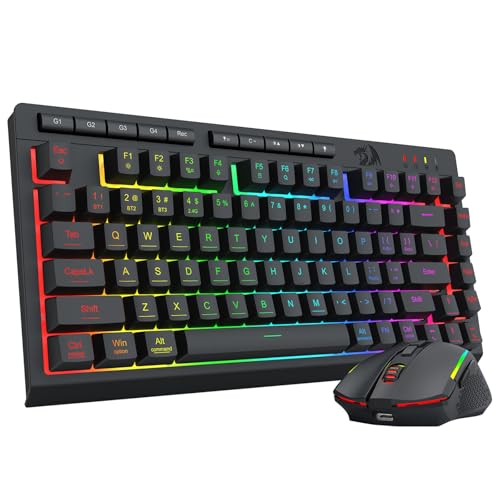
- Specs:
- 75% keyboard layout
- 12800 DPI mouse sensitivity
- Bluetooth, 2.4G wireless, and USB-C connections
All 4 Picks at a Glance
| Product | Specs | Action |
|---|---|---|
| RedThunder K62 Compact Combo |
| Check price on Amazon |
| CHONCHOW 87-Key TKL Combo |
| Check price on Amazon |
| Redragon S155-PRO Wireless Combo |
| Check price on Amazon |
 CHONCHOW G100 Compact Wireless Combo |
| Check price on Amazon |
Key takeaways
- Find the best gaming keyboard and mouse for ps5 with wired and wireless combos, high-DPI mice, and layouts built for console play on your couch or desk.
A keyboard and mouse can change how a PS5 feels to play, but only when the combo fits the console. Not every game accepts keyboard and mouse input, and the PS5 treats these peripherals differently from a PC, so the first decision is whether your favourite titles support them at all. After that, layout matters: a compact keyboard leaves room for broad mouse sweeps on a small desk, while a full-size board suits players who want a number pad. Wireless combos keep a living room tidy, while wired sets remove charging from the equation entirely.
This guide covers players who want mouse aim and keyboard shortcuts on their PS5, whether they play from a desk or a couch. The four combos below were picked from the names and specifications printed on their Amazon listings, with attention to layout size, sensor sensitivity, connection type, and whether PlayStation compatibility is stated in the listing itself, so you can match a set to your games and your room.
Quick Picks
As an Amazon Associate we earn from qualifying purchases
| Product | Best for | Key spec from title |
|---|---|---|
| RedThunder K62 Compact Combo | Compact couch and desk play | 61-key board, 7200 DPI mouse |
| CHONCHOW 87-Key TKL Combo | Full-size feel, smaller footprint | 87-key TKL board, 3200 DPI mouse |
| Redragon S155-PRO Combo | Wireless freedom | compact board, 12800 DPI mouse |
| CHONCHOW G100 Compact Wireless Combo | Shared-receiver simplicity | 68-key board, shared 2.4G receiver |
How to Choose
Check Game Support First
Keyboard and mouse support on PS5 depends on the game, not the console alone. Many shooters, strategy games, and simulators accept them, while plenty of action and sports titles do not, so check your library before you spend anything. The PS5 recognises most standard USB and Bluetooth keyboards and mice, yet some games map keys in fixed ways that cannot be changed. Search each game’s settings or help pages for mouse support, and keep your controller nearby for the titles that refuse keyboard input, because you will still need it. Checking two favourite titles first usually tells you whether a combo earns its place beside your console.
Layout Size and Desk Space
Keyboard size decides how much room your mouse gets. A 60 percent board drops the number pad, function row, and navigation keys, which frees space for wide mouse movements on a small desk or a lap tray. A tenkeyless board keeps the function row and arrows while still saving space, which suits players who use function keys for inventory or chat. Full-size boards suit players with a large desk who want every key. Measure your desk or tray first, then pick the smallest layout that still holds the keys your games need. A crowded board slows every flick, so leave a clear strip beside the keyboard.
Wired or Wireless Connection
Wired combos connect with a cable and never need charging, which suits players who hate interruptions and play long sessions at a desk. Wireless combos use a 2.4 GHz receiver or Bluetooth, which keeps cables off the floor and works better from a couch, though the keyboard and mouse both need power. Some wireless sets include a shared receiver for both devices, which saves a USB port on the console. Think about where you sit and how far you are from the console, because distance and obstacles affect wireless reliability more than marketing suggests. Count the console’s free USB ports before choosing a set that needs two receivers.
Mouse Sensor and Buttons
The mouse decides your aim, so its sensor and weight deserve attention. Higher DPI settings let the cursor cross the screen with small hand movements, which suits high-sensitivity players, while lower settings give steadier control for precise shots. Extra side buttons help with reloading, crouching, or ability shortcuts, though too many buttons can confuse a new player. A honeycomb shell cuts weight for fast flicks, while a solid shell feels sturdier. Test the grip shape against your hand size, because comfort matters more than any single specification. A mouse that fits your palm keeps long sessions comfortable, while a cramped shape tires your hand before the match ends.
The 4 Best Options
RedThunder K62 Compact Combo
- Specs:
- 61-key 60% keyboard layout
- 7200 DPI honeycomb mouse
- Wired USB connection
The RedThunder K62 is the compact pick in this guide, built for players who want a small footprint without giving up a capable mouse. Its 61-key keyboard leaves generous room for mouse movement, which matters on a lap tray or a crowded desk, and the honeycomb mouse tracks up to 7200 DPI for fast, responsive aiming. The wired USB connection keeps input steady and removes batteries from the equation, and the listing names PS5 compatibility directly. Backlighting helps in dim rooms, and the small board travels well between a desk and a living room setup. The light shell suits players who lift the mouse often.
CHONCHOW 87-Key TKL Combo
- Specs:
- 87-key tenkeyless keyboard layout
- 800-3200 DPI mouse sensitivity
- Wired USB connection
The CHONCHOW 87-key combo suits players who want a familiar full keyboard feel in a smaller package. Its tenkeyless layout keeps the function row, arrow keys, and navigation cluster while dropping only the number pad, so most games map naturally without relearning key positions. The wired mouse adjusts from 800 to 3200 DPI, which covers both steady aiming and fast turns, and the listing states PS5 compatibility in its text. The set connects by cable, so there is nothing to charge, and the straightforward design keeps setup simple for players new to keyboard and mouse on console. Familiar spacing makes switching from a controller easier.
Redragon S155-PRO Wireless Combo
- Specs:
- 75% keyboard layout
- 12800 DPI mouse sensitivity
- Bluetooth, 2.4G wireless, and USB-C connections
The Redragon S155-PRO is the wireless pick for players who want to cut cables without losing performance. Its 75 percent keyboard keeps the function row and arrows in a compact frame, and the mouse reaches 12800 DPI for players who favour high sensitivity. The set connects over Bluetooth, 2.4 GHz wireless, or USB-C cable, so it adapts to a desk, a couch, or a PC as well as the PS5. PlayStation appears among the compatible devices in the listing, and the wireless design keeps a living room tidy when the console sits far from the sofa. The modes let one set serve both desk and sofa.
CHONCHOW G100 Compact Wireless Combo
- Specs:
- 68-key 60% RGB keyboard layout
- Shared 2.4G receiver for keyboard and mouse
- Wireless connection
The CHONCHOW G100 is the simplest wireless set in this guide, built around one shared receiver for both devices. Its 68-key RGB keyboard covers the keys most games need while staying small enough for a lap tray, and the shared 2.4 GHz receiver means only one USB port is used on the console. The listing names PS5 compatibility, and the wireless design suits couch play where cables would trail across the floor. The compact layout and single receiver make setup quick, which helps players who want to start a game rather than configure hardware. Fewer parts also means fewer things to lose between sessions.
Which One Fits Your Situation
The Couch Player
If you play from a sofa with the console across the room, a wireless set is the obvious answer. The Redragon S155-PRO gives you three connection modes and a high-sensitivity mouse, while the CHONCHOW G100 keeps things simpler with one shared receiver. Add a lap desk or sturdy tray, because a mouse needs a flat surface to track well, and charge both devices before long sessions.
The Desk Player
If you play at a desk with the console beside your monitor, a wired set removes charging and connection worries entirely. The RedThunder K62 leaves the most room for wide mouse sweeps, which suits fast shooters, while the CHONCHOW 87-key combo keeps function keys for games with deep keybinds. Route cables behind the desk so they never snag the mouse, and set the mouse sensitivity low for steady aim.
The Player Who Switches Games Often
If your library jumps between shooters, strategy games, and simulators, pick the combo with the widest connection range. The Redragon S155-PRO works wired or wireless and names PlayStation among its compatible devices, so it adapts when a game supports keyboard input and steps aside when it does not. Keep your controller charged and within reach, because some titles will still demand it, and learn each game’s keybinds before ranked matches rather than during them.
The First-Time Keyboard Player on PS5
If you have only ever used a controller, start with the simplest set that still feels good. The CHONCHOW G100 pairs one receiver with a compact board, so setup takes minutes, while the RedThunder K62 gives you a wired connection that never drops. Spend your first sessions in casual modes while your fingers learn the key positions, and lower the mouse sensitivity until your aim feels steady.
Common Mistakes
- Buying a combo before checking whether your favourite games accept keyboard and mouse input, then finding the set gathers dust.
- Choosing a full-size keyboard for a small desk and leaving no room for the mouse to move freely during fast turns.
- Picking the highest DPI setting and wondering why your aim feels twitchy and unstable in every match you play.
- Forgetting that wireless keyboards and mice both need charging before long sessions, then losing power in the middle of a match.
- Assuming every PS5 game maps keys the same way, when each game sets its own controls, shortcuts, and menu navigation.
Frequently Asked Questions
Do all PS5 games support keyboard and mouse?
No, support depends on each game rather than the console. Many shooters, strategy games, and simulators accept keyboard and mouse input, while action, sports, and racing titles often do not. Check a game’s settings or help pages before buying, and keep your controller nearby for titles that only accept gamepad input.
Is a wired or wireless combo better for PS5?
Wired combos never need charging and keep input steady, which suits desk players and long sessions. Wireless combos keep cables off the floor and work better from a couch, though both devices need power and the receiver needs a clear path to the console. Choose based on where you sit.
What keyboard size works best on a couch?
A 60 percent or 75 percent board works best on a couch, because it fits on a lap tray and leaves room for the mouse beside it. Full-size boards crowd a small tray and push the mouse off the edge, which ruins aim. Pair a compact board with a firm lap desk so the keyboard stays level.
Can I use the same combo on a PC too?
Yes, these combos connect through standard USB or wireless receivers, so they work on a PC as well as a PS5. The keyboard layouts and mouse sensors behave the same way, though PC games usually offer deeper keybinding options. A set with both wired and wireless modes is the most flexible choice.
FAQ
Do all PS5 games support keyboard and mouse?
Is a wired or wireless combo better for PS5?
What keyboard size works best on a couch?
Can I use the same combo on a PC too?
More from Amazon
Programs that pair well with the guide above. Offers and eligibility are set by Amazon and may change.
Free shipping on eligible items, Prime Video and more. Eligible new members can start with a free trial.
Start a Prime free trialA Prime membership for ages 18-24 with a trial period. Eligibility is set by Amazon.
See Prime for Young AdultsAudiobooks and podcasts to listen to on the go. Eligible new members can start with a free trial.
Try Audible freeAd-free music streaming. Eligible new subscribers can start with a free trial.
Try Music Unlimited freeAs an Amazon Associate we earn from qualifying purchases.









