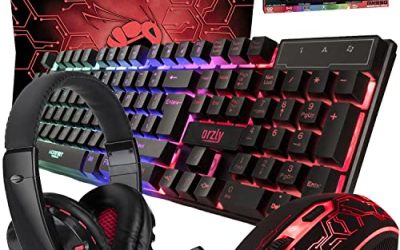
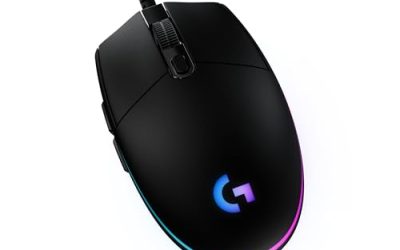
Our Short List of 3
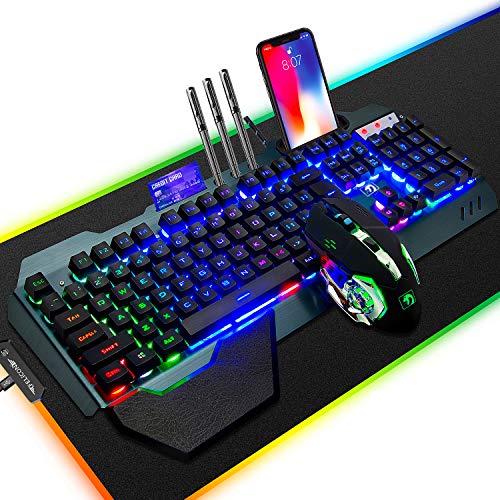
- Layout: 104-key full size
- Top panel: aluminum alloy
- Backlight: 16 lighting effects
- Anti-ghosting: 26 keys
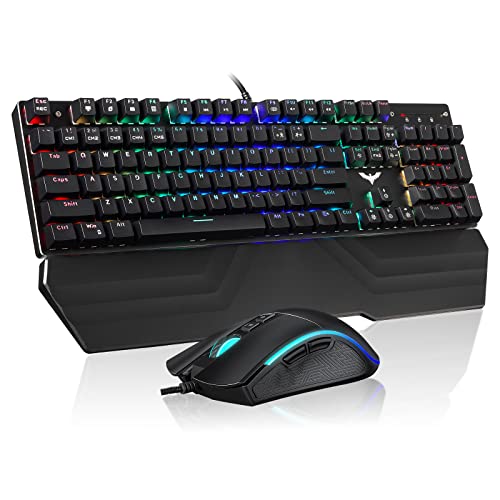
- Layout: 104-key full size
- Switches: blue mechanical
- Anti-ghosting: full-key rollover
- Keyboard backlight: 21 light modes, 3 recordable custom groups

- Layout: 104-key full size
- Switch feel: mechanical-feel membrane
- Backlight: 3 colours, 3 brightness levels, 2 breathing modes
- Anti-ghosting: 19 keys
All 4 Picks at a Glance
| Product | Specs | Action |
|---|---|---|
| FELICON K13 Wired Gaming Keyboard and Mouse Combo |
| Check price on Amazon |
| Havit HV-KB389L Mechanical Keyboard and Mouse Combo |
| Check price on Amazon |
| FLAGPOWER RGB Gaming Keyboard and Breathing Mouse Combo |
| Check price on Amazon |
 Snpurdiri K68 60% Wireless Gaming Keyboard and Mouse Combo |
| Check price on Amazon |
Key takeaways
- Compare the best gaming keyboard and mouse combo under 100: five wired and wireless sets with backlit keys, capable gaming mice and full spec lists.
A matched keyboard and mouse set is the simplest way to finish a gaming desk in one box. The two halves arrive tuned to sit together, the lighting matches without any fiddling, and a wireless set shares a single receiver so only one USB port disappears. In this tier the market splits into a few clear camps: full-size wired sets with big extras such as desk pads and wrist rests, rechargeable wireless sets built around long battery life, a smaller group with true mechanical switches, and compact boards that hand the saved desk space back to the mouse.
This guide rounds up five combos that cover those camps. The list includes a wired four-piece set with an extended RGB desk pad, a rechargeable wireless set with a shared receiver, a wired set built on blue mechanical switches, a full-size wired set with removable keycaps, and a compact 60 percent wireless set for tight desks. Switch types, layouts, mouse sensitivity ranges, battery figures and connection details are laid out in the spec list under each pick so the five are easy to compare side by side.
Read the picks with your desk in mind. Players who type as much as they play usually want a full-size board with a number pad. Players short on space, or who sweep the mouse across a wide area in shooters, are often happier with a compact layout. Wireless sets trade a charging routine for a clean desk, while wired sets never need a charge at all.
Disclosure: As an Amazon Associate, we earn from qualifying purchases made through links on this page, at no extra cost to you.
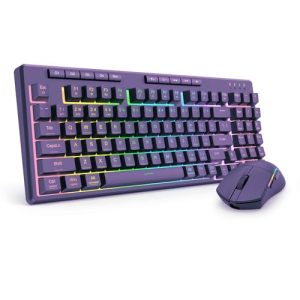
FELICON K13 Wired Gaming Keyboard and Mouse Combo
- Layout: 104-key full size
- Top panel: aluminum alloy
- Backlight: 16 lighting effects
- Anti-ghosting: 26 keys
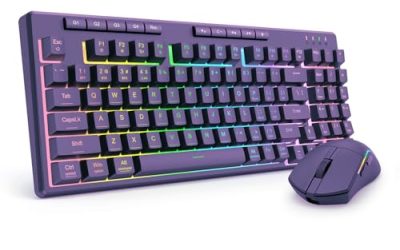
The FELICON K13 is the most complete box in this group. Alongside the keyboard and mouse it packs a magnetic wrist rest and an extended RGB desk pad, so the whole surface of the desk is covered by one purchase. The keyboard is a full-size 104-key board with an aluminum alloy top panel that keeps the frame rigid, and its backlight runs through 16 effects. Anti-ghosting covers 26 keys, which is enough for movement keys, modifiers and ability keys pressed together in fast games.
The wrist rest is more than padding. It attaches magnetically, lifts off in a second for cleaning or for players who prefer a bare desk edge, and it carries holders for a phone, cards and a pen along its top edge. The mouse is a six-button optical model with four sensitivity steps running from 1,200 to 3,200 DPI, changed from a button on the mouse itself. The desk pad measures 32.5 by 12 inches, runs under both devices, and adds its own lighting with 10 modes around the edge.
Everything connects over USB with no software to install, and the set works with Windows and Mac computers. For a player building a desk from nothing, this is the pick that leaves nothing else to buy for the surface itself: board, mouse, rest and pad all arrive together and share one design language.
RedThunder K10 Wireless Gaming Keyboard and Mouse Combo
The RedThunder K10 cuts the cables entirely. Keyboard and mouse share one 2.4 GHz USB receiver, which stores in the base of the mouse when the set travels, and both devices are rechargeable over USB-C. The keyboard carries a 3,000 mAh battery and the mouse an 800 mAh battery. The maker quotes up to eight hours of continuous play with the lighting on, and both halves sleep after two idle minutes to stretch the time between charges much further in everyday mixed use.
The keyboard is a full-size board with a rainbow backlight that runs two breathing modes and three static modes across four brightness levels. Its keycaps use a two-colour injection moulding process, so the legends are part of the cap rather than a printed layer that wears away. Two gaming shortcuts are built in: FN plus W swaps the WASD cluster with the arrow keys, and FN plus the Windows key locks that key during play. The board sits at a fixed seven-degree tilt, and the maker rates the keys for ten million presses.
The mouse is an optical model that tracks up to 3,200 DPI, adjusted from two dedicated buttons so sensitivity can move in either direction without cycling through the full range. Seven programmable buttons cover the usual side pair plus the wheel and top controls, and the shell lighting cycles through seven colours. For players who want one receiver, no cables across the desk, and batteries that recharge from the same lead, the K10 is the natural wireless pick here.
Specs
- Layout: 104-key full size
- Connection: 2.4 GHz wireless, single shared USB receiver
- Receiver storage: in the base of the mouse
- Keyboard battery: 3,000 mAh, rechargeable
- Mouse battery: 800 mAh, rechargeable
- Charging: USB-C
- Keyboard backlight: rainbow LED, 2 breathing modes, 3 static modes, 4 brightness levels
- Mouse: optical, up to 3,200 DPI
- Mouse buttons: 7, programmable
- Mouse lighting: 7-colour cyclical effect
- Key life: 10 million presses
- Keyboard size: 439 × 134 × 38 mm
- Mouse size: 127 × 72 × 40 mm
Havit HV-KB389L Mechanical Keyboard and Mouse Combo
- Layout: 104-key full size
- Switches: blue mechanical
- Anti-ghosting: full-key rollover
- Keyboard backlight: 21 light modes, 3 recordable custom groups
The Havit HV-KB389L is the pick for players who want real mechanical switches in a combo box. Its keyboard uses blue mechanical switches, the clicky, tactile kind that give a clear bump and an audible click at the point each press registers. The board supports full-key anti-ghosting with full rollover, so crowded inputs in fighting games, rhythm titles or fast ability rotations all land as intended. An aluminium alloy top case keeps the frame stiff under hard use.
Lighting is unusually deep for a combo set. The keyboard offers 21 light modes and can record three custom groups, so a player can keep one layout for work and another for play, while the mouse runs seven lighting modes of its own. The suspended keycap design leaves the switches open to the light, which makes the backlight read clearly in a dark room. A detachable wrist rest is in the box, and twelve multimedia combinations sit on the function row through the Fn key.
The mouse is a wired optical model with six sensitivity steps from 800 up to 4,800 DPI and seven programmable buttons, enough for item wheels, push-to-talk or a sniper toggle in most games. The set connects over USB and works with Windows, Linux, Chrome OS and Mac computers. If switch feel is the thing you care about most, this is the combo in the group built around it.
FLAGPOWER RGB Gaming Keyboard and Breathing Mouse Combo
- Layout: 104-key full size
- Switch feel: mechanical-feel membrane
- Backlight: 3 colours, 3 brightness levels, 2 breathing modes
- Anti-ghosting: 19 keys
The FLAGPOWER combo is a straightforward full-size wired set that concentrates on the basics done neatly. The keyboard uses a mechanical-feel membrane design: the keys sit taller and answer with a firmer push than a flat office board, without individual switches underneath. Its backlight offers three colours across three brightness grades, plus two breathing modes, all handled from Fn key combinations with nothing to install.
Anti-ghosting covers 19 keys, which takes in the movement cluster and the keys around it that games lean on hardest. The keycaps are double-injection ABS, so the legends stay legible, and they pull off for cleaning the dust and crumbs that gather under any daily-use board. The body tilts at a natural angle, and the whole keyboard weighs 1.2 pounds, light enough to move between a desk and a living-room setup without any fuss.
The mouse matches the keyboard with a four-colour circular breathing light and four sensitivity steps from 1,200 to 3,200 DPI, changed from the button behind the wheel. Both devices are plug and play over USB and work with Windows and Mac computers. The maker backs the set with a year of support. For a shared family PC, a spare setup, or a first gaming desk that needs a full number pad for school and office work as well, this is the simplest wired option in the group.
Snpurdiri K68 60% Wireless Gaming Keyboard and Mouse Combo
- Layout: 68-key, 60 percent format
- Connection: 2.4 GHz wireless, single shared USB receiver
- Receiver storage: slot under the keyboard
- Keyboard battery: 2,000 mAh, rechargeable
The Snpurdiri K68 takes the opposite approach to the full-size sets above. Its keyboard is a 68-key board in the 60 percent format, just 311 mm wide, which leaves a wide-open area to the right for mouse movement — the main reason compact boards are popular with shooter players who run low sensitivity settings. The number pad, function row and dedicated arrow cluster are folded into the main block through the Fn layer.
Both devices share a single 2.4 GHz receiver that stores in a slot under the keyboard, so the set packs down cleanly for travel between desks. The keyboard battery is 2,000 mAh; the maker quotes more than 40 hours of use with the backlight on and roughly two hours for a full recharge, while the mouse carries a 500 mAh battery of its own. The keys are membrane with a mechanical feel, mounted on a steel backplate that gives the small frame a solid, flex-free base.
The rainbow backlight is arranged in three groups, and FN plus W swaps the WASD keys into arrow keys for games and menus that expect a dedicated cluster. The colourway mixes white and grey caps with orange accents, which gives the small board a look quite different from the black sets around it. For a tight desk, a dorm room, or a living-room PC driven from the sofa, the K68 is the combo here that asks for the least space.
How to Choose a Gaming Keyboard and Mouse Combo in This Tier
Connection comes first. Wired sets such as the FELICON K13, the Havit HV-KB389L and the FLAGPOWER combo never need charging and never drop a signal, with a cable for each device as the trade-off. Wireless sets such as the RedThunder K10 and the Snpurdiri K68 run both devices from one receiver and keep the desk clear, but they add a charging routine and a battery that will one day wear down. Neither is better in absolute terms; the right answer depends on whether your desk stays put or moves around.
Switch type shapes how the board feels. True mechanical switches, like the blue switches in the Havit set, give a defined bump or click and can be the better long-term buy for heavy typists. Mechanical-feel membrane boards, used by the other four sets here, are quieter and simpler, and many players cannot tell the difference in the middle of a game. If you play late in a shared house, the quieter membrane sets are the kinder choice.
Layout decides your desk geometry. A full-size 104-key board keeps the number pad for spreadsheets, strategy games and keybind-heavy titles. A 60 percent board like the K68 removes it and hands that width to the mouse, which matters more than most players expect in shooters. Tenkeyless and other middle sizes exist, but in combo sets the choice is usually between these two poles.
Do not overlook the mouse half. Combo mice are often treated as a free extra, yet the mouse is the device that aims. Look for at least four sensitivity steps, side buttons you can bind, and a shape that suits your grip. The Havit and RedThunder mice add programmable buttons for players who bind abilities to the mouse, while the simpler mice in the wired sets cover the essentials for casual play.
Extras change the real contents of the box. A desk pad and wrist rest, like those in the FELICON box, are items many players end up buying separately within a month. A detachable rest, as on the Havit, suits players who switch between gaming and typing postures. Compare what is actually in each box, not just the two headline devices, before deciding which set covers your desk most completely.
FAQ
Is a combo set a sensible way to equip a first gaming desk?
Yes, for most players. A combo guarantees the keyboard and mouse share a design, a lighting style and, on wireless sets, a single receiver, and it removes the research of matching two separate product lines. The trade-off is that you cannot pick a favourite keyboard and a favourite mouse independently. Players with very specific demands on one half — a particular switch type, or a mouse shape that fits an unusual grip — are the ones who gain most from buying the two devices separately.
Do these keyboard and mouse combos work with game consoles?
Mostly, with limits. Wired USB sets generally work on consoles that accept USB keyboards and mice, and the wireless sets here list console support in their compatibility notes. The catch is that each game decides for itself whether keyboard and mouse input is allowed, and many console titles restrict play to a controller. Treat console use as a bonus for menus, chat and the titles that support it, and count on a PC as the main home for any of these sets.
What is the difference between mechanical and mechanical-feel keyboards?
A mechanical keyboard has an individual switch under every key, and those switches come in distinct flavours — the clicky blue switches in the Havit combo in this guide are one example. A mechanical-feel board uses a membrane sheet like an office keyboard, but with taller keys and a firmer action tuned to imitate the push of a switch. Mechanical boards usually last longer and give clearer feedback per press; mechanical-feel boards run quieter and simpler. In fast games both register inputs perfectly well.
How long do the wireless combos run between charges?
It depends on how much the lighting is used. The RedThunder K10 pairs a 3,000 mAh keyboard battery with an 800 mAh mouse battery and quotes up to eight hours of continuous lit play, with an automatic sleep after two idle minutes stretching real-world use across many days of mixed gaming and typing. The smaller Snpurdiri K68 quotes more than 40 hours with its backlight on from a 2,000 mAh keyboard battery, and about two hours to recharge. Turning the backlight down or off extends both figures considerably.
FAQ
Is a combo set a sensible way to equip a first gaming desk?
Do these keyboard and mouse combos work with game consoles?
What is the difference between mechanical and mechanical-feel keyboards?
How long do the wireless combos run between charges?
More from Amazon
Programs that pair well with the guide above. Offers and eligibility are set by Amazon and may change.
Free shipping on eligible items, Prime Video and more. Eligible new members can start with a free trial.
Start a Prime free trialA Prime membership for ages 18-24 with a trial period. Eligibility is set by Amazon.
See Prime for Young AdultsAudiobooks and podcasts to listen to on the go. Eligible new members can start with a free trial.
Try Audible freeAd-free music streaming. Eligible new subscribers can start with a free trial.
Try Music Unlimited freeAs an Amazon Associate we earn from qualifying purchases.