Our Short List of 3

- Sensor: gaming-grade optical, up to 8,000 DPI
- Connection: wired USB, 1,000 Hz report rate
- Buttons: 6 programmable, metal spring button tensioning
- Lighting: LIGHTSYNC RGB, three zones

- Sensor: true optical, up to 6,400 DPI
- Tracking: up to 220 IPS, up to 30 G acceleration
- Buttons: 5 Hyperesponse, independently programmable
- Switches: Razer mechanical, rated for 10 million clicks
- Sensor: Pixart 3327 optical, up to 6,200 DPI native
- Tracking: up to 220 IPS, up to 30 G acceleration
- Buttons: 7 programmable, switches rated for 20 million clicks
- Polling: 1,000 Hz
All 5 Picks at a Glance
| Product | Specs | Action |
|---|---|---|
| 1. Logitech G203 LIGHTSYNC (Black) |
| Check price on Amazon |
| 2. Razer DeathAdder Essential |
| Check price on Amazon |
| 3. HyperX Pulsefire Core |
| Check price on Amazon |
 4. Redragon M711 Cobra |
| Check price on Amazon |
 5. Redragon M602 Griffin (Tri-Mode) |
| Check price on Amazon |
Key takeaways
- Five economical gaming mice compared on sensor accuracy, switch lifespan, weight and grip, from wired staples to a tri-mode wireless pick that lasts.
Economical is a design brief, not a compromise. A mouse earns the label by putting its engineering where play actually happens: a sensor that tracks without smoothing or acceleration, switches with a long rated lifespan, and a shell that survives years of daily sessions without developing a wobble or a double-firing button. The features that inflate flagship spec sheets, such as wireless charging docks, exotic shell materials and five-figure polling rates, add expense without adding aim. The five mice in this guide skip those extras and spend their engineering on tracking quality, durability and shapes that suit real hands.
The spread covers the main ways people play at this level. Four picks are wired, which removes batteries and charging from the equation entirely, and one is a tri-mode wireless model with a rechargeable cell for players who want a clean desk. Shapes run from a compact symmetrical shell that suits claw and fingertip grips to a large sculpted ergonomic design built for palm players, and button counts run from five essentials to seven fully programmable inputs. Every pick is a current model with a live Amazon US listing, so the specs below describe the mouse you would actually receive, not a discontinued revision trading on an old name.
Disclosure: As an Amazon Associate, we earn from qualifying purchases made through links on this page, at no extra cost to you.
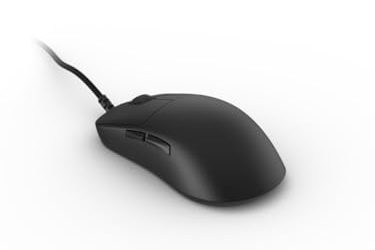
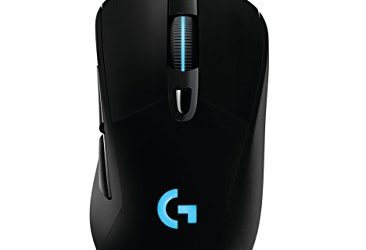
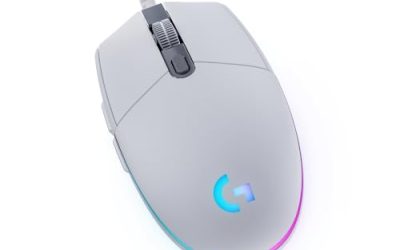
1. Logitech G203 LIGHTSYNC (Black)
- Sensor: gaming-grade optical, up to 8,000 DPI
- Connection: wired USB, 1,000 Hz report rate
- Buttons: 6 programmable, metal spring button tensioning
- Lighting: LIGHTSYNC RGB, three zones
The G203 is the benchmark that every other entry-level mouse gets measured against, and the reason is consistency. Its gaming-grade optical sensor tracks up to 8,000 DPI with the clean, acceleration-free response that made Logitech’s name in this category, and the classic symmetrical shell has been refined over so many generations that it fits small, medium and large hands without forcing any single grip style. For a first gaming mouse, or a spare that will live in a laptop bag, that predictability is worth more than a longer feature list.
Durability is the quiet argument for this pick. The main buttons use a metal spring tensioning system that keeps each click crisp and consistent deep into the mouse’s life, rather than turning mushy as plain plastic mechanisms do. Six programmable buttons cover the essentials, on-board memory holds your settings so they travel between PCs without software, and LIGHTSYNC RGB adds a three-zone lighting strip that can match the rest of a setup. It is wired, light at 85 g, and backed by the support network of the largest maker in the category, which matters when a mouse has to last for years.
2. Razer DeathAdder Essential
- Sensor: true optical, up to 6,400 DPI
- Tracking: up to 220 IPS, up to 30 G acceleration
- Buttons: 5 Hyperesponse, independently programmable
- Switches: Razer mechanical, rated for 10 million clicks
The DeathAdder shape is one of the most copied ergonomic designs in gaming, and the Essential is the purest version of it: a large, right-handed shell with a high arch and flared base that fills the palm and supports relaxed, low-sensitivity arm aiming. Players with medium to large hands who find symmetrical mice cramped will feel at home here within minutes. The contours also make it a natural fit for long sessions, since the hand rests on the shell instead of gripping it.
Under the shell, Razer keeps the parts that matter. The true 6,400 DPI optical sensor tracks at up to 220 IPS with no interpolated steps, the five Hyperesponse buttons are independently programmable in Synapse, and the mechanical switches carry a 10-million-click lifespan figure. Polling runs at 1,000 Hz, the side buttons are large enough to find without looking, and rubberised side grips keep the shell planted during fast swipes. It skips RGB frills beyond a single lit logo, and at 96 g it has a planted, deliberate feel that suits tactical shooters and MOBAs better than flick-heavy arena play.
3. HyperX Pulsefire Core
- Sensor: Pixart 3327 optical, up to 6,200 DPI native
- Tracking: up to 220 IPS, up to 30 G acceleration
- Buttons: 7 programmable, switches rated for 20 million clicks
- Polling: 1,000 Hz
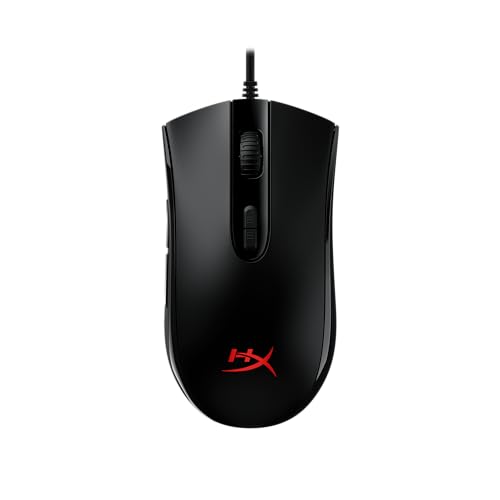
The Pulsefire Core is the pick for players who read spec sheets. Its Pixart 3327 sensor is a known quantity in this class: native steps up to 6,200 DPI, tracking at 220 IPS, and no hardware acceleration, so the cursor goes exactly where the hand sends it. Four onboard DPI presets cover most games without opening software, and the symmetrical shell with textured side panels suits palm and claw grips on either a cautious or aggressive hand position.
Longevity is where this mouse separates itself from the no-name crowd. The seven programmable buttons sit on switches rated for 20 million clicks, double the lifespan figure of many rivals at this level, and the braided cable resists the fraying that kills wired mice at the shell entry point. HyperX NGENUITY software handles macros, DPI stages and the single-zone RGB lighting, and one onboard profile keeps those settings on the mouse itself. It is also one of the few picks here with a two-year warranty printed in the listing, a small detail that says a lot about how the maker expects it to be used.
4. Redragon M711 Cobra
- Sensor: Avago optical, 100 to 10,000 DPI in software
- DPI switching: five onboard levels, adjustable in 100-DPI steps
- Buttons: 7 programmable, macro recording supported
- Polling: up to 1,000 Hz
Redragon built its name on giving entry-level players the software depth that big brands reserve for higher tiers, and the M711 Cobra is the clearest example. Through its driver, the Avago optical sensor adjusts from 100 to 10,000 DPI in fine 100-step increments, five onboard DPI levels switch on the fly, and every one of the seven programmable buttons takes remaps and recorded macros. That granularity lets a player dial in separate sensitivities for a sniper scope, a build menu and desktop work on one mouse.
The hardware keeps pace with the software. Polling reaches 1,000 Hz, the full-spectrum RGB backlighting runs through the scroll wheel and logo, and the sculpted right-handed shell has a textured grip area that stays secure during long sessions. At roughly 114 g it is the heaviest pick in this guide, which some players prefer: the extra mass steadies small movements and keeps the mouse planted during lift-offs. For players who like to tinker with settings and want a substantial, planted feel, the Cobra delivers depth that mice with bigger badges often leave out at this level.
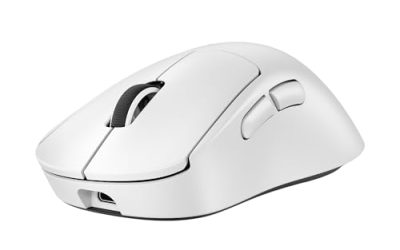
5. Redragon M602 Griffin (Tri-Mode)
- Sensor: optical, 250 to 8,000 DPI adjustable
- Connection: 2.4 GHz wireless, Bluetooth and USB-C wired
- Polling: 125, 250, 500 or 1,000 Hz selectable
- Buttons: 7 programmable, macro editing in driver
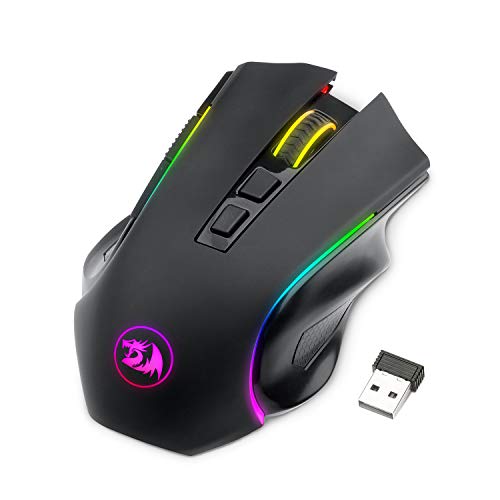
The Griffin is the wireless pick, and it solves the running-expense problem that usually counts against wireless mice at this level: the cell is rechargeable over USB-C, so there are no disposable batteries to keep buying, and it still runs wired when the charge runs low. Three connection modes, a 2.4 GHz receiver link, Bluetooth and the cable, let one mouse cover a gaming PC, a laptop and a tablet, and switching between them takes a toggle rather than a pairing ritual.
Battery life is rated at up to 70 hours with the RGB lighting off and around 35 hours with it on, which translates to weeks of evening play between charges. The sensor adjusts from 250 to 8,000 DPI, polling can be set at 125, 250, 500 or 1,000 Hz to trade responsiveness against battery life, and all seven buttons are programmable with macro support in the Redragon driver. The ergonomic shell is larger and heavier than the wired picks, suiting palm grips and relaxed play more than competitive fingertip aiming, but as a single mouse for a whole desk, nothing else in this guide covers as many devices.
Buying Guide: Where the Value Actually Lives
Sensor honesty beats headline DPI. A sensor that tracks 6,000 DPI with no acceleration is a better tool than one advertising 20,000 DPI with smoothing layered on top. Look for a named sensor, such as the Pixart unit in the Pulsefire Core, and a stated tracking speed in IPS. Most players settle between 400 and 3,200 DPI in game, so clean tracking in that window is what you are really buying.
Switch lifespans predict longevity. The click switches are the first component to wear out, and makers publish their rated lifespan in millions of clicks. A 20-million-click figure, like the Pulsefire Core carries, points to years of heavy use, while tensioning systems like the one in the G203 keep the click feel consistent as the mouse ages. When two mice look equal on paper, the higher switch figure is usually the better long-term buy.
Shape decides comfort more than weight. A shell that fits your grip style will feel accurate at any weight in this guide, while a poor shape causes fatigue no spec can fix. Palm players with larger hands should look at the DeathAdder Essential or the Griffin; claw and fingertip players are better served by the G203 or Pulsefire Core. Measure your current mouse and compare lengths before ordering.
Count the ongoing inputs, not just the mouse. Wired mice ask nothing after purchase. Wireless models on disposable cells add a steady trickle of battery purchases, while a rechargeable model like the Griffin only asks for a cable now and then. On-board memory is worth having if you play on more than one PC, since your DPI stages and bindings travel with the mouse instead of living in software on one machine.
Software depth is a real feature. Remapping, macros and per-game profiles turn a basic mouse into a control surface for strategy games and productivity alike. The Redragon picks and the Pulsefire Core offer the deepest drivers here, while the G203 keeps things simple with on-board storage. None of the five needs its software running after setup, which keeps older PCs free of background load.
FAQ
What separates an economical gaming mouse from a low-end one?
The sensor and the switches. An economical pick uses a named optical sensor with acceleration-free tracking and switches rated in the tens of millions of clicks, inside a shell from a maker with warranty support. Low-end mice cut exactly those parts, so they feel vague in game and develop click faults early. Everything in this guide clears the higher bar.
Is wired or wireless the smarter long-term choice at this level?
Wired is the simpler equation: no batteries, no charging, no link to manage, and the G203, DeathAdder Essential, Pulsefire Core and M711 Cobra all poll at 1,000 Hz over the cable. Wireless earns its place when a clean desk matters, and a rechargeable tri-mode model like the Griffin keeps the ongoing input to an occasional USB-C top-up rather than a stream of disposable cells.
How much DPI do you actually need for gaming?
Far less than the headline numbers suggest. Most shooter players run between 400 and 1,600 DPI, strategy and MOBA players often sit between 800 and 3,200, and only very high-resolution desktop work pushes beyond that. Every pick here covers that working range with native steps, so judge them on tracking quality and shape rather than the size of the DPI figure on the box.
What usually wears out first, and can you slow it down?
The main click switches and the cable entry point are the usual failure spots, in that order. Choosing a high switch lifespan figure, avoiding yanking a wired mouse by its cable, and keeping the sensor lens and glide feet clean will stretch the service life of any pick in this guide. A mouse pad also protects the feet, which are the easiest part to preserve and the most annoying to lose.
More from Amazon
Programs that pair well with the guide above. Offers and eligibility are set by Amazon and may change.
Free shipping on eligible items, Prime Video and more. Eligible new members can start with a free trial.
Start a Prime free trialA Prime membership for ages 18-24 with a trial period. Eligibility is set by Amazon.
See Prime for Young AdultsAudiobooks and podcasts to listen to on the go. Eligible new members can start with a free trial.
Try Audible freeAd-free music streaming. Eligible new subscribers can start with a free trial.
Try Music Unlimited freeAs an Amazon Associate we earn from qualifying purchases.