Our Short List of 3
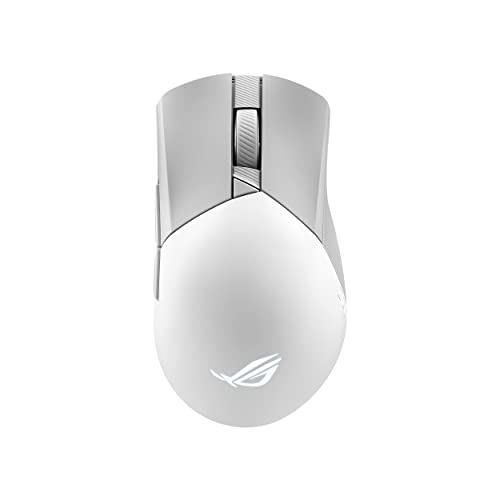
- Sensor: ROG AimPoint optical, up to 36,000 DPI
- Switch system: Push-Fit Switch Socket II, hot-swappable 3-pin mechanical and 5-pin optical switches
- Connectivity: 2.4 GHz wireless, Bluetooth, wired USB-C
- Buttons: 6 programmable

- Sensor: optical, up to 19,000 DPI
- Switch system: push-fit hot-swappable switch sockets
- Connectivity: 2.4 GHz wireless and wired
- Buttons: 12 programmable

- Sensor: ROG AimPoint optical, up to 36,000 DPI
- Switch system: Push-Fit Switch Socket II, hot-swappable 3-pin mechanical and 5-pin optical switches
- Connectivity: 2.4 GHz wireless, Bluetooth, wired USB-C
- Buttons: 5 programmable, PBT left and right buttons
All 5 Picks at a Glance
| Product | Specs | Action |
|---|---|---|
| ASUS ROG Gladius III Wireless AimPoint |
| Check price on Amazon |
| ASUS ROG Spatha X |
| Check price on Amazon |
| ASUS ROG Keris Wireless AimPoint |
| Check price on Amazon |
 Razer Naga V3 Pro |
| Check price on Amazon |
 ASUS ROG Chakram X Origin |
| Check price on Amazon |
Key takeaways
- Compare the best custom gaming mouse picks with swappable switches, modular side plates and adjustable parts that let you tailor shape and feel.
Most gaming mice ask you to adapt to them. A custom gaming mouse flips that around. In this guide, “custom” means customizable gaming mice: mice with swappable shells or covers, adjustable weight, interchangeable buttons or side panels, and modular designs that let the player tailor the shape and feel of the mouse to their own hand and play style. Instead of living with whatever grip width, click tension, and button layout the factory chose, you get hardware that can be opened up, rebalanced, and rearranged.
That matters more than it might sound. A switch swap changes how every click feels and how long the buttons hold up. A side plate swap turns one mouse into three, moving between an MMO grid and a clean two-button shooter layout. A weight system shifts the balance point forward or back, which changes how the mouse behaves in fast flicks versus slow tracking. The five mice below cover each of those ideas, from hot-swappable switch sockets to a detachable joystick, and each one is a current model with a verifiable Amazon listing.
Disclosure: As an Amazon Associate, we earn from qualifying purchases made through links on this page, at no extra cost to you.
ASUS ROG Gladius III Wireless AimPoint
- Sensor: ROG AimPoint optical, up to 36,000 DPI
- Switch system: Push-Fit Switch Socket II, hot-swappable 3-pin mechanical and 5-pin optical switches
- Connectivity: 2.4 GHz wireless, Bluetooth, wired USB-C
- Buttons: 6 programmable
The Gladius III Wireless AimPoint builds its customization story around the switches. Its Push-Fit Switch Socket II accepts both 3-pin mechanical switches and 5-pin optical micro switches, so you can change the click feel, actuation style, and expected lifespan of the main buttons without soldering or replacing the whole mouse. A pair of spare switches ships in the box, and the socket design also makes the Gladius III easier to keep in service for years, since a worn switch becomes a quick swap rather than a repair job.
Around that system sits a capable right-handed ergonomic shell. The ROG AimPoint optical sensor tracks at up to 36,000 DPI, connectivity covers 2.4 GHz wireless, Bluetooth, and a wired USB-C mode, and the mouse weighs 79 g, light enough for fast shooters while still feeling planted. Six programmable buttons handle everyday bindings, and battery life runs up to 119 hours on the 2.4 GHz connection. For players who like the classic Gladius shape but want control over how the clicks feel, this is the most direct route.
ASUS ROG Spatha X
- Sensor: optical, up to 19,000 DPI
- Switch system: push-fit hot-swappable switch sockets
- Connectivity: 2.4 GHz wireless and wired
- Buttons: 12 programmable
The Spatha X is the heavyweight of this group, and it leans into customization from two directions. First, its main switches sit in push-fit hot-swap sockets, so the click feel can be changed or refreshed at home. Second, it carries 12 programmable buttons arranged for MMO and MOBA play, giving players a deep pool of physical inputs to assign to skills, items, and macros, with onboard profiles to keep different layouts for different games.
The rest of the package suits long sessions at a desk. The optical sensor reaches 19,000 DPI, the mouse runs wired or over 2.4 GHz wireless, and a magnetic charging dock keeps it topped up between sessions, with up to 67 hours of wireless play per charge. At 168 g it is deliberately substantial, which fans of larger, heavier mice will appreciate for controlled, deliberate movement. If your idea of custom is a big command center you can rewire and rebind endlessly, the Spatha X fits that brief.
ASUS ROG Keris Wireless AimPoint
- Sensor: ROG AimPoint optical, up to 36,000 DPI
- Switch system: Push-Fit Switch Socket II, hot-swappable 3-pin mechanical and 5-pin optical switches
- Connectivity: 2.4 GHz wireless, Bluetooth, wired USB-C
- Buttons: 5 programmable, PBT left and right buttons
The Keris Wireless AimPoint takes the same hot-swap idea as the Gladius III and puts it in a smaller, lighter frame aimed at players with compact hands or a fingertip style. The Push-Fit Switch Socket II again supports both 3-pin mechanical and 5-pin optical switches, so click feel stays a personal choice rather than a factory decision. The left and right buttons use PBT material, which resists the smooth, shiny wear that develops on ordinary shells.
Performance hardware matches the larger Gladius: the ROG AimPoint sensor reaches 36,000 DPI, and the mouse connects over 2.4 GHz, Bluetooth, or a cable. At 75 g with up to 119 hours of battery in 2.4 GHz mode, it suits players who want a light wireless mouse they can still open up and tune. Five programmable buttons keep the layout clean for shooters while leaving room for a couple of utility bindings. It is the pick here for smaller hands that still want full switch-level control.
Razer Naga V3 Pro
- Sensor: Razer Focus Pro 50K Optical Sensor Gen-3, up to 50,000 DPI
- Custom system: 3 swappable magnetic side plates (12, 6, and 2 buttons)
- Connectivity: HyperSpeed wireless, Bluetooth, wired USB-C
- Buttons: up to 23 programmable, depending on plate
The Naga V3 Pro approaches customization through its side panels. Three magnetic side plates ship in the box: a 12-button plate for MMOs, a 6-button plate for battle royale and MOBA layouts, and a clean 2-button plate for shooters. The plates attach magnetically and swap in seconds, so one mouse genuinely covers three genres, with up to 23 programmable buttons available when the full grid is fitted. It is the clearest example in this guide of interchangeable hardware changing what the mouse is for.
The supporting hardware is current flagship grade. Razer’s Focus Pro 50K Optical Sensor Gen-3 tracks at up to 50,000 DPI, the HyperScroll tilt wheel works in both tactile and free-spin modes, and the optical switches are rated for fast, consistent actuation. Connectivity spans HyperSpeed wireless, Bluetooth, and a wired mode, with battery life up to 280 hours over Bluetooth. At roughly 117 g it is a full-size mouse, and players who jump between game genres will get the most from its plate system.
ASUS ROG Chakram X Origin
- Sensor: ROG AimPoint optical, up to 36,000 DPI
- Custom system: detachable joystick (analog and digital modes) with cover plate
- Switch system: Push-Fit Switch Socket II, hot-swappable mechanical and optical switches
- Connectivity: 2.4 GHz wireless, Bluetooth, wired USB-C
The Chakram X Origin adds a control most mice never offer: a detachable joystick. Mounted beside the thumb, the joystick works in analog mode for smooth movement input or as a digital four-way control for bindings, and when you do not want it, it removes and a cover plate takes its place. Combined with 11 programmable buttons, that gives the Chakram X a modular input layout that can shift between flight and space games, racers, and everyday shooters.
It also carries the ROG switch-socket system. Push-Fit Switch Socket II supports mechanical and optical micro switches for the main buttons, and the ROG AimPoint sensor tracks at up to 36,000 DPI. Tri-mode connectivity covers 2.4 GHz, Bluetooth, and wired play, the mouse supports Qi wireless charging, and battery life reaches up to 150 hours in Bluetooth mode. At 123 g it sits in the middle of this group for heft. Players who want one mouse that can gain or lose an entire control axis will find the idea hard to match elsewhere.
How to Choose a Custom Gaming Mouse
Begin with the kind of change you actually want to make. If click feel is your main concern, look at switch systems first. Hot-swappable sockets, like the Push-Fit designs in the ASUS mice above, let you move between crisp mechanical switches and fast optical ones, and they double as a maintenance feature, since a worn switch can be replaced in minutes. If you play several genres, interchangeable side plates or extra modular inputs matter more, because they change how many commands sit under your thumb.
Weight and shape come next. Adjustable or fixed heft shapes how a mouse behaves: lighter mice around 75 to 80 g favor fast, low-sensitivity arm movement, while heavier models above 120 g feel steadier for deliberate tracking and large button layouts. None of the mice here use loose add-on weights, so treat the listed weight as part of the design and match it to your grip style and hand size. Smaller hands generally do better with compact shells like the Keris, while large hands and palm grips suit the Spatha X and Naga V3 Pro.
Finally, check the everyday details. Tri-mode connectivity makes a mouse easy to move between a gaming PC and a laptop. Battery figures vary widely by connection type, so compare the mode you will actually use. Software support matters as well, since profiles, macros, and lighting all live there, and a good profile system is what turns modular hardware into setups you can switch between instantly.
FAQ
What makes a gaming mouse “custom”?
A custom gaming mouse offers hardware-level adjustment rather than software settings alone. That includes hot-swappable switches, interchangeable side plates or buttons, adjustable weight, and modular parts such as a detachable joystick. The goal is to change the shape, feel, and layout of the mouse itself, so it fits your hand and your games instead of the other way around.
Are hot-swappable mouse switches worth it?
For many players, yes. Switch sockets let you change how the main clicks feel, try optical switches after using mechanical ones, and replace a worn switch without replacing the mouse. That extends the working life of the mouse and keeps the click feel consistent over time, which matters in fast games where button response is part of your timing.
Can one mouse really work for both MMOs and shooters?
A modular mouse can. Swappable side plates, like the three plates included with the Naga V3 Pro, let you fit a 12-button grid for an MMO session and then switch to a plain 2-button plate for a shooter, where a clean grip matters more than extra inputs. Profile software completes the setup by keeping separate bindings ready for each layout.
Do heavier gaming mice have any advantages?
They can. A heavier mouse tends to feel more stable during slow, precise tracking and is less likely to shift accidentally when you press stiff side buttons, which is why large MMO mice often carry extra heft. Lighter mice reduce fatigue and move faster for flick-heavy play. Neither is better in general; the right choice follows your grip, sensitivity, and the games you play most.
FAQ
What makes a gaming mouse “custom”?
Are hot-swappable mouse switches worth it?
Can one mouse really work for both MMOs and shooters?
Do heavier gaming mice have any advantages?
More from Amazon
Programs that pair well with the guide above. Offers and eligibility are set by Amazon and may change.
Free shipping on eligible items, Prime Video and more. Eligible new members can start with a free trial.
Start a Prime free trialA Prime membership for ages 18-24 with a trial period. Eligibility is set by Amazon.
See Prime for Young AdultsAudiobooks and podcasts to listen to on the go. Eligible new members can start with a free trial.
Try Audible freeAd-free music streaming. Eligible new subscribers can start with a free trial.
Try Music Unlimited freeAs an Amazon Associate we earn from qualifying purchases.