Our Short List of 3

- Sensor: gaming-grade optical, 200 to 8,000 DPI
- Connection: wired USB, 1,000 Hz report rate
- Buttons: 6 programmable, metal spring button tensioning
- Lighting: LIGHTSYNC RGB

- Sensor: optical, 100 to 8,000 DPI
- Tracking: up to 200 IPS, up to 30 G acceleration
- Buttons: 6 programmable
- Switches: rated for 60 million clicks

- Sensor: PixArt PAW-3519 optical, up to 4,200 DPI in software
- DPI presets: 200, 400, 800, 1,600 and 3,200 on the mouse
- Polling: 1,000 Hz
- Switches: Omron, rated beyond 10 million clicks
All 5 Picks at a Glance
| Product | Specs | Action |
|---|---|---|
| 1. Logitech G203 LIGHTSYNC (White) |
| Check price on Amazon |
| 2. ASUS TUF Gaming M3 Gen II |
| Check price on Amazon |
| 3. MSI Clutch GM08 |
| Check price on Amazon |
 4. Redragon M612 Predator |
| Check price on Amazon |
 5. Redragon M908 Impact |
| Check price on Amazon |
Key takeaways
- Five entry level gaming mice for new buyers, compared on sensor accuracy, switch lifespan, shape and button layout, from wired staples to an MMO grid.
An entry level gaming mouse has one job: teach your hand what good tracking feels like, without quirks that get in the way while you learn. That means an optical sensor with no built-in acceleration or smoothing, main switches with a published lifespan figure, and a shape that suits a common grip instead of an experimental one. The extras that headline flagship models, such as wireless charging, swappable shells and five-figure polling rates, can all come later. A first mouse should be simple to set up, honest in its tracking and durable enough to still be working when you are ready to judge it against something fancier.
The five picks below cover the main ways new players actually play. All five are wired, which keeps the routine to a single cable and nothing to charge, pair or lose. Shapes range from a compact symmetrical shell that suits almost any hand to a wide MMO body carrying a full grid of thumb buttons, and one pick adds adjustable weights so a beginner can experiment with how heft changes their aim. Every model is a current listing with published specifications from its maker, so the details below describe the mouse you would actually receive.
Disclosure: As an Amazon Associate, we earn from qualifying purchases made through links on this page, at no extra cost to you.
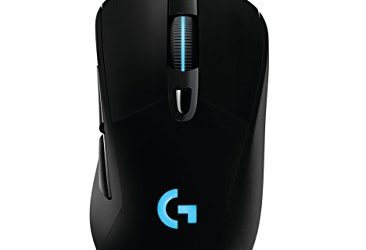
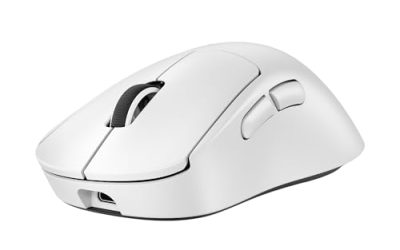
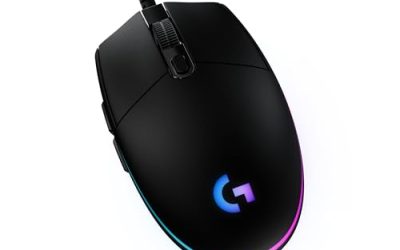
1. Logitech G203 LIGHTSYNC (White)
- Sensor: gaming-grade optical, 200 to 8,000 DPI
- Connection: wired USB, 1,000 Hz report rate
- Buttons: 6 programmable, metal spring button tensioning
- Lighting: LIGHTSYNC RGB
The G203 is where most first-time buyers should begin, because it removes variables. Its gaming-grade optical sensor tracks from 200 to 8,000 DPI with zero filtering or smoothing, so the pointer goes where your hand sends it and nowhere else, and the small symmetrical shell has been refined over so many generations that it suits palm, claw and fingertip grips on small to medium hands. In the white finish it also brightens a desk that is otherwise all black boxes, which is a legitimate reason to pick it over its black twin.
The details underneath are what make it a teacher rather than a toy. The primary buttons use a metal spring tensioning system that keeps clicks crisp and even as the mouse ages, six programmable buttons cover the essentials without overwhelming a new player, and on-board memory stores your DPI stages and bindings so they travel to any PC without the software. LIGHTSYNC RGB lighting syncs with other Logitech G gear if your setup grows that way, and at 85 g the shell is light enough for fast swipes yet planted enough for careful aim. Logitech G HUB handles the setup once, and then the mouse simply works.
2. ASUS TUF Gaming M3 Gen II
- Sensor: optical, 100 to 8,000 DPI
- Tracking: up to 200 IPS, up to 30 G acceleration
- Buttons: 6 programmable
- Switches: rated for 60 million clicks
The TUF Gaming M3 Gen II is the pick for new players who are hard on their gear. At 59 g it is the lightest mouse in this guide by a wide margin, and the shell carries IP56 protection against dust and water splashes, plus an Antibacterial Guard coating on the surfaces your fingers live on. Spilled drinks, dusty desks and marathon sessions in a warm room are the natural habitat of a first gaming setup, and this is the one mouse here built to shrug all three off.
Performance matches the toughness. The optical sensor spans 100 to 8,000 DPI with tracking rated at 200 IPS and 30 G of acceleration, figures that comfortably cover flick shots in shooters and slow tracking in strategy games alike. A dedicated button cycles four sensitivity levels mid-match, the six programmable buttons are built on switches rated for 60 million clicks, the highest lifespan figure in this guide, and PTFE feet keep the glide smooth on cloth or hard pads. The right-handed ergonomic shape fills the palm without bulk, and the Armoury Crate software handles bindings and lighting when you want them.
3. MSI Clutch GM08
- Sensor: PixArt PAW-3519 optical, up to 4,200 DPI in software
- DPI presets: 200, 400, 800, 1,600 and 3,200 on the mouse
- Polling: 1,000 Hz
- Switches: Omron, rated beyond 10 million clicks
The Clutch GM08 answers a question every new player eventually asks: how heavy should a mouse feel? Instead of guessing, it ships with three adjustable weights that slot into the base, so you can play a week light, a week heavy, and learn which feel steadies your aim. That single experiment teaches more about personal preference than a dozen spec sheets, and it is a feature usually found on far more elaborate models.
The rest of the mouse keeps things deliberately simple. A PixArt PAW-3519 optical sensor offers five preset steps from 200 to 3,200 DPI, rising to 4,200 through MSI software, which is honest headroom for 1080p and 1440p play where most beginners live. Omron switches are rated beyond 10 million clicks, polling runs at 1,000 Hz, and the symmetrical shell works for right- and left-handed players in palm or claw grips. Red LED lighting, dragon-scale side grips and a gold-plated USB connector round out a mouse that weighs 92 g before the tuning weights go in.
4. Redragon M612 Predator
- Sensor: PixArt optical, 500 to 8,000 DPI in software
- DPI presets: 500, 1,000, 2,000, 3,000 and 4,000 on the mouse
- Buttons: 11 programmable, including a rapid-fire key and 2 side macro buttons
- Switches: Huano, rated for 20 million clicks
Most first mice give you six buttons and ask you to be grateful. The M612 Predator gives you eleven, all programmable, including two side macro buttons and a dedicated rapid-fire key, which makes it the natural pick for new players heading toward MOBAs, MMOs or any game where abilities pile up faster than keyboard fingers can reach them. Redragon’s software lets every button be reassigned, so the layout can grow with your game library instead of being replaced by it.
The tracking hardware is a PixArt optical sensor with five onboard presets from 500 to 4,000 DPI and any value up to 8,000 available through the software, so fine sniping steps and fast menu sweeps are both covered. Huano primary switches carry a 20-million-click lifespan figure, the frosted coating resists fingerprints, and a rubber-textured panel under the thumb keeps the wide right-handed shell secure during lifts. Five RGB backlit modes handle the looks. It is a bigger, heavier mouse than the G203, and that planted feel is exactly what palm-grip players coming from an office mouse will find familiar.
5. Redragon M908 Impact
- Sensor: PixArt PAW3327 optical, 200 to 12,400 DPI
- Polling: 1,000 Hz
- Tracking: up to 30 G acceleration
- Buttons: 18 programmable, including a 12-button side panel
The M908 Impact is the specialist: a full MMO mouse with a twelve-button grid under the thumb, built for players whose first games involve action bars, raid rotations and more abilities than two hands can cover. Eighteen programmable buttons in total, five memory profiles identified by their own lighting colours, and software that records proper macros make it the deepest control surface in this guide. If your gaming life is about to revolve around hotbars, nothing else here comes close.
Underneath the grid sits a PixArt PAW3327 optical sensor adjustable from 200 to 12,400 DPI, tracking at 1,000 Hz polling with 30 G of acceleration headroom. An eight-piece tuning weight set, 2.4 g per piece, lets you add heft to the already wide and substantial shell, which measures about 122 by 92 by 42 mm and suits large hands and committed palm grips. Teflon feet, a braided cable with a gold-plated connector and 16.8 million colour RGB lighting complete a mouse that asks for a big hand and a button-hungry game, and rewards both.
Buying Guide: What a First Gaming Mouse Must Get Right
Sensor behaviour matters more than the DPI headline. Every sensor in this guide reaches at least 4,200 DPI, and most players settle between 400 and 3,200 in actual games. What separates a good first mouse is clean tracking inside that working range: no acceleration quietly adding distance to fast swipes, and no smoothing rounding off small corrections. A named sensor, like the PixArt units in the MSI, Redragon and ASUS picks, is the easiest way to know what you are getting.
Shape is the first decision, buttons are the second. Measure your current mouse and note how you hold it. Palm players who rest their whole hand on the shell should look at the TUF M3 Gen II or the M612 Predator, claw and fingertip players will feel at home on the G203 or the Clutch GM08, and anyone whose games live on a hotbar should go straight to the M908 Impact and its thumb grid. A shape that fits teaches good habits; a shape that fights you teaches tension.
Switch lifespan is your durability forecast. The main buttons are the first parts to wear, and makers publish their expected life in millions of clicks. The figures in this guide run from beyond 10 million on the GM08 to 60 million on the TUF M3 Gen II, and the higher numbers point to a mouse that still clicks cleanly years in. Tensioning systems, like the metal springs in the G203, keep the feel consistent as that wear accumulates.
Weight is a preference you can test. Light mice such as the 59 g TUF M3 Gen II favour fast, low-sensitivity arm aiming and tire the wrist less over long sessions. Heavier shells feel steadier for small, precise movements. If you genuinely do not know which camp you are in, the GM08 and the M908 Impact both include tuning weights, turning the question into an experiment instead of a second purchase.
Keep the routine simple at first. All five picks are wired, so there is no battery to manage, no receiver to lose and no pairing step between you and the game. Software from each maker handles DPI stages, bindings and lighting, and the G203 and M908 Impact store profiles on the mouse itself, which helps if you play on more than one computer. Set your sensitivity once, then leave it alone for a few weeks while your aim calibrates to it.
FAQ
What makes a mouse entry level rather than just basic?
The intent behind the parts. An entry level mouse uses a named optical sensor with clean tracking, switches with a published lifespan in the millions of clicks, and a shape refined for a common grip, then trims the decorative extras. A merely basic mouse trims the sensor and switches first, which are the two things a new player feels on every movement and every click.
How much DPI does a first gaming mouse actually need?
Less than the packaging suggests. Shooter players typically play between 400 and 1,600 DPI, strategy and MOBA players often between 800 and 3,200, and desktop work at high resolutions might use the range above that. Every pick in this guide covers the full working span with native steps, so choose on tracking quality and shape rather than the largest number on the box.
Should a first-time buyer choose wired or wireless?
Wired is the simpler beginning: nothing to charge, nothing to pair, and a consistent 1,000 Hz report rate from every pick here. Wireless earns its place later, once you know your grip, your sensitivity and whether a cable genuinely bothers your aim. Starting wired also means the money in the mouse goes into the sensor, switches and shell, which are the parts you keep learning on.
Which grip style should a beginner start with?
Whichever one your hand falls into naturally when you rest it on the mouse. Palm grip suits larger ergonomic shells like the M612 Predator, claw and fingertip grips suit compact symmetrical shells like the G203 and the Clutch GM08, and none of them is more correct than the others. Pick the shell that matches the grip you already have, play for a few weeks, and only then consider experimenting.
More from Amazon
Programs that pair well with the guide above. Offers and eligibility are set by Amazon and may change.
Free shipping on eligible items, Prime Video and more. Eligible new members can start with a free trial.
Start a Prime free trialA Prime membership for ages 18-24 with a trial period. Eligibility is set by Amazon.
See Prime for Young AdultsAudiobooks and podcasts to listen to on the go. Eligible new members can start with a free trial.
Try Audible freeAd-free music streaming. Eligible new subscribers can start with a free trial.
Try Music Unlimited freeAs an Amazon Associate we earn from qualifying purchases.