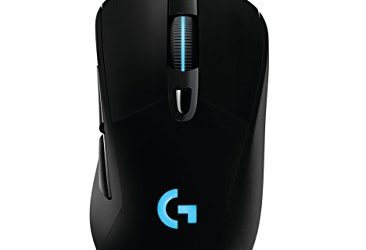
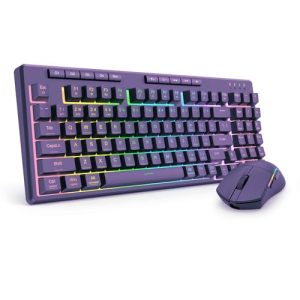
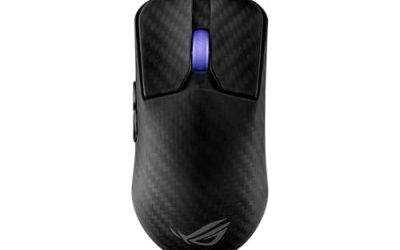
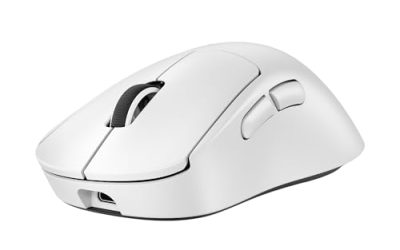
Our Short List of 3
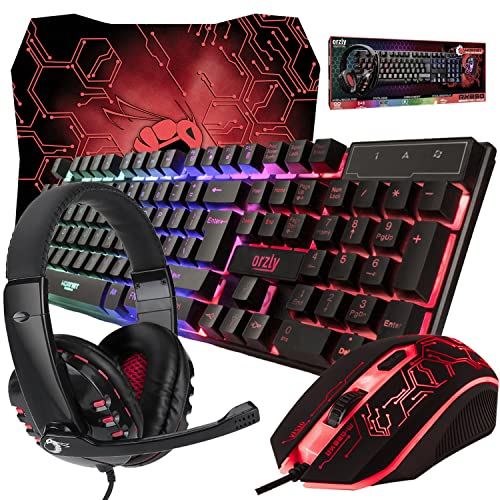
- Bundle contents: full-size keyboard, gaming mouse, stereo headset and cloth mouse pad
- Keyboard: 104-key membrane layout, 19-key rollover with anti-ghosting
- Backlighting: multi-mode RGB on the keyboard, rotating RGB on the mouse
- Keyboard build: spill-resistant drainage design, foldable feet, rated for 8 million keystrokes

- Keyboard: full-size 104-key wired layout with number pad and function row
- Backlighting: RGB with 3 light modes and 7 colours, adjustable brightness and speed
- Comfort: built-in wrist rest, stepped high-and-low keycap profile
- Shortcuts: 12 multimedia combinations on the function row

- Bundle contents: K55 CORE RGB keyboard, HARPOON RGB PRO mouse, HS35 v3 headset, MM medium mouse mat
- Keyboard: full-size membrane layout, ten-zone RGB backlighting
- Keyboard extras: four dedicated multimedia keys, splash resistance up to 300 ml
- Keyboard performance: 1,000 Hz polling rate, 12-key rollover, iCUE software support
All 5 Picks at a Glance
| Product | Specs | Action |
|---|---|---|
| Orzly Hornet RX-250 4-in-1 Gaming Bundle |
| Check price on Amazon |
| Rii RK400 Gaming Keyboard and Mouse Combo |
| Check price on Amazon |
| Corsair 4-in-1 Gaming Bundle |
| Check price on Amazon |
 RedThunder K62 60% Gaming Keyboard and Mouse Combo |
| Check price on Amazon |
 CHONCHOW Gaming Keyboard and Mouse Combo |
| Check price on Amazon |
Key takeaways
- The best entry level gaming keyboard and mouse combos for a first setup: plug-and-play wired sets with backlit keys, simple controls and matched mice.
A first gaming keyboard and mouse set has one job: get a new player from the box to the game with as little friction as possible. Entry level combos earn their place by keeping setup simple. Most are wired USB sets that work the moment they are plugged in, with no software to install, no pairing steps and no separate purchases to match up. The keyboard and mouse arrive together, share a design language and cover the basics a beginner actually needs: readable backlit keys, anti-ghosting on the keys games use most, a mouse with a few clearly spaced sensitivity steps, and media shortcuts that work straight from the function row.
The five combos below are all built for that first setup. Two are complete bundles that add a headset and a mouse pad to the keyboard and mouse, one is a compact 60 percent wired set for smaller desks, and the rest are full-size wired sets that keep the number pad and a standard layout, which helps when the same desk also handles school or office work. None of them needs a driver download before the first session. Where a set does offer optional software, it is an extra for later, not a requirement on day one.
Disclosure: As an Amazon Associate, we earn from qualifying purchases made through links on this page, at no extra cost to you.
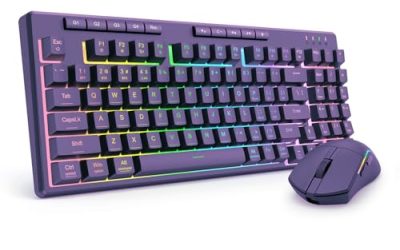
Orzly Hornet RX-250 4-in-1 Gaming Bundle
- Bundle contents: full-size keyboard, gaming mouse, stereo headset and cloth mouse pad
- Keyboard: 104-key membrane layout, 19-key rollover with anti-ghosting
- Backlighting: multi-mode RGB on the keyboard, rotating RGB on the mouse
- Keyboard build: spill-resistant drainage design, foldable feet, rated for 8 million keystrokes
The Orzly Hornet RX-250 is the most complete starting point in this group because the box holds four matched pieces: the RX250-K keyboard, the RX250-M mouse, a stereo headset and a cloth mouse pad. For a first-time buyer who owns none of the surrounding gear, that removes three extra decisions at once. Everything is wired, so the whole set connects with cables and works without charging or pairing.
The keyboard is a full-size 104-key membrane board with 19-key rollover and anti-ghosting, which covers the key clusters first-person and action games lean on. Its backlighting runs through several RGB modes, foldable feet set the typing angle, and drainage channels in the body route small spills away from the switches. Orzly rates the board for eight million keystrokes, a figure that suits years of everyday play and typing. The mouse is a light 90 gram ambidextrous shape, so it works in either hand, with four sensitivity steps from 1,200 to 3,200 DPI and rotating RGB lighting. The headset adds stereo sound and a foldable microphone for squad chat, and the pad gives the mouse a consistent anti-skid surface from the first session.
For a beginner, the appeal is the absence of gaps: keyboard, mouse, sound and surface all arrive together, all match, and all run over plain wired connections on PC, PlayStation, Xbox and Switch systems that accept USB keyboards.
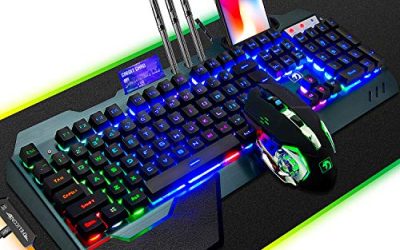
Rii RK400 Gaming Keyboard and Mouse Combo
- Keyboard: full-size 104-key wired layout with number pad and function row
- Backlighting: RGB with 3 light modes and 7 colours, adjustable brightness and speed
- Comfort: built-in wrist rest, stepped high-and-low keycap profile
- Shortcuts: 12 multimedia combinations on the function row
The Rii RK400 keeps things as plain as a combo gets, and that plainness is the point for a first set. It pairs a full-size 104-key wired keyboard with a matching six-button mouse, both running over USB with no drivers and no setup beyond plugging them in. The layout is the standard one a new player will already know from any school or office machine, complete with a number pad and a full function row, so there is nothing to relearn.
The keyboard carries RGB backlighting with three light modes and seven colours, plus brightness and speed control from the keyboard itself. An attached wrist rest runs along the front edge, and the stepped high-and-low keycap profile is shaped to keep fingers settled during long sessions. The listing describes anti-ghosting support for the key combinations games use most, and twelve multimedia shortcuts sit on the function row for volume and playback. The mouse cycles through four sensitivity steps from 1,200 to 3,200 DPI with a button on top, so a beginner can slow it down for aiming practice and raise it for desktop work without opening any software. Its LED lighting breathes through colours on its own and needs no configuration either.
Everything about the RK400 is set-and-forget: two cables, standard keys, lighting that runs itself and sensitivity that changes with one button. It is a sensible first set for a shared family PC as much as for a dedicated gaming desk.
Corsair 4-in-1 Gaming Bundle
- Bundle contents: K55 CORE RGB keyboard, HARPOON RGB PRO mouse, HS35 v3 headset, MM medium mouse mat
- Keyboard: full-size membrane layout, ten-zone RGB backlighting
- Keyboard extras: four dedicated multimedia keys, splash resistance up to 300 ml
- Keyboard performance: 1,000 Hz polling rate, 12-key rollover, iCUE software support
Corsair’s 4-in-1 Gaming Bundle is the big-brand route into a first setup. It groups the K55 CORE RGB keyboard, the HARPOON RGB PRO mouse, the HS35 v3 headset and an MM medium cloth mouse mat in one box, and the keyboard and mouse both work with Corsair’s iCUE software for players who later want to record macros or sync lighting. On day one, though, both devices run as plain plug-and-play USB gear.
The K55 CORE is a full-size membrane keyboard with ten-zone RGB backlighting, four dedicated multimedia keys and a splash-resistant design rated to handle up to 300 ml of liquid, which is a forgiving trait on a crowded desk. It polls at 1,000 Hz and supports 12-key rollover, enough for the multi-key inputs most games ask for. The HARPOON RGB PRO mouse is the strongest mouse in this roundup on paper: it weighs 85 grams, uses an optical sensor reaching 12,000 DPI, and carries six fully programmable buttons on Omron switches, so it keeps up as a player’s aim and game library grow. The HS35 v3 headset connects over a standard 3.5 mm plug and works across PC, Mac, PlayStation, Xbox, Switch and mobile devices, with 50 mm drivers and an adjustable headband.
This bundle suits a first-time buyer who wants one recognised ecosystem from the start, with software headroom for later and a mouse that will not need replacing when skills improve.
RedThunder K62 60% Gaming Keyboard and Mouse Combo
- Keyboard: 61-key 60 percent layout, no number pad or dedicated function row
- Backlighting: RGB with multiple modes, adjustable colour and brightness via Fn keys
- Anti-ghosting: 26-key support for simultaneous inputs
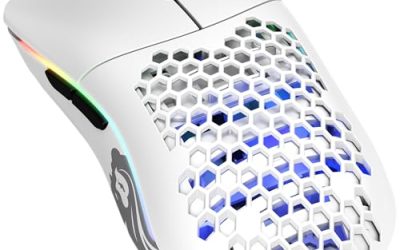
- Mouse: honeycomb shell, about 65 g, symmetrical shape for either hand
The RedThunder K62 wired set is the compact option. Its 61-key keyboard drops the number pad, the function row and the arrow cluster, which frees a wide strip of desk for mouse movement. That layout is a deliberate trade: players who aim with low sensitivity and big arm sweeps gain room, while anyone who needs a number pad for daily work should look at the full-size sets in this list instead.
The board is RGB backlit with several modes, colour choices and brightness levels, all changed through Fn combinations, and it carries 26-key anti-ghosting so dense movement and ability inputs register together. The function row and arrows live on an Fn layer, which takes a short adjustment period for a first-time user but becomes routine quickly. The bundled mouse is the fun half of the set: a honeycomb shell that brings it down to about 65 grams, with an optical sensor reaching 7,200 DPI, a 1,000 Hz polling rate, 12,000 fps scanning, 400 IPS tracking speed and 40G acceleration tolerance. Those are figures a beginner can grow into rather than out of. Both devices are wired over USB and work with PC, PS5 and Xbox systems.
For a small desk or a laptop-based setup, the K62 pair delivers a genuinely light mouse and a tidy footprint while keeping the plug-and-play simplicity an entry level set should have.
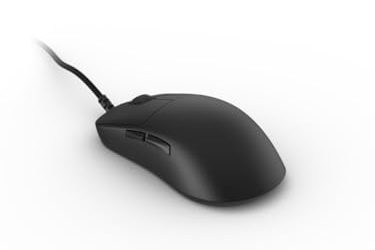
CHONCHOW Gaming Keyboard and Mouse Combo
- Keyboard: full-size 104-key wired layout with number pad
- Shortcuts: 12 multimedia function keys
- Anti-ghosting: 19 keys for common gaming combinations
- Backlighting: 10 colour settings, solid or multicolour, Fn control of speed, brightness and direction
The CHONCHOW combo is a full-size wired set built around cross-platform use. Its 104-key keyboard and matching mouse connect over USB with no drivers, and the listing names Windows, Mac OS, Linux, PlayStation and Xbox systems, which makes it a practical pick for a household where the same set might move between a PC and a console.
The keyboard keeps the complete layout a beginner expects: number pad, twelve multimedia function keys and 19 anti-ghosting keys for common gaming combinations. Its backlighting offers ten colour settings, either a single solid colour or a multicolour effect, with Fn shortcuts adjusting the effect speed, brightness and direction. The body is described as water resistant, and fold-out stands at the back raise the typing angle. Keycap legends are printed to resist wear, which matters on a set that will also handle daily typing. The mouse is an ambidextrous ergonomic shape with an anti-skid scroll wheel and four sensitivity steps from 1,200 to 3,600 DPI, changed with a button on the mouse itself. Its seven-colour breathing backlight can be switched off entirely for a plain look.
Nothing here asks a new player to learn software or menus. The CHONCHOW set covers the standard layout, console compatibility and one-button sensitivity changes in a single wired package.
How to Choose a First Gaming Keyboard and Mouse Combo
Layout is the first decision. A full-size 104-key board keeps the number pad and a standard function row, which suits a desk shared between games and everyday typing. A tenkeyless or 60 percent board gives that space back to the mouse, which helps low-sensitivity aiming but hides arrows and function keys behind an Fn layer. Beginners who play a mix of genres and also type on the same machine usually settle fastest on a full-size set like the Orzly, Rii or CHONCHOW combos, while players setting up a small, game-only desk can take the compact RedThunder route.
Connection type is the second decision, and at this level wired is the simpler answer. A wired combo never needs charging, never drops a wireless link and works on consoles and PCs alike the moment it is plugged in. Every set in this list is wired for exactly those reasons. Membrane keyboards are also the norm in entry level sets: they are quiet, forgiving of spills in several of these designs, and consistent from key to key, even if they lack the crisp feel of mechanical switches. Anti-ghosting numbers between 19 and 26 keys sound modest, but they cover the movement clusters and ability keys that games actually press together.
For the mouse, look at the sensitivity steps rather than the headline maximum. Four steps spread between roughly 1,200 and 3,600 DPI, as on the Orzly, Rii and CHONCHOW mice, give a new player room to experiment without getting lost, while a lighter shell such as the RedThunder honeycomb mouse or the 85 gram Corsair HARPOON makes long sessions easier on the wrist. Bundles that add a headset and pad, like the Orzly and Corsair sets, complete a first desk in one purchase. Finally, check console support per game: consoles accept USB keyboards and mice, but each title decides whether to use them.
FAQ
Do these combos need software before the first game?
No. Every set in this list works as soon as it is plugged in, with lighting and sensitivity controlled from the devices themselves. The Corsair keyboard and mouse offer optional iCUE software for macros and lighting sync, but it is an extra for later, not a requirement.
Will a wired combo work on a PlayStation or Xbox?
Mostly yes, with one condition. The consoles recognise USB keyboards and mice at the system level, and several sets here list PlayStation and Xbox support directly. Each game then decides whether it accepts keyboard and mouse input, so check the specific title before counting on it.
Is a membrane keyboard good enough for gaming?
For a first set, yes. Membrane boards are quiet, consistent and often spill resistant, and every combo here pairs one with proper anti-ghosting on the keys games use. Mechanical switches feel crisper, but they are an upgrade to consider later, once a player knows which layout and size they prefer.
What mouse sensitivity should a beginner start with?
Start on one of the lower steps the mouse offers, somewhere in the 1,200 to 1,800 DPI range, and play for a few sessions before changing it. Lower settings trade desk space for steadier aim. Raise the step only when the mouse regularly runs out of pad before the turn is finished.
FAQ
Do these combos need software before the first game?
Will a wired combo work on a PlayStation or Xbox?
Is a membrane keyboard good enough for gaming?
What mouse sensitivity should a beginner start with?
More from Amazon
Programs that pair well with the guide above. Offers and eligibility are set by Amazon and may change.
Free shipping on eligible items, Prime Video and more. Eligible new members can start with a free trial.
Start a Prime free trialA Prime membership for ages 18-24 with a trial period. Eligibility is set by Amazon.
See Prime for Young AdultsAudiobooks and podcasts to listen to on the go. Eligible new members can start with a free trial.
Try Audible freeAd-free music streaming. Eligible new subscribers can start with a free trial.
Try Music Unlimited freeAs an Amazon Associate we earn from qualifying purchases.