Our Short List of 3

- Sensor: PixArt PMW-3360 optical
- Sensitivity: up to 12,000 DPI, adjustable in steps
- Polling rate: 1,000 Hz
- Weight: 67 g
- Sensor: PixArt PAW3335 optical
- Sensitivity: up to 16,000 DPI
- Tracking speed: 400 IPS
- Weight: 47 g

- Sensor: Owl-Eye 26K optical
- Sensitivity: up to 26,000 DPI
- Switches: TITAN optical
- Connectivity: 2.4 GHz wireless, Bluetooth, wired USB-C
All 5 Picks at a Glance
| Product | Specs | Action |
|---|---|---|
| Glorious Model O Wired (Matte White) |
| Check price on Amazon |
| ASUS TUF Gaming M4 Air |
| Check price on Amazon |
| Turtle Beach Pure Air |
| Check price on Amazon |
 HyperX Pulsefire Haste 2 Wired (White) |
| Check price on Amazon |
 SteelSeries Rival 3 Gen 2 (White) |
| Check price on Amazon |
Key takeaways
- Compare the best fps gaming mouse under 50: five lightweight picks with sharp optical sensors, fast polling and low-latency clicks for shooter players.
First-person shooters punish slow hardware more than any other genre. A flick that lands a fraction late, a sensor that spins out during a fast swipe, or a shell that drags across the pad can each turn a winnable duel into a lost round. The good news is that the parts of a mouse that matter most in shooters — a flawless optical sensor, a light shell, low-latency clicks and slick feet — have moved well down the market, and this tier now holds genuinely competitive hardware rather than cut-down leftovers.
This guide rounds up five FPS gaming mice that cover the main ways shooter players hold and move a mouse. The list includes a honeycomb wired classic, an ultralight wired model with dust and water resistance, a wireless option with optical switches, a wired model with an 8,000 Hz polling rate, and a durable wired pick built around fast clicks. Every model here uses an optical sensor with clean tracking at the low sensitivity settings most shooter players run, and every shape is light enough for repeated low-sensitivity swipes without wearing out your arm.
Read the picks with your grip in mind. Fingertip and claw players usually want the lightest shell they can control, while palm players tend to prefer a fuller shape with a taller hump. Sensor figures, weights, switch types and connectivity for each pick are laid out in the spec lists so the five are easy to compare side by side.
Disclosure: As an Amazon Associate, we earn from qualifying purchases made through links on this page, at no extra cost to you.
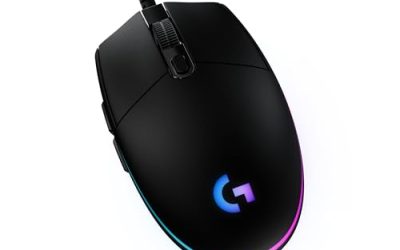
Glorious Model O Wired (Matte White)
- Sensor: PixArt PMW-3360 optical
- Sensitivity: up to 12,000 DPI, adjustable in steps
- Polling rate: 1,000 Hz
- Weight: 67 g
The Model O is the mouse that made the honeycomb shell mainstream, and it remains one of the most natural shapes for shooter play. The symmetrical body suits fingertip and claw grips well, the sides are flat and easy to lock onto during fast target switches, and the perforated shell keeps the weight low without making the mouse feel hollow or fragile. In the matte white finish it also shrugs off the shine that glossier coatings pick up over time.
Under the shell sits the PixArt PMW-3360, a sensor with a long track record in competitive mice. It tracks cleanly across the full range of sensitivity settings shooter players actually use, from slow tactical settings to faster arena settings, and it holds up during hard flicks without spinning out. The Omron main switches give a crisp, familiar click feel, and the G-Skates feet are pure PTFE, so the glide stays smooth and consistent on cloth pads.
The Ascended cable is a soft paracord-style cord that flexes out of the way instead of pushing back against the mouse, which removes most of the drag people associate with wired play. Six programmable buttons cover the essentials — two side buttons, a clickable wheel and a DPI button behind it — and the RGB lighting runs through the shell cutouts and around the wheel. For players who want a proven wired shape with a sensor that simply never misbehaves, the Model O is the safe anchor pick of this group.
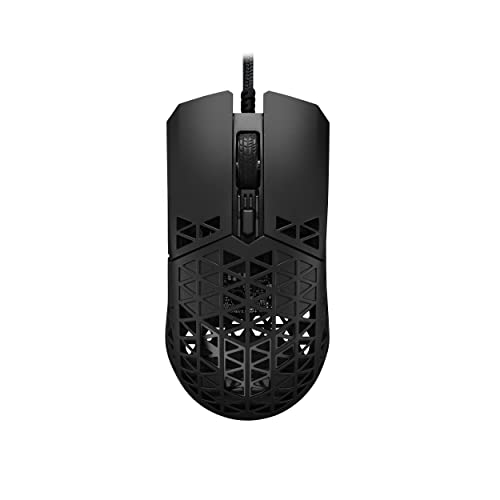
ASUS TUF Gaming M4 Air
- Sensor: PixArt PAW3335 optical
- Sensitivity: up to 16,000 DPI
- Tracking speed: 400 IPS
- Weight: 47 g
The M4 Air is built around one idea: take weight out of every part of the mouse. At 47 g it is the lightest pick in this guide, achieved with an air-shelled chassis full of triangular cutouts that keep the structure rigid while shedding grams. That low mass makes it extremely easy to start and stop on the pad, which is exactly the motion pattern of flick-heavy play in tactical shooters and arena titles alike.
The sensor is a PixArt PAW3335 optical unit tuned for up to 16,000 DPI and 400 IPS tracking, comfortably beyond what fast swipes demand, and it keeps tracking true at the low DPI steps most competitive players settle on. The main switches are rated for 60 million clicks, and the feet are 100% PTFE for a low-friction glide that pairs well with the light shell — small corrections feel nearly effortless.
What separates the M4 Air from other ultralight wired mice is the protection built into it. The shell is rated IPX6 for water and dust resistance, so drink spills and dusty desks are less of a threat, and the surfaces are treated with ASUS Antibacterial Guard to slow bacterial growth on a mouse that sees daily hand contact. The flexible TUF Gaming paracord-style cable keeps drag minimal. Players with small to medium hands who play fingertip grip will get the most from this design, and anyone who has found standard gaming mice tiring over long sessions should look here first.
Turtle Beach Pure Air
- Sensor: Owl-Eye 26K optical
- Sensitivity: up to 26,000 DPI
- Switches: TITAN optical
- Connectivity: 2.4 GHz wireless, Bluetooth, wired USB-C
The Pure Air is the wireless entry in this group, and it earns its place on sensor and switch hardware rather than convenience alone. Its Owl-Eye 26K optical sensor tracks at up to 26,000 DPI with the clean, acceleration-free behaviour shooter players need, and the TITAN optical switches register clicks with light instead of a metal contact, which removes the debounce delay that can add latency to mechanical clicks and eliminates double-click faults as the switches age.
Connectivity is flexible: a 2.4 GHz wireless link for lag-free play, Bluetooth for a second device, and a wired USB-C mode that also charges. Battery life runs up to 125 hours per charge, so charging is a weekly habit rather than a daily one, and the mouse is NVIDIA Reflex compatible for players running a supported monitor and graphics card who want the full low-latency chain measured end to end.
At 54 g the Pure Air stays firmly in ultralight territory despite carrying a battery, and the symmetrical shell works for claw and fingertip grips on small to medium hands. Pure PTFE glides keep movement smooth, and the left and right buttons have a firm, tactile actuation that suits tap-firing. For players who want to clear the cable off the desk without giving up optical switches or a top-tier sensor, this is the pick that fits.
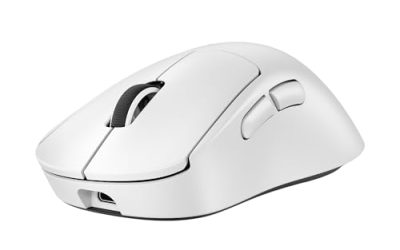
HyperX Pulsefire Haste 2 Wired (White)
- Sensor: HyperX 26K optical
- Sensitivity: up to 26,000 DPI
- Tracking speed: 650 IPS
- Polling rate: up to 8,000 Hz
The Pulsefire Haste 2 takes the opposite route from honeycomb designs: a solid shell that still weighs only 53 g. That matters for players who like the light, fast feel of an ultralight mouse but dislike perforated sides under their fingers. The shape is a safe symmetrical form with a low profile, and it works across fingertip, claw and even palm grips for smaller hands.
Inside is the HyperX 26K sensor, tracking up to 26,000 DPI at 650 IPS, paired with the headline feature of this mouse — an 8,000 Hz polling rate. Where a standard gaming mouse reports its position one thousand times per second, the Haste 2 can report eight thousand times per second, shrinking the gap between a physical movement and the report reaching the PC. In fast-paced shooters that translates to smoother micro-corrections and a more direct feel during tracking aim.
The custom HyperX switches are rated for 100 million clicks, the longest switch life figure in this guide, and the HyperFlex 2 cable is a paracord-style cord that stays out of the way during swipes. Virgin PTFE skates handle the glide, grip tape is included in the box for players who want extra hold on the buttons and sides, and the six programmable buttons plus DPI settings are handled through HyperX NGENUITY software. Players chasing the most responsive wired connection in this tier will find it here.
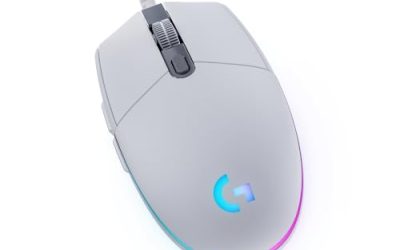
SteelSeries Rival 3 Gen 2 (White)
- Sensor: TrueMove Core optical (PixArt PAW3311)
- Sensitivity: up to 8,500 DPI
- Tracking speed: 300 IPS, 35G acceleration
- Click latency: 1.35 ms
The Rival 3 Gen 2 is the durability-focused pick of the group. SteelSeries built this second generation around click speed and switch life: the mechanical switches are rated for 60 million clicks, and the click latency is quoted at 1.35 ms, the fastest figure the company has shipped in this line. For shooter players whose rounds are decided by who fires first in a head-on duel, that response figure is the point of the mouse.
The TrueMove Core optical sensor, developed with PixArt around the PAW3311, tracks up to 8,500 DPI at 300 IPS with true one-to-one movement. That ceiling is lower than the flagship sensors elsewhere in this guide, but it covers the range shooter players genuinely use many times over — most competitive settings sit far below it — and the tracking stays consistent at low sensitivity, which is where precision is won or lost.
At 77 g the Rival 3 Gen 2 is the heaviest mouse here, and some players will read that as a benefit: the extra mass adds stability during long tracking movements and makes small stops feel deliberate rather than twitchy. The shell is a comfortable symmetrical shape with a matte finish, the feet are 100% PTFE, and the super-mesh paracord cable keeps drag low. Three-zone Prism RGB lighting rounds out the package. Players who prioritise a solid, planted feel and long switch life over the lightest possible shell should start with this one.
How to Choose an FPS Gaming Mouse in This Tier
Start with shape and grip, not sensor figures. Every sensor in this guide tracks far beyond human swipe speeds, so the deciding factor is how the shell fits your hand. Fingertip players move the mouse with their fingers alone and usually prefer the lightest, smallest shells — the M4 Air and Pure Air fit that style best. Claw players arch their fingers and want a defined hump to pull against, which the Model O and Haste 2 provide. Palm players rest their whole hand on the mouse and generally favour a fuller body like the Rival 3 Gen 2. A shape that fights your grip will hurt your aim more than any sensor difference on this page.
Weight changes how aiming feels. Lighter mice are easier to flick and stop quickly, which suits low-sensitivity arm aiming and fast target switching. Slightly heavier mice add inertia that smooths out long tracking movements and can calm a shaky hand. There is no correct number — there is only the weight that matches your sensitivity and play style — but this tier now spans from 47 g to 77 g, so both ends of that preference are covered here.
Wired or wireless is now a preference, not a performance gap. Modern 2.4 GHz links like the one in the Pure Air match wired latency for practical play, and optical switches can even cut click delay below mechanical designs. Wired models answer with zero charging, the lightest possible builds, and features like the Haste 2’s 8,000 Hz polling, which current wireless hardware in this tier does not match. Choose based on whether a cable bothers you and how often you are willing to charge.
Polling rate and click latency are the fine print worth reading. A standard 1,000 Hz report rate is proven and entirely sufficient for most players. Higher polling smooths the report stream further, and lower click latency shaves the delay on every shot. Neither replaces a good sensor or a shape that fits, but between two mice that otherwise suit you, they are sensible tie-breakers.
Feet and cables decide how the mouse moves day to day. Pure PTFE feet glide evenly on cloth pads and wear slowly; every pick here uses them. Paracord-style cables flex instead of dragging, which is why all three wired picks use one. If you play wired without a bungee, cable behaviour matters more than most spec-sheet lines.
FAQ
What DPI should I use for FPS games?
Most competitive shooter players run between 400 and 1,600 DPI and adjust the in-game sensitivity to match, because lower settings give finer control over small crosshair movements. Every mouse in this guide covers that range with room to spare, so set DPI where your aim feels steadiest and leave the headline maximum figures aside — they exist for high-sensitivity players and fast desktop work, not as a target to aim for.
Does polling rate matter for shooters?
It can, at the margins. A higher polling rate sends position updates to the PC more often, which smooths fast movements and slightly reduces input delay. The jump from standard rates to the Haste 2’s 8,000 Hz mode is most noticeable on high-refresh monitors during rapid flicks. For most players the difference between the wired picks here is small, but players with fast monitors who play flick-heavy roles will feel the benefit most.
Are optical switches better than mechanical switches for FPS play?
Optical switches register a click with a beam of light rather than a bending metal contact, so they avoid the debounce delay mechanical designs need and they do not develop double-click faults as they wear. The Pure Air uses them, and they suit rapid tap-firing well. Mechanical switches, like those in the other four picks, remain popular because many players prefer their tactile feel. Both types are fast enough for competitive play; the choice is about feel and long-term consistency.
How long do the feet and switches on these mice last?
The switches here are rated from 20 million to 100 million clicks, which covers years of daily play for most people. PTFE feet wear gradually and can be replaced when the glide starts to feel scratchy — keeping the pad clean slows that wear considerably. Cables are the other wear point on wired models, and the flexible paracord-style cords used here are designed to survive repeated bending far better than stiff rubber cables.
FAQ
What DPI should I use for FPS games?
Does polling rate matter for shooters?
Are optical switches better than mechanical switches for FPS play?
How long do the feet and switches on these mice last?
More from Amazon
Programs that pair well with the guide above. Offers and eligibility are set by Amazon and may change.
Free shipping on eligible items, Prime Video and more. Eligible new members can start with a free trial.
Start a Prime free trialA Prime membership for ages 18-24 with a trial period. Eligibility is set by Amazon.
See Prime for Young AdultsAudiobooks and podcasts to listen to on the go. Eligible new members can start with a free trial.
Try Audible freeAd-free music streaming. Eligible new subscribers can start with a free trial.
Try Music Unlimited freeAs an Amazon Associate we earn from qualifying purchases.