Our Short List of 3

- Best for: Players who want one mouse for shooters, MMOs and work, with the most buttons in this guide.
- Sensor: HERO 25K optical, 100 to 25,600 DPI
- Buttons: 11 programmable buttons
- Scroll wheel: Dual-mode hyper-fast, with tilt
- Weights: Five removable 3.6-gram tuning weights

- Best for: Palm-grip players who want a comfortable ergonomic mouse for long sessions.
- Sensor: Razer Focus+ optical, up to 20,000 DPI
- Resolution accuracy: 99.6 percent
- Tracking speed: 650 IPS
- Acceleration: 50 G

- Best for: Players who want a cable-free desk and long battery life at a modest outlay.
- Sensor: Logitech HERO 12K optical, 200 to 12,000 DPI
- Tracking speed: 400 IPS
- Connection: LIGHTSPEED wireless, 1 ms report rate
- Battery: 1 AA, up to 250 hours in performance mode, up to 9 months in Endurance mode
All 3 Picks at a Glance
| Product | Specs | Action |
|---|---|---|
| 1. Logitech G502 HERO |
| Check price on Amazon |
| 2. Razer DeathAdder V2 |
| Check price on Amazon |
| 3. Logitech G305 LIGHTSPEED |
| Check price on Amazon |
Key takeaways
- Searching for the best gaming mouse under 100? Compare five wired and wireless mice with strong sensors, light bodies and honest trade-offs.
A gaming mouse under 100 does not have to feel like a compromise. The five mice in this guide all come from established brands and use optical sensors that track cleanly at the sensitivities most players actually use. What separates them is shape, weight, button count and connection type, and those are the things that decide whether a mouse disappears into your hand or fights you every session.
Every mouse here sits under the 100 mark at its usual listing, and each one earns its place for a different kind of player: the button-heavy all-rounder, the ergonomic palm-grip classic, the long-battery wireless pick, the budget wired mouse and the ultralight small-hand option.
Quick Picks
- Best overall: Logitech G502 HERO — eleven buttons, tunable weights and a sensor that reaches 25,600 DPI.
- Best ergonomic: Razer DeathAdder V2 — a right-handed palm-grip shape with a 20,000 DPI Focus+ sensor.
- Best wireless value: Logitech G305 LIGHTSPEED — a 99-gram wireless mouse with a 12,000 DPI HERO sensor and up to 250 hours from one AA battery.
- Best budget wired: SteelSeries Rival 3 — a 77-gram wired mouse with a TrueMove Core sensor and split trigger buttons.
- Best ultralight: Razer Viper Mini — a 61-gram ambidextrous mouse with an 8,500 DPI sensor and Chroma RGB underglow.
| Mouse | Best for | Sensor | Weight | Connection |
|---|---|---|---|---|
| Logitech G502 HERO | Most buttons and control | HERO 25K, up to 25,600 DPI | 121 g | Wired |
| Razer DeathAdder V2 | Ergonomic palm grip | Focus+ optical, up to 20,000 DPI | 82 g | Wired |
| Logitech G305 LIGHTSPEED | Wireless play on a budget | HERO 12K, up to 12,000 DPI | 99 g | LIGHTSPEED wireless |
| SteelSeries Rival 3 | Simple wired value | TrueMove Core, up to 8,500 CPI | 77 g | Wired |
| Razer Viper Mini | Small hands and fast flicks | Optical, up to 8,500 DPI | 61 g | Wired |
How to Choose
Match the shape to your grip first. A mouse that fights your hand will never feel right, no matter how good its sensor is. Palm-grip players who rest the whole hand on the mouse usually do best with a taller, right-handed ergonomic shell like the DeathAdder V2 or the G502 HERO. Claw-grip players who arch the fingers and keep the palm off the shell often prefer a lower, narrower body such as the G305 or the Viper Mini. Fingertip players want the lightest mouse they can find, and the 61-gram Viper Mini is the clearest fit here. Hands under 17 cm usually suit the smaller mice in this guide, while hands over 19 cm suit the larger ergonomic shells.
Sensor numbers matter less than you think. Every sensor in this guide tracks cleanly at the sensitivities most players use, which usually sit between 400 and 3,200 DPI. A 25,600 DPI ceiling sounds impressive, but almost nobody plays at that level, and a higher ceiling does not make a sensor more accurate at normal settings. What matters more is consistency: a sensor with no smoothing, filtering or acceleration keeps your crosshair movement predictable.
Count the buttons you will actually use. An MMO player who maps abilities, consumables and macros to the mouse will feel the difference between six buttons and eleven. A competitive shooter player who only needs primary fire, aim-down-sights and two side buttons will not. The G502 HERO leads this group with eleven programmable buttons, while the G305, Rival 3 and Viper Mini each offer six.
Weigh the wireless trade-off honestly. The G305 is the only wireless mouse in this guide, and it earns its place with a 1 ms LIGHTSPEED report rate and a battery that lasts up to 250 hours of play from one AA cell. That freedom comes with two limits: it connects only through its USB receiver, with no Bluetooth and no wired mode, and it weighs 99 grams with the battery installed. If you play at a fixed desk and never move your mouse, a wired mouse gives you the same response with less weight and nothing to charge or replace.
Check the little things before you buy. Look at the cable on wired mice: a flexible braided cable drags less than a stiff rubber one, and both Razer mice here use the flexible Speedflex design. Look at the software: Logitech G HUB, Razer Synapse 3 and SteelSeries GG all let you remap buttons and tune DPI steps, but they only run on Windows for full features.
1. Logitech G502 HERO
- Best for: Players who want one mouse for shooters, MMOs and work, with the most buttons in this guide.
- Sensor: HERO 25K optical, 100 to 25,600 DPI
- Buttons: 11 programmable buttons
- Scroll wheel: Dual-mode hyper-fast, with tilt
- Weights: Five removable 3.6-gram tuning weights
Players who want one mouse for shooters, MMOs and work, with the most buttons in this guide.
Heavy at 121 grams, large right-handed shell, and switch double-click reports after long use.
The G502 HERO is the most versatile mouse in this guide, and it is the one to pick when a single mouse has to cover shooters, MMOs and everyday work. Its right-handed ergonomic shell fills a medium to large hand comfortably, and eleven programmable buttons cover abilities, weapon swaps and macros. The dual-mode hyper-fast scroll wheel switches between free-spin for long documents and ratchet mode for precise weapon switching.
Under the shell sits the HERO 25K sensor, which tracks from 100 to 25,600 DPI with no smoothing, filtering or acceleration in its published specifications. That consistency is what competitive aiming rewards, because your crosshair moves the same distance for the same hand movement every time. Five removable 3.6-gram weights let you tune the balance from the 121-gram base up to 139 grams, and on-board memory stores up to five profiles on the mouse itself.
The trade-offs are honest ones. At 121 grams before you add any weights, the G502 HERO is the heaviest mouse in this guide, and players who favor fast flicks or fingertip grips may find it sluggish next to a 61-gram or 77-gram rival. The large right-handed shell does not suit small hands or left-handed players, and the sheer number of buttons takes a week of use before your thumb finds them without looking. Owner discussion also notes the mechanical switches can develop a double-click fault after extended use, so buy from a seller with an easy return policy.
Watch out for: Heavy at 121 grams, large right-handed shell, and switch double-click reports after long use.
2. Razer DeathAdder V2
- Best for: Palm-grip players who want a comfortable ergonomic mouse for long sessions.
- Sensor: Razer Focus+ optical, up to 20,000 DPI
- Resolution accuracy: 99.6 percent
- Tracking speed: 650 IPS
- Acceleration: 50 G
Palm-grip players who want a comfortable ergonomic mouse for long sessions.
Right-handed only, wired only, and eight buttons may feel thin for MMO play.
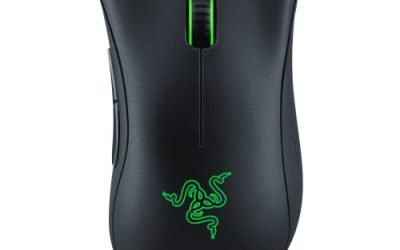
The DeathAdder V2 is the ergonomic classic of this group, and it is the mouse to pick when comfort during long sessions matters most. Its right-handed shell has been refined over many generations into a shape that suits palm and claw grips alike, with a gentle curve that fills the hand. At 82 grams it is light enough for quick aiming but heavy enough to feel planted, and rubberized side grips keep it steady.
The Focus+ optical sensor tracks up to 20,000 DPI with 99.6 percent resolution accuracy, 650 inches per second of tracking speed and 50 G of acceleration, which is far more headroom than any human hand needs. Razer optical switches sit under the primary buttons and are built for 70 million clicks, with a light, crisp actuation and no debounce delay. Eight programmable buttons cover the essentials, and Chroma RGB lighting across two zones lets you match the mouse to the rest of your setup through Synapse 3.
The limits are the shape itself. The DeathAdder V2 is right-handed only, so left-handed players need to look elsewhere, and its 127 mm length can feel oversized for hands under 17 cm. Eight buttons is plenty for shooters but thin for MMO players who map a full ability bar to the mouse, and the V2 is wired only, so players who want a cable-free desk will need a different model.
Watch out for: Right-handed only, wired only, and eight buttons may feel thin for MMO play.
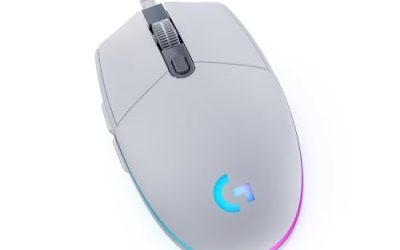
3. Logitech G305 LIGHTSPEED
- Best for: Players who want a cable-free desk and long battery life at a modest outlay.
- Sensor: Logitech HERO 12K optical, 200 to 12,000 DPI
- Tracking speed: 400 IPS
- Connection: LIGHTSPEED wireless, 1 ms report rate
- Battery: 1 AA, up to 250 hours in performance mode, up to 9 months in Endurance mode
Players who want a cable-free desk and long battery life at a modest outlay.
USB receiver only with no Bluetooth or wired mode, and double-click reports after long use.
The G305 LIGHTSPEED is the wireless pick in this guide, and it is the mouse to choose when you want to cut the cord without paying a premium. Its compact, symmetrical egg shape suits claw and fingertip grips, and at 99 grams with the battery installed it is light enough for quick flicks while still feeling solid in the hand. The HERO 12K sensor tracks up to 12,000 DPI with zero smoothing, filtering or acceleration, and the LIGHTSPEED wireless connection reports at 1 ms, which matches a wired mouse for response.
Battery life is the headline feature. A single AA battery delivers up to 250 hours of continuous play in performance mode, and Endurance mode through G HUB stretches that to up to 9 months of everyday use. The USB receiver stores inside the mouse body, so the G305 travels well with a laptop.
The trade-offs come from that simplicity. The G305 connects only through its USB receiver: there is no Bluetooth and no wired mode, so losing the tiny receiver means losing the mouse. At 99 grams it is heavier than the wired ultralight mice in this guide, and competitive FPS players who chase the lightest possible setup will notice the difference. Owner discussion notes the left button can develop a double-click fault after one to three years of heavy use.
Watch out for: USB receiver only with no Bluetooth or wired mode, and double-click reports after long use.
Logitech G305 LIGHTSPEED on Amazon
4. SteelSeries Rival 3
The Rival 3 is the simplest mouse in this guide, and it is the pick for players who want a solid wired mouse with nothing to fuss over. Its ergonomic right-handed shape fits medium hands well, and at 77 grams it is light enough for fast aiming. The TrueMove Core optical sensor tracks up to 8,500 CPI, which is more than enough for the sensitivities most players use.
Six programmable buttons cover the essentials, and the split trigger buttons stand apart from the shell, which gives them a crisp, consistent click feel. Mechanical switches are built for 60 million clicks, and the Prism RGB system lights three zones that you can tune through SteelSeries GG.
The limits are modest and match the simple brief. The 8,500 CPI ceiling is the lowest in this guide, though it will not hold back any player who aims between 400 and 3,200 DPI. There is no on-board memory for profiles, so your button layout lives in software rather than on the mouse, and the right-handed shape rules out left-handed players. The cable is a standard wired connection rather than a flexible paracord-style design, so players who are sensitive to cable drag may want a bungee.
Specs
- Sensor: TrueMove Core optical, up to 8,500 CPI
- Buttons: 6 programmable buttons
- Click buttons: Split trigger design
- Switches: Mechanical, built for 60 million clicks
- Weight: 77 grams
- Lighting: Prism RGB, three zones
- Connection: Wired USB
- Model: 62513
Best for: Players who want a light, simple wired mouse with a clean click feel.
Watch out for: No on-board memory, 8,500 CPI ceiling, and a standard cable rather than a flexible paracord design.
5. Razer Viper Mini
The Viper Mini is the ultralight pick in this guide, and it is the mouse for small hands and fast flicks. At 61 grams it is the lightest mouse here by a clear margin, and the ambidextrous shape suits claw and fingertip grips. The compact body measures 119 mm long, which keeps the mouse nimble during rapid direction changes.
The optical sensor tracks up to 8,500 DPI, which covers the sensitivities most competitive players use, and Razer optical switches under the primary buttons are built for 50 million clicks with a fast, light actuation. Six programmable buttons cover the essentials, Chroma RGB underglow adds a subtle accent through Synapse 3, and one on-board memory profile stores your layout on the mouse.
The trade-offs follow from the size. Large hands will find the Viper Mini cramped, and palm-grip players will miss the support of a taller shell. The 8,500 DPI ceiling is the joint lowest in this guide, and a single on-board profile means players who switch between several games will lean on software profiles instead. The side buttons sit only on the left side, so left-handed players get the ambidextrous shape but not a mirrored button layout.
Specs
- Sensor: Optical, up to 8,500 DPI
- Switches: Razer Optical, built for 50 million clicks
- Buttons: 6 programmable buttons
- Weight: 61 grams
- Dimensions: 119 x 61 x 38 mm
- Cable: Razer Speedflex
- Lighting: Chroma RGB underglow
- On-board memory: 1 profile
- Model: RZ01-03250100-R3M1
Best for: Small hands, claw and fingertip grips, and players who want the lightest mouse possible.
Watch out for: Cramped for large hands, single on-board profile, and side buttons only on the left.
Which One Fits
- One mouse for everything: Logitech G502 HERO. Eleven buttons, tunable weights and the strongest sensor in this guide make it the best all-rounder for medium to large hands.
- Long sessions in comfort: Razer DeathAdder V2. The ergonomic palm-grip shell suits players who game for hours.
- A cable-free desk: Logitech G305 LIGHTSPEED. A 1 ms wireless connection and up to 250 hours from one AA battery, with the caveat that it needs its USB receiver.
- The lowest outlay: SteelSeries Rival 3. A 77-gram wired mouse with a clean click feel and nothing to charge.
- Small hands and fast flicks: Razer Viper Mini. At 61 grams it is the lightest and most nimble mouse in this guide.
Common Mistakes
Chasing the biggest DPI number. A 25,600 DPI ceiling looks better than an 8,500 DPI ceiling, but almost every player aims between 400 and 3,200 DPI. Pick the shape and weight that fit your hand, and treat DPI as a tuning range rather than a ranking.
Ignoring grip style. A tall ergonomic shell punishes a fingertip player, and a tiny ambidextrous mouse punishes a palm player. Measure your hand, name your grip, and shortlist the mice that match before you compare sensors.
Buying wireless without checking the connection. Some wireless mice offer Bluetooth, a 2.4 GHz receiver and a wired mode. The G305 offers only its USB receiver. Know the limits before you buy.
Forgetting the mousepad. A great sensor on a worn, dirty pad tracks worse than a modest sensor on a clean cloth pad. Budget for a decent pad alongside the mouse.
Skipping the return window. Mouse fit is personal. Buy from a seller with a straightforward return policy, use the mouse for a full week, and send it back if your wrist or fingers complain.
FAQ
What DPI should I use for gaming?
Most players aim between 400 and 3,200 DPI, with 800 DPI as a common middle ground. Lower DPI with a larger mousepad gives steadier crosshair control, while higher DPI suits small pads and fast turns. Pick the sensitivity that feels steady for you.
Is a wireless gaming mouse as fast as a wired one?
The G305 LIGHTSPEED reports at 1 ms, which matches a wired mouse for response in normal play. The difference players notice comes from weight and battery rather than latency.
How much does mouse weight matter?
Weight matters most for fast flicks and long sessions. A 61-gram mouse changes direction with less effort than a 121-gram mouse, while a heavier mouse can feel steadier for slow, deliberate aiming.
Do I need eleven buttons on a gaming mouse?
Only if you will map them. MMO and strategy players who assign abilities, items and macros to the mouse will use all eleven buttons on the G502 HERO. Shooter players who only need fire, aim and two side buttons will be happy with six.
As an Amazon Associate, we earn from qualifying purchases.
FAQ
What DPI should I use for gaming?
Is a wireless gaming mouse as fast as a wired one?
How much does mouse weight matter?
Do I need eleven buttons on a gaming mouse?
More from Amazon
Programs that pair well with the guide above. Offers and eligibility are set by Amazon and may change.
Free shipping on eligible items, Prime Video and more. Eligible new members can start with a free trial.
Start a Prime free trialA Prime membership for ages 18-24 with a trial period. Eligibility is set by Amazon.
See Prime for Young AdultsAudiobooks and podcasts to listen to on the go. Eligible new members can start with a free trial.
Try Audible freeAd-free music streaming. Eligible new subscribers can start with a free trial.
Try Music Unlimited freeAs an Amazon Associate we earn from qualifying purchases.