Our Short List of 3

- Best for: Apple users who carry their laptop everywhere and want silent, all-day performance.
- Display: 13.6-inch Liquid Retina
- Processor: Apple M4 chip, 10-core CPU, 10-core GPU
- Memory: 16GB unified memory
- Storage: 512GB SSD
- Best for: Families and students who want a large touchscreen Windows laptop for mixed everyday tasks.
- Display: 15.6-inch Full HD touchscreen
- Processor: AMD Ryzen 7 5825U
- Memory: 16GB RAM
- Storage: 512GB SSD

- Best for: Home users with large local file collections who want strong everyday performance.
- Display: 15-inch touchscreen
- Processor: Intel Core i5-13420H
- Memory: 16GB RAM
- Storage: 1TB SSD
All 5 Picks at a Glance
| Product | Specs | Action |
|---|---|---|
| Apple MacBook Air 13-inch (M4) |
| Check price on Amazon |
| Lenovo IdeaPad Slim 3 15.6-inch |
| Check price on Amazon |
| Acer Aspire Go 15 |
| Check price on Amazon |
 HP 255 G10 |
| Check price on Amazon |
 Dell Inspiron 15 3530 |
| Check price on Amazon |
Key takeaways
- Five widely reviewed laptops compared on specs that matter: MacBook Air M4, IdeaPad Slim 3, Aspire Go 15, HP 255 G10 and Inspiron 15, with buying tips.
When a laptop model keeps showing up in roundup after roundup, it is usually because the specification sheet makes sense for the money: enough memory, a fast solid-state drive, a screen you can look at all day, and no strange compromises hiding in the fine print. The real decision is not finding a good laptop, it is matching one of these proven models to how you actually work, because the wrong screen size or operating system will annoy you long after the unboxing.
This guide is for home users, students, and remote workers who want a mainstream machine with a track record rather than a gamble on an unknown name. Every pick below was chosen from the model name and specification list published on its Amazon product page, so you can verify each detail yourself before ordering.
Quick Picks
As an Amazon Associate we earn from qualifying purchases
| Product | Best for | Key spec from title |
|---|---|---|
| Apple MacBook Air 13-inch (M4) | Battery life and portability | Apple M4 chip, 16GB memory, 512GB SSD |
| Lenovo IdeaPad Slim 3 15.6-inch | A big touchscreen for home and study | AMD Ryzen 7 5825U, 16GB RAM, 512GB SSD |
| Acer Aspire Go 15 | Storage-heavy everyday workloads | Intel Core i5-13420H, 16GB RAM, 1TB SSD |
| HP 255 G10 | Business use with Windows 11 Pro | AMD Ryzen 5 7530U, 16GB RAM, 512GB SSD |
| Dell Inspiron 15 3530 | Multitaskers who want extra memory | Intel Core i5-1334U, 32GB RAM, 1TB SSD |
How to Choose
Start with memory and storage, not the processor badge
For everyday work, the specification that decides how a laptop feels after two years is memory. Sixteen gigabytes is the comfortable floor for a browser full of tabs, office documents, and a video call running at once, and every model in this guide meets or beats it. Storage matters just as much: a 512GB solid-state drive is the sensible minimum, while 1TB suits anyone keeping large photo libraries or game installs locally. Processor names change yearly, but a modern six-core or better chip paired with enough memory stays responsive far longer than a faster chip starved of RAM.
Pick your operating system before your brand
The least reversible choice in this guide is macOS versus Windows. The MacBook Air runs Apple’s system and integrates tightly with an iPhone, while the four Windows machines here run standard software, connect to the widest range of printers and accessories, and in two cases ship with Windows 11 Pro for business features such as remote desktop hosting and drive encryption. Neither side is better in the abstract. Choose based on the software you already own, the phone in your pocket, and whether your workplace or school requires Windows-only applications.
Screen size is a daily comfort decision
A 13.6-inch laptop like the MacBook Air disappears into a bag and works on a train tray table, but the text is smaller and there is no room for a number pad. The 15.6-inch Windows models here spread spreadsheets wider, add numeric keypads on some configurations, and suit a fixed desk far better. Touchscreens on the Lenovo, Acer, and Dell add flexibility for scrolling and signing documents, though they also add glare. Think about where the laptop will actually sit for most of its life, then choose the size that fits that place.
Check the exact configuration behind the listing title
Mainstream laptops are sold in dozens of configurations under one model name, and listings from different sellers can pair the same chassis with a weaker chip or half the memory. Before ordering, read the full title and specification table on the product page and confirm the processor, memory, storage, and operating system match the version described here. This matters most for the business models and upgraded configurations in this guide, where two listings with near-identical names can be very different machines.
The 5 Best Options
Apple MacBook Air 13-inch (M4)
- Best for: Apple users who carry their laptop everywhere and want silent, all-day performance.
- Display: 13.6-inch Liquid Retina
- Processor: Apple M4 chip, 10-core CPU, 10-core GPU
- Memory: 16GB unified memory
- Storage: 512GB SSD
Apple users who carry their laptop everywhere and want silent, all-day performance.
Memory and storage are fixed at purchase, and ports are limited, so confirm the configuration and plan on a USB-C hub if you use many accessories.
The MacBook Air is the default recommendation for anyone in Apple’s ecosystem who wants a laptop that simply stays out of the way. The M4 chip handles documents, browsing, photo edits, and video calls without a fan, so it runs silently, and the 13.6-inch Liquid Retina display is sharp enough for long reading sessions. At under three pounds it is the easiest machine here to carry daily, and the 512GB configuration listed avoids the cramped storage of the entry model. It suits commuters, students, and writers who value battery life and build quality over screen size.
Lenovo IdeaPad Slim 3 15.6-inch
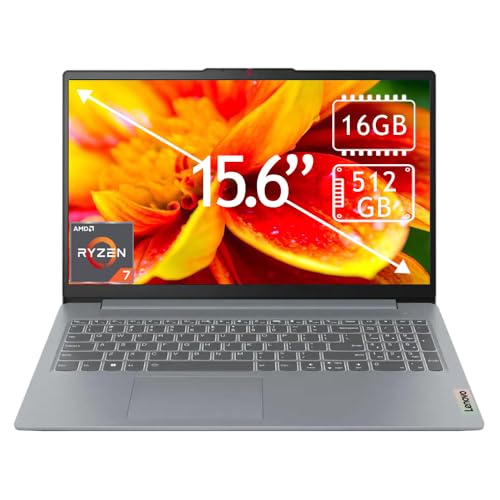
- Best for: Families and students who want a large touchscreen Windows laptop for mixed everyday tasks.
- Display: 15.6-inch Full HD touchscreen
- Processor: AMD Ryzen 7 5825U
- Memory: 16GB RAM
- Storage: 512GB SSD
Families and students who want a large touchscreen Windows laptop for mixed everyday tasks.
IdeaPad Slim 3 listings span many chips and memory sizes, so verify the Ryzen 7 5825U and 16GB configuration in the title before ordering.
Lenovo’s IdeaPad Slim 3 is the mainstream Windows pick in this lineup: a 15.6-inch touchscreen machine built around AMD’s Ryzen 7 5825U, a chip with enough cores for office multitasking, light photo work, and casual gaming on integrated graphics. Sixteen gigabytes of memory and a 512GB solid-state drive match what most buyers actually need, and the larger display with touch input makes it comfortable for shared family use, homework, and streaming at a desk. If you want one Windows laptop that covers the whole household without overspending on gaming hardware, this is the balanced choice.
Acer Aspire Go 15
- Best for: Home users with large local file collections who want strong everyday performance.
- Display: 15-inch touchscreen
- Processor: Intel Core i5-13420H
- Memory: 16GB RAM
- Storage: 1TB SSD
Home users with large local file collections who want strong everyday performance.
Aspire Go 15 is sold with several different processors, including much slower entry chips, so check that the listing names the Core i5-13420H.
The Aspire Go 15 stands out in this group for storage: its 1TB solid-state drive doubles the space of most rivals here, which matters if you keep years of photos, a large music library, or several big applications installed at once. The Intel Core i5-13420H is a performance-series chip rather than a low-power one, so it chews through spreadsheets, browser-heavy research, and light editing with headroom to spare. Add a touchscreen and 16GB of memory, and you get a desk-friendly 15-inch machine aimed at buyers who keep everything local instead of in the cloud.
HP 255 G10
- Best for: Small-business and office users who need Windows 11 Pro on a proven mainstream platform.
- Display: 15.6-inch Full HD
- Processor: AMD Ryzen 5 7530U, 6 cores, up to 4.5 GHz
- Graphics: AMD Radeon integrated graphics
- Memory: 16GB RAM
Small-business and office users who need Windows 11 Pro on a proven mainstream platform.
The 255 G10 is sold in many configurations by different sellers, so confirm the Ryzen 5 chip, 16GB memory, and Pro operating system on the exact listing.
The HP 255 G10 is a business laptop in the plainest sense: a 15.6-inch Full HD screen, a six-core Ryzen 5 7530U that boosts up to 4.5 GHz, 16GB of memory, and Windows 11 Pro, which adds drive encryption and remote desktop features that the Home edition lacks. There is no gaming styling and no touchscreen, just a silver work machine aimed at offices, schools, and anyone setting up a dependable home workstation. Buyers who need Pro licensing for work, or who simply prefer a straightforward business build over consumer extras, will find this the most businesslike option here.
Dell Inspiron 15 3530
- Best for: Heavy multitaskers who want maximum memory and storage in a mainstream 15-inch laptop.
- Display: 15.6-inch WVA LED Full HD anti-glare touchscreen
- Processor: Intel Core i5-1334U, 10 cores
- Memory: 32GB RAM
- Storage: 1TB SSD
Heavy multitaskers who want maximum memory and storage in a mainstream 15-inch laptop.
This configuration is upgraded and sold by a third-party seller rather than shipped as a standard factory build, so check the seller’s warranty and return terms.
This Inspiron 15 3530 configuration doubles the memory of the other Windows laptops here, pairing Intel’s 10-core Core i5-1334U with 32GB of RAM and a 1TB solid-state drive. That combination suits people who keep dozens of tabs, large spreadsheets, and several applications open all day, and the 15.6-inch anti-glare touchscreen stays readable under office lighting. It runs Windows 11 Pro, which keeps it suitable for work as well as home use. Because this is an upgraded configuration, treat the specification list on the product page as the final word on what ships.
Which One Fits Your Situation
You travel or commute with your laptop daily
Choose the MacBook Air. It is the lightest machine here, silent in meetings and libraries, and its battery is built for a full day away from an outlet. The trade-off is the smaller screen and macOS, so it fits best if your work lives in a browser, documents, and Apple apps rather than Windows-only software.
One laptop has to serve the whole household
Pick the Lenovo IdeaPad Slim 3. The 15.6-inch touchscreen works for homework, video calls, streaming, and shared accounts, and the Ryzen 7 chip with 16GB of memory handles several users’ worth of mixed tasks without slowing down. It is the most even-handed Windows option in this guide for a family machine.
You keep everything on the laptop itself
Go with the Acer Aspire Go 15 or the Dell Inspiron 15. Both carry a 1TB drive, twice the storage of the other picks. The Acer suits buyers who want a stronger performance chip for editing and heavy browsing, while the Dell’s 32GB of memory fits people whose problem is too many open applications rather than slow ones.
You need a work machine with business licensing
The HP 255 G10 and the Dell Inspiron 15 both ship with Windows 11 Pro. The HP is the cleaner business buy, a standard configuration with a six-core Ryzen 5 and a plain, office-ready build. The Dell adds memory and storage for heavier workloads, but check the third-party seller’s warranty terms before choosing it for company use.
Common Mistakes
- Buying on the model name alone, then discovering the listing pairs the same chassis with a weaker processor or half the memory described in reviews of a different configuration.
- Choosing 8GB of memory to save money, then fighting slowdowns within a year as browsers and office software grow heavier.
- Ignoring the operating system edition, and finding that a job or school requirement needs Windows 11 Pro features the Home edition does not include.
- Picking a 15.6-inch laptop for daily commuting without checking the weight, or a 13-inch model for full-time desk work without considering an external monitor.
- Assuming every listing for a popular model is sold and warranted the same way, when upgraded configurations from third-party sellers carry their own warranty terms.
Frequently Asked Questions
How much memory does an everyday laptop actually need?
Sixteen gigabytes is the practical target for most buyers in 2026. It keeps a browser with many tabs, office documents, and a video call running smoothly at the same time. Eight gigabytes still works for light single-task use, but it leaves little headroom, which is why every laptop in this guide has at least 16GB.
Is a 512GB drive enough, or should I pay for 1TB?
A 512GB solid-state drive covers documents, applications, and a moderate photo library comfortably, especially if you also use cloud storage. Choose 1TB if you store large video files, keep many games installed, or simply dislike managing space. Two picks in this guide, the Acer and the Dell, include 1TB as listed.
Should I choose the MacBook Air or a Windows laptop?
Choose the MacBook Air if you use an iPhone, prefer macOS, and value silent operation and portability. Choose a Windows model if your work or school requires Windows software, you want a larger 15.6-inch screen or touchscreen, or you need Windows 11 Pro features. The hardware in this guide is comparable; the ecosystem decides.
What should I verify on the product page before ordering?
Confirm the processor model, memory size, storage capacity, and operating system edition in the listing title and specification table, since popular models are sold in many configurations. Also check who sells and ships the item, and what warranty applies, particularly for upgraded configurations sold by third-party sellers rather than the manufacturer.
FAQ
How much memory does an everyday laptop actually need?
Is a 512GB drive enough, or should I pay for 1TB?
Should I choose the MacBook Air or a Windows laptop?
What should I verify on the product page before ordering?
More from Amazon
Programs that pair well with the guide above. Offers and eligibility are set by Amazon and may change.
Free shipping on eligible items, Prime Video and more. Eligible new members can start with a free trial.
Start a Prime free trialA Prime membership for ages 18-24 with a trial period. Eligibility is set by Amazon.
See Prime for Young AdultsAudiobooks and podcasts to listen to on the go. Eligible new members can start with a free trial.
Try Audible freeAd-free music streaming. Eligible new subscribers can start with a free trial.
Try Music Unlimited freeAs an Amazon Associate we earn from qualifying purchases.