Our Short List of 3
All 4 Picks at a Glance
| Product | Specs | Action |
|---|---|---|
 1. Logitech Keys-To-Go 2 — Best for the Lightest Carry | Check price on Amazon | |
 2. Logitech K380 — Best Everyday All-Rounder | Check price on Amazon | |
 3. Logitech MX Keys Mini — Best for Long Writing Sessions | Check price on Amazon | |
 4. Keychron K3 Max — Best Low-Profile Mechanical Travel Keyboard | Check price on Amazon |
Key takeaways
- Find the best travel keyboards for laptops, tablets, and phones. Compare slim, folding, and mechanical picks built for bags, planes, and hotel desks today.
The best travel keyboards turn a cramped tray table, a hotel desk, or a cafe counter into a workspace you can actually type on for hours. A laptop keyboard is fine when the screen sits at the right height and the keys are full size, but that is rarely the situation on the road. A separate travel keyboard lets you raise the laptop on a stand, prop a tablet at eye level, or answer a long email on a phone without tapping glass.
Travel keyboards are not simply small keyboards. The good ones balance packed size against key size, weight against typing feel, and battery life against backlighting. A board that is wonderful on a desk can be a poor travel companion if it needs a cable, a dongle, and a bulky case. Likewise, the lightest board on the market is no bargain if its keys are so small and shallow that every long document becomes an exercise in correcting mistakes.
This guide explains how to choose a travel keyboard for the way you actually travel, then recommends four boards: the lightest option for tablet-first travellers, the most comfortable option for long writing sessions, the best all-rounder for mixed laptop and tablet use, and a low-profile mechanical option for typists who want real switch feel on the road.
How to Choose a Travel Keyboard
Start with the device you will type on most. If that is a tablet or a phone, Bluetooth is essential, and multi-device pairing matters more than anything else. A keyboard that pairs with three devices lets you switch between a tablet, a phone, and a laptop with a single key press. If your main machine is a laptop, a keyboard with a 2.4 GHz wireless receiver as well as Bluetooth gives you a lower-latency connection for the laptop and Bluetooth for everything else, plus a wired mode for the days when the battery runs low.
Size and weight deserve more thought than the headline numbers suggest. Packed size is what matters. A folding keyboard packs smaller than a one-piece board, but the hinge adds weight and a potential failure point. A one-piece slim board is simpler and more rigid, yet it takes up a full rectangle in your bag. Measure the pocket it has to fit: a laptop sleeve pocket, a backpack organiser, or the space beside a tablet in a carry-on. A board that is 250 mm long slides into most laptop sleeves; a board over 300 mm long usually needs its own compartment. Anything under 250 grams is easy to forget in a bag, while boards between 400 and 550 grams are reasonable for a backpack but noticeable in a small shoulder bag.
Key feel is where travel keyboards diverge most. Scissor-switch keys, the kind found on most laptops, are quiet, low, and consistent, and they suit long writing sessions in shared spaces such as libraries, trains, and open-plan offices. Low-profile mechanical switches add a more distinct tactile bump and a little more travel, which many touch typists prefer, but they also add height, weight, and sometimes noise. Full-height mechanical switches are generally too tall and too loud for travel. Very shallow keys feel fast at first and tiring after an hour, and keys much smaller than standard laptop keys force your fingers to relearn spacing and increase typing errors.
Battery life is a travel feature, not a footnote. Replaceable coin cells or AAA batteries rated for months or years mean you never need to remember a charging cable, and a dead battery is fixed by a spare cell from a convenience store. Rechargeable boards are more convenient at home, but they add one more device to charge on a trip. Backlighting is useful in dim cabins and hotel rooms, yet it is the single biggest drain on a rechargeable battery.
Protection matters more on the road than at a desk. Keys catch on bag zippers, chargers, and notebook spirals. A built-in cover, a folding design, or a slim hard case keeps keys from being pressed or damaged in transit.
Finally, check the layout. A 75 percent layout keeps the function row and arrow keys and is easy to adjust to, while a 60 percent layout drops them, which frustrates spreadsheet work and coding. Check the arrow keys, the right Shift key, and whether the legends cover both Mac and Windows.
Our Top Picks at a Glance
| Keyboard | Best For | Layout | Connection | Battery |
|---|---|---|---|---|
| Logitech Keys-To-Go 2 | Lightest carry | Compact, scissor keys | Bluetooth, 3 devices | Coin cells, up to 36 months rated |
| Logitech K380 | Everyday all-rounder | Compact, round scissor keys | Bluetooth, 3 devices | AAA cells, up to 24 months rated |
| Logitech MX Keys Mini | Long writing sessions | Compact, backlit scissor keys | Bluetooth and Logi Bolt, 3 devices | Rechargeable USB-C |
| Keychron K3 Max | Mechanical typing feel | 75 percent, low-profile mechanical | Bluetooth, 2.4 GHz, wired USB-C | Rechargeable USB-C |
1. Logitech Keys-To-Go 2 — Best for the Lightest Carry
The Logitech Keys-To-Go 2 is the board to choose when every gram counts and the keyboard will live in a bag beside a tablet. It measures about 250 by 105 mm, is under 9 mm thick at its thinnest point, and weighs about 222 grams, which makes it one of the lightest full-function travel keyboards available. It slides into a laptop sleeve pocket or a tablet case without changing how the bag closes, and its built-in cover folds over the keys in transit, so there is no separate case to lose and no exposed keys to catch on a zipper.
Under the cover are scissor keys with 1 mm of key travel and a full shortcut row, plus Easy-Switch keys that pair with up to three devices over Bluetooth. The universal version works with Windows, Android, Chrome OS, iPadOS, iOS, and macOS, so it can move between a tablet on a train and a laptop in a hotel room without re-pairing. Power comes from two replaceable CR2032 coin cells rated by Logitech for up to 36 months. Changing the cells requires opening a screwed compartment, so keep a small screwdriver in your kit if you expect to do it on the road.
The trade-offs are honest ones. There is no backlight, so late-night typing in a dark cabin depends on the screen glow or the cabin light. There is no built-in stand for a tablet or phone, so you will need a separate stand or a case that props the screen up. The key travel is shallow, which suits fast, light typing and may feel too flat for writers who like a deeper keystroke.
2. Logitech K380 — Best Everyday All-Rounder
The Logitech K380 is the classic travel keyboard for a reason: it is compact, quiet, and comfortable enough to type on all day. Its round, scooped keys look unusual at first, but the concave shape guides fingertips to the centre of each key, and the scissor mechanism underneath gives a quiet, laptop-like press. The board measures about 279 by 124 mm and weighs about 415 grams with its two AAA batteries installed, so it is heavier than the Keys-To-Go 2 but still easy to carry in a backpack or a tote.
Like the other Logitech picks here, the K380 pairs with up to three devices over Bluetooth and switches between them with dedicated Easy-Switch keys. It works with Windows, macOS, Chrome OS, Android, iPadOS, and iOS, and the key legends cover both Windows and Mac layouts. Battery life is rated by Logitech at up to 24 months on the included AAA cells, and replacing them takes seconds with no tools, which is a real advantage on a long trip.
The K380 has no backlight and no number pad, and it is a little wider than the slimmest travel boards, so it needs a slightly larger pocket in your bag. It also has no cover of its own, so a slim sleeve or a soft pouch is worth adding if it will share a bag with chargers and cables. If you want one keyboard that works at a desk, on a train, and in a hotel room, and you do not want to think about charging, the K380 is the safe default.
3. Logitech MX Keys Mini — Best for Long Writing Sessions
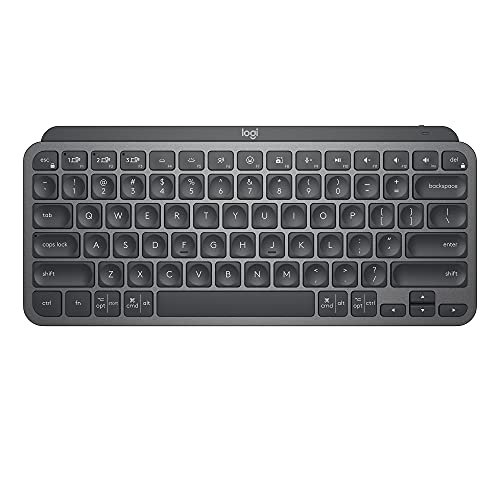
The Logitech MX Keys Mini is the travel keyboard for people whose trips are mostly work. It is a compact, backlit board with the same Perfect Stroke scissor keys as the full-size MX Keys, shaped for fingertips and spaced for fast, accurate typing over long documents. The keys are backlit with a proximity sensor, so the lighting turns on as your hands approach and adjusts to the ambient light. The board is built around a metal plate, so it stays put on a smooth desk and does not flex under heavy typing.
At about 296 by 132 mm and about 506 grams, the MX Keys Mini is the largest and heaviest board in this guide, and it is the least suited to ultralight packing. That is the price of its comfort. It connects over Bluetooth Low Energy or Logi Bolt to up to three devices, charges over USB-C, and is rated by Logitech for up to 10 days on a full charge with backlighting on, or up to 5 months with backlighting off. It works with Windows, macOS, iOS, iPadOS, Android, Chrome OS, and Linux, and Logitech Options software on Windows and macOS unlocks custom shortcuts and Flow features for moving between computers.
Choose the MX Keys Mini when typing comfort matters more than saving a few hundred grams, and when your bag has room for a board closer to a small desk keyboard than a tablet accessory. It is the best pick here for writers, editors, and anyone who will spend several hours a day typing away from their usual desk.
4. Keychron K3 Max — Best Low-Profile Mechanical Travel Keyboard
The Keychron K3 Max is for the traveller who has tried scissor keyboards and still misses mechanical switches. It is a 75 percent, low-profile mechanical keyboard with 84 keys, keeping the function row and arrow keys while staying far smaller than a tenkeyless board. Low-profile switches give it a distinct tactile feel and a little more key travel than a scissor board, without the height and noise of a full-size mechanical keyboard. Selected versions are hot-swappable, so compatible low-profile switches can be changed without soldering, and the board supports QMK and VIA remapping through the Keychron Launcher web app.
Connectivity is the K3 Max’s strongest travel feature. It connects over Bluetooth 5.1 to up to three devices, over a 2.4 GHz wireless receiver with a 1000 Hz polling rate, or wired over USB-C, so there is a fallback for every situation, including a dead battery or a crowded wireless environment. The aluminium frame and double-shot PBT keycaps feel durable, and the board weighs about 500 grams. Battery life is rated by Keychron at up to 72 hours with the backlight on and up to 9 weeks with the backlight off, so turning the backlight down or off makes a large difference on a long trip.
There are a few things to check before buying. The hot-swappable sockets take low-profile switches only, so standard-height switches will not fit. The 2.4 GHz receiver is USB-A, so a USB-C adapter is needed for many modern laptops and tablets. Some configurations are sold without a case, so a slim sleeve is worth budgeting for.
Which Travel Keyboard Should You Choose?
The four picks solve different versions of the same problem, and the right choice depends on which constraint bites hardest on your trips. The Keys-To-Go 2 wins on packed size and weight, and its built-in cover makes it the easiest to throw into a bag without thinking. The K380 wins on simplicity and battery life, with tool-free battery changes and a layout that works for almost anyone. The MX Keys Mini wins on typing comfort and backlighting, at the cost of size and the need to charge it. The K3 Max wins on typing feel and connectivity, at the cost of weight and the need to check switch and receiver compatibility.
A good travel keyboard also deserves a good travel setup, and the setup is mostly about the screen, not the keyboard. A laptop stand raises the screen to eye level and stops the neck strain that comes from looking down at a laptop for hours. A tablet needs a stand or a folding case for the same reason. Pair all three device slots before you leave, and test the switch keys at home so you are not troubleshooting Bluetooth in an airport.
Frequently Asked Questions
Are travel keyboards good for everyday typing?
Yes, for most people. A good travel keyboard uses the same scissor or low-profile mechanical switches as a laptop or compact desk keyboard, and the best ones are comfortable for several hours of typing a day. The main adjustment is layout: compact boards shrink or move some keys, so give yourself a few days to learn the arrow keys and shortcuts. If you type all day every day at a fixed desk, a full-size keyboard is still more comfortable.
Should I choose a folding keyboard or a one-piece keyboard?
A folding keyboard packs smaller and is the best choice when bag space is the limiting factor, especially for tablet-first travellers. A one-piece keyboard is more rigid, simpler, and usually more comfortable to type on, because there is no hinge flexing under your hands. The picks in this guide are all one-piece boards, because the hinge on folding boards adds a failure point and the typing feel varies more between models.
Is Bluetooth or a 2.4 GHz receiver better for travel?
Bluetooth is better for tablets and phones, because they have no USB port for a receiver, and it is better for switching between several devices. A 2.4 GHz receiver is better for a laptop when you want the lowest latency and a connection that does not depend on Bluetooth pairing. A board with both, such as the Keychron K3 Max, gives you the choice, and a wired USB-C mode is a useful backup when a battery runs low.
How long do travel keyboard batteries last?
It depends on the power source. Battery-powered boards such as the K380 and Keys-To-Go 2 are rated by their makers for up to 24 and 36 months respectively on replaceable cells, because scissor keys and no backlight use very little power. Rechargeable boards vary much more: the MX Keys Mini is rated for up to 10 days with backlighting on or up to 5 months with it off, and the K3 Max for up to 72 hours with backlighting on or up to 9 weeks with it off. Check the current listing for the exact battery rating of the variant you buy.
Can I use a travel keyboard with an iPad or Android tablet?
Yes. All four keyboards in this guide pair over Bluetooth with iPadOS, iOS, and Android, and the Keys-To-Go 2 and K380 are designed with tablet use in mind. Check that the keyboard layout matches your tablet’s language and that the shortcut keys you rely on exist on the compact layout. A tablet stand is almost essential: without one, the screen sits too low and the ergonomic benefit of the external keyboard is lost.
Conclusion
The best travel keyboards are the ones that make a temporary workspace feel like a real one, without adding a heavy, fragile, or fiddly object to your bag. For the lightest possible carry, the Logitech Keys-To-Go 2 is hard to beat, with its built-in cover and coin-cell battery that lasts for years. For a simple, reliable board that works with everything and never needs charging, the Logitech K380 remains the default choice. For long writing sessions where comfort matters most, the Logitech MX Keys Mini justifies its extra size and weight with backlit, fingertip-shaped keys. For typists who want mechanical switches on the road, the Keychron K3 Max brings a 75 percent layout, three connection modes, and remappable firmware in a genuinely portable frame.
Pick the board that matches your main device and your bag, pair it before you leave, and pack a stand for your screen. The keyboard is the smallest part of a mobile workstation, and it is the part that makes the biggest difference to how much you get done on the road.
Disclosure: As an Amazon Associate, we earn from qualifying purchases.
FAQ
Which Travel Keyboard Should You Choose?
Are travel keyboards good for everyday typing?
Should I choose a folding keyboard or a one-piece keyboard?
Is Bluetooth or a 2.4 GHz receiver better for travel?
How long do travel keyboard batteries last?
Can I use a travel keyboard with an iPad or Android tablet?
More from Amazon
Programs that pair well with the guide above. Offers and eligibility are set by Amazon and may change.
Free shipping on eligible items, Prime Video and more. Eligible new members can start with a free trial.
Start a Prime free trialA Prime membership for ages 18-24 with a trial period. Eligibility is set by Amazon.
See Prime for Young AdultsAudiobooks and podcasts to listen to on the go. Eligible new members can start with a free trial.
Try Audible freeAd-free music streaming. Eligible new subscribers can start with a free trial.
Try Music Unlimited freeAs an Amazon Associate we earn from qualifying purchases.