Our Short List of 3
All 4 Picks at a Glance
| Product | Specs | Action |
|---|---|---|
 1. Ducky One 3 TKL — Best Overall Ducky Keyboard | Check price on Amazon | |
 2. Ducky One 3 Mini — Best Compact Ducky Keyboard | Check price on Amazon | |
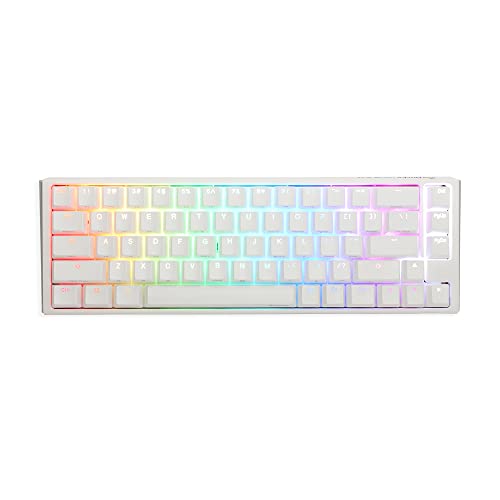 3. Ducky One 3 SF — Best 65 Percent Ducky Keyboard | Check price on Amazon | |
 4. Ducky One 3 Mini Pro Nazca 8K — Best Ducky Keyboard for Competitive Gaming | Check price on Amazon |
Key takeaways
- Discover the best Ducky keyboards for gaming and typing, from compact 60 percent boards to TKL layouts, with hot-swap switches, PBT keycaps and RGB lighting.
The best Ducky keyboards share a simple formula that has kept the Taiwanese brand at the top of mechanical keyboard shortlists for years: genuine Cherry MX switches, thick double-shot PBT keycaps, hot-swap sockets, and a no-nonsense build that puts typing feel ahead of flashy extras. Ducky does not chase gimmicks. Instead, each board in the One 3 family refines the same proven recipe in a different size, so the hardest part of buying one is choosing the layout that fits your desk and your habits.
This guide compares four Ducky keyboards that are actually available to buy, covering the compact 60 percent Mini, the 65 percent SF, the tenkeyless TKL, and the upgraded Mini Pro with faster polling. Every pick below is a genuine Ducky One 3 model with hot-swappable switches and RGB backlighting, so whichever size you choose, you get the same core quality. Read on to find the Ducky that matches how you type, game, and use your desk space.
How to Choose a Ducky Keyboard
Ducky keeps its lineup refreshingly simple, but a few decisions still matter before you buy. Work through these five factors and the right board usually picks itself.
1. Pick your layout size first
Layout is the single biggest difference between Ducky models. The 60 percent Mini drops the function row, arrow keys, and number pad, giving you the smallest possible footprint and the most mouse room. The 65 percent SF adds a dedicated arrow cluster and a few navigation keys while staying compact. The TKL keeps the function row and navigation cluster but drops the number pad, which is the sweet spot for most gamers and typists. If you do spreadsheet work or enter numbers all day, a full-size board is the only layout with a dedicated number pad, though it takes up the most desk space.
2. Choose your switch type
Ducky boards ship with genuine Cherry MX switches, and the switch in the listing title changes the feel more than anything else. Cherry MX Red is linear and smooth, with no bump and no click, making it the default choice for fast gaming. Cherry MX Brown adds a gentle tactile bump without a loud click, which suits mixed typing and gaming. Cherry MX Blue is clicky and tactile, with a crisp audible click that many typists love but roommates may not. Cherry MX Silent Red feels like a Red but with dampened stems that soften the bottom-out sound, making it the quietest option. Cherry MX2A switches, found on the newer Pro models, are a refined Cherry design with a smoother factory feel and tighter tolerances.
3. Check hot-swap support
Every One 3 keyboard in this guide uses hot-swap sockets, which means you can pull switches out and press new ones in without soldering. That matters because switches are a matter of taste, and hot-swap lets you try a different feel later, replace a worn switch, or mix switch types across the board. Ducky uses Kailh yellow sockets on the One 3 series, which accept standard three-pin and five-pin MX-style switches, so the aftermarket is wide open.
4. Look at keycaps and sound dampening
Ducky’s reputation rests heavily on its keycaps. Double-shot PBT keycaps have legends molded through two layers of plastic, so the legends never fade and the thick walls give each keystroke a deep, satisfying sound. The One 3 series adds the company’s QUACK Mechanics design, which layers a silicone plate dampener and EVA foam inside the case to absorb hollow resonance. The result is a board that sounds fuller and less rattly than most prebuilt keyboards at a similar level, with no modification required.
5. Consider connectivity and extras
Most Ducky One 3 boards are wired over a detachable USB-C cable with 1000 Hz polling, which is all a competitive gamer needs and keeps latency consistent. The Pro models push polling to 8000 Hz for even faster input reporting. Ducky deliberately ships no companion software: macros, lighting, and key behavior are all programmed from the keyboard itself using key combinations and DIP switches on the underside. That means the board works identically on Windows, Mac, and Linux with nothing to install, though it also means lighting customization takes a little learning.
Top Picks
1. Ducky One 3 TKL — Best Overall Ducky Keyboard
The One 3 TKL is the Ducky to buy if you only want one keyboard and want it to do everything well. Its tenkeyless layout keeps the function row, arrow keys, and navigation cluster while dropping the number pad, freeing up desk space for low-sensitivity mouse movement without sacrificing any key you use daily. The 87-key board uses genuine Cherry MX switches in hot-swap sockets, double-shot PBT keycaps, and per-key RGB backlighting, all wrapped in the QUACK Mechanics dampening package that gives the One 3 series its famously full typing sound.
What sets the TKL apart in daily use is balance. It is large enough for comfortable typing sessions and serious gaming, yet small enough to fit a crowded desk or a keyboard tray. The detachable USB-C cable makes it easy to pack for a LAN event or move between a work desk and a gaming setup, and the onboard controls mean your macros and lighting travel with the board rather than living in a software profile. Cherry MX Red, Brown, Blue, and Silver variants cover every switch preference, so you can match the feel to your hands rather than settling for whatever is in stock.
This is the pick for gamers who want a proven board with no weak spots, typists who want a full function row, and anyone buying their first serious mechanical keyboard. If you can live without a number pad, there is little reason to look further.
2. Ducky One 3 Mini — Best Compact Ducky Keyboard
The One 3 Mini squeezes the full Ducky experience into a 60 percent frame with just 61 keys. Everything non-essential is gone: no function row, no arrow keys, no number pad. What remains is a dense, heavy little board that leaves maximum room for your mouse and looks clean on any desk. Despite the size, nothing about the build is compromised. It has the same hot-swap Cherry MX switches, the same thick PBT keycaps, the same RGB lighting, and the same silicone and foam dampening as its larger siblings.
The Mini rewards users who are willing to learn its function layer. Arrow keys, function keys, and media controls live on a secondary layer accessed by holding the Fn key, and once those combinations become muscle memory, most users stop missing the dedicated keys entirely. The compact size also makes it the easiest Ducky to carry, and its weight gives it a planted feel that cheaper 60 percent boards cannot match.
Choose the Mini if desk space is tight, if you play games that benefit from a wide mouse area, or if you love the minimalist look of a small board. It is also a strong second keyboard for a travel setup or a living-room PC. Just be honest with yourself about how often you reach for arrow keys and the function row before committing to the smallest layout.
3. Ducky One 3 SF — Best 65 Percent Ducky Keyboard
The One 3 SF splits the difference between the Mini and the TKL, and for many people it is the ideal compromise. Its 65 percent layout adds a dedicated arrow cluster and a small navigation column to the compact frame, fixing the Mini’s biggest usability complaint while staying far smaller than a TKL. You get arrows for editing text and navigating menus without reaching for a function layer, plus a layout that still leaves plenty of mouse room.
Like the rest of the One 3 family, the SF uses hot-swappable Cherry MX switches, double-shot PBT keycaps, and per-key RGB lighting, with the same QUACK Mechanics dampening inside the case. The Pure White version with Cherry MX Blue switches is a popular configuration: the clicky switches pair well with the board’s deep sound profile, and the white chassis with RGB lighting makes a striking centerpiece for a light-colored setup. The SF also keeps Ducky’s signature onboard programming, so macros and lighting are set from the board itself with no software to install.
Pick the SF if you want a compact board but cannot give up dedicated arrow keys. It is the best choice for writers and editors who work in a small space, for gamers who want a tidy desk without losing navigation keys, and for anyone who tried a 60 percent board and found the function layer one step too far.
4. Ducky One 3 Mini Pro Nazca 8K — Best Ducky Keyboard for Competitive Gaming
The One 3 Mini Pro Nazca 8K takes the compact Mini formula and upgrades the internals for players who care about input speed. The headline feature is 8000 Hz polling, which reports key presses to your PC eight times faster than the standard 1000 Hz rate on the regular One 3 boards. In practice that means lower input latency and more responsive-feeling keystrokes, which matters most in fast-paced competitive games where milliseconds count.
The Pro also uses Cherry MX2A switches, a refined version of the classic Cherry design with smoother travel and improved factory lubrication, and it keeps the hot-swap sockets, so you can still change switches later. The Nazca edition adds triple-shot PBT keycaps with a distinctive colorway inspired by the Nazca lines, giving it a bolder look than the plain Classic and Pure White versions. Underneath, the same gasket-style dampening approach keeps the typing sound deep and controlled rather than hollow.
This is the Ducky for competitive gamers who already know they want a 60 percent board and want the fastest version of it. The 8000 Hz polling and MX2A switches are genuine upgrades over the standard Mini, though casual players and typists will be perfectly happy with the regular One 3 Mini for less. If your games reward reaction time and you love compact boards, the Mini Pro Nazca is the sharpest Ducky you can buy.
Comparison Table
| Keyboard | Layout | Keys | Switches | Hot-Swap | Keycaps | Polling Rate | Best For |
|---|---|---|---|---|---|---|---|
| Ducky One 3 TKL | Tenkeyless | 87 | Cherry MX | Yes | Double-shot PBT | 1000 Hz | Best overall |
| Ducky One 3 Mini | 60 percent | 61 | Cherry MX | Yes | Double-shot PBT | 1000 Hz | Smallest desks |
| Ducky One 3 SF | 65 percent | 67 | Cherry MX | Yes | Double-shot PBT | 1000 Hz | Compact with arrows |
| Ducky One 3 Mini Pro Nazca 8K | 60 percent | 61 | Cherry MX2A | Yes | Triple-shot PBT | 8000 Hz | Competitive gaming |
Frequently Asked Questions
Are Ducky keyboards good for gaming?
Yes. Ducky keyboards are widely regarded as some of the best prebuilt mechanical keyboards for gaming, thanks to genuine Cherry MX switches, full N-key rollover, 1000 Hz polling on the One 3 series, and hot-swap sockets. The 8000 Hz polling on the Mini Pro models goes further for competitive play. The compact layouts also leave more room for mouse movement, which low-sensitivity players appreciate.
Are Ducky keyboards hot-swappable?
The Ducky One 3 models in this guide are all hot-swappable, using Kailh yellow sockets that accept standard three-pin and five-pin MX-style switches. You can remove and replace switches with a switch puller and no soldering. Older Ducky models, such as the original One 2 Mini, were not hot-swappable, so check the listing before buying if you are considering an older board.
What switches should I choose on a Ducky keyboard?
Cherry MX Red is the safest default for gaming because it is linear and smooth. Cherry MX Brown is the best all-rounder for mixed typing and gaming thanks to its gentle tactile bump. Cherry MX Blue suits typists who enjoy a loud, clicky feel. Cherry MX Silent Red is the pick for shared spaces or late-night use, and Cherry MX2A switches on the Pro models offer a smoother factory feel across the board.
Do Ducky keyboards need software?
No. Ducky keyboards have no companion software. Macros, RGB lighting modes, and key remapping are all configured from the keyboard itself using Fn key combinations and DIP switches on the underside. This makes the boards work identically on Windows, Mac, and Linux, and your settings travel with the keyboard when you plug it into another computer.
What is the difference between the Ducky One 3 Mini, SF, and TKL?
The difference is layout size. The Mini is a 60 percent board with 61 keys and no dedicated arrows or function row. The SF is a 65 percent board with 67 keys, adding dedicated arrow keys. The TKL is a tenkeyless board with 87 keys, adding a full function row and navigation cluster. All three share the same switches, keycaps, hot-swap support, and dampening, so choose based on how many keys you need rather than on quality.
Conclusion
The best Ducky keyboards all share the same strengths: genuine Cherry MX switches, thick PBT keycaps, hot-swap sockets, and a deep, well-damped typing sound that cheaper prebuilt boards rarely match. The choice comes down to size and speed. The One 3 TKL is the best all-round Ducky for most people, balancing a full key set with a desk-friendly footprint. The One 3 Mini is the pick for minimal desks and maximum mouse room, while the One 3 SF fixes the Mini’s missing arrow keys without giving up much compactness. Competitive players who want the fastest possible input should step up to the One 3 Mini Pro Nazca 8K with its 8000 Hz polling and MX2A switches.
Whichever layout you choose, double-check the switch type in the listing title before ordering, since each Ducky model is sold in several switch variants. Get the layout and the switch right, and a Ducky One 3 is a keyboard that can stay on your desk for years, with hot-swap sockets ready whenever your taste in switches changes.
Disclosure: As an Amazon Associate, we earn from qualifying purchases.
FAQ
Are Ducky keyboards good for gaming?
Are Ducky keyboards hot-swappable?
What switches should I choose on a Ducky keyboard?
Do Ducky keyboards need software?
What is the difference between the Ducky One 3 Mini, SF, and TKL?
More from Amazon
Programs that pair well with the guide above. Offers and eligibility are set by Amazon and may change.
Free shipping on eligible items, Prime Video and more. Eligible new members can start with a free trial.
Start a Prime free trialA Prime membership for ages 18-24 with a trial period. Eligibility is set by Amazon.
See Prime for Young AdultsAudiobooks and podcasts to listen to on the go. Eligible new members can start with a free trial.
Try Audible freeAd-free music streaming. Eligible new subscribers can start with a free trial.
Try Music Unlimited freeAs an Amazon Associate we earn from qualifying purchases.