Our Short List of 3

- Processor: Intel Core Ultra 9 275HX
- Graphics: NVIDIA GeForce RTX 5070 Ti
- Display: 16-inch WQXGA OLED, 2560 by 1600, 240Hz
- Memory and storage: 32GB, 1TB SSD

- Processor: Intel Core Ultra 9 275HX
- Graphics: NVIDIA GeForce RTX 5080
- Display: 18-inch ROG Nebula HDR, 2560 by 1600, 240Hz
- Memory and storage: 32GB DDR5, 2TB SSD

- Processor: Intel Core Ultra 9 285HX
- Graphics: NVIDIA GeForce RTX 5090
- Display: 18-inch QHD+, 240Hz
- Memory and storage: 64GB DDR5, 2TB Gen5 NVMe SSD
All 4 Picks at a Glance
| Product | Specs | Action |
|---|---|---|
| Lenovo Legion Pro 7i: The Vapor Chamber Benchmark in 16 Inches |
| Check price on Amazon |
| ASUS ROG Strix SCAR 18: Tri-Fan Cooling With Room to Breathe |
| Check price on Amazon |
| MSI Raider 18 HX AI: Cooler Boost 5 and Desktop-Replacement Volume |
| Check price on Amazon |
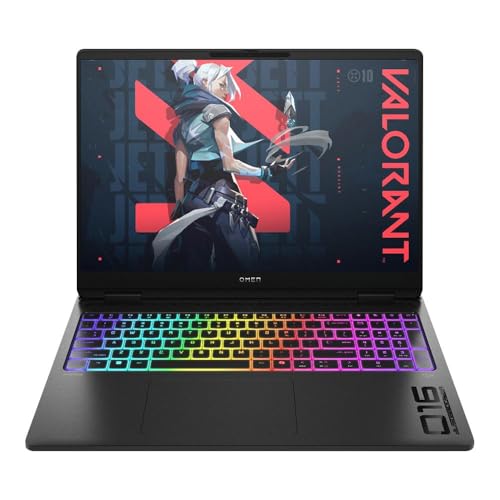 HP OMEN MAX 16: Cooling That Cleans Its Own Fans |
| Check price on Amazon |
Key takeaways
- Five laptops chosen for cooling first: vapor chambers, tri-fan airflow, liquid metal and oversized heat pipes, compared for sustained gaming and work.
As an Amazon Associate we earn from qualifying purchases.
Every laptop makes the same promise on its box: a fast processor and a powerful graphics chip. The part the box rarely explains is how long that speed lasts. Ten minutes into a demanding game, a long render, or a large compile, a thin chassis fills with heat, the fans reach their limit, and the processor quietly slows itself down to stay within its temperature ceiling. That slowdown is called thermal throttling, and it is why two laptops with identical headline specifications can feel very different after an hour of real work.
This guide takes the opposite approach to most laptop roundups. Cooling is the first filter, not a footnote. Every machine below was selected because its manufacturer builds a serious thermal system into the chassis: a vapor chamber spreading heat across a wide plate instead of a narrow pipe, multiple fans moving air through dedicated intake and exhaust paths, liquid metal or an equivalent high-conductivity interface material on the hottest chips, and heat pipes sized for the combined output of the processor and graphics card. These are complete laptops, not cooling pads or accessories, and each pick states the specific cooling hardware behind it so the claim can be checked against the manufacturer’s own description.
How to Judge Laptop Cooling Before You Buy
Vapor chambers beat single heat pipes for combined loads
A heat pipe moves heat from one hot spot to a fin stack. A vapor chamber does the same job across a flat sealed plate, so the processor and graphics chip share one large spreading surface instead of competing for separate pipes. Where both chips run hard at once, that plate evens out hot spots and gives the fans a bigger, more uniform radiator to work with. A stated chamber power rating, or a size increase over a previous generation, is a concrete cooling claim rather than marketing decoration.
Fan count matters less than airflow path
Two fans are the baseline for a high-performance laptop, and three or four appear on the strongest designs here. The count alone is not the whole story. What matters is whether cool air enters through a clear intake, passes over the fin stacks, and leaves without blowing across the user’s hands. Rear exhausts, raised chamber structures, and side and underside intakes all describe a deliberate airflow path. A laptop that can only breathe through a base pressed against a desk mat will run hotter than its fan count suggests.
The interface material is the first bottleneck
Between each chip and its heatsink sits a thin layer of thermal material. Conventional paste is adequate, but liquid metal conducts heat far more effectively, which is why several manufacturers apply it, or a hybrid compound based on it, on flagship cooling systems. It is worth checking on the listing because it cannot be upgraded easily later, and it decides how quickly heat leaves the chip.
Size is a cooling feature, not just a portability cost
Larger chassis dominate this list for a physical reason: a bigger body holds bigger fans, longer fin stacks, and more internal volume for air to move through. A 16-inch machine can still cool exceptionally well when its maker spends the budget on a vapor chamber and efficient fans, and three such models are included here. The trade is unavoidable: the best-cooling laptops are heavy, travel with large adapters, and treat battery life as secondary, so buyers who mostly work unplugged should read the portability notes honestly.
The Picks at a Glance
| Laptop | Cooling system in brief | Best for |
|---|---|---|
| Lenovo Legion Pro 7i | Legion Coldfront: Vapor, rated vapor chamber with turbo-charged fans | Sustained 16-inch flagship performance |
| ASUS ROG Strix SCAR 18 | End-to-end vapor chamber, tri-fan design, liquid metal on CPU and GPU | Maximum cooling volume in an 18-inch chassis |
| Alienware 16 Area-51 | Cryo-Chamber base, quad fans, enlarged vapor chamber, seven heat pipes | Buyers who want the most elaborate airflow design |
| MSI Raider 18 HX AI | Cooler Boost 5, dual fans with seven heat pipes, dedicated SSD cooling | High total power in a desktop-replacement body |
| HP OMEN MAX 16 | OMEN Tempest Cooling Pro, vapor chamber, Cryo Compound, self-cleaning fans | Cooling that also manages its own dust build-up |
Lenovo Legion Pro 7i: The Vapor Chamber Benchmark in 16 Inches
- Processor: Intel Core Ultra 9 275HX
- Graphics: NVIDIA GeForce RTX 5070 Ti
- Display: 16-inch WQXGA OLED, 2560 by 1600, 240Hz
- Memory and storage: 32GB, 1TB SSD
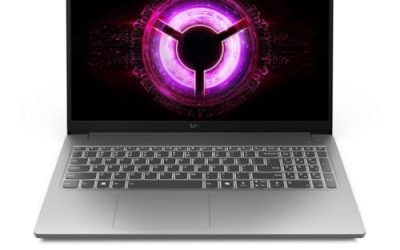
The Legion Pro 7i is the clearest example here of cooling treated as the headline feature. Lenovo’s Legion Coldfront: Vapor system combines turbo-charged fans with a vapor chamber rated at 250W, sealed with what the manufacturer calls hyperchamber technology, aimed at peak cooling at reduced noise rather than simply maximum fan speed. That rating matters because it describes the combined heat the chamber is designed to handle, the exact load a flagship processor and graphics chip produce together.
The listed configuration pairs an Intel Core Ultra 9 275HX with an NVIDIA GeForce RTX 5070 Ti, 32GB of memory, and 1TB of storage, behind a 16-inch WQXGA OLED display at 2560 by 1600 and 240Hz. That is a demanding specification for a 16-inch body, and precisely the kind that exposes weak cooling within the first half hour of use. The vapor chamber is Lenovo’s answer: heat from both chips spreads across the chamber instead of queueing through individual pipes, and the fans exhaust a more evenly heated airstream.
The Pro 7i suits long, plugged-in desk sessions: competitive play where frame-rate stability matters more than a peak number, video timelines that render for extended stretches, and any workload where a mid-task slowdown is more frustrating than fan noise. At 16 inches it is more manageable than the 18-inch machines below, though it remains desk-first rather than a commuter laptop.
ASUS ROG Strix SCAR 18: Tri-Fan Cooling With Room to Breathe
- Processor: Intel Core Ultra 9 275HX
- Graphics: NVIDIA GeForce RTX 5080
- Display: 18-inch ROG Nebula HDR, 2560 by 1600, 240Hz
- Memory and storage: 32GB DDR5, 2TB SSD
The Strix SCAR 18 takes the simplest route to strong cooling and executes it thoroughly: give the heat a very large place to go. Its ROG Intelligent Cooling system uses an end-to-end vapor chamber paired with a sandwiched heatsink, a tri-fan design, and Conductonaut Extreme liquid metal applied to both the processor and the graphics chip. Each element addresses a different stage of the same journey, from chip surface to chamber, from chamber to fins, and from fins out of the chassis.
ASUS also rethought where the air leaves. On the 2025 SCAR design the exhaust vents sit at the rear of the hinge, keeping warm air away from the mouse hand, while the sides and underside act as intakes and air is drawn through the keyboard deck, a practical comfort feature during long sessions.
The listed configuration combines an Intel Core Ultra 9 275HX with an NVIDIA GeForce RTX 5080, 32GB of DDR5 memory, and a 2TB solid-state drive, driving an 18-inch ROG Nebula HDR display at 2560 by 1600 and 240Hz. An 18-inch chassis is a commitment that needs a large desk and mostly lives in one place. In exchange, it offers the largest fans and fin area in this guide. For a buyer setting up a permanent gaming or creation station who has ruled out a desktop, this is the most direct cooling-first choice here.
Alienware 16 Area-51: The Most Elaborate Airflow Design
Alienware’s 16 Area-51 approaches cooling as a structural problem. Its Cryo-Chamber is a raised section at the base that props the machine up and opens a much larger intake, directing air toward the core components, with a clear Gorilla Glass panel over the fans on higher graphics configurations. Above that intake, the Cryo-tech system uses quad fans to pressurise the chassis, a vapor chamber described as 40 percent larger than the previous generation’s, up to seven heat pipes, substantially more copper by weight than earlier 16-inch models, and an Element 31 thermal interface material.
That list supports a stated total performance power of up to 240W, a figure normally associated with larger machines. The listed configuration runs an Intel Core Ultra 9 275HX with an NVIDIA GeForce RTX 5080, 32GB of DDR5 memory, and a 1TB solid-state drive, with a 16-inch QHD+ display at 2560 by 1600 and 240Hz. Memory sits in two SO-DIMM slots and can be expanded, suiting buyers who keep a flagship laptop for several years.
The Area-51 suits a buyer who wants flagship cooling without an 18-inch body, and who values the intake design’s side benefit: a raised base with a clear breathing path is far less sensitive to desk surfaces than a flat-bottomed chassis. The glass chamber panel belongs to the higher graphics configurations, so confirm the exact configuration on the listing before ordering, as with every pick here.
- Processor: Intel Core Ultra 9 275HX
- Graphics: NVIDIA GeForce RTX 5080
- Display: 16-inch QHD+, 2560 by 1600, 240Hz
- Memory and storage: 32GB DDR5, 1TB SSD
- Cooling basis: Cryo-Chamber raised intake, quad fans, vapor chamber enlarged by 40 percent, up to seven heat pipes and Element 31 interface material, per the manufacturer’s listing description
MSI Raider 18 HX AI: Cooler Boost 5 and Desktop-Replacement Volume
- Processor: Intel Core Ultra 9 285HX
- Graphics: NVIDIA GeForce RTX 5090
- Display: 18-inch QHD+, 240Hz
- Memory and storage: 64GB DDR5, 2TB Gen5 NVMe SSD
MSI’s Raider line has always treated size as an asset, and the Raider 18 HX AI continues that logic. Its Cooler Boost 5 system uses two fans and seven heat pipes shared across the processor and graphics chip, so whichever chip is working harder can borrow thermal capacity from the whole array rather than being limited to its own pipe. The design also includes dedicated cooling for the PCIe Gen5 solid-state drive, a detail that matters because current high-speed drives can throttle under sustained transfers.
The OverBoost Ultra technology quoted for this model pushes total power up to 260W, the highest ceiling stated among these picks, and that figure only makes sense alongside a cooling system built to hold it. The listed configuration pairs an Intel Core Ultra 9 285HX with an NVIDIA GeForce RTX 5090, 64GB of DDR5 memory, and a 2TB Gen5 NVMe drive, behind an 18-inch QHD+ display at 240Hz. This is unambiguously a desktop replacement, bought to sit on a desk and run the heaviest games, local AI workloads, and creator sessions its owner has.
Choose the Raider if the laptop will rarely leave one room and sustained output outranks everything else. Noise-sensitive buyers should note that a two-fan system moving this much heat will be audible at maximum power. As a pure exercise in giving powerful hardware a large, purpose-built thermal system, the Raider is one of the most complete packages here.
HP OMEN MAX 16: Cooling That Cleans Its Own Fans
- Processor: AMD Ryzen AI 9 HX 375
- Graphics: NVIDIA GeForce RTX 5080
- Display: 16-inch WQXGA IPS, 2560 by 1600, 240Hz
- Memory and storage: 32GB DDR5, 2TB SSD
The OMEN MAX 16 adds an idea the other picks do not: maintenance as part of the cooling system. Its OMEN Tempest Cooling Pro architecture combines a vapor chamber with OMEN Cryo Compound, a hybrid thermal material applied to both main chips that HP describes as carrying the heat-dissipation benefits of liquid metal with greater viscosity for longevity. Around that core, a Fan Cleaner routine periodically cycles the fans to expel dust before it mats into the fin stacks, addressing the slow cooling degradation that affects almost every hard-used laptop in its second and third year.
The rest of the specification matches that flagship intent. The listed configuration uses an AMD Ryzen AI 9 HX 375 with an NVIDIA GeForce RTX 5080, 32GB of DDR5 memory, and 2TB of storage, behind a 16-inch WQXGA IPS display at 2560 by 1600 and 240Hz. HP’s Unleashed mode in the OMEN Gaming Hub software allows the power limits to be raised manually, again tying the performance ceiling to the thermal system designed to support it, and an infrared thermal sensor feeds temperature data into the cooling control.
This is the strongest choice for a buyer who keeps a laptop for years and does not want to open the chassis for cleaning, or who uses the machine in a dusty room or a home with pets, where fin stacks clog faster than average. It is also the most compact route here to a vapor chamber flagship. Confirm the processor family on the exact listing before purchase, because the OMEN MAX 16 is sold in both Intel and AMD configurations under the same model name.
Which Cooling Laptop Should You Buy?
Start with where the laptop will live. A permanent desk setup points to the 18-inch machines: the ROG Strix SCAR 18 for its tri-fan vapor chamber design and rear exhaust layout, or the MSI Raider 18 HX AI for the highest stated total power and its shared seven-pipe array.
If the laptop must move between rooms or on occasional trips, the 16-inch picks are the realistic shortlist. The Legion Pro 7i offers the clearest single cooling specification here with its rated vapor chamber. The Alienware 16 Area-51 offers the most elaborate airflow structure. The OMEN MAX 16 offers the longest-term cooling story, because its self-cleaning fans target the dust build-up that erodes every other system over time.
Three habits protect whichever model is chosen. Keep intakes unobstructed and the rear exhaust clear of walls and clutter. Use the manufacturer’s performance software deliberately, running the highest power mode for demanding work and a balanced mode for everyday tasks. And confirm the full configuration on the live listing before ordering, since memory, storage, display, and even processor family can vary under one model name.
Frequently Asked Questions
Does a vapor chamber really make a laptop cooler?
A vapor chamber spreads heat across a wide flat plate instead of funnelling it through narrow pipes, so both main chips share one large surface and hot spots even out before air reaches the fins. The benefit shows up most under combined processor and graphics loads, the exact pattern in gaming, rendering, and local AI work, though it still depends on fan capacity and a clear airflow path.
Why do gaming laptops get slower during long sessions?
When internal temperatures reach the manufacturer’s ceiling, the processor and graphics chip reduce their power draw to protect themselves, a behaviour called thermal throttling. Clock speeds fall, and frame rates or render times fall with them. A stronger cooling system raises the sustainable power level, so the slowdown arrives later, is smaller, or does not arrive during a typical session.
Is a bigger laptop always better for cooling?
Usually, but not automatically. A larger chassis can hold bigger fans, longer fin stacks, and more intake area, which is why the 18-inch models here state such high power ceilings. Design still decides the outcome: a well-engineered 16-inch vapor chamber system can outperform a larger but simpler dual-pipe design. Compare the named cooling hardware, not just the screen size.
Can a cooling pad replace a strong internal cooling system?
No. A cooling pad moves air across the underside of the chassis and can help a laptop whose intakes sit on its base, but it cannot remove heat from the chips themselves. That work is done by the internal vapor chamber or heat pipes, the interface material, and the fans and fin stacks inside the machine, which is why this guide covers complete laptops rather than accessories.
How can cooling performance be maintained over time?
Dust is the main enemy. Fin stacks and fan blades accumulate it gradually, airflow falls, and temperatures climb months before the change becomes obvious. Keeping intakes clear, using the laptop on a hard surface, and choosing a model with a self-cleaning fan routine all slow that decline, and keeping system software current helps too, since updates occasionally refine fan curves.
Disclosure
Disclosure: This article contains affiliate links. If you buy through those links, a commission may be earned at no additional cost to you. Product information was taken from the listings and manufacturer details available at the time of writing, and specifications should be confirmed on the live listing before purchase.
FAQ
Which Cooling Laptop Should You Buy?
Does a vapor chamber really make a laptop cooler?
Why do gaming laptops get slower during long sessions?
Is a bigger laptop always better for cooling?
Can a cooling pad replace a strong internal cooling system?
How can cooling performance be maintained over time?
More from Amazon
Programs that pair well with the guide above. Offers and eligibility are set by Amazon and may change.
Free shipping on eligible items, Prime Video and more. Eligible new members can start with a free trial.
Start a Prime free trialA Prime membership for ages 18-24 with a trial period. Eligibility is set by Amazon.
See Prime for Young AdultsAudiobooks and podcasts to listen to on the go. Eligible new members can start with a free trial.
Try Audible freeAd-free music streaming. Eligible new subscribers can start with a free trial.
Try Music Unlimited freeAs an Amazon Associate we earn from qualifying purchases.