Our Short List of 3
All 4 Picks at a Glance
| Product | Specs | Action |
|---|---|---|
 Lenovo Yoga 7 2-in-1 14: The Balanced Default | Check price on Amazon | |
 HP Spectre x360 14: The Premium Pick With Real Headroom | Check price on Amazon | |
 Samsung Galaxy Book5 Pro 360: The Big Screen With a Pen in the Box | Check price on Amazon | |
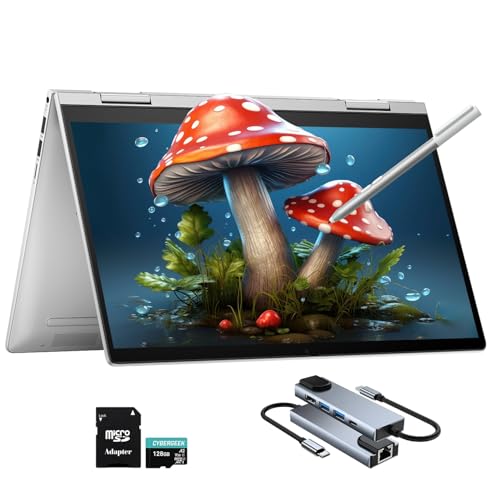 HP Envy x360 14: The Budget Entry Point, With Its Ceiling Stated | Check price on Amazon |
Key takeaways
- The best convertible laptops fold a full 360 degrees into tablet, tent and stand modes. Five 2-in-1 picks compared on screen, processor, memory, pen support and ports.
As an Amazon Associate we earn from qualifying purchases.
A convertible laptop is a laptop first and a tablet when you need one. The screen sits on a 360-degree hinge, so the same machine types at a desk in the morning, folds into a tent for a video call or a recipe at lunch, stands up for a presentation in the afternoon, and lies flat as a tablet for reading or marking up documents in the evening. That hinge is the whole point of the category, and it is the entry requirement for this guide: every pick below is a true fold-back 2-in-1. Ordinary clamshell laptops are excluded, however good they are, and so are detachable tablets with clip-on keyboards, which make different compromises around lap use, ports and performance.
The five machines here cover the realistic spread of the market: the Lenovo Yoga 7 2-in-1 as the balanced default, the HP Spectre x360 as the premium 14-inch option, the Samsung Galaxy Book5 Pro 360 as the big-screen pick with an included pen, the Dell Inspiron 14 2-in-1 as the mainstream value option, and the HP Envy x360 as the budget entry point, included with its main limitation stated plainly.
How to Choose a Convertible Laptop
The hinge is the product, so judge it first
Everything else about a convertible follows from the hinge. A good 360-degree hinge holds the screen steady at every angle and keeps the display from wobbling when you tap it in laptop mode. In tablet mode the keyboard folds underneath and is disabled automatically, and the folded package should feel like one solid slab. Hinge quality is hard to read from a specification sheet, which is why the picks here come from established convertible lines — Yoga, Spectre x360, Galaxy Book Pro 360, Inspiron 2-in-1 and Envy x360 — where the mechanism is a mature, multi-generation design rather than a first attempt.
Screen size decides how each mode feels
Fourteen inches is the convertible sweet spot: large enough for documents and split-screen work, small enough that tablet mode is a genuine one- or two-handed hold, and light enough to carry daily. Sixteen-inch convertibles like the Samsung trade that tablet comfort for workspace — folded flat they are two-handed devices, but in laptop and tent mode the extra room suits spreadsheets and side-by-side documents. Choose the size by the mode you will use most.
Panel type matters more than resolution past a point
Three of the five picks use OLED or AMOLED panels, and for convertible use that matters: a fold-back screen spends much of its life showing video, photos and documents at arm’s length in varied lighting, and OLED contrast and viewing angles suit all of it. Every pick here is at least 1920 by 1200, sharp enough at 14 inches for text work; the higher resolutions on the HP and Samsung picks earn their keep at larger sizes and for photo work.
Memory is fixed, so buy the ceiling you need
Convertibles in this class almost always carry soldered memory that cannot be upgraded after purchase, so the configuration on the listing is the configuration for the life of the machine. Sixteen gigabytes is the comfortable level for office work, study, browsing with many tabs and light creative tasks, and four of the five picks meet it. Thirty-two gigabytes, offered by the Spectre x360 here, suits heavier multitasking and larger creative projects. The one 8GB pick is flagged honestly in its section: it is a budget configuration with a real ceiling, suitable for lighter workloads rather than a machine to grow into.
Check pen support before you assume it
A touchscreen is not the same as pen support. Some convertibles accept an active stylus for handwriting and drawing, some include the pen in the box, and some are touch-only. The Samsung pick includes its S Pen, making it the natural choice for note-taking. On the other picks, pen support varies by configuration, so confirm it on the live listing if handwriting matters to you.
Ports shrink on thin convertibles
Thin bodies cost ports, and the slimmest machines lean on USB-C and Thunderbolt for charging, displays and accessories. If your desk setup involves wired peripherals, an external monitor or a card reader, count the ports on the exact listing and budget for a small hub where the count falls short.
The Picks at a Glance
| Pick | Screen | Processor | Memory and storage | Best for |
|---|---|---|---|---|
| Lenovo Yoga 7 2-in-1 14 | 14-inch WUXGA OLED touch | AMD Ryzen AI 5 340 | 16GB, 512GB SSD | The balanced default with an OLED screen |
| HP Spectre x360 14 | 14-inch 2.8K OLED touch | Intel Core Ultra 7 155H | 32GB, 2TB SSD | Premium build with the most headroom |
| Samsung Galaxy Book5 Pro 360 | 16-inch 3K AMOLED touch, 120Hz | Intel Core Ultra 7 256V | 16GB, 512GB SSD | Big-screen work and pen notes |
| Dell Inspiron 14 2-in-1 (7445) | 14-inch FHD+ IPS touch | AMD Ryzen 5 8640HS | 16GB, 512GB SSD | Mainstream value in a familiar line |
| HP Envy x360 14 | 14-inch FHD IPS touch | Intel Core 5 120U | 8GB, 512GB SSD | The budget entry point |
Lenovo Yoga 7 2-in-1 14: The Balanced Default
The Yoga 7 2-in-1 is the pick that fits the widest range of buyers, and its specification explains why. The 14-inch WUXGA OLED touchscreen covers 100 percent of the DCI-P3 colour space, which puts a genuinely high-quality panel — deep contrast, accurate colour, comfortable viewing angles in every folded position — into the middle of the market rather than reserving it for flagships. For a machine that will spend its life switching between documents, media and the occasional photo task, that screen is the strongest single reason to choose it.
Performance is current-generation. The AMD Ryzen AI 5 340 is a six-core, twelve-thread processor boosting up to 4.8 GHz, with Radeon 840M integrated graphics and a neural processor rated up to 50 TOPS, which qualifies the machine for the current wave of on-device AI features in Windows. It is paired with 16GB of memory and a 512GB SSD — the sensible mainstream configuration, enough for office and study workloads with room to spare, and the honest limit of this pick is storage: a large photo or video library will fill 512GB, and the drive choice is fixed at purchase.
The listing configuration runs Windows 11 Pro, which suits buyers who need its management and security features for work. As a Yoga, the hinge is the line’s core design, moving through laptop, stand, tent and tablet positions, and the 14-inch size keeps tablet mode practical rather than theoretical.
Choose the Yoga 7 if you want one convertible that does everything well — the best screen-per-commitment balance in this group. Look elsewhere only if you need more storage, more memory, or a larger display, which are exactly the directions the next two picks take.
HP Spectre x360 14: The Premium Pick With Real Headroom
The Spectre x360 has been HP’s flagship convertible line for years, and this configuration shows the full version of the idea. The 14-inch OLED touchscreen runs at 2880 by 1800 resolution with a variable refresh range, which makes it the sharpest small screen in this guide, and the specification behind it is the strongest here: an Intel Core Ultra 7 155H processor with sixteen cores, Intel Arc integrated graphics, 32GB of LPDDR5 memory and a 2TB NVMe SSD. That memory and storage pairing is the point of this pick — it is the convertible in the group that heavy multitaskers and creative users will not outgrow quickly.
The supporting details match the positioning. Two Thunderbolt 4 ports handle charging, docks and external displays, Wi-Fi 6E covers wireless, and a fingerprint reader and backlit keyboard are standard. The CNC-machined aluminium body is the other half of the premium proposition: convertibles live a harder physical life than ordinary laptops because the hinge works constantly and the machine is handled in tablet mode, so build quality is a functional feature here, not decoration.
Two cautions belong with this pick. First, Spectre x360 configurations vary widely under one name, and this listing is a specific seller configuration — confirm the processor, memory, storage and operating system lines on the live listing before ordering. Second, the premium is real: buyers whose work fits comfortably in 16GB of memory are paying for headroom they will not use, and the Yoga 7 above covers the same daily tasks with an equally good class of screen.
Choose the Spectre x360 if you want the 14-inch convertible with the longest useful life and the fewest specification compromises, and if your workload justifies the top configuration in this guide.
Samsung Galaxy Book5 Pro 360: The Big Screen With a Pen in the Box
The Galaxy Book5 Pro 360 is the pick for buyers who want the convertible format at full size. Its 16-inch AMOLED touchscreen runs at 2880 by 1800 resolution with a 120Hz refresh rate, making it the largest and smoothest display in this group, and Samsung includes the S Pen with this configuration — the only pick here where the pen is part of the listed package rather than an accessory to research. For note-taking, annotation and sketching at a readable size, that combination of big panel and included pen is the natural choice.
The rest of the specification is a modern mainstream flagship tier: an Intel Core Ultra 7 256V processor with Intel Arc 140V graphics, 16GB of memory and a 512GB SSD, running Windows 11 Pro. Ports are comparatively generous for a machine this thin, with two Thunderbolt 4 ports, HDMI 2.1, a USB-A port and a microSD reader, and the battery is a 76.1Wh unit. At 3.73 pounds it is light for a 16-inch laptop, though weight is only part of the tablet-mode story: a 16-inch screen folded flat is a two-handed, rest-it-on-something device, and buyers should choose this size for its laptop, stand and tent modes rather than imagining a giant hand-held tablet.
Choose the Galaxy Book5 Pro 360 if your work wants a large canvas — documents side by side, big spreadsheets, media in tent mode — and if a pen is part of how you work. Its Galaxy phone and tablet continuity tools are a bonus for Samsung households. Choose a 14-inch pick if the machine will travel daily or tablet mode will be a regular, hand-held part of your routine.
Dell Inspiron 14 2-in-1 (7445): Mainstream Value, Sensible Specification
The Inspiron 14 2-in-1 is the straightforward pick: a mainstream convertible from Dell’s high-volume line, with a specification that covers ordinary work without paying for flagship materials or panels. The processor is an AMD Ryzen 5 8640HS, a six-core, twelve-thread chip boosting up to 4.9 GHz, paired with 16GB of DDR5 memory and a 512GB SSD. That is the same memory level as the Yoga 7 and the Samsung, and it is the right level for office work, study and home use.
The compromises sit where value lines usually put them. The 14-inch FHD+ IPS touchscreen is the plainest display in this group — perfectly serviceable for documents, browsing and video, without the contrast and colour range of the OLED and AMOLED picks. The configuration is a 2024 model year, which is stated plainly on the listing and reflected in its positioning: the processor generation is a step behind the newest picks here, though for the workloads this machine targets the practical difference is small.
In exchange, the everyday details are complete: a fingerprint reader, a backlit keyboard, an FHD webcam and Windows 11 Pro in this configuration, which makes it an easy fit for small-office and school environments that standardise on Pro.
Choose the Inspiron 7445 if you want a competent 14-inch convertible at the mainstream level and your screen standards are practical rather than perfectionist. Step up to the Yoga 7 if the display is a priority, since that is the clearest gap between the two.
HP Envy x360 14: The Budget Entry Point, With Its Ceiling Stated
The Envy x360 is the accessible end of HP’s convertible range, and this configuration is the budget pick of the guide — included because many buyers’ first convertible should be an inexpensive one, and because its specification is honest about what that means. The processor is an Intel Core 5 120U, storage is a 512GB SSD, the 14-inch Full HD IPS touchscreen is a step below the OLED panels above it, and the supporting features are better than the price tier suggests: a fingerprint reader, a backlit keyboard and a 5MP privacy camera, running Windows 11 Home.
The ceiling is memory. This configuration carries 8GB of RAM, which handles browsing, documents, email, streaming and light multitasking, and which will feel tight sooner than any other pick here as workloads grow — and because the memory in this class is not a post-purchase upgrade, that ceiling is permanent. Buyers should choose this configuration with clear eyes: it is a good machine for a student with a document-and-browser workload, a household’s shared convertible, or a first 2-in-1 bought to find out whether the format suits you. It is not the pick for a professional intending to keep one laptop for many years of growing workloads.
Choose the Envy x360 if the budget is firm and the workload is light, and treat the memory figure as the deciding fact. If there is any room to move, the Dell and Lenovo picks above are where the extra headroom starts.
Which Convertible Should You Buy?
Most buyers should start with the Lenovo Yoga 7 2-in-1: it pairs the screen quality of the premium tier with a current processor and the mainstream memory and storage level, in the size that makes every mode of a convertible genuinely usable. Buyers who keep a laptop for a long time and run heavy workloads should step up to the HP Spectre x360, whose 32GB of memory and 2TB of storage are this group’s real headroom. Buyers who work on a large canvas or take handwritten notes should choose the Samsung Galaxy Book5 Pro 360 for its 16-inch AMOLED screen and included pen. The Dell Inspiron 7445 is the sensible mainstream alternative when value and support matter more than panel quality, and the HP Envy x360 is the right buy only when the budget is firm and the workload is light enough for its memory ceiling.
Whichever pick you choose, two checks apply before ordering. Confirm the exact configuration on the live listing — convertible names cover many configurations, and the processor, memory, storage and pen inclusion are the lines that vary. And decide the size by the mode you will actually use: a convertible bought for tablet mode should be 14 inches, and one bought for desk and tent work can happily be 16.
Frequently Asked Questions
What is the difference between a convertible laptop and a detachable?
A convertible keeps its keyboard permanently attached on a 360-degree hinge that folds behind the screen. A detachable is a tablet whose keyboard clips on and comes off. Convertibles are generally sturdier on a lap, offer more ports and performance, and cannot lose their keyboard; detachables are lighter in tablet mode. Every pick in this guide is a convertible.
Is a convertible laptop good for note-taking?
Yes, provided it supports an active pen. Pen support varies by model and configuration: the Samsung pick includes its pen, while on other picks pen support and availability need confirming on the listing. For handwriting-heavy use, that check matters more than any other specification.
How much memory does a convertible laptop need?
Sixteen gigabytes suits the large majority of office, study and home workloads and is the level four of these five picks meet. Thirty-two gigabytes suits heavier multitasking and creative work. Eight gigabytes, as on the budget pick here, is workable for light use but is the first specification that will feel limiting, and it generally cannot be upgraded later in this class.
Are convertible laptops less durable than ordinary laptops?
The hinge does more work than a standard laptop hinge, which is why established convertible lines are the safer buy: their mechanisms are mature designs rated for constant folding.
Can a convertible replace a separate tablet?
For reading, media, browsing, annotation and casual touch apps, yes — that is the core appeal of the format. Dedicated tablets remain lighter for purely hand-held use, which is a real consideration at 16 inches and a minor one at 14.
Disclosure
Disclosure: This article contains affiliate links. If you buy through those links, a commission may be earned at no additional cost to you. Product information was taken from the listings and manufacturer details available at the time of writing, and specifications should be confirmed on the live listing before purchase.
FAQ
Which Convertible Should You Buy?
What is the difference between a convertible laptop and a detachable?
Is a convertible laptop good for note-taking?
How much memory does a convertible laptop need?
Are convertible laptops less durable than ordinary laptops?
Can a convertible replace a separate tablet?
More from Amazon
Programs that pair well with the guide above. Offers and eligibility are set by Amazon and may change.
Free shipping on eligible items, Prime Video and more. Eligible new members can start with a free trial.
Start a Prime free trialA Prime membership for ages 18-24 with a trial period. Eligibility is set by Amazon.
See Prime for Young AdultsAudiobooks and podcasts to listen to on the go. Eligible new members can start with a free trial.
Try Audible freeAd-free music streaming. Eligible new subscribers can start with a free trial.
Try Music Unlimited freeAs an Amazon Associate we earn from qualifying purchases.