
Key takeaways
- Two wireless mechanical keyboards compared on Bluetooth range, battery life, and switch feel, so you can cut the cable without giving up the feel.
A wireless mechanical keyboard asks you to give up the one thing a wired board never makes you think about: the cable that doubles as its power supply and its connection. The real decision is not whether mechanical switches feel better than a flat laptop keyboard, because that is settled the moment you type on one. The decision is whether the board stays connected when you walk back to the desk with a coffee, whether its battery survives a full week of work, and whether it can jump to a tablet without a fresh pairing ritual.
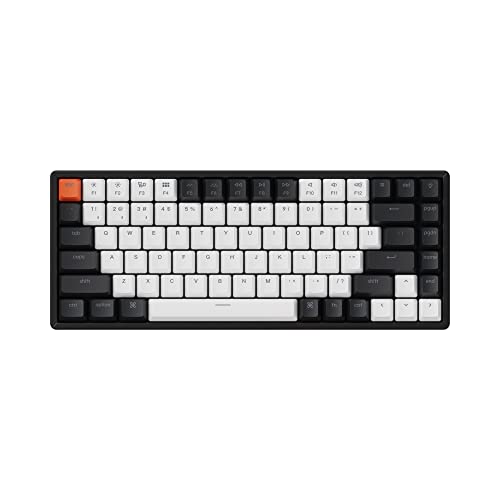

This guide is for people whose keyboard serves several machines: a laptop and a desktop sharing a desk, a tablet that needs a proper keyboard for long documents, and a home office where a cable across the floor has become a daily irritation. Both picks below are mechanical keyboards with a genuine wireless mode, chosen from the names and specifications on their Amazon listings and judged first on how they behave without a cable.
Quick Picks
As an Amazon Associate we earn from qualifying purchases.
| Product | Best for | Key spec |
|---|---|---|
| Keychron K2 | A compact board that jumps between three devices | Bluetooth 5.1 for up to 3 devices, 4000mAh battery |
| Keychron K8 | A tenkeyless board for Mac and Windows typing | Gateron G Pro Brown switches, Bluetooth 5.1, 4000mAh battery |
How to Choose
Start With the Wireless Connection, Not the Switch
Switch feel gets all the attention in keyboard guides, yet on a wireless board the connection decides whether you enjoy using it at all. Bluetooth suits a desk where one keyboard serves a laptop, a tablet, and a phone, because it pairs with all three and switches between them with a keystroke instead of a replug. A dedicated 2.4 GHz receiver suits fast-paced games better, since it answers with less delay than a Bluetooth link. Both boards in this guide use Bluetooth, so ask how many devices each one remembers and how quickly it wakes after sitting idle. Check for a wired USB-C mode too, because that fallback turns a dead battery from a lost afternoon into a minor inconvenience.
Read the Battery Claim the Way It Was Written
Battery figures on keyboard listings look generous until you read the small print beside them, and the difference matters more than the headline number. A claim of several hundred hours usually assumes the backlight is switched off, while the same board with bright RGB lighting may need charging several times sooner. Both picks here carry a 4000mAh battery, which puts them in the same endurance class, yet the honest comparison is how each one behaves with the lights on during a normal working day. Look for a board that charges over USB-C and keeps typing while it charges, and remember that replaceable batteries are a different trade from a sealed cell that must be plugged in.
Match the Layout to Every Device You Pair
A keyboard that moves between machines has to fit every screen it serves, not just the main desktop. The Keychron K2 uses a compact 84-key layout that drops the number pad and keeps the navigation keys close, which suits crowded desks and travel. The Keychron K8 keeps a tenkeyless 87-key layout, so the function row and arrow keys sit where a full-size typist expects them. Before choosing, count how often you reach for a number pad, and check whether it ships with keycaps for both Mac and Windows, since a Windows legend on a Mac desk causes constant small mistakes. A layout that looks tidy in a photo can feel cramped after eight hours of typing.
Check What You Can Change Later
A wireless mechanical keyboard is a longer commitment than a membrane board, so the parts you can swap after purchase deserve a close look before you buy. Hot-swappable sockets let you pull out a switch and press in a different one without a soldering iron, so a board that feels too loud or too stiff can be fixed instead of replaced. Keycap profile matters too: taller sculpted caps guide your fingers, while flatter caps suit a low, fast typing style. Check whether the board supports remapping, whether its stabilisers can be adjusted, and how much it weighs, because a heavy aluminium frame stays planted on a desk yet feels like a brick in a travel bag.
The 2 Best Options
Keychron K2
The Keychron K2 is the compact traveller of this pair, a three-quarter board with 84 keys that trades the number pad for desk space and portability. Its hot-swappable sockets accept most MX-style switches, so the pre-installed Keychron Super Red linear switches can be swapped later without tools or solder. Bluetooth 5.1 pairs with up to three devices at once, and the Mac-first layout ships with Windows keycaps in the box, which makes it a natural fit for a household where a MacBook, a Windows desktop, and a tablet all share one keyboard. The aluminium frame gives it a solid weight that keeps it from sliding during fast typing.
Specs
- Layout: Compact 84-key, three-quarter layout
- Switches: Keychron Super Red linear, 50 million keystroke lifespan
- Connectivity: Bluetooth 5.1 for up to 3 devices, USB Type-C wired mode
- Battery: 4000mAh, up to 240 hours with the backlight off as stated on the listing
- Backlight: RGB LED
- Keycaps: Double-shot keycaps
- Frame: Aluminium frame
- Model number: K2 C1H
- Dimensions: 12.48 x 4.84 x 1.38 inches
- Weight: 1.5 kilograms
- Compatibility: Mac and Windows
Best for: Anyone who types on a laptop, a tablet, and a phone and wants one compact board for all three.
Watch out for: The compact layout has no number pad, so heavy spreadsheet work needs a separate keypad.
Keychron K8
The Keychron K8 is the tenkeyless workhorse of this pair, keeping 87 keys and a familiar function row for typists who never learned to live without one. Gateron G Pro Brown tactile switches give each press a small bump without an audible click, which suits a shared room. Bluetooth 5.1 connects with up to three devices, and the wired USB-C mode covers long days when the battery runs low. Extra keycaps for Mac and Windows come in the box, the typing angle adjusts across three levels, and hot-swappable sockets mean the switches can be changed later as your preference develops.
Specs
- Layout: Tenkeyless, 87 keys
- Switches: Gateron G Pro Brown tactile
- Connectivity: Bluetooth 5.1 for up to 3 devices, USB Type-C wired mode
- Battery: 4000mAh
- Backlight: RGB with more than 15 lighting modes
- Keycaps: OSA-profile keycaps, Mac and Windows keycaps included
- Frame: Aluminium frame
- Hot-swappable switches: Yes
- Typing angle: Three levels of adjustment
- Rollover: N-key rollover wired, 6-key rollover wireless
- Model number: k8c3
- First available: March 24, 2020
- Compatibility: Mac and Windows
Best for: Typists who split time between Mac and Windows machines and want a full tenkeyless layout without a cable.
Watch out for: Confirm the exact switch and colour variant on the listing before ordering, since the K8 is sold in several configurations under different ASINs.
Which One Fits Your Situation
One Keyboard for a Laptop, a Tablet, and a Phone
Pick the Keychron K2. Its compact 84-key frame slips into a bag without complaint, and Bluetooth 5.1 holds three pairings at once, so moving from a laptop to a tablet takes a single keystroke. The 4000mAh battery stretches across long stretches away from a charger with the backlight off, and the Mac-first layout with Windows keycaps in the box keeps legends correct on either system. Choose the K8 only if the missing number pad would slow you down every day.
Typing on Both Mac and Windows
Pick the Keychron K8. It ships with keycaps for both systems, so command and option legends sit where a Mac user expects them while the Windows legends stay available. The tenkeyless layout keeps the function row and navigation keys in their familiar places, which matters when shortcuts differ between systems and muscle memory does half the work. Bluetooth switching across three devices lets one board serve a work MacBook and a home Windows desktop without replugging.
Long Days Away From a Charger
Pick the Keychron K2. Its listing states up to 240 hours of typing with the backlight switched off, which covers weeks of ordinary use before the battery needs attention. When the charge does run low, the USB-C wired mode keeps the board typing while it tops up, so a dead battery never ends a working session. Keep the backlight dim or off during long stretches, and the K2 becomes the board you charge on a weekend rather than midweek.
A First Board You Can Change Later
Pick the Keychron K8. Hot-swappable sockets let you try a different switch feel months after purchase without buying a new board, and the tenkeyless layout leaves room to experiment with keycap sets that would look lost on a compact frame. Three levels of typing angle help you find a comfortable wrist position, and the RGB lighting offers more than 15 modes to explore. If desk space is tight, the K2 offers the same hot-swap freedom in a smaller package.
Common Mistakes
- Buying a wireless board that pairs with only one device, then discovering it cannot follow you from a laptop to a tablet.
- Trusting a battery-hours figure without checking whether the backlight was switched off when it was measured.
- Choosing clicky switches for a shared office or bedroom without considering how far the sound carries.
- Assuming every mechanical keyboard is hot-swappable, then finding the switches are soldered in place.
- Forgetting to check for a wired fallback, so a flat battery means no keyboard at all until it recharges.
Frequently Asked Questions
Do wireless mechanical keyboards lag when gaming?
Bluetooth adds a small delay compared with a wired connection, which most typists never notice but fast players can feel. Both boards here also work over USB-C, so wired mode removes the delay entirely for competitive sessions. For casual play and everyday work, Bluetooth is responsive enough to leave the cable in the drawer. If ranked play is the priority, use wired mode and treat wireless as the travel option.
How long does the battery really last?
It depends almost entirely on the backlight. The Keychron K2 lists up to 240 hours with the backlight off, while bright RGB lighting shortens that figure on any board. Both picks carry a 4000mAh battery, charge over USB-C, and keep typing while plugged in, so a low battery is an inconvenience rather than a stop. Dimming the lights and switching the board off overnight stretch a charge furthest.
Can one keyboard work with both Mac and Windows?
Yes, both boards here are built for it. The Keychron K2 uses a Mac-first layout and ships with Windows keycaps, while the Keychron K8 includes keycaps for both systems. Legends, function keys, and modifier positions differ between systems, so check which layout the board ships with by default. Remapping software may differ by system, so confirm the features you need work on the machine you use most.
Are the switches replaceable without soldering?
Both boards here are hot-swappable, so the switches pull out and press back in without a soldering iron. The Keychron K2 accepts most MX-style three-pin and five-pin switches, so many replacements fit. Before ordering spares, confirm the socket type and pin count, since a switch with the wrong pin layout will not seat properly. Keep the original switches in case a replacement ever needs to go back.
FAQ
Do wireless mechanical keyboards lag when gaming?
How long does the battery really last?
Can one keyboard work with both Mac and Windows?
Are the switches replaceable without soldering?
More from Amazon
Programs that pair well with the guide above. Offers and eligibility are set by Amazon and may change.
Free shipping on eligible items, Prime Video and more. Eligible new members can start with a free trial.
Start a Prime free trialA Prime membership for ages 18-24 with a trial period. Eligibility is set by Amazon.
See Prime for Young AdultsAudiobooks and podcasts to listen to on the go. Eligible new members can start with a free trial.
Try Audible freeAd-free music streaming. Eligible new subscribers can start with a free trial.
Try Music Unlimited freeAs an Amazon Associate we earn from qualifying purchases.









