Our Short List of 3

- Best for: New streamers who want Canon autofocus and colour in their first interchangeable-lens setup.
- 24.2MP APS-C CMOS sensor
- DIGIC X processor
- RF-S 18-45mm f/4.5-6.3 IS STM kit lens
- 4K 30p video oversampled from 6K; Full HD up to 120p

- Best for: Desk-based streamers who want a camera whose own listing is built around webcam and livestream use.
- Micro Four Thirds interchangeable-lens system
- 12-32mm lens included
- 4K 24p/30p video
- Built-in microphone
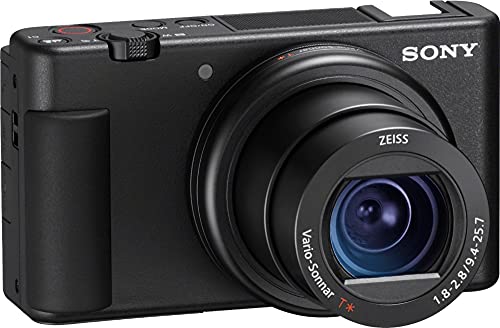
- Best for: Creators who want one compact camera that streams and records without any lens purchases.
- 20.1MP 1.0-type sensor (model DCZV1/B)
- Flip (vari-angle) screen
- Built-in microphone
- 4K HDR video
All 3 Picks at a Glance
| Product | Specs | Action |
|---|---|---|
| Canon EOS R50 with RF-S 18-45mm Lens Kit |
| Check price on Amazon |
| Panasonic LUMIX G100 Vlogger Kit (DC-G100VK) |
| Check price on Amazon |
| Sony ZV-1 (Black) |
| Check price on Amazon |
Key takeaways
- Step up from a webcam with four streaming cameras: Sony, Canon and Panasonic picks with 4K video, tracking autofocus and clean USB webcam modes.
A webcam tops out quickly: the moment you want shallow depth of field, reliable eye autofocus and a picture that survives a dim room, the camera itself becomes the limit. The real decision is not whether to upgrade but how far — a compact fixed-lens camera, or an interchangeable-lens body you can grow with better glass later. It also decides how much desk gear — capture cards, dummy batteries, lenses — you will end up buying around it.
This roundup suits streamers outgrowing a USB webcam, vloggers who record and broadcast from the same desk, and creators who want one camera for both. The four picks were chosen from their Amazon listing names and specifications: Sony’s ZV-E10 II kit and ZV-1, Canon’s EOS R50 kit, and Panasonic’s LUMIX G100 vlogger kit, each leading with streaming or webcam-mode capability.
Quick Picks
As an Amazon Associate we earn from qualifying purchases.
| Product | Best for | Key spec |
|---|---|---|
| Sony ZV-E10 II with 16-50mm Lens | Streamers wanting the sharpest 4K picture | 26MP APS-C sensor, 4K at 60 fps |
| Canon EOS R50 with RF-S 18-45mm Lens Kit | A first interchangeable-lens streaming setup | 24.2MP APS-C sensor, 4K 30p from 6K |
| Panasonic LUMIX G100 Vlogger Kit | Desk streamers who want webcam mode built in | Micro Four Thirds, 12-32mm lens included |
| Sony ZV-1 | One-camera streamers who skip lens buying | 20.1MP 1.0-type sensor, 4K HDR video |
How to Choose
Sensor Size and Low-Light Headroom
A bigger sensor gathers more light, which is why these cameras hold up in a lamplit room where a webcam turns grainy. APS-C bodies like the ZV-E10 II and EOS R50 sit at the top of this pool, the G100’s Micro Four Thirds sensor lands in the middle, and the ZV-1’s 1.0-type sensor still dwarfs a webcam’s chip. Judge the gap by your lighting: a bright, window-lit desk narrows it, while evening streams under ceiling lights widen it. Sensor size also buys shallower depth of field, the blurred-background look most stream upgrades are really chasing.
Autofocus That Tracks a Presenter
Streaming autofocus has one job: stay locked on your eyes while you lean toward the screen, hold up a product, or glance at chat. Every camera here offers face or eye detection on paper, but the systems differ in how stubbornly they hold a subject who moves. Sony’s Real-time Eye AF and Tracking, and Canon’s Dual Pixel CMOS AF II, are the two most established implementations in this group. Whichever body you pick, test the behaviour you actually need: tracking that survives a hand passing in front of your face beats a longer feature list.
USB Webcam Mode Versus HDMI and a Capture Card
Two connection routes exist, and they suit different desks. USB webcam mode is the simple path: the G100’s listing sells it directly, and Canon states UVC/UAC streaming over USB for the R50, so the computer sees a camera with no extra hardware. HDMI output into a capture card adds a box and setup steps to the desk, yet it usually unlocks the camera’s cleanest feed and sidesteps USB session limits. Check what your streaming software expects, whether the camera charges or drains while connected, and how you will power it through a long broadcast before choosing.
Audio Path and Session Length
Picture upgrades get the attention, but streams fail on audio and endurance. Two picks carry built-in microphones — the G100 and the ZV-1 — which is a workable start, yet a camera across the desk will always pick up room echo, so plan a path to a closer microphone. Endurance matters just as much: some cameras cap individual 4K clips, the R50 can run into thermal limits during long 4K sessions, and batteries sized for shooting trips drain fast under continuous video. Match the camera’s stated limits to your longest typical broadcast, not your shortest.
The 4 Best Options
Sony ZV-E10 II with 16-50mm Lens (Black)
Sony built the ZV-E10 II squarely for creators who sit in front of the camera, and it shows in the specification. The 26MP APS-C sensor is the largest in this group, which buys cleaner images in ordinary room light, while 4K recording at 60 fps gives streamers who also publish edited videos extra headroom. Real-time Eye AF and Real-time Tracking hold focus on a presenter who leans, gestures and glances at a second monitor. The powered 16-50mm kit lens zooms smoothly for reframing between a wide desk shot and a tighter talking-head frame.
Specs
- 26MP APS-C Exmor R CMOS sensor
- E PZ 16-50mm F3.5-5.6 OSS II kit lens
- 4K video at 60 fps; Full HD at 120 fps
- Real-time Eye AF and Real-time Tracking
- 3-inch vari-angle touchscreen
- No in-body stabilisation; the kit lens carries Optical SteadyShot
- Model ZVE10M2KB
Best for: Streamers who want the strongest 4K picture in this group and a lens mount that grows with them.
Watch out for: Amazon carries many third-party bundle listings for this camera — memory-card and bag kits sold under their own ASINs. Order only Sony’s camera-and-lens listing tied to the ASIN below, and check the box contents against the listing when it arrives.
Canon EOS R50 with RF-S 18-45mm Lens Kit
- Best for: New streamers who want Canon autofocus and colour in their first interchangeable-lens setup.
- 24.2MP APS-C CMOS sensor
- DIGIC X processor
- RF-S 18-45mm f/4.5-6.3 IS STM kit lens
- 4K 30p video oversampled from 6K; Full HD up to 120p
New streamers who want Canon autofocus and colour in their first interchangeable-lens setup.
The R50 has no in-body stabilisation — the kit lens’s IS does that work — and long 4K sessions can hit thermal limits. Body-only and bundle listings carry different ASINs, so confirm you are ordering the 18-45mm kit described here.
Canon’s EOS R50 kit is the gentlest step into interchangeable lenses for a new streamer. Its 24.2MP APS-C sensor records 4K 30p oversampled from 6K, so the downscaled picture looks crisp even after a platform compresses it, and Dual Pixel CMOS AF II is widely trusted for keeping a face sharp without hunting. Canon states UVC/UAC live streaming over USB, which means the camera can feed a computer directly, and a micro-HDMI output covers capture-card setups. The vari-angle screen flips forward for solo framing checks.
Watch out for: The R50 has no in-body stabilisation — the kit lens’s IS does that work — and long 4K sessions can hit thermal limits. Body-only and bundle listings carry different ASINs, so confirm you are ordering the 18-45mm kit described here.
Panasonic LUMIX G100 Vlogger Kit (DC-G100VK)
- Best for: Desk-based streamers who want a camera whose own listing is built around webcam and livestream use.
- Micro Four Thirds interchangeable-lens system
- 12-32mm lens included
- 4K 24p/30p video
- Built-in microphone
Desk-based streamers who want a camera whose own listing is built around webcam and livestream use.
4K recording is capped per clip on this model — maker documentation puts the limit at 10 minutes — so long streams should run through the camera’s webcam or HDMI mode rather than internal recording.
Panasonic markets the G100 vlogger kit as a camera that moonlights as a webcam, and its own listing bullets say so outright: connect it to a computer and calls, livestreams and interviews look crisp and bright. The Micro Four Thirds sensor sits between webcam and APS-C territory, the included 12-32mm lens keeps the outfit small, and a built-in microphone plus 5-Axis Hybrid I.S. covers handheld vlogging between streams. A frame marker for social aspect ratios helps creators who clip vertical video from the same session.
Watch out for: 4K recording is capped per clip on this model — maker documentation puts the limit at 10 minutes — so long streams should run through the camera’s webcam or HDMI mode rather than internal recording.
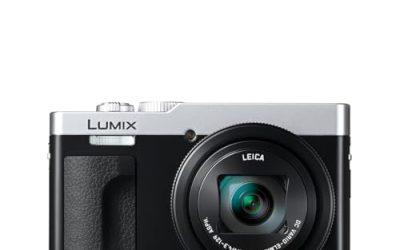
Sony ZV-1 (Black)
- Best for: Creators who want one compact camera that streams and records without any lens purchases.
- 20.1MP 1.0-type sensor (model DCZV1/B)
- Flip (vari-angle) screen
- Built-in microphone
- 4K HDR video
Creators who want one compact camera that streams and records without any lens purchases.
Trackers disagree about this exact ASIN — one titles it ‘(Renewed)’ while a current price tracks against the standard listing — so open the product page before ordering and confirm whether the featured offer is the new camera or a renewed unit. The lens is also fixed, with no upgrade path later.
The ZV-1 takes the opposite route from the three lens-swapping bodies above: everything lives in one compact shell. Its 20.1MP 1.0-type sensor is far larger than any webcam’s, the flip screen turns to face the presenter, and a built-in microphone handles audio before you invest in external gear. The listing itself leads with live video streaming and webcam use, and 4K HDR recording covers polished uploads between broadcasts. For a creator who wants a single device on the desk, charged and ready, this is the low-friction option.
Watch out for: Trackers disagree about this exact ASIN — one titles it ‘(Renewed)’ while a current price tracks against the standard listing — so open the product page before ordering and confirm whether the featured offer is the new camera or a renewed unit. The lens is also fixed, with no upgrade path later.
Which One Fits Your Situation
You stream from the same desk every day
The G100 vlogger kit fits a fixed desk best. Its listing sells the webcam connection outright, so the camera plugs into the computer and behaves like an oversized webcam with a real sensor behind it. The included 12-32mm lens covers a normal desk framing, the built-in microphone starts you off, and Hybrid I.S. matters less here because the camera never moves.
You record videos and go live with one camera
Choose the ZV-E10 II kit. The APS-C sensor and 4K at 60 fps serve edited uploads as well as broadcasts, Eye AF keeps solo recording painless, and the powered zoom reframes without touching the camera. Because it takes interchangeable lenses, a faster prime bought later upgrades both halves of your workflow instead of replacing the body.
You want one device and no lens shopping
The ZV-1 is the self-contained answer. Its fixed lens, flip screen and built-in microphone mean the box holds everything a stream needs, and the 1.0-type sensor still outclasses any webcam. Pick it when simplicity beats expandability — and confirm on the product page whether the current offer is the new camera or a renewed unit before ordering.
You are buying your first interchangeable-lens camera
Start with the EOS R50 kit. Canon’s colour and Dual Pixel autofocus forgive beginner mistakes, the 18-45mm lens covers desk and room framing while you learn, and USB streaming works without a capture card. Accept the trade-offs knowingly: stabilisation lives in the lens rather than the body, and very long 4K sessions can run into thermal limits.
Common Mistakes
- Ordering a third-party bundle listing — memory cards, a bag, filters — instead of the manufacturer’s own camera listing, then discovering the ASIN and box contents differ from what the roundup described.
- Assuming a camera streams over USB just because it records 4K; check for a stated webcam or UVC mode, or plan on HDMI plus a capture card.
- Ignoring per-clip recording limits and thermal behaviour, then having the camera stop mid-broadcast during a long session.
- Relying on a camera’s built-in microphone from across the room, which leaves the stream sounding echoey no matter how good the picture looks.
- Buying a fixed-lens camera while planning to upgrade lenses later, or buying into a lens system when you actually wanted a single self-contained device.
Frequently Asked Questions
Can one of these cameras fully replace my webcam?
For most desk streamers, yes. The G100 connects as a webcam by design, the R50 states UVC/UAC streaming over USB, and both Sony models are creator cameras designed around presenting to the lens. What changes is the workflow around the camera: power, mounting and audio need more thought than a clip-on webcam, but the picture quality jump is the entire point.
Do I need a capture card to stream with these cameras?
Not always. USB webcam modes feed a computer directly, which covers most streaming software with zero extra hardware. A capture card earns its place when you want the camera’s cleanest HDMI feed, when USB sessions behave inconsistently with your software, or when you run multiple cameras. Decide after checking how your chosen model connects, not before.
Which pick handles a dim room best?
The APS-C cameras hold the advantage because their larger sensors gather more light: the ZV-E10 II first, with its 26MP sensor and 4K60 recording, then the EOS R50. The G100’s Micro Four Thirds sensor follows, and the ZV-1’s 1.0-type sensor trails the group while still beating any webcam. Adding one soft light near the desk narrows every gap described here.
What should I check before a long streaming session?
Three things. First, recording limits: some models cap individual 4K clips, so long broadcasts belong in webcam or HDMI mode rather than internal recording. Second, heat and power — a body like the R50 can meet thermal limits in extended 4K use, and continuous video drains batteries quickly. Third, the exact listing: confirm the featured offer matches the ASIN and configuration you chose.
FAQ
Can one of these cameras fully replace my webcam?
Do I need a capture card to stream with these cameras?
Which pick handles a dim room best?
What should I check before a long streaming session?
More from Amazon
Programs that pair well with the guide above. Offers and eligibility are set by Amazon and may change.
Free shipping on eligible items, Prime Video and more. Eligible new members can start with a free trial.
Start a Prime free trialA Prime membership for ages 18-24 with a trial period. Eligibility is set by Amazon.
See Prime for Young AdultsAudiobooks and podcasts to listen to on the go. Eligible new members can start with a free trial.
Try Audible freeAd-free music streaming. Eligible new subscribers can start with a free trial.
Try Music Unlimited freeAs an Amazon Associate we earn from qualifying purchases.