Key takeaways
- Find the best 4000Hz gaming mouse with a fast polling rate and a precise sensor. Compare mice whose listings state 4000 Hz polling or higher for FPS play.
Polling rate is how often a mouse reports its position to the computer. A standard gaming mouse reports 1,000 times per second, which is 1,000 Hz. A 4000 Hz mouse reports 4,000 times per second, which cuts the delay between movement and on-screen response to a quarter of a millisecond. For fast-paced shooters, that difference shows up in tracking: the cursor follows the hand more closely, flicks land more precisely, and the mouse feels connected to the screen in a way a standard mouse does not.


A 4000 Hz mouse is not for everyone. The benefit is clearest in competitive shooters at high refresh rates, where the monitor can actually show the extra updates. In slower games, the difference is harder to notice. A 4000 Hz mouse also needs a capable PC and a high-refresh monitor to show its full value, and the higher polling rate uses more battery on wireless models. But for players who compete and want every edge, a mouse with a listed 4000 Hz polling rate is a real upgrade.
This guide compares mice whose listings actually state a 4000 Hz polling rate or higher. Every pick below is a real mouse with a real listing on Amazon US, and every one lists a polling rate of 4000 Hz or above. Use the comparison table to narrow the list, then read the detailed notes to match a mouse to your games, your connection preference, and your grip.
What to Look For in a 4000Hz Gaming Mouse
Polling Rate
Polling rate is the headline feature. A mouse listed at 4000 Hz reports its position 4,000 times per second. Some mice in this guide list 8000 Hz, which is even faster, and they include a 4000 Hz stage that can be selected in software. Check the listing for the polling rate, since many mice claim to be fast without stating a number. A mouse that does not list a polling rate should not be treated as a 4000 Hz mouse.
Sensor
A fast polling rate needs a fast sensor to match. The mice in this guide use sensors rated to 20,000 DPI or higher, with accurate tracking at high speeds. A sensor that cannot keep up with fast movement will skip or stutter, which defeats the purpose of a high polling rate. Look for a sensor with a high maximum DPI and a proven track record in competitive play.
Connection
Wired mice reach their highest polling rates through a cable, with no battery to manage. Wireless mice with a high polling rate need a dedicated dongle, since standard wireless connections cannot sustain 4000 Hz or 8000 Hz. The Razer Viper V3 Pro and Viper V3 HyperSpeed use a HyperPolling wireless dongle to reach their rated speeds. If you play competitively and want the fastest response, a wired mouse or a wireless mouse with a dedicated polling dongle is the right choice.
Weight
A light mouse moves faster with less effort, which matters when every millisecond counts. The mice in this guide weigh between 54 and 71 grams. A light mouse also reduces wrist fatigue during long competitive sessions, where the hand moves constantly.
Shape and Grip
Polling rate means little if the mouse does not fit your hand. The Razer Viper line uses a symmetrical shape that suits palm, claw, and fingertip grips, while the Glorious Model O 2 PRO uses an ambidextrous honeycomb shape. A mouse that fits your grip lets you aim consistently, which matters more than any single specification.
Top Picks
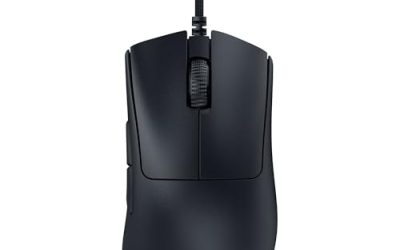
1. Razer Viper V3 HyperSpeed
The Razer Viper V3 HyperSpeed is a wireless mouse with a listed 4000 Hz wireless polling rate, a Focus Pro 30K optical sensor, and a battery life of up to 280 hours. It uses Razer HyperSpeed wireless with a HyperPolling dongle to sustain the 4000 Hz polling rate, and it weighs light enough for fast flicks. The symmetrical shape suits palm, claw, and fingertip grips.
This mouse suits players who want a true 4000 Hz wireless mouse without paying for an 8000 Hz flagship. The 4000 Hz polling rate is the headline, and it is listed clearly in the product specifications. The Focus Pro 30K sensor tracks accurately at high speeds, and the battery life is long enough that charging becomes a rare event. The mouse can also connect over Bluetooth for general use, though the 4000 Hz rate needs the HyperSpeed wireless connection.
The Viper V3 HyperSpeed is a practical competitive mouse. It delivers the polling rate that matters, a sensor that keeps up with fast movement, and a battery life that removes charging from the daily routine. For players who want 4000 Hz wireless play at a straightforward level, this is the most direct pick in the guide.
Check this mouse on Amazon US: Razer Viper V3 HyperSpeed — ASIN B0CBCPB2T1.
2. Razer Viper V3 Pro Black
The Razer Viper V3 Pro is a wireless esports mouse with a true 8000 Hz wireless polling rate through the included HyperPolling dongle, a Focus Pro 35K optical sensor, and a weight of 54 grams. The 8000 Hz polling rate is the fastest in this guide, and the mouse includes a 4000 Hz stage that can be selected in software. The symmetrical shape is designed for competitive play, and the battery life covers long sessions.
This mouse suits players who want the fastest polling rate available in a wireless mouse. The 8000 Hz wireless polling rate reports position 8,000 times per second, which is twice the rate of a 4000 Hz mouse and eight times the rate of a standard 1000 Hz mouse. The 54-gram weight makes flicks effortless, and the Focus Pro 35K sensor is the most capable sensor in the Razer lineup.
The Viper V3 Pro is the flagship pick in this guide. It is built for players who compete at a high level and want every edge the hardware can provide. The HyperPolling dongle is included in the box, so the 8000 Hz rate works out of the box without extra hardware. For players who want the fastest wireless polling rate available, this is the mouse to choose.
Check this mouse on Amazon US: Razer Viper V3 Pro Black — ASIN B0CW25XR5R.
3. Razer Viper 8KHz ESL Edition
The Razer Viper 8KHz ESL Edition is a wired mouse with 8000 Hz HyperPolling, a 20K DPI Focus+ optical sensor, and a weight of 71 grams. The 8000 Hz polling rate reports position 8,000 times per second over a wired connection, and the polling rate can be set to stages including 4000 Hz. The mouse has eight programmable buttons and a symmetrical shape designed for esports play.
This mouse suits players who want the fastest polling rate in a wired mouse. The wired connection keeps latency low and never needs charging, and the 8000 Hz polling rate is the highest available over a cable. The 20K DPI Focus+ sensor tracks accurately at high speeds, and the eight programmable buttons cover the actions most games need.
The Viper 8KHz ESL Edition is a good fit for players who prefer a wired mouse and want a polling rate above 4000 Hz. The ESL Edition is the tournament version of the Viper 8KHz, built to the same specifications with a design that marks it as an esports model. For players who want a wired mouse with a listed polling rate of 4000 Hz or higher, this is the classic pick.
Check this mouse on Amazon US: Razer Viper 8KHz ESL Edition — ASIN B09QFVT5P2.
4. Glorious Model O 2 PRO 4K/8KHz
The Glorious Model O 2 PRO 4K/8KHz is a wireless mouse with a polling rate of 4000 Hz or 8000 Hz, a lightweight honeycomb shell, and a BAMF sensor. The 4K/8KHz designation is in the product name, and the mouse can be set to a 4000 Hz polling rate for competitive play or an 8000 Hz polling rate for the fastest response. The ambidextrous shape suits palm, claw, and fingertip grips.
This mouse suits players who want a Glorious mouse with a high polling rate. The Model O 2 PRO builds on the original Model O with a faster sensor, a higher polling rate, and a refined shape. The honeycomb shell keeps the weight low, and the wireless connection gives freedom of movement without a cable.
The Model O 2 PRO 4K/8KHz is a good fit for players who already like the Glorious shape and want a polling rate that matches the fastest mice on the market. The 4000 Hz stage is the practical choice for most competitive play, since it balances responsiveness with battery life, while the 8000 Hz stage is available when the fastest response matters most. For Glorious fans who want a high polling rate, this is the pick.
Check this mouse on Amazon US: Glorious Model O 2 PRO 4K/8KHz — ASIN B0CJ5SS889.
| Product | Key Feature | Best For |
|---|---|---|
| Razer Viper V3 HyperSpeed | 4000 Hz wireless polling, Focus Pro 30K, up to 280 hours battery | True 4000 Hz wireless play |
| Razer Viper V3 Pro Black | True 8000 Hz wireless polling, Focus Pro 35K, 54 g | Fastest wireless polling rate |
| Razer Viper 8KHz ESL Edition | 8000 Hz wired HyperPolling, 20K DPI, 71 g | Fastest wired polling rate |
| Glorious Model O 2 PRO 4K/8KHz | 4000 or 8000 Hz polling, lightweight honeycomb shell | Glorious shape with high polling |
Buying Guide: Things to Consider
Match the Polling Rate to Your Monitor
A 4000 Hz mouse shows its value on a high-refresh monitor. On a 60 Hz monitor, the screen updates 60 times per second, so the extra mouse reports have little to show. On a 144 Hz or 240 Hz monitor, the faster polling rate produces smoother tracking that is visible in play. Before buying a 4000 Hz mouse, check your monitor refresh rate.
Check Your PC
A high polling rate uses more CPU time, since the computer processes more mouse reports per second. A modern gaming PC handles 4000 Hz or 8000 Hz without trouble, but an older or low-power PC may struggle. If your PC is several years old, test the polling rate setting and lower it if the system feels sluggish.
Choose Wired or Wireless
Wired mice reach their highest polling rates through a cable, with no battery to manage. Wireless mice with a high polling rate need a dedicated dongle, which is included with the Razer Viper V3 Pro and Viper V3 HyperSpeed. If you play competitively and want the simplest setup, a wired mouse is the safer choice. If you want freedom of movement, a wireless mouse with a polling dongle is the better fit.
Balance Polling Rate and Battery Life
A higher polling rate uses more battery on wireless mice. The Viper V3 HyperSpeed runs for up to 280 hours, which is long enough that the polling rate has little practical effect on charging frequency. Still, if battery life matters more than the last bit of responsiveness, a 4000 Hz setting uses less power than an 8000 Hz setting.
Shape Matters More Than Specs
A mouse that does not fit your hand will not help your aim, no matter how fast it polls. The Razer Viper line uses a symmetrical shape that suits most grips, while the Glorious Model O 2 PRO uses an ambidextrous honeycomb shape. Compare the mouse dimensions to a mouse you already own before choosing.
FAQ
What does 4000 Hz mean for a gaming mouse?
A 4000 Hz polling rate means the mouse reports its position to the computer 4,000 times per second. A standard gaming mouse reports 1,000 times per second. The higher rate reduces the delay between movement and on-screen response, which makes tracking feel smoother and more connected.
Do I need a 4000 Hz mouse for casual gaming?
No. A 4000 Hz mouse shows its value in competitive shooters at high refresh rates, where fast tracking matters. For casual games, role-playing games, and strategy games, a standard 1000 Hz mouse is more than enough. A 4000 Hz mouse is an upgrade for competitive play, not a requirement for gaming in general.
Does a higher polling rate use more battery?
Yes. A wireless mouse at 8000 Hz uses more battery than the same mouse at 4000 Hz, and a mouse at 4000 Hz uses more than a mouse at 1000 Hz. The mice in this guide have long battery lives, so the difference is rarely a problem in practice, but it is worth knowing.
Can I use a 4000 Hz mouse on any PC?
Yes, but a modern gaming PC handles a high polling rate best. An older PC may struggle to process 4,000 or 8,000 mouse reports per second. If the system feels sluggish, lower the polling rate in the mouse software to 1000 Hz or 2000 Hz.
Conclusion
A 4000 Hz gaming mouse reports its position four times as often as a standard mouse, and the difference shows in fast, precise tracking. The Razer Viper V3 HyperSpeed is the most direct 4000 Hz wireless mouse, the Razer Viper V3 Pro brings a true 8000 Hz wireless polling rate in a 54-gram body, the Razer Viper 8KHz ESL Edition delivers the fastest wired polling rate, and the Glorious Model O 2 PRO 4K/8KHz brings high polling to the Glorious shape. Match the polling rate to your monitor, check your PC can handle it, and choose the shape that fits your hand. With the right mouse, the cursor follows the hand without delay.
Disclosure: As an Amazon Associate, we earn from qualifying purchases.
FAQ
What does 4000 Hz mean for a gaming mouse?
Do I need a 4000 Hz mouse for casual gaming?
Does a higher polling rate use more battery?
Can I use a 4000 Hz mouse on any PC?
More from Amazon
Programs that pair well with the guide above. Offers and eligibility are set by Amazon and may change.
Free shipping on eligible items, Prime Video and more. Eligible new members can start with a free trial.
Start a Prime free trialA Prime membership for ages 18-24 with a trial period. Eligibility is set by Amazon.
See Prime for Young AdultsAudiobooks and podcasts to listen to on the go. Eligible new members can start with a free trial.
Try Audible freeAd-free music streaming. Eligible new subscribers can start with a free trial.
Try Music Unlimited freeAs an Amazon Associate we earn from qualifying purchases.