
Key takeaways
- Compare the best cheap wireless gaming mouse picks for budget play, with sensor, battery, weight and connection checks to help you choose well.
A cheap wireless gaming mouse used to mean compromise everywhere: a vague sensor, a connection that dropped at the worst moment, and a battery that seemed to fade just as a match got interesting. That picture has changed. The budget end of the market now borrows sensors, switches, and wireless systems that were once reserved for far more expensive models, and the result is a group of mice that can handle competitive shooters, MOBAs, and everyday desktop work without a cable dragging across the desk.
The trick is knowing which corners a maker can cut safely and which ones matter. Fancy lighting, elaborate packaging, and premium shell coatings can go without hurting your aim. Sensor accuracy, switch feel, wireless stability, and a shape that suits your hand cannot. This guide works through four budget wireless gaming mice that take different approaches to that balance, then explains how to read the specifications so you can match a mouse to your grip, your games, and your desk setup.
As an Amazon Associate we earn from qualifying purchases.
What Cheap Should and Should Not Mean
Cheap should mean a short, honest feature list, not a weak core. A good budget wireless gaming mouse still needs an optical sensor that tracks fast flicks without spinning out, a 2.4 GHz connection with a proper USB receiver for low-latency play, main switches that register clicks cleanly, and enough battery life that charging or swapping a cell is an occasional chore rather than a weekly one.
Where savings are reasonable is in the extras. Bluetooth is useful for a laptop bag but is not essential for a single gaming PC. RGB lighting looks lively on a desk and does nothing for tracking. A charging dock is convenient, yet a simple cable works. Even maximum DPI figures are mostly marketing headroom, since most players settle far below the ceiling a modern sensor offers. Judging a budget mouse means looking past the biggest number on the box and asking how the basics are handled.
Shape deserves more attention than any headline specification. A mouse that is too large, too small, too heavy, or shaped for the wrong grip style will feel wrong no matter how good its sensor is. Small, symmetrical shells suit fingertip and claw grips and smaller hands. Larger, right-handed ergonomic shells support palm grips and give the thumb a more sculpted rest. Weight plays into this as well: lighter mice are easier to flick and stop quickly in shooters, while a little extra heft can feel steadier for slower, sweeping movements.
The Picks at a Glance
Four mice cover most budget needs well. The Logitech G305 LIGHTSPEED is the safe, proven all-rounder with exceptional battery life from a single AA cell. The Razer Orochi V2 is the portable option, pairing dual wireless modes with an unusually light, compact shell. The Redragon M686 Vampire Elite is the feature-heavy choice, with a rechargeable battery, RGB lighting, and extra programmable buttons. The ATTACK SHARK X11 is the lightweight newcomer, adding a magnetic charging dock and tri-mode connectivity at a budget position.
None of these mice tries to be everything. Each one trades something away, and the sections below spell out what that trade is so there are no surprises after the box is opened.
1. Logitech G305 LIGHTSPEED — The Proven Budget All-Rounder

View the Logitech G305 LIGHTSPEED on Amazon
The G305 has been a budget reference point for years, and its formula is easy to understand. Logitech built it around the HERO optical sensor, rated up to 12,000 DPI with tracking above 400 IPS, and paired it with LIGHTSPEED wireless, which reports at 1 millisecond through the included USB receiver. That combination covers the two things a gaming mouse must get right: the cursor goes exactly where the hand sends it, and it gets there without a perceptible delay.
Battery life is the headline strength. The listing rates the G305 for up to 250 hours of continuous gameplay on a single AA battery, and the mouse carries its receiver in a storage compartment inside the shell, which makes it simple to move between a desktop and a laptop without losing the small dongle. At 99 grams with the battery fitted, it is not the lightest mouse in this guide, but the weight is honest for an AA-powered design and the compact, symmetrical shell suits claw and fingertip grips and small to medium hands.
Six programmable buttons are available through Logitech G HUB software, including the two side buttons and the DPI control behind the scroll wheel. There is no RGB lighting and no Bluetooth, and the receiver is USB-A rather than USB-C, so a modern laptop with only USB-C ports will need an adapter. Those omissions are exactly the kind that make sense at this level: nothing that affects aim has been removed. For a buyer who wants one dependable recommendation and very little to think about afterwards, the G305 remains the obvious starting point.
2. Razer Orochi V2 — The Portable Dual-Mode Option

View the Razer Orochi V2 on Amazon
The Orochi V2, in the black finish covered by this listing, is built for players who game in more than one place. It offers two wireless modes: Razer HyperSpeed over a USB receiver for gaming, and Bluetooth for lower-power everyday use with a laptop or tablet. Switching between a gaming PC and a work machine becomes a matter of moving a toggle rather than re-pairing or swapping cables.
Inside is Razer’s 5G advanced optical sensor rated at 18,000 DPI, along with second-generation Razer mechanical mouse switches. Battery figures are the standout detail: the listing quotes up to 950 hours of use over Bluetooth, with the mouse able to run on either an AA or an AAA battery, which also lets the owner adjust the weight and balance slightly by choosing the smaller cell. Few gaming mice at any level ask so little attention to power.
The shape is small and symmetrical, aimed at fingertip and claw grips and at hands that find mid-sized mice bulky. Palm-grip players with large hands should look elsewhere in this guide, because the short shell will not fill the palm. There is no lighting to speak of and no charging system, since the design relies on replaceable cells. For a student, a traveller, or anyone whose gaming happens on a laptop as often as at a desk, the Orochi V2 packs genuine gaming hardware into the most portable form here.
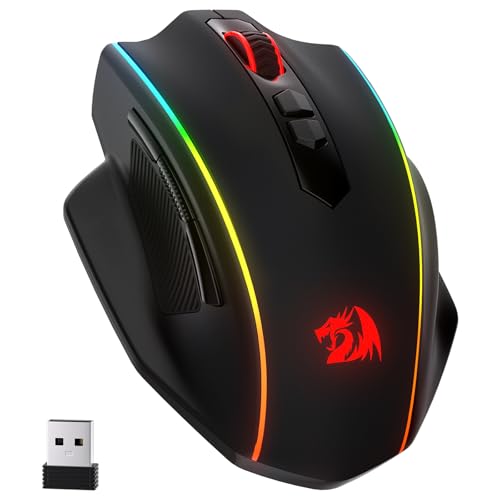
3. Redragon M686 Vampire Elite — The Feature-Heavy Value Pick
View the Redragon M686 Vampire Elite on Amazon
Redragon takes the opposite approach to Logitech and Razer: instead of trimming the feature list, the M686 Vampire Elite fills it. This is a larger, right-handed ergonomic mouse with RGB backlighting, eight programmable buttons including three side macro buttons, and a rechargeable battery, aimed at players who want plenty of inputs for MOBAs, MMOs, and productivity shortcuts.
The sensor is a PixArt PAW3335 optical unit rated up to 16,000 DPI, with five onboard DPI stages that can be switched during play and adjusted further through Redragon’s software. Polling reaches 1000 Hz in its dual wired and wireless modes, with a 2.4 GHz dongle handling the wireless connection and a cable included for wired play and charging. The built-in 1000 mAh rechargeable battery is rated for up to 45 hours in eco mode, which is far shorter than the AA-powered mice above but removes the need to keep spare cells around; the mouse simply plugs in when it runs low and keeps working while it charges.
At roughly 123 grams by the listing’s product dimensions data, this is a noticeably heavier, bigger mouse than the others here, and that is a deliberate fit for palm grips and medium to large hands rather than a flaw. Players who prefer a featherweight shell for fast shooter flicks will feel the difference, while players who rest their whole hand on the mouse and use many buttons will appreciate the room. If your game library leans on macros and your desk can carry a bit of RGB, the M686 offers the longest feature list in this roundup.
4. ATTACK SHARK X11 — Lightweight, With a Charging Dock

View the ATTACK SHARK X11 on Amazon
The X11 is the newest style of budget mouse: a very light shell, a modern sensor, and a charging dock in the box, a combination that would have sounded unlikely at this level not long ago. This black version connects three ways — 2.4 GHz wireless, Bluetooth, and USB-C wired — so one mouse can serve a gaming desktop, a laptop, and a tablet without extra hardware.
Its PixArt PAW3311 optical sensor offers six adjustable DPI levels up to 22,000 DPI, with 300 IPS tracking speed, 1000 Hz response, and 35 G acceleration listed by the maker. The shell weighs around 62 grams, which puts it in proper lightweight territory for fingertip and claw players who move the mouse with quick, short strokes. Five programmable buttons are configured through the maker’s driver software, and the main clicks use HUYU switches with a TTC encoder for the scroll wheel.
The magnetic RGB charging dock is the feature that separates the X11 from everything else here. Dropping the mouse onto the dock at the end of a session replaces the ritual of finding a cable, and the dock doubles as a home for the wireless receiver. The trade-offs are those of a newer, smaller brand: software and support ecosystems are less established than Logitech’s or Razer’s, and the dock takes a permanent spot on the desk. For players who want the lightest mouse and the easiest charging routine their budget allows, those are reasonable exchanges.
Side-by-Side Comparison
| Mouse | Sensor | Max DPI | Weight | Battery approach | Connections | Best for |
|---|---|---|---|---|---|---|
| Logitech G305 LIGHTSPEED | HERO optical | 12,000 | 99 g | Single AA, up to 250 hours | 2.4 GHz receiver | Dependable all-round play |
| Razer Orochi V2 | 5G advanced optical | 18,000 | Lightweight compact shell | AA or AAA, up to 950 hours on Bluetooth | HyperSpeed receiver, Bluetooth | Travel and laptop gaming |
| Redragon M686 Vampire Elite | PixArt PAW3335 | 16,000 | About 123 g | Rechargeable 1000 mAh, up to 45 hours eco | 2.4 GHz receiver, wired | Buttons, macros, palm grip |
| ATTACK SHARK X11 | PixArt PAW3311 | 22,000 | Around 62 g | Rechargeable, magnetic dock | 2.4 GHz, Bluetooth, USB-C wired | Lightweight play, easy charging |
Read the table by priorities rather than by the largest numbers. The highest DPI ceiling belongs to the X11, yet most players will set every mouse here somewhere in the hundreds or low thousands for actual matches. Battery approach splits the group cleanly: the AA and AAA designs run for weeks or months and ask for a spare cell, while the rechargeable designs plug in or dock more often but never need a battery purchase. Weight splits it again, from the dock-equipped lightweight X11 to the full-sized M686.
How to Choose the Right One
Start with your hand and your grip. Measure roughly from the tip of your middle finger to the base of your palm, then be honest about how you hold a mouse. Fingertip and claw players who lift and reset often should look first at the Orochi V2 or the X11. Palm players, or anyone with larger hands, will be better served by the M686. The G305 sits in the middle, with a safe shape that few people dislike.
Next, count your devices. A single gaming PC needs only a good 2.4 GHz receiver connection, which all four mice provide. A gaming PC plus a laptop makes dual-mode designs such as the Orochi V2 and the tri-mode X11 more attractive, because Bluetooth can stay paired to the second machine. Check your ports, too: most receivers here are USB-A, so a laptop with only USB-C sockets may need a small adapter, while the X11’s dock arrangement can keep the receiver parked in the dock itself.
Then decide how you feel about batteries. Replaceable cells deliver the longest untethered stretches and a mouse that is ready again in seconds with a fresh AA, at the cost of keeping spares in a drawer. Rechargeable mice remove that errand but introduce charging habits, whether that is the M686’s cable or the X11’s dock. Neither answer is wrong; the right one is the routine you will actually keep.
Finally, think about buttons and software. Shooter players usually need two reliable side buttons and nothing more. MMO and strategy players benefit from the M686’s extra programmable inputs and macro support. Every mouse here relies on its maker’s software for full customisation, so players who dislike background utilities should favour the mice with onboard DPI switching and stored settings.
Common Budget-Mouse Mistakes
The most frequent mistake is buying on DPI alone. Beyond a point that modern sensors passed long ago, extra DPI adds nothing to accuracy, and an enormous figure on a box says little about tracking quality. Sensor model, polling rate, and wireless design tell a more useful story.
A second mistake is ignoring the receiver. Wireless performance depends on a clear path between mouse and dongle, and a receiver buried in the back of a PC under a desk can behave worse than the same receiver on a short extension near the mousepad. Budget mice rarely include an extension adapter, so plan receiver placement when you set up.
A third is forgetting the ongoing details: whether spare AA batteries are in the house, whether a charging cable can reach the desk, and whether the mouse feet and shape suit your pad. None of these decide a specification chart, yet together they decide whether a cheap mouse still feels like a bargain after a month of daily use.
Frequently Asked Questions
Is a cheap wireless gaming mouse fast enough for competitive shooters?
Yes, provided it uses a proper 2.4 GHz gaming connection rather than Bluetooth alone. The mice in this guide report at up to 1000 Hz over their receivers, which is the same polling rate long used by wired gaming mice. Bluetooth modes, where fitted, are best kept for desktop work and casual play.
How much DPI do you actually need?
Far less than any of these sensors offer. Many players settle between 400 and 3,200 DPI depending on screen resolution and sensitivity preference. A sensor rated well above that range simply gives headroom and finer adjustment steps; smooth, accurate tracking at your chosen setting matters more than the ceiling.
Are replaceable batteries better than rechargeable ones?
Each suits a different routine. Replaceable AA or AAA cells deliver very long runtimes and instant swaps, as the G305 and Orochi V2 show. Rechargeable designs such as the M686 and X11 avoid buying cells and charge by cable or dock, but need that charging habit built into your week.
Will these mice work with a laptop that only has USB-C ports?
The mice themselves will work, but most of their receivers are USB-A, so a small USB-C adapter or hub is usually required for the 2.4 GHz connection. Bluetooth-equipped models, the Orochi V2 and the X11, can connect to such a laptop with no adapter at all, with the receiver reserved for the gaming machine.
Does a lighter mouse always aim better?
Not always. Lighter mice reduce the effort of starting and stopping fast movements, which many shooter players prefer, and the X11 shows how light a budget mouse can now be. Other players prefer the steadier feel of a heavier mouse such as the M686 for slow tracking. Grip, hand size, and the games you play decide which feel is right.
Verdict
For most buyers, the Logitech G305 LIGHTSPEED is still the easiest cheap wireless gaming mouse to recommend: a trusted sensor, a fast receiver connection, and battery life measured in months rather than days. Choose the Razer Orochi V2 if your gaming travels with a laptop, the Redragon M686 Vampire Elite if you want buttons, macros, and a full-sized ergonomic shape, and the ATTACK SHARK X11 if low weight and a charging dock top your list. Every one of them keeps the essentials intact, which is exactly what a budget mouse should do.
FAQ
Is a cheap wireless gaming mouse fast enough for competitive shooters?
How much DPI do you actually need?
Are replaceable batteries better than rechargeable ones?
Will these mice work with a laptop that only has USB-C ports?
Does a lighter mouse always aim better?
More from Amazon
Programs that pair well with the guide above. Offers and eligibility are set by Amazon and may change.
Free shipping on eligible items, Prime Video and more. Eligible new members can start with a free trial.
Start a Prime free trialA Prime membership for ages 18-24 with a trial period. Eligibility is set by Amazon.
See Prime for Young AdultsAudiobooks and podcasts to listen to on the go. Eligible new members can start with a free trial.
Try Audible freeAd-free music streaming. Eligible new subscribers can start with a free trial.
Try Music Unlimited freeAs an Amazon Associate we earn from qualifying purchases.









