
Key takeaways
- Compare the best Bluetooth gaming mouse options for gaming and second devices, from lightweight travel picks to ergonomic mice with long battery life.
A Bluetooth gaming mouse solves a practical problem that a dongle-only mouse does not. It can stay paired to a laptop, tablet, or second computer without taking up a USB port, and it can move between a gaming desk and a work setup without unplugging anything. At the same time, Bluetooth on its own is rarely the connection a player would choose for fast, competitive play, because Bluetooth modes on gaming mice generally report less frequently than a dedicated 2.4 GHz wireless link. That is why almost every serious model in this guide offers both: Bluetooth for convenience and a second device, and 2.4 GHz wireless for gaming.
As an Amazon Associate we earn from qualifying purchases
This guide compares five gaming mice that all list Bluetooth connectivity on their Amazon US listings. They cover very different priorities: an ergonomic mouse with many controls, a tiny travel mouse with exceptionally long stated battery life, a larger Logitech shape with a performance and endurance mode switch, a lightweight ambidextrous ASUS model with replaceable switches, and a SteelSeries model that runs on replaceable AAA batteries. Reading them side by side makes the real decision clearer. Shape, battery system, and how you plan to split time between Bluetooth and 2.4 GHz matter more than a headline sensitivity figure.
Quick comparison
- Razer Basilisk V3 X HyperSpeed — ergonomic right-handed shape, nine programmable controls, and the longest Bluetooth battery figure in this group.
- Razer Orochi V2 — compact travel shape, very light, and a choice of AA or AAA power.
- Logitech G603 LIGHTSPEED — larger ergonomic shape, six programmable buttons, and separate HI and LO performance modes.
- ASUS ROG Strix Impact III Wireless — 57-gram ambidextrous shape, 36,000 DPI sensor, replaceable switches, and a receiver that can also pair a compatible keyboard.
- SteelSeries Rival 3 Wireless Gen 2 — straightforward six-button shape, TrueMove Air sensor, and AAA power with long Bluetooth runtime.
What Bluetooth actually changes on a gaming mouse
Bluetooth is a pairing standard built into most modern laptops, many desktops, tablets, and handheld devices. Pairing a mouse over Bluetooth means no receiver is needed, no port is occupied, and the connection can persist when the machine wakes from sleep. For strategy games, turn-based games, casual shooters, everyday desktop work, and gaming on a second machine, that convenience is often worth more than the last increment of polling speed.
For fast-paced competitive play, the listings and manufacturer descriptions for these mice point in the same direction: use the 2.4 GHz mode for gaming where it is offered. The Razer Basilisk V3 X HyperSpeed, for example, separates its battery figures by mode, which reflects the different power and reporting demands of each connection. The Logitech G603 makes the split explicit in a different way, with a HI mode for performance and a LO mode for endurance. The practical approach is simple. Keep Bluetooth paired to the laptop or second device you use most, keep the 2.4 GHz receiver in your main gaming machine, and switch modes on the underside of the mouse when you move between them.
Bluetooth also helps battery life. On several models here, the stated Bluetooth runtime is substantially longer than the 2.4 GHz runtime, which can stretch the interval between charges or battery swaps.
1. Razer Basilisk V3 X HyperSpeed — best ergonomic option with many controls

The Razer Basilisk V3 X HyperSpeed is the most control-heavy mouse in this guide, and the one most clearly shaped around a right hand resting on it for long sessions.
The listing describes a customizable wireless gaming mouse with Razer HyperSpeed wireless and Bluetooth connectivity, a 5G Advanced 18K optical sensor, mechanical switches Gen-2, Chroma RGB, and nine programmable controls. It also lists battery life of up to 285 hours on HyperSpeed and up to 535 hours on Bluetooth, figures that underline the pattern described above: Bluetooth is the endurance mode, HyperSpeed is the gaming mode.
The ergonomic form is the main reason to choose this model over the lighter mice that follow. A sculpted right-handed shell with a thumb rest suits palm and relaxed claw grips, and it gives the side controls a natural place to sit without forcing the thumb to hunt for them. Nine programmable controls matter most in games with many bindings — massively multiplayer games, shooters with ping and ability keys, and simulation titles — and in desktop software where a spare button can carry a shortcut you use all day.
Consider the trade-offs before choosing it. An ergonomic shell of this kind is not ambidextrous, so left-handed players should look at the ASUS or SteelSeries models instead. It is also a larger, heavier style of mouse than the Orochi V2 or the Impact III Wireless, which makes it less appealing for low-sensitivity players who lift and reposition the mouse constantly, and less convenient to carry in a small laptop sleeve. Chroma RGB is part of the listing, so buyers who prefer no lighting at all may spend a little time in the software turning effects down or off.
Choose the Basilisk V3 X HyperSpeed if you want one mouse that can game over 2.4 GHz at your desk, stay paired over Bluetooth to a laptop, and give you plenty of buttons in a comfortable right-handed shape.
2. Razer Orochi V2 — best for travel and small setups

The Razer Orochi V2 takes the opposite approach to the Basilisk. It is a compact mobile wireless gaming mouse built around portability and battery flexibility.
The Amazon listing for the Classic Black version describes an ultra-lightweight mouse with two wireless modes, up to 950 hours of battery life, mechanical mouse switches, and a 5G Advanced 18K DPI optical sensor. The item model number in the listing is RZ01-03730100-R3U1. Razer positions the two modes as HyperSpeed wireless for gaming and Bluetooth for a lower-power connection, and the mouse can run on either a single AA or a single AAA battery, which changes the weight depending on which cell is fitted.
That battery choice is a genuinely useful detail for travel. If an AA is available, use it for the longest runtime. If only an AAA is at hand, the mouse still works. For players who game in hotel rooms, on trains, at a second home, or at a hot desk, that flexibility can matter more than an internal rechargeable cell that leaves the mouse tethered to a cable when it runs flat at the wrong moment.
The compact shape is the compromise. Small mice suit fingertip and claw grips and smaller hands well, but a player with a large hand who prefers a full palm grip will likely find the Orochi V2 cramped over a long session. The control set is also simpler than the Basilisk V3 X, so players who rely on many thumb buttons should compare the button layout carefully before deciding.
Choose the Orochi V2 if portability is the priority: a light, small gaming mouse that pairs over Bluetooth to a laptop without a receiver, switches to its gaming wireless mode when needed, and keeps going for a very long stated runtime on a replaceable battery.
3. Logitech G603 LIGHTSPEED — best for switching between performance and endurance

The Logitech G603 LIGHTSPEED is an older design than most mice in this guide, but its core idea still makes sense for a Bluetooth shortlist: one mouse that can be set up for responsive gaming or for very long endurance, and that can connect to more than one device.
The listing describes the G603 as a wireless gaming mouse with the HERO 12K sensor, 12,000 DPI, six programmable buttons, 500-hour battery life, and on-board memory, for PC and Mac, in black. The listing’s feature details give a resolution range of 200 to 12,000 DPI, Bluetooth as a connectivity technology alongside LIGHTSPEED wireless, and a model number of 910-005099. Logitech’s description notes that the G603 can connect to multiple devices and switch between performance modes.
That mode switch is the defining feature. In HI mode the mouse is set up for gaming responsiveness, while LO mode reduces the report rate to extend battery life for everyday use. Paired with Bluetooth for a second device and LIGHTSPEED for the gaming machine, it gives a clear, hardware-level way to separate work use from play without changing mice. Six programmable buttons cover the needs of most genres without crowding the side of the shell, and on-board memory means settings can travel with the mouse between computers.
Buyers should weigh two points. First, the maximum sensitivity of 12,000 DPI is lower on paper than the 18,000 to 36,000 DPI figures elsewhere in this guide, although in practice most players use far lower settings than any of these maximums, so shape and connection options are usually the more meaningful differences. Second, this is a comparatively large, tall ergonomic shape, which suits palm grip and larger hands better than fingertip grip and smaller hands.
Choose the G603 if you like a larger right-handed shape, want Bluetooth and LIGHTSPEED in one mouse, and value a simple performance-versus-endurance switch over the newest sensor headline.
4. ASUS ROG Strix Impact III Wireless — best lightweight ambidextrous option
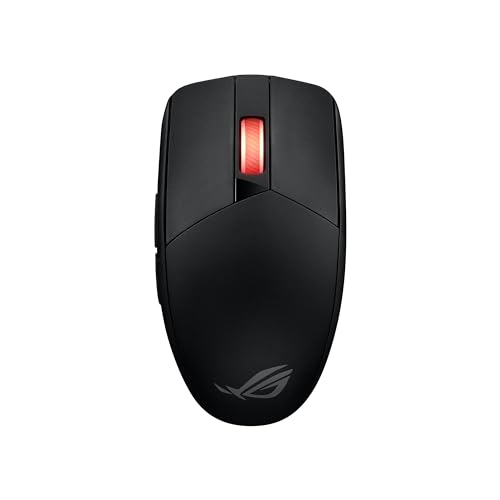
The ASUS ROG Strix Impact III Wireless is the lightest mouse in this guide and the clearest pick for players who want a symmetrical shape.
The Amazon listing describes a 57-gram lightweight gaming mouse with a 36K DPI sensor, Bluetooth and 2.4 GHz RF connectivity, ROG SpeedNova wireless technology, up to 618 hours of battery life, replaceable switches, and the ROG Omni Receiver, in black. The listing also describes the ROG AimPoint optical sensor and notes that the Omni Receiver allows a keyboard and a mouse to connect through a single dongle, which is useful on a laptop or small desk where ports are limited.
Replaceable switches are the unusual feature here. The listing states that the ROG Micro Switches have a 70-million-click lifespan, and the push-fit switch sockets let an owner swap switches to change click feel or replace a worn switch without replacing the whole mouse. For a player who has a strong preference for a particular click weight, or who simply likes the idea of maintaining a mouse for longer, that is a meaningful difference from a sealed design.
The ambidextrous shape broadens who can use it, including left-handed players, although symmetrical mice place side buttons in positions that do not suit every grip. Battery power comes from replaceable cells rather than an internal rechargeable battery, which some buyers prefer for travel and others find less convenient than plugging in a cable. There is no wired mode described for this model in the material reviewed, so the mouse is a purely wireless choice.
Choose the Impact III Wireless if low weight matters most, you prefer a symmetrical shape, and the combination of Bluetooth, 2.4 GHz, and a shared receiver fits a compact setup with limited ports.
5. SteelSeries Rival 3 Wireless Gen 2 — best straightforward AAA option

The SteelSeries Rival 3 Wireless Gen 2, in the White version listed here, is the simplest proposition in the guide: a familiar shape, a proven sensor specification, dual wireless, and replaceable AAA power.
The Amazon listing describes a gaming mouse with 2.4 GHz and Bluetooth connectivity, an 18,000 DPI TrueMove Air optical sensor, 60-million-click durability, and 100 percent PTFE feet. It gives battery life of up to 200 hours on 2.4 GHz and up to 450 hours on Bluetooth, and the product description notes true one-to-one tracking with 400 IPS and a maximum acceleration of 40G, developed in partnership with PixArt. The listing gives the item model number as 62688 and a first available date in May 2025 for this generation.
The appeal is balance rather than a single headline feature. The TrueMove Air specification is ample for most genres, the PTFE feet support a smooth glide on cloth and hard pads, and the ability to run on one or two AAA batteries, as described for this model line, lets the owner trade a little weight for runtime. Bluetooth pairing makes it an easy second-device mouse for a laptop, while the 2.4 GHz dongle handles gaming duty at a desk.
The compromises are weight and ambition. With batteries fitted, this is a heavier mouse than the ASUS Impact III Wireless or the Orochi V2, so players chasing the lowest possible weight for fast flicks should compare carefully. It also keeps a six-button layout rather than the expanded control set of the Basilisk V3 X, so it suits players who want the essentials done well rather than a button for every binding.
Choose the Rival 3 Wireless Gen 2 if you want a dependable dual-mode gaming mouse with long Bluetooth runtime, replaceable batteries, and no complicated setup, in a shape that works for a wide range of hand sizes and grips.
How to choose the best Bluetooth gaming mouse for you
Start with how you will actually connect. If Bluetooth will be your only connection — for example, gaming entirely on a laptop without free ports — pay close attention to the stated Bluetooth battery figures and accept that Bluetooth mode is designed more for convenience than for the fastest reporting. If you play competitive games at a desk, make sure the mouse also offers a 2.4 GHz mode, and plan to use that mode for gaming sessions while Bluetooth handles the second device.
Next, decide on power. Replaceable AA or AAA batteries, as used by the Orochi V2, the Impact III Wireless, and the Rival 3 Wireless Gen 2, mean a flat battery is a thirty-second swap and the mouse never needs to sit on a cable. The trade-off is keeping spare cells at hand. A mouse with a long stated runtime in the mode you use most reduces how often that question comes up at all, which is why the mode-specific figures in each listing are worth comparing rather than a single headline number.
Then match the shape to your hand and grip, because no sensor specification compensates for a shell that does not fit. Palm grip and larger hands point toward the Basilisk V3 X HyperSpeed or the G603. Fingertip grip, smaller hands, and travel point toward the Orochi V2. A symmetrical, lightweight preference points toward the Impact III Wireless. A middle path — a conventional shape, moderate size, and simple controls — points toward the Rival 3 Wireless Gen 2.
Finally, count the controls you genuinely use. Nine programmable controls on the Basilisk V3 X are valuable if your games and applications can fill them, and unnecessary weight and complexity if they cannot. Six buttons, as on the G603 and the Rival 3 Wireless Gen 2, remain enough for the majority of shooters, action games, and strategy titles.
Frequently asked questions
Can you game on Bluetooth, or do you need 2.4 GHz?
You can game over Bluetooth, and for slower-paced and casual games many players will be satisfied. For fast-paced competitive titles, the 2.4 GHz mode offered by every mouse in this guide is the mode the listings position for gaming, so it is the safer choice for those sessions.
Does Bluetooth use less battery than 2.4 GHz?
On the models that publish separate figures, yes. The Basilisk V3 X HyperSpeed lists up to 535 hours on Bluetooth compared with up to 285 hours on HyperSpeed, and the Rival 3 Wireless Gen 2 lists up to 450 hours on Bluetooth compared with up to 200 hours on 2.4 GHz. Actual runtime depends on settings and use.
Is a higher DPI figure always better?
No. The mice here range from 12,000 DPI on the G603 to 36,000 DPI on the Impact III Wireless, and most players use settings well below any of those maximums. Sensor quality, shape, weight, and connection options usually affect day-to-day play more than the maximum number.
Which of these is best for left-handed players?
The symmetrical models are the natural starting point: the ASUS ROG Strix Impact III Wireless and the SteelSeries Rival 3 Wireless Gen 2. The Basilisk V3 X HyperSpeed and the G603 are right-handed ergonomic shapes.
Which is best for travel?
The Razer Orochi V2, because of its compact size, low weight, long stated battery life, and ability to run on either an AA or an AAA battery. The Impact III Wireless is also light, if a symmetrical shape suits you better.
Conclusion
The best Bluetooth gaming mouse is the one that fits your hand, your grip, and the way you split time between machines. Pick the Basilisk V3 X HyperSpeed for an ergonomic shape and many controls, the Orochi V2 for travel, the G603 for a larger shape with a clear performance and endurance split, the Impact III Wireless for the lightest ambidextrous design with replaceable switches, or the Rival 3 Wireless Gen 2 for a straightforward AAA-powered all-rounder. In each case, use Bluetooth for the flexibility it is good at, and switch to 2.4 GHz when the game demands it.
More from Amazon
Programs that pair well with the guide above. Offers and eligibility are set by Amazon and may change.
Free shipping on eligible items, Prime Video and more. Eligible new members can start with a free trial.
Start a Prime free trialA Prime membership for ages 18-24 with a trial period. Eligibility is set by Amazon.
See Prime for Young AdultsAudiobooks and podcasts to listen to on the go. Eligible new members can start with a free trial.
Try Audible freeAd-free music streaming. Eligible new subscribers can start with a free trial.
Try Music Unlimited freeAs an Amazon Associate we earn from qualifying purchases.









