
Key takeaways
- Find the best asus rog wireless gaming mouse for FPS, MMO, and everyday play, with sensor, weight, battery, and connectivity compared side by side today.
Choosing the best asus rog wireless gaming mouse starts with your games and your grip. ASUS ROG wireless mice share SpeedNova wireless technology, ROG optical sensors, and Aura Sync lighting, yet they differ in weight, shape, sensor ceiling, button count, battery life, and charging method. A light mouse that suits fast flick shots in a shooter can feel wrong for long MMO sessions that need many commands close at hand, while a large MMO mouse can feel slow for competitive FPS play.
Our top pick: ASUS ROG Harpe Ace Aim Lab Edition Wireless Gaming Mouse. Runner-up: ASUS ROG Keris Wireless AimPoint Gaming Mouse. This guide compares published specifications only: sensor resolution, tracking speed and acceleration, weight, shape and grip style, connectivity modes, polling rate, battery life, programmable buttons, switch design, feet and cable, lighting, and software features.
At a Glance
| Product | Best for | Key specification |
|---|---|---|
| ASUS ROG Harpe Ace Aim Lab Edition Wireless Gaming Mouse | Lightweight FPS play and fast aiming | 54 g, 36,000 DPI ROG AimPoint sensor, up to 90 hours battery life |
| ASUS ROG Keris Wireless AimPoint Gaming Mouse | Balanced everyday FPS play and comfort | 75 g, 42,000 DPI sensor, tri-mode connectivity, up to 119 hours battery life |
| ASUS ROG Gladius III Wireless AimPoint Gaming Mouse | Ergonomic comfort with extra controls | 79 g, 36,000 DPI ROG AimPoint sensor, 6 programmable buttons, up to 119 hours battery life |
| ASUS ROG Spatha X Wireless Gaming Mouse | MMO and MOBA play with many commands | 168 g, 19,000 DPI sensor, 12 programmable buttons, magnetic charging dock, up to 67 hours battery life |
How to Choose
1. Match the sensor to the game
Sensor resolution is listed in DPI, and every mouse here lists a ceiling far above the sensitivity most players use. The Harpe Ace Aim Lab Edition and the Gladius III Wireless AimPoint list a 36,000 DPI ROG AimPoint optical sensor. The Keris Wireless AimPoint lists a 42,000 DPI ceiling in its current Amazon listing. The Spatha X lists a 19,000 DPI sensor, lower on paper yet still far above common in-game settings. Tracking consistency matters more than the largest number, so set sensitivity in software rather than chasing the largest DPI figure.
2. Weight changes how fast your hand can move and stop
Weight is one of the clearest differences in this guide. The Harpe Ace Aim Lab Edition is listed at 54 g, the lightest mouse here by a wide margin. The Keris Wireless AimPoint is listed at 75 g, and the Gladius III Wireless AimPoint is listed at 79 g. The Spatha X is listed at 168 g, more than three times the weight of the Harpe Ace Aim Lab Edition. A lighter mouse needs less force to start, move, and stop, which helps with fast flicks and long sessions. A heavier mouse can feel more planted and controlled, especially for palm players who make small wrist movements.
3. Shape and grip style decide comfort over hours
All four mice are right-handed in layout, yet their shapes are not the same. The Harpe Ace Aim Lab Edition uses a symmetrical shape that suits claw and fingertip grips and also works for palm players with medium hands. The Keris Wireless AimPoint uses a right-handed ergonomic shape with a gentle curve that supports the thumb. The Gladius III Wireless AimPoint uses a larger ergonomic shape with a more pronounced palm swell. The Spatha X uses a large MMO shape with a wide thumb rest and a side panel for its extra buttons. Palm players often prefer a longer, taller body, claw players often prefer a medium body with a defined hump, and fingertip players often prefer a shorter, lighter body.
4. Connectivity modes affect latency and flexibility
Tri-mode connectivity is a core feature of the Keris Wireless AimPoint, the Gladius III Wireless AimPoint, and the Harpe Ace Aim Lab Edition. Tri-mode means 2.4 GHz RF wireless through a USB receiver, Bluetooth wireless, and wired USB. The Spatha X uses dual-mode connectivity, with 2.4 GHz RF wireless and wired USB, plus a magnetic charging dock. For gaming, use 2.4 GHz RF, built for low latency through ROG SpeedNova wireless technology. Bluetooth is useful for a laptop or a second computer, but it is not the mode to choose for competitive play. Wired USB is useful for charging while you play.
5. Battery life is listed by mode, so read the listing
Battery figures depend on connection mode and lighting. The Keris Wireless AimPoint and the Gladius III Wireless AimPoint are each listed at up to 119 hours in 2.4 GHz RF mode. The Harpe Ace Aim Lab Edition is listed at up to 90 hours. The Spatha X is listed at up to 67 hours in wireless mode with RGB lighting turned off. Lighting, polling rate, and connection mode can shorten the time between charges. The Spatha X uses a magnetic charging dock, so you can drop it on the dock at the end of a session. The other three mice charge over USB-C and can be used while charging in wired mode.
6. Buttons, switches, and software shape customization
Button count is a direct guide to game type. The Keris Wireless AimPoint lists five programmable buttons. The Harpe Ace Aim Lab Edition also lists five programmable buttons, with a clean, uncluttered top and side. The Gladius III Wireless AimPoint lists six programmable buttons, giving you one more bind without moving to a full MMO layout. The Spatha X lists 12 programmable buttons, including a thumb grid for abilities, items, and macros in MMO and MOBA games. These models use ROG Micro Switches or ROG Optical Micro Switches, and several include Push-Fit Switch Socket II, which lets you swap compatible switches without soldering. Armoury Crate is the ASUS ROG software for DPI, polling rate, button assignments, and lighting.
7. Polling rate, feet, cable, and lighting complete the picture
Polling rate is listed in hertz and describes how often the mouse reports its position to the computer. A 1,000 Hz polling rate is standard across these models in wireless mode, and some models list support for a higher rate with a polling rate booster or receiver accessory where included. A higher rate can make cursor movement feel smoother on a high-refresh display, but it can also use more battery. The Keris Wireless AimPoint, Gladius III Wireless AimPoint, and Harpe Ace Aim Lab Edition list 100 percent PTFE mouse feet, built for smooth movement across a mousepad. Lighting is Aura Sync RGB across the range, and it does not change performance, but it does affect battery life.
8. Think about desk setup, hand size, and the games you will play next
A large MMO mouse needs more desk space and a larger mousepad for broad movements. A light FPS mouse needs a smooth surface and enough room for low-sensitivity arm aiming. A charging dock needs a clear spot on the desk and a USB port nearby. A tri-mode mouse needs a plan for its receiver, whether that means a front USB port or a receiver extender. If you plan to play more shooters, a light symmetrical or ergonomic mouse with a high-ceiling sensor is a strong fit. If you plan to play more MMO or MOBA titles, a mouse with more programmable buttons and a larger thumb area is a strong fit.
Our Picks
ASUS ROG Keris Wireless AimPoint Gaming Mouse — ASIN B0CNL46V1R

The ASUS ROG Keris Wireless AimPoint Gaming Mouse is a right-handed ergonomic wireless mouse listed at 75 g, with tri-mode connectivity through 2.4 GHz RF, Bluetooth, and wired USB. Its current Amazon listing describes a sensor with a 42,000 DPI ceiling, ROG SpeedNova wireless technology, and up to 119 hours of battery life in 2.4 GHz RF mode. The listing also describes five programmable buttons, ROG Micro Switches with Push-Fit Switch Socket II, PBT buttons, a ROG Paracord cable, and 100 percent PTFE mouse feet.
Best for: Players who want a balanced, ergonomic wireless mouse for FPS and everyday play, with long battery life and tri-mode connectivity.
Consideration: The five-button layout is leaner than the Gladius III Wireless AimPoint and far leaner than the Spatha X, so players who need many thumb binds may want a model with more programmable controls.
ASUS ROG Gladius III Wireless AimPoint Gaming Mouse — ASIN B0BRTJNQQ8
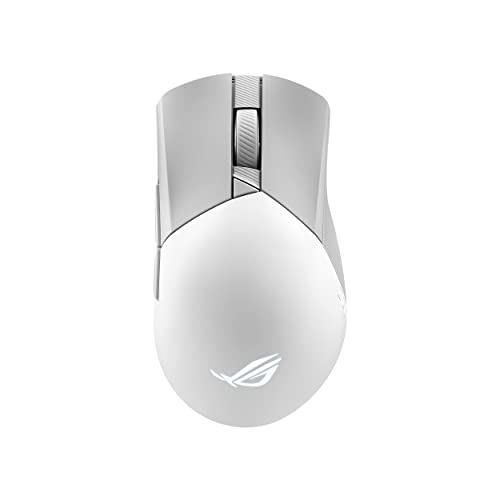
The ASUS ROG Gladius III Wireless AimPoint Gaming Mouse is a right-handed ergonomic wireless mouse listed at 79 g, with tri-mode connectivity through 2.4 GHz RF, Bluetooth, and wired USB. Its Amazon listing describes a 36,000 DPI ROG AimPoint optical sensor, ROG SpeedNova wireless technology, and up to 119 hours of battery life in 2.4 GHz RF mode. The listing also describes six programmable buttons, ROG Micro Switches with Push-Fit Switch Socket II, a ROG Paracord cable, and Aura Sync RGB lighting.
Best for: Palm grip players and players with larger hands who want an ergonomic wireless mouse with an extra programmable button and long battery life.
Consideration: At 79 g, it is heavier than the Harpe Ace Aim Lab Edition and the Keris Wireless AimPoint, so players who prioritize the lightest possible mouse for fast flick aiming may prefer a lighter model in this guide.
ASUS ROG Harpe Ace Aim Lab Edition Wireless Gaming Mouse — ASIN B0BSKX9V7C

The ASUS ROG Harpe Ace Aim Lab Edition Wireless Gaming Mouse is a lightweight wireless esports mouse listed at 54 g, with tri-mode connectivity through 2.4 GHz RF, Bluetooth, and wired USB. Its Amazon listing describes a 36,000 DPI ROG AimPoint optical sensor, ROG SpeedNova wireless technology, and up to 90 hours of battery life. The listing also describes ROG Optical Micro Switches, a symmetrical shape, five programmable buttons, and an Aim Lab Settings Optimizer feature that links the mouse to Aim Lab training profiles.
Best for: FPS and esports players who want the lightest ASUS ROG wireless mouse in this guide, with a clean symmetrical shape and Aim Lab linked settings.
Consideration: Battery life is listed at up to 90 hours, which is shorter than the 119-hour figures listed for the Keris Wireless AimPoint and the Gladius III Wireless AimPoint, so players who want the longest time between charges may prefer one of those models.
ASUS ROG Spatha X Wireless Gaming Mouse — ASIN B09726KT4R

The ASUS ROG Spatha X Wireless Gaming Mouse is a wireless MMO and MOBA mouse listed at 168 g, with dual-mode connectivity through 2.4 GHz RF wireless and wired USB. Its Amazon listing describes a 19,000 DPI optical sensor, ROG SpeedNova wireless technology, and up to 67 hours of battery life in wireless mode with RGB lighting turned off. The listing also describes 12 programmable buttons, a magnetic charging dock, ROG Micro Switches with Push-Fit Switch Sockets, a ROG Paracord cable, and Aura Sync RGB lighting.
Best for: MMO and MOBA players who need 12 programmable buttons, a large ergonomic body, and a magnetic charging dock for easy charging.
Consideration: At 168 g, it is the heaviest mouse in this guide by a wide margin, and its 19,000 DPI sensor ceiling and 67-hour battery figure are lower than the figures listed for the lighter FPS models, so fast shooter players may prefer a lighter pick.
Which One Is Right for You?
If you play shooters most of the time and want the lightest, fastest-feeling mouse, start with the ASUS ROG Harpe Ace Aim Lab Edition Wireless Gaming Mouse. If you want a balanced ergonomic mouse for shooters, action games, and everyday use, start with the ASUS ROG Keris Wireless AimPoint Gaming Mouse. If you have larger hands and use a palm grip, start with the ASUS ROG Gladius III Wireless AimPoint Gaming Mouse. If you play MMO or MOBA games and need many commands under your thumb, start with the ASUS ROG Spatha X Wireless Gaming Mouse. Match the mouse to your grip, your game type, and your desk setup first, and let sensor ceiling and lighting sit second.
Frequently Asked Questions
What is the best ASUS ROG wireless gaming mouse for FPS games?
For FPS play, the ASUS ROG Harpe Ace Aim Lab Edition Wireless Gaming Mouse is the strongest match in this guide because its listing shows a 54 g weight, a 36,000 DPI ROG AimPoint optical sensor, ROG SpeedNova wireless technology, and tri-mode connectivity. The ASUS ROG Keris Wireless AimPoint Gaming Mouse is the runner-up for FPS play, with a 75 g ergonomic body, a 42,000 DPI sensor ceiling in its current listing, and up to 119 hours of battery life.
How long does the battery last on an ASUS ROG wireless gaming mouse?
Battery life depends on the model, the connection mode, and whether lighting is on. The Keris Wireless AimPoint and the Gladius III Wireless AimPoint are each listed at up to 119 hours in 2.4 GHz RF mode. The Harpe Ace Aim Lab Edition is listed at up to 90 hours. The Spatha X is listed at up to 67 hours in wireless mode with RGB lighting turned off. All four mice can be used while charging over USB, with the Spatha X also charging on its magnetic dock.
Do ASUS ROG wireless gaming mice work over Bluetooth as well as 2.4 GHz?
Three of the four mice in this guide list tri-mode connectivity, which includes 2.4 GHz RF wireless, Bluetooth, and wired USB. Those models are the Keris Wireless AimPoint, the Gladius III Wireless AimPoint, and the Harpe Ace Aim Lab Edition. The Spatha X lists dual-mode connectivity, with 2.4 GHz RF wireless and wired USB. For gaming, use the 2.4 GHz RF link through ROG SpeedNova wireless technology.
What is the difference between the Keris Wireless AimPoint and the Gladius III Wireless AimPoint?
The two mice share tri-mode connectivity, ROG SpeedNova wireless technology, a ROG AimPoint sensor, and a listed battery life of up to 119 hours. The Keris Wireless AimPoint is listed at 75 g with five programmable buttons and a 42,000 DPI sensor ceiling in its current listing. The Gladius III Wireless AimPoint is listed at 79 g with six programmable buttons and a 36,000 DPI ROG AimPoint sensor, plus a larger ergonomic body that suits palm grip players and larger hands.
Is the ASUS ROG Spatha X a good choice if I do not play MMO games?
The Spatha X can be used for other game types, but its design is built around MMO and MOBA play. Its listing shows 12 programmable buttons, a large 168 g body, a magnetic charging dock, and a 19,000 DPI sensor. If you play shooters or action games that need only a few binds, the lighter Harpe Ace Aim Lab Edition, Keris Wireless AimPoint, or Gladius III Wireless AimPoint will feel faster and less bulky.
Can I change the switches on an ASUS ROG wireless gaming mouse?
Several ASUS ROG wireless mice in this guide list Push-Fit Switch Socket II or Push-Fit Switch Sockets, which are built to let you swap compatible switches without soldering. The Keris Wireless AimPoint and the Gladius III Wireless AimPoint list Push-Fit Switch Socket II. The Spatha X lists Push-Fit Switch Sockets. Check the listing for your exact model and colour before buying switches, and use only switches listed as compatible with that socket type.
Bottom Line
The best asus rog wireless gaming mouse depends on your grip, your game type, and how much weight and how many buttons you want under your hand. The ASUS ROG Harpe Ace Aim Lab Edition Wireless Gaming Mouse leads this guide for lightweight FPS play at 54 g. The ASUS ROG Keris Wireless AimPoint Gaming Mouse is the runner-up and the best all-round pick, with a 75 g ergonomic body and up to 119 hours of battery life. The ASUS ROG Gladius III Wireless AimPoint Gaming Mouse suits larger hands and palm grip players, while the ASUS ROG Spatha X Wireless Gaming Mouse suits MMO and MOBA players who need 12 programmable buttons and a charging dock.
Disclosure: As an Amazon Associate, this site earns from qualifying purchases.
FAQ
Which One Is Right for You?
What is the best ASUS ROG wireless gaming mouse for FPS games?
How long does the battery last on an ASUS ROG wireless gaming mouse?
Do ASUS ROG wireless gaming mice work over Bluetooth as well as 2.4 GHz?
What is the difference between the Keris Wireless AimPoint and the Gladius III Wireless AimPoint?
Is the ASUS ROG Spatha X a good choice if I do not play MMO games?
Can I change the switches on an ASUS ROG wireless gaming mouse?
More from Amazon
Programs that pair well with the guide above. Offers and eligibility are set by Amazon and may change.
Free shipping on eligible items, Prime Video and more. Eligible new members can start with a free trial.
Start a Prime free trialA Prime membership for ages 18-24 with a trial period. Eligibility is set by Amazon.
See Prime for Young AdultsAudiobooks and podcasts to listen to on the go. Eligible new members can start with a free trial.
Try Audible freeAd-free music streaming. Eligible new subscribers can start with a free trial.
Try Music Unlimited freeAs an Amazon Associate we earn from qualifying purchases.









