
Key takeaways
- Find the best mmo gaming mouse wireless for MMO play with this guide to side-button grids, sensors, battery life, wireless modes, and programmable controls.
An MMO session asks a mouse to do far more than point and click. Abilities, potions, mounts, emotes, target markers, chat macros, and profession tools all compete for space on the keyboard, and reaching across the keyboard for a rarely used ability in the middle of a boss mechanic can break concentration at exactly the wrong moment. A wireless MMO gaming mouse moves many of those commands to the thumb, where a grid of side buttons puts a full action bar within a short thumb movement. When the grid is arranged in familiar rows, muscle memory builds quickly, and abilities that once required a stretch across the keyboard become a single thumb press.
Wireless connection adds freedom to that layout. Without a cable dragging across the desk, the mouse can move in a wider arc, and the same mouse can move from a desktop setup to a laptop without unplugging anything. Modern wireless MMO mice use a dedicated 2.4 GHz USB receiver for low-latency play, and many also include Bluetooth for a second device or a wired USB connection for charging while playing.
Our top pick: Razer Naga V2 Pro Wireless MMO Gaming Mouse. Runner-up: Corsair Scimitar Elite RGB Wireless MMO Gaming Mouse. This guide compares published specifications only: side-button layout and programmability, sensor resolution, wireless modes and polling rate, battery life, weight and shape, scroll wheel design, lighting, onboard memory, and software support.
At a Glance
| Product | Best for | Key specification |
|---|---|---|
| Razer Naga V2 Pro Wireless MMO Gaming Mouse | Players who want swappable side plates for MMO, MOBA, and FPS play | 19 plus 1 programmable buttons with 2, 6, and 12-button side plates and a Focus Pro 30K optical sensor |
| Corsair Scimitar Elite RGB Wireless MMO Gaming Mouse | Players who want a sliding 12-button side panel and long battery life | 26,000 DPI MARKSMAN sensor with 16 programmable buttons and up to 150 hours of battery life |
| Redragon M913 Impact Elite Wireless Gaming Mouse | Players who want a 12-button MMO grid in a straightforward wireless design | 16,000 DPI sensor with 16 programmable buttons, 12 side buttons, and up to 45 hours of battery life |
| UtechSmart Venus Pro RGB Wireless MMO Gaming Mouse | Players who want a compact wireless MMO mouse with a 12-button grid | 16,000 DPI optical sensor with 16 programmable buttons, 12 side buttons, and up to 70 hours of battery life |
How to Choose
1. Count the side buttons and check the grid layout
The side-button grid is the defining feature of an MMO mouse. A 12-button grid, usually arranged in three rows of four buttons, mirrors a standard action bar and gives the thumb direct access to twelve commands without moving the hand. Some mice use a fixed 12-button panel, while others use swappable plates that change the side layout for different game types. Count the total programmable buttons as well as the side buttons, because top buttons, scroll-wheel clicks, and DPI buttons can also carry commands. Check whether the buttons are spaced and shaped so the thumb can tell them apart by touch, and whether the panel can slide forward or backward to match thumb length and grip.
2. Match the sensor to the way you play
Sensor resolution, stated in DPI, sets how far the pointer moves for a given hand movement, and most MMO mice list a maximum DPI between 16,000 and 30,000. A high maximum DPI does not mean every player should use the highest setting, because most MMO players settle on a middle range that feels steady for camera control, targeting, and inventory management. Look instead at the sensor name, the tracking speed, and whether the listing states a polling rate. A 1,000 Hz polling rate means the mouse reports its position one thousand times per second, which keeps cursor movement smooth during fast camera turns.
3. Compare wireless modes and polling rate
A wireless MMO mouse should state its wireless technology clearly. A dedicated 2.4 GHz receiver is the usual choice for gaming, because it is designed for a stable, low-latency link between the mouse and the computer. Bluetooth is a useful second mode for laptops, tablets, and other devices, although its polling rate is often lower than the 2.4 GHz mode. A wired USB mode matters too, because it lets the mouse keep working while the battery charges and gives a fallback if the wireless receiver is lost or the battery runs low. Check whether the mouse ships with a USB receiver, a charging cable, and a receiver adapter or extender, because those accessories affect how easily the mouse fits a crowded desk or a PC tucked under it.
4. Check battery life and charging
Battery life varies widely among wireless MMO mice, from around 45 hours to 300 hours in the listings in this guide, and the stated figure usually depends on lighting settings and connection mode. A mouse with RGB lighting turned on will generally run for fewer hours than the same mouse with lighting turned off, and Bluetooth mode often lasts longer than 2.4 GHz mode. Look for the battery figure that matches the way the mouse will actually be used, and check whether charging uses USB-C, whether the mouse can be used while charging, and whether a charging dock is included or sold separately. A mouse that charges over USB-C and works while plugged in is easier to keep ready for a long raid night than a mouse that must sit idle while it charges.
5. Consider shape, size, and weight
MMO mice tend to be larger than lightweight FPS mice, because the side-button grid needs room and the palm rest needs to support the hand through long sessions. A right-handed ergonomic shape is common in this category, with a flared thumb rest and a contoured palm area. Hand size matters more than any single dimension, so compare length, width, and height across models and think about grip style. A palm grip rests the whole hand on the mouse, a claw grip arches the fingers, and a fingertip grip keeps the palm off the shell. A heavier mouse can feel steady and planted, while a lighter mouse can feel quicker during fast camera movement.
6. Look at the scroll wheel and extra controls
The scroll wheel on an MMO mouse does more than scroll through inventory and chat. Many models add tilt clicks, a free-spin mode, and a notched mode, and some let the wheel switch between those modes for different tasks. A free-spin wheel moves quickly through long lists, while a notched wheel gives precise steps for weapon selection or zoom control. Extra buttons behind the wheel, on the top shell, or near the thumb can carry DPI shifts, profile changes, and push-to-talk commands. Check how many of those extra controls are programmable, and whether they sit where the index finger or thumb can reach them without shifting the grip.
7. Check software, profiles, and onboard memory
Software turns a grid of buttons into a working action bar. Through the companion software for each mouse, buttons can be assigned to keyboard keys, macros, media controls, and application shortcuts, and DPI stages, polling rate, lighting, and lift-off distance can be adjusted. Onboard memory stores those settings on the mouse itself, so profiles travel with the mouse to another computer without reinstalling software. Check how many profiles the mouse can store and whether the software supports the operating system in use.
8. Think about lighting, build, and long sessions
RGB lighting is a standard feature on wireless MMO mice, and it can mark the side-button grid, the scroll wheel, and the logo with color. Lighting can also serve a practical purpose, with different colors marking different profiles or DPI stages. Build details matter during long sessions, including the texture of the side grips, the click feel of the main buttons, and the durability rating of the switches. Some listings state a switch lifetime in millions of clicks, which gives a comparison point for long-term use.
Our Picks
Razer Naga V2 Pro Wireless MMO Gaming Mouse — ASIN B0BGJTLFN5

The Razer Naga V2 Pro Wireless MMO Gaming Mouse lists 19 plus 1 programmable buttons and includes three swappable side plates with 2, 6, and 12-button layouts, so the same mouse can present a full 12-button MMO grid or a simpler layout for other game types. Its Focus Pro 30K optical sensor lists a maximum resolution of 30,000 DPI, and its HyperScroll Pro wheel supports free-spin and tactile modes. The listing states HyperSpeed Wireless 2.4 GHz and Bluetooth connectivity, plus a wired USB-C connection, with up to 300 hours of battery life and Optical Mouse Switches Gen-3.
Best for: MMO players who want one wireless mouse that can change its side-button layout for MMO, MOBA, and FPS play without changing hardware.
Consideration: The swappable plates and wide feature set add complexity, so players who want a fixed 12-button grid with no extra parts to keep track of may prefer a simpler fixed-panel design.
Corsair Scimitar Elite RGB Wireless MMO Gaming Mouse — ASIN B0CCVYHZ9N

The Corsair Scimitar Elite RGB Wireless MMO Gaming Mouse lists 16 programmable buttons and a 12-button side panel mounted on a Key Slider that moves the panel forward or backward by 8 mm to fit different thumb positions. Its MARKSMAN sensor lists a maximum resolution of 26,000 DPI, and the listing states SLIPSTREAM wireless technology, Bluetooth, and a wired USB connection, with a 1,000 Hz polling rate and up to 150 hours of battery life. The mouse works with Corsair iCUE software for button assignments, macros, DPI stages, and RGB lighting control.
Best for: MMO players who want a sliding side panel that can be adjusted to thumb length, paired with long battery life and a high-resolution sensor.
Consideration: The side panel adjustment is a mechanical slider, so players should confirm that the panel position stays comfortable across long sessions and that the iCUE software fits their setup.
Redragon M913 Impact Elite Wireless Gaming Mouse — ASIN B088B3ZM76
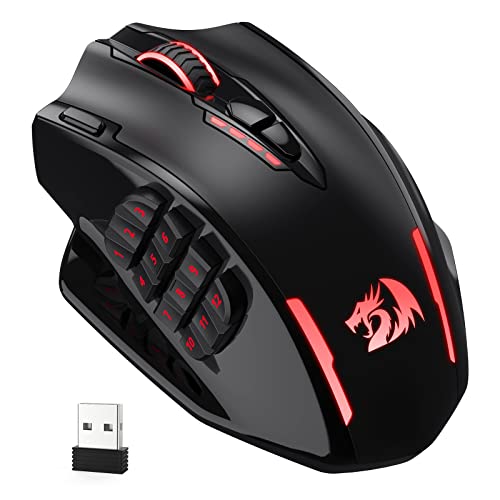
The Redragon M913 Impact Elite Wireless Gaming Mouse lists 16 programmable buttons, including 12 side buttons arranged in a thumb grid for MMO commands. Its optical sensor lists a maximum resolution of 16,000 DPI, and the listing states 2.4 GHz wireless and wired connectivity, with up to 45 hours of battery life and up to 80 hours in ECO mode with RGB lighting turned off. The mouse includes RGB lighting, DPI adjustment buttons, and software for button assignments, macros, and lighting control.
Best for: MMO players who want a direct 12-button wireless MMO mouse with a clear button grid and a wired fallback for charging and play.
Consideration: Its stated battery life is shorter than the other mice in this guide, so players who play long wireless sessions should plan charging time and use ECO mode or reduced lighting when needed.
UtechSmart Venus Pro RGB Wireless MMO Gaming Mouse — ASIN B07XP4K152

The UtechSmart Venus Pro RGB Wireless MMO Gaming Mouse lists 16 programmable buttons, including 12 side buttons in a thumb grid, and a 16,000 DPI optical sensor for MMO and general gaming use. The listing states 2.4 GHz wireless transmission with a USB receiver and a wired USB connection, with up to 70 hours of battery life. Its ergonomic right-handed shape includes RGB lighting with a 16 million color range, DPI buttons on the top shell, and software for button assignments and lighting settings.
Best for: MMO players who want a compact wireless mouse with a full 12-button side grid and a straightforward set of wireless and wired modes.
Consideration: The listing describes 2.4 GHz wireless and wired use, so players who need Bluetooth for a second device should confirm the connection modes on the listing before choosing this model.
Which One Is Right for You?
Choose the Razer Naga V2 Pro Wireless MMO Gaming Mouse when a swappable side plate matters most, because its 2, 6, and 12-button plates let one mouse cover MMO rotations, MOBA abilities, and FPS controls. Choose the Corsair Scimitar Elite RGB Wireless MMO Gaming Mouse when thumb fit and battery life matter most, because its sliding 12-button panel adjusts to thumb position and its listed battery life reaches up to 150 hours. Choose the Redragon M913 Impact Elite Wireless Gaming Mouse when a clear, fixed 12-button grid and a simple wireless and wired setup matter most. Choose the UtechSmart Venus Pro RGB Wireless MMO Gaming Mouse when a compact wireless MMO mouse with a 12-button grid and up to 70 hours of battery life fits the desk and the hand best. In every case, match the side-button layout to the number of abilities used regularly, match the sensor and polling rate to camera and targeting habits, and match battery life and charging to session length.
Frequently Asked Questions
What makes a mouse an MMO gaming mouse?
An MMO gaming mouse is defined by its side-button grid, usually twelve buttons arranged for the thumb, plus a high count of programmable buttons for abilities, macros, and shortcuts. The grid mirrors an action bar, so abilities can be triggered from the mouse instead of the keyboard. MMO mice also tend to list a high-resolution optical sensor, onboard memory for profiles, and software for assigning keys and macros to each button.
Is a wireless MMO mouse reliable for raid and dungeon play?
Wireless MMO mice in this guide use a dedicated 2.4 GHz USB receiver designed for gaming, and several also include a wired USB mode for use while charging. A 1,000 Hz polling rate, where stated, keeps cursor reports frequent during fast movement. Battery level, receiver placement, and wireless interference can affect any wireless device, so keeping the receiver close to the mouse and keeping the battery charged are practical steps for long sessions.
How many side buttons do MMO players need?
Twelve side buttons suit many MMO players, because twelve buttons match a standard action bar and cover a full rotation plus utility abilities. Players with fewer regularly used abilities may prefer a 6-button plate, where available, while players with large rotations may assign additional commands to top buttons, the scroll wheel, and DPI buttons. The right count depends on the game, the class or build, and how many abilities are used in a typical encounter.
Does a higher DPI sensor make an MMO mouse better?
A higher maximum DPI gives more sensitivity range, but it does not by itself make a mouse better for MMO play. Most MMO players use a middle DPI setting that feels steady for targeting, camera control, and menu navigation. Sensor tracking quality, polling rate, shape, button layout, and software matter at least as much as the maximum DPI figure. Compare the full specification list, not the DPI number alone, when choosing between models.
Can a wireless MMO mouse be used while it charges?
Many wireless MMO mice can be used while charging through a USB cable, and the models in this guide list a wired USB connection alongside wireless modes. Using the mouse while plugged in keeps play going during a long session and removes battery worry for that session. Check the listing for the cable type, usually USB-C on newer models, and confirm that the cable is included in the box.
Do wireless MMO mice work on more than one computer?
A wireless MMO mouse with onboard memory can carry button assignments and DPI settings from one computer to another, because the settings are stored on the mouse. A 2.4 GHz receiver can move between computers with the mouse, and a Bluetooth model can pair with a second device where Bluetooth is supported. Software may still be needed on each computer to change settings, so check software support for each operating system that will be used.
Bottom Line
The best mmo gaming mouse wireless for most MMO players is the one whose side-button grid matches the action bar, whose sensor feels steady during camera and targeting movement, and whose battery life fits session length. The Razer Naga V2 Pro Wireless MMO Gaming Mouse leads this guide with swappable 2, 6, and 12-button side plates and a Focus Pro 30K sensor, while the Corsair Scimitar Elite RGB Wireless MMO Gaming Mouse follows closely with a sliding 12-button panel, a 26,000 DPI sensor, and up to 150 hours of battery life. The Redragon M913 and UtechSmart Venus Pro complete the set with fixed 12-button grids, 16,000 DPI sensors, and wireless plus wired modes.
Disclosure: As an Amazon Associate, this site earns from qualifying purchases.
FAQ
Which One Is Right for You?
What makes a mouse an MMO gaming mouse?
Is a wireless MMO mouse reliable for raid and dungeon play?
How many side buttons do MMO players need?
Does a higher DPI sensor make an MMO mouse better?
Can a wireless MMO mouse be used while it charges?
Do wireless MMO mice work on more than one computer?
More from Amazon
Programs that pair well with the guide above. Offers and eligibility are set by Amazon and may change.
Free shipping on eligible items, Prime Video and more. Eligible new members can start with a free trial.
Start a Prime free trialA Prime membership for ages 18-24 with a trial period. Eligibility is set by Amazon.
See Prime for Young AdultsAudiobooks and podcasts to listen to on the go. Eligible new members can start with a free trial.
Try Audible freeAd-free music streaming. Eligible new subscribers can start with a free trial.
Try Music Unlimited freeAs an Amazon Associate we earn from qualifying purchases.









