
Our Short List of 3

- Best for: Large homes that want the fastest Wi-Fi 7 available.
- Wi-Fi 7 tri-band, BE19000
- Up to 19 Gbps combined wireless speed
- 10 Gig internet port and 10 Gig LAN port
- Coverage up to 3,500 sq ft
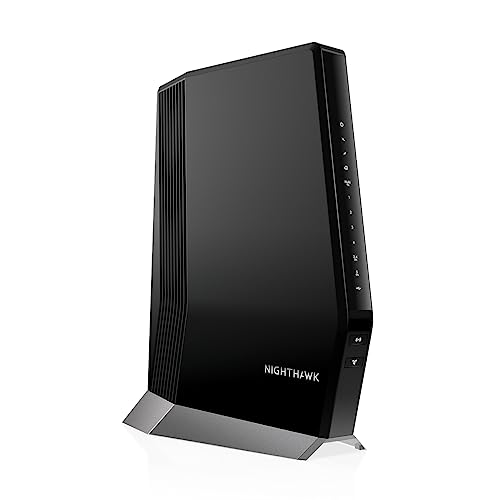
- Best for: Cable homes that want to stop renting a modem.
- DOCSIS 3.1 cable modem and Wi-Fi 6 router combo
- AX6000 Wi-Fi 6, up to 6 Gbps
- Cable plans up to 2 Gbps
- Coverage up to 2,500 sq ft, 30 or more devices

- Best for: Mid-size homes that want strong Wi-Fi 6 without a flagship price.
- Wi-Fi 6 dual-band, AX5400
- Up to 5.4 Gbps combined wireless speed
- 6-stream design
- Coverage up to 2,500 sq ft
All 4 Picks at a Glance
| Product | Specs | Action |
|---|---|---|
| NETGEAR Nighthawk RS700S |
| Check price on Amazon |
| NETGEAR Nighthawk CAX80 |
| Check price on Amazon |
| NETGEAR Nighthawk RAX50 |
| Check price on Amazon |
 NETGEAR Nighthawk CAX30 |
| Check price on Amazon |
Key takeaways
- Looking for the best nighthawk routers for fast Wi-Fi? Compare 4 Nighthawk models from the Wi-Fi 7 flagship to modem-router combos for busy cable homes.
A router is the one device every screen in the house depends on, and when it struggles, everything struggles with it. Video calls freeze, games lag, and the smart TV buffers at the worst moment. NETGEAR’s Nighthawk line has been the go-to answer for years, from straightforward Wi-Fi 6 routers to a Wi-Fi 7 flagship and modem-router combos that replace a rented cable box entirely.
This guide compares four Nighthawk routers chosen from the Wi-Fi generation, speed class, coverage, and port details printed on their Amazon pages. One is the fastest option available, two combine a modem and a router for cable homes, and one is the sensible mid-range pick, so the right box for your home is in this short list.
Quick Picks
As an Amazon Associate we earn from qualifying purchases
| Product | Best for | Key spec from title |
|---|---|---|
| Nighthawk RS700S | Fastest Wi-Fi 7 | BE19000 tri-band, 10 Gig ports |
| Nighthawk CAX80 | Cable modem combo | DOCSIS 3.1, AX6000 |
| Nighthawk RAX50 | Mid-range Wi-Fi 6 | AX5400, 2,500 sq ft |
| Nighthawk CAX30 | Smaller cable homes | DOCSIS 3.1, AX2700 |
How to Choose
Wi-Fi Generation and Speed Class
The Wi-Fi generation decides how much speed the router can deliver and how well it handles many devices at once. Wi-Fi 7 adds a 6GHz band and wider channels, which is why the RS700S reaches a BE19000 speed class, while Wi-Fi 6 routers such as the RAX50 top out at AX5400. The speed class is a combined figure across all bands rather than a single device’s speed, so compare routers by their generation first and their class second. A Wi-Fi 7 router also future-proofs the home, since phones and laptops with Wi-Fi 7 radios are already on the market.
Coverage and Device Count
Coverage figures on a listing describe an open-plan home with few walls, so treat them as a ceiling rather than a promise. A router rated for 3,500 square feet suits a large house, while one rated for 2,000 square feet fits an apartment or a small home. Device count matters just as much: a home with phones, tablets, TVs, consoles, and smart plugs can pass 25 connected devices quickly, and a router built for 200 handles that load without slowing down. Count your connected devices before choosing, and add a few for the gadgets you will buy next year.
Modem or Router Only
A standalone router such as the RAX50 or RS700S needs a separate modem or an ISP gateway in front of it, while a combo such as the CAX80 or CAX30 replaces both boxes with one device. The combo saves a monthly rental fee and a tangle of cables, which is why cable subscribers often prefer it. Check the DOCSIS version on the listing, since DOCSIS 3.1 supports the fastest cable plans, and confirm your provider and plan speed against the combo’s stated limits before buying. A combo that caps below your plan speed wastes the connection you already pay for.
Ports and Security
The ports on the back decide what the router can do beyond Wi-Fi. A 10 Gig internet port lets a multi-gigabit plan reach the router at full speed, while a 2.5 Gig port suits a fast wired desktop or a network drive. Link aggregation combines two gigabit ports into a faster pipe for a NAS or a server. Security matters too: NETGEAR Armor scans connected devices for threats, WPA3 encryption protects the wireless network, and the Nighthawk app puts setup, guest networks, and device pausing in your pocket. Read the listing for the full port list and the security trial length.
The 4 Best Options
NETGEAR Nighthawk RS700S
- Best for: Large homes that want the fastest Wi-Fi 7 available.
- Wi-Fi 7 tri-band, BE19000
- Up to 19 Gbps combined wireless speed
- 10 Gig internet port and 10 Gig LAN port
- Coverage up to 3,500 sq ft
Large homes that want the fastest Wi-Fi 7 available.
Stock signals conflicted between sources, so confirm availability before ordering.
The NETGEAR Nighthawk RS700S is the flagship pick, a tri-band Wi-Fi 7 router rated BE19000 with combined speeds up to 19 Gbps across its 2.4GHz, 5GHz, and 6GHz bands. A 10 Gig internet port and a 10 Gig LAN port keep wired devices at full speed, coverage reaches up to 3,500 square feet, and the router supports up to 200 devices. A one-year Armor subscription protects the network from threats, and the tall, hexagonal design hides powerful radios behind a clean look. It is the router for homes that want the fastest Wi-Fi available today.
NETGEAR Nighthawk CAX80
- Best for: Cable homes that want to stop renting a modem.
- DOCSIS 3.1 cable modem and Wi-Fi 6 router combo
- AX6000 Wi-Fi 6, up to 6 Gbps
- Cable plans up to 2 Gbps
- Coverage up to 2,500 sq ft, 30 or more devices
Cable homes that want to stop renting a modem.
It works with cable providers only, not fiber, DSL, or satellite.
The NETGEAR Nighthawk CAX80 is the premium combo pick, pairing a DOCSIS 3.1 cable modem with an AX6000 Wi-Fi 6 router in a single box. It supports cable plans up to 2Gbps, covers up to 2,500 square feet for 30 or more devices, and carries a 2.5 Gig multi-gig port alongside four gigabit Ethernet ports with link aggregation. The 32×8 channel bonding keeps the modem side fast, and the Nighthawk app guides setup and manages the network. It replaces a rented modem and a separate router in one move.
NETGEAR Nighthawk RAX50
- Best for: Mid-size homes that want strong Wi-Fi 6 without a flagship price.
- Wi-Fi 6 dual-band, AX5400
- Up to 5.4 Gbps combined wireless speed
- 6-stream design
- Coverage up to 2,500 sq ft
Mid-size homes that want strong Wi-Fi 6 without a flagship price.
A Renewed version and a separate bundle circulate under other codes, so confirm the listing is the new RAX50-100NAS.
The NETGEAR Nighthawk RAX50 is the mid-range pick, a Wi-Fi 6 dual-band router rated AX5400 with combined speeds up to 5.4 Gbps. Its six-stream design covers up to 2,500 square feet, and the 1.5GHz tri-core processor keeps the network responsive when many devices connect at once. Four gigabit Ethernet ports handle wired consoles and desktops, a USB 3.0 port shares a drive or a printer, and NETGEAR Armor protects the network. It is the straightforward choice for a home that needs strong Wi-Fi without flagship pricing.
NETGEAR Nighthawk CAX30
- Best for: Apartments and smaller cable homes.
- DOCSIS 3.1 cable modem and Wi-Fi 6 router combo
- Wi-Fi 6, AX2700, up to 2.7 Gbps
- Cable plans up to 1 Gbps
- Coverage up to 2,000 sq ft, 25 devices
Apartments and smaller cable homes.
The 2,000 sq ft coverage limit leaves larger homes needing a mesh system instead.
The NETGEAR Nighthawk CAX30 is the smaller combo pick, with a DOCSIS 3.1 cable modem and a Wi-Fi 6 router rated AX2700 in one device. It covers up to 2,000 square feet for 25 devices, supports cable plans up to 1Gbps, and carries the Xfinity Recommended tag for Comcast customers. Four gigabit Ethernet ports with link aggregation handle wired devices, a USB 3.0 port shares storage, and the Nighthawk app manages setup and security. It suits apartments and smaller homes that want to replace a rented modem without overpaying.
Which One Fits Your Situation
Large Homes
Large homes should pick the Nighthawk RS700S, whose 3,500 square feet of coverage and support for 200 devices handle a big house full of phones, TVs, consoles, and smart gadgets. Wi-Fi 7 and the 10 Gig ports mean the network will not be the bottleneck when the internet plan or the devices get faster. Place the router centrally and high, and the signal reaches rooms that a smaller router would leave in a dead zone.
Cable Subscribers
Cable subscribers should choose a combo and stop paying a monthly modem rental. The CAX80 suits gigabit plans and larger homes, while the CAX30 covers plans up to 1Gbps in apartments and smaller houses. Both replace the modem and the router with one box, and both carry the Xfinity, Spectrum, and Cox compatibility that most cable customers need. Check your plan speed first, since the CAX30 caps at 1Gbps and the CAX80 reaches 2Gbps.
Gamers
Gamers get the most from the RS700S or the RAX50, depending on budget. The RS700S brings Wi-Fi 7, a 6GHz band with less congestion, and 10 Gig ports for a wired console or PC, while the RAX50 delivers strong Wi-Fi 6 with a 6-stream design at a lower cost. Either way, wire the gaming machine to the router when possible, since a cable beats any wireless connection for latency, and use the Wi-Fi for everything else in the house.
Budget Homes
Budget homes should pick the RAX50 if they already have a modem, or the CAX30 if they rent one from the cable company. The RAX50 covers 2,500 square feet with Wi-Fi 6 at a sensible cost, while the CAX30 adds a modem and removes the rental fee, which pays for the device over time. Both run the Nighthawk app for easy setup, so neither needs networking knowledge to get working. The saving pays over time.
Common Mistakes
- Buying a combo router for a fiber connection it cannot serve.
- Choosing a router rated for 2,000 square feet for a 3,500 square foot house.
- Reading the combined speed class as the speed a single device will reach.
- Ignoring the DOCSIS version and capping a fast cable plan with an old modem.
- Placing the router behind a TV or in a cabinet, then blaming the signal on the hardware.
Frequently Asked Questions
Do I need a modem as well as a router?
It depends on which model you buy. A standalone router such as the RAX50 or RS700S needs a modem or an ISP gateway in front of it, while a combo such as the CAX80 or CAX30 includes the modem and replaces both boxes. A combo removes a rental fee; a standalone router suits owners of a modem.
Is Wi-Fi 7 worth it yet?
For most homes it is a future-proofing choice rather than an immediate need, since few devices use Wi-Fi 7 radios today. The RS700S earns its place through its 6GHz band, 10 Gig ports, and support for 200 devices. If you keep routers for five years or more, Wi-Fi 7 makes sense; if you upgrade often, Wi-Fi 6 still covers everyday needs.
How many devices can a Nighthawk router handle?
It varies by model, from 25 devices on the CAX30 to 200 on the RS700S. Count every connected gadget in the house, including phones, tablets, TVs, consoles, smart speakers, and plugs, because the total climbs faster than most people expect. A router that handles your current count with headroom will cope with the devices you add next year.
What does the Nighthawk app do?
The Nighthawk app guides the initial setup, runs speed tests, manages guest networks, and lets you pause internet access for individual devices. It also handles firmware updates and shows which devices are connected, so you can spot an unfamiliar gadget on the network. The app works on iOS and Android and replaces the web interface for most everyday tasks.
FAQ
Do I need a modem as well as a router?
Is Wi-Fi 7 worth it yet?
How many devices can a Nighthawk router handle?
What does the Nighthawk app do?
More from Amazon
Programs that pair well with the guide above. Offers and eligibility are set by Amazon and may change.
Free shipping on eligible items, Prime Video and more. Eligible new members can start with a free trial.
Start a Prime free trialA Prime membership for ages 18-24 with a trial period. Eligibility is set by Amazon.
See Prime for Young AdultsAudiobooks and podcasts to listen to on the go. Eligible new members can start with a free trial.
Try Audible freeAd-free music streaming. Eligible new subscribers can start with a free trial.
Try Music Unlimited freeAs an Amazon Associate we earn from qualifying purchases.









