Our Short List of 3


All 4 Picks at a Glance
| Product | Specs | Action |
|---|---|---|
| Apple Magic Keyboard for iPad Air 11-inch: The Floating Premium Pick | Check price on Amazon | |
| Logitech Combo Touch for iPad Air 11-inch: The Detachable All-Rounder | Check price on Amazon | |
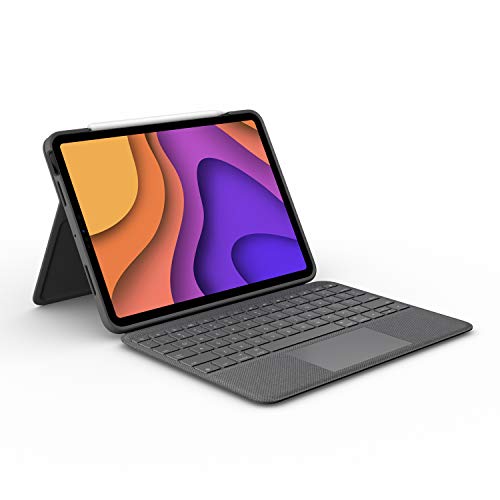 Logitech Folio Touch: The Smart Connector Pick for Air 4 and 5 | Check price on Amazon | |
 ESR Flex Keyboard Case for iPad Air 11-inch: The Lightweight Bluetooth Pick | Check price on Amazon |
Key takeaways
- Compare the best keyboards for iPad Air: five keyboard cases for the 11-inch Air M3, M2 and Air 5 and 4, with trackpad, connection and fit checks inside.
As an Amazon Associate we earn from qualifying purchases.
The iPad Air is fast enough to draft reports, edit documents, answer a full day of email, and take lecture notes, but the on-screen keyboard covers half the display and gives your hands nothing to rest on. A keyboard case fixes both problems at once: it adds real keys and, on most of the picks below, a trackpad, while also wrapping the tablet in protection it can travel in. The catch is fit. The iPad Air line now spans the 10.9-inch Air (4th generation, 2020) and Air (5th generation, 2022), then the 11-inch Air with the M2 chip (2024) and the 11-inch Air with the M3 chip (2025), plus a separate 13-inch Air size that needs its own, larger cases. Cases for the 11-inch and 10.9-inch models are often shared because the bodies are close in size, but camera cutouts, button placement, and magnet alignment still differ between generations, so the generation named on a listing is the first thing to check.
Every pick in this guide is an 11-inch-class keyboard case whose listing names the iPad Air directly, and each pick section states exactly which Air generations that version covers. If you own the 13-inch iPad Air, none of these specific listings is the right size — each maker sells a separate 13-inch version, and you should order the one that names the 13-inch model. The five picks split by connection and by design: two use Apple’s Smart Connector and never need charging, one is Apple’s own floating magnetic design, and two connect over Bluetooth, which adds a battery to manage but lets the keyboard detach and work at a distance from the case.
How to Choose a Keyboard for iPad Air
Start with the generation check, because it rules out more listings than any other step. Find your model in Settings or from the model number on the back of the tablet, then match it against the listing. The Air 11-inch (M2) uses model numbers A2902, A2903, and A2904; the Air (5th generation) uses A2588, A2589, and A2591; the Air (4th generation) uses A2316, A2324, A2325, and A2072. Several picks below print those numbers in their compatibility lines, which is the most reliable way to confirm a fit before ordering.
Next, decide how the keyboard connects. Smart Connector models draw power from the iPad itself, pair the moment they attach, and never need a charging cable — but the keyboard only works while it is physically connected to the case. Bluetooth models carry their own battery, work detached, and in some cases can pair with a second device, but they need periodic charging and a pairing step after long gaps. Neither system is better in the abstract; the right one depends on whether you type mostly in the case or also away from it.
Then weigh the trackpad question. A trackpad turns the Air into something much closer to a laptop for document editing, spreadsheet work, and text selection, and iPadOS supports the standard gestures on all of the trackpad picks here. If you mainly type long text and navigate by touch, a keyboard without a trackpad is lighter and simpler, and one pick below takes exactly that route. Also consider how you use the tablet away from the desk: a detachable keyboard lets you leave the keys behind and keep a protective case and kickstand on the tablet, while a fixed folio keeps everything in one piece that cannot be separated or misplaced.
Finally, check the details that listings state plainly and buyers often skip: whether the keys are backlit and at how many levels, whether there is a holder or magnetic attachment point for an Apple Pencil, how far the stand adjusts, and how much the whole case weighs, because a keyboard case roughly doubles what you carry compared with the tablet alone.
Apple Magic Keyboard for iPad Air 11-inch: The Floating Premium Pick
Apple’s own Magic Keyboard is the pick for buyers who want the closest thing to a laptop hinge Apple makes for this tablet. The pinned listing is the Black, US English version for the 11-inch iPad Air, model MGYX4LL/A, and its compatibility line covers the iPad Air 11-inch (M2 and M3) and the iPad Air (4th and 5th generation), so one listing spans the full 11-inch and 10.9-inch Air range covered in this guide. The tablet attaches magnetically and floats above the keyboard on a cantilever design, which lets the viewing angle adjust smoothly and keeps the screen at a natural height on a desk.
The keyboard itself has a full 14-key function row, backlit keys, and a built-in glass trackpad, a combination none of the other picks matches exactly — the function row puts screen brightness, volume, and media controls on dedicated keys instead of shortcuts. Connection is through the Smart Connector, so there is no pairing and no battery in the keyboard to charge. A USB-C port on the hinge handles pass-through charging of the iPad, which frees the tablet’s own port for an accessory or a drive while you work at a desk.
The trade-offs are structural rather than hidden. The floating design protects the front and back while closed, but the sides of the tablet stay exposed, and there is no kickstand-style tablet-only mode: take the iPad off the keyboard and it is a bare tablet with no case on it. It is also the heaviest style of typing setup to commit to for anyone who frequently reads or draws with the tablet flat. For a writer, student, or office user whose Air lives on desks and tables and whose work is mostly typing and cursor work, the listing’s specification — function row, glass trackpad, pass-through charging, and the widest stated Air compatibility in this guide — makes it the most complete single purchase here.
Logitech Combo Touch for iPad Air 11-inch: The Detachable All-Rounder
The Combo Touch takes the opposite approach to Apple’s design: instead of a floating hinge, it is a protective back case with a kickstand, plus a keyboard that detaches completely. The pinned listing is the Midnight Black version, model 920-012837, for the iPad Air 11-inch (M2, M3 and M4) and the iPad Air (5th generation). Note the boundary in that line carefully — this version does not name the Air (4th generation), so Air 4 owners should choose the Folio Touch below or the Oxford Grey Combo Touch variant whose listing covers their model, rather than assuming this one fits.
Like Apple’s keyboard, the Combo Touch connects through the Smart Connector, so it is powered by the iPad and never needs charging, and Logitech describes the trackpad on this generation as its biggest yet for the line. The keys are backlit, there is a row of iPadOS shortcut keys, and the case is designed so an Apple Pencil can still attach to the side of the tablet. The kickstand adjusts across a wide range, and because the keyboard detaches, the tablet keeps its case, stand, and protection for reading, sketching, or watching video with the keys left in a bag.
At about 17.5 ounces for the package per the listing’s item details, it is a substantial addition to the tablet, which is the honest cost of a case built to protect rather than merely to hold. What you get for that weight is the most flexible arrangement in this guide: laptop-style typing with a trackpad at a desk, a propped tablet without keys on a train table, and a covered tablet in a bag, all from one purchase. For Air (5th generation) and 11-inch Air owners who split their time between typing and tablet-only use, this is the balanced pick.
Logitech Folio Touch: The Smart Connector Pick for Air 4 and 5
The Folio Touch is the older sibling in Logitech’s Air line, and its listing is the one that leads with the earlier generations: the Graphite version pinned here, model 920-009952, is listed for the iPad Air 11-inch (M2 and M3) and the iPad Air (4th and 5th generation), which makes it the natural Logitech choice for Air 4 owners in particular, since the Combo Touch version above leaves that generation out. It also connects through the Smart Connector, so there is no battery to charge and no Bluetooth pairing — the keyboard works the moment the folio is open.
The design is a fixed folio rather than a detachable system. The keyboard stays attached, the back has an adjustable kickstand, and there is a holder for a Logitech Crayon or an Apple Pencil. The keys are backlit with adjustable levels, the trackpad supports the standard iPadOS gestures, and Logitech describes four use modes — typing, viewing, sketching, and reading — based on how far the folio is folded. At roughly 642 grams per retailer specification sheets for this model, it is not a light case, and the fabric-style finish is part of that: this is a case built to be carried daily and to shrug off the knocks of a commute.
Choose the Folio Touch over the Combo Touch if your Air is a 4th-generation model, if you prefer a keyboard that can never be separated from the case and left behind, or if the fixed-folio format simply suits how you work. Choose the Combo Touch instead if you have a 5th-generation or 11-inch Air and want the detachable keyboard and the larger trackpad. The two listings overlap on the Air (5th generation), so for that tablet the decision is about format, not fit.
ESR Flex Keyboard Case for iPad Air 11-inch: The Lightweight Bluetooth Pick
ESR’s Flex case is the value route into a trackpad keyboard for the Air, and its listing covers the widest generation range of the third-party picks: the Dark Gray version pinned here is listed for the iPad Air 11-inch (M4, M3 and M2) and the iPad Air (5th and 4th generation), with the model numbers for all of those tablets printed in the compatibility details. Unlike the three picks above, it connects over Bluetooth, so the keyboard has its own battery to charge — and in exchange it detaches magnetically and can be used separated from the case, or left behind entirely while the tablet stays in its protective back cover.
The stand offers two set angles, described by the maker as a steeper angle around 65 degrees for working, watching, or reading and a shallow angle around 20 degrees for sketching or writing, which is a simpler arrangement than the free-adjusting kickstands above but covers the two positions most people actually use. The trackpad is a large precision unit, the keyboard itself is notably thin at about 6.9 mm per the listing, and there is a holder for a stylus. Because it is a Bluetooth accessory, expect the normal Bluetooth routine: an initial pairing, occasional recharging, and a brief wake-up when the keyboard has been asleep.
This is the pick for a buyer who wants the trackpad-and-case combination on an Air 4, 5, or 11-inch model without paying for the Smart Connector designs, and who is comfortable trading the never-charge convenience for a lower-commitment, lighter keyboard deck. Confirm the colour variant you order carries the same ASIN family and compatibility line, since ESR sells several similar Air keyboard cases — including a floating magnetic version and a 360-degree rotating version — under closely related names.
ZAGG Pro Keys for iPad Air: The Rugged Pick Without a Trackpad
The ZAGG Pro Keys is deliberately different from the other four picks: there is no trackpad. The pinned listing, model 103404717, is the detachable case and wireless keyboard listed for the iPad Air 11-inch (M3), the iPad Air (4th generation, 5th generation and M2), and the 11-inch iPad Pro generations that share the same body — for this guide, the relevant fit is that it spans the Air 4 and 5 and the 11-inch Air M2 and M3. It connects over Bluetooth and can pair with two devices, so the same keyboard can move between the Air and a second tablet or computer with a key press.
What it offers instead of a trackpad is protection and battery life. ZAGG rates the case for drop protection of up to 6.6 feet, the strongest protection claim among these five listings, and the keyboard detaches from the case so the tablet keeps that protection when the keys are off. The keys are backlit in multiple colours with adjustable brightness, there is a holder for an Apple Pencil, and the keyboard’s own battery is built for long intervals between charges, which suits a keyboard that may live in a drawer or a travel bag between trips. The adjustable stand is integrated into the detachable case, so propping the tablet does not require the keyboard to be attached.
Pick the Pro Keys if your typing is mostly long-form text — email, notes, documents — where your hands stay on the keys and navigation happens by touch between paragraphs, and if drop protection matters more to you than cursor work. Skip it if you edit spreadsheets or select text all day; the trackpad picks above exist for exactly that work. For Air owners who travel with the tablet in rough conditions, it is the most protection-focused keyboard in this guide.
Which iPad Air Keyboard Should You Buy?
Match the pick to your Air generation first, then to how you work. Air (4th generation) owners have four confirmed routes here: the Apple Magic Keyboard, the Logitech Folio Touch, the ESR Flex, and the ZAGG Pro Keys all name that generation, while the pinned Combo Touch listing does not. Air (5th generation) and 11-inch Air (M2 and M3) owners can choose from all five. Owners of the 13-inch Air should stop here and order the 13-inch version of whichever design they prefer, because none of these 11-inch listings fits that tablet.
For desk-bound typing and cursor work, Apple’s Magic Keyboard offers the function row, glass trackpad, and pass-through charging in the most laptop-like package. For a mix of typing and tablet-only use, the Combo Touch’s detachable keyboard and kickstand case is the most flexible format, with the Folio Touch as the fixed-folio alternative that also covers the Air 4. For a lighter, lower-commitment trackpad case, the ESR Flex covers every 11-inch-class Air generation over Bluetooth. And for travel and protection first, the ZAGG Pro Keys trades the trackpad for the strongest drop rating in the group and a two-device Bluetooth keyboard.
Whichever pick you choose, confirm two things on the live listing before ordering: that the compatibility line names your exact Air generation or model number, and that the size in the title is the 11-inch or 10.9-inch version rather than the 13-inch version of the same product, since both sizes often sit in the same listing family under similar names.
Disclosure
Disclosure: This article contains affiliate links. If you buy through those links, a commission may be earned at no additional cost to you. Product information was taken from the listings and manufacturer details available at the time of writing, and specifications should be confirmed on the live listing before purchase.
FAQ
Which iPad Air Keyboard Should You Buy?
More from Amazon
Programs that pair well with the guide above. Offers and eligibility are set by Amazon and may change.
Free shipping on eligible items, Prime Video and more. Eligible new members can start with a free trial.
Start a Prime free trialA Prime membership for ages 18-24 with a trial period. Eligibility is set by Amazon.
See Prime for Young AdultsAudiobooks and podcasts to listen to on the go. Eligible new members can start with a free trial.
Try Audible freeAd-free music streaming. Eligible new subscribers can start with a free trial.
Try Music Unlimited freeAs an Amazon Associate we earn from qualifying purchases.