Our Short List of 3

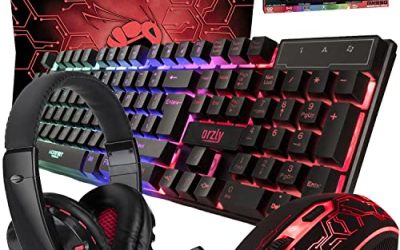
- Keyboard: 87-key tenkeyless layout, mechanical switches (custom Blue equivalent)
- Keyboard backlight: RGB LED, double-shot keycaps for shine-through legends
- Keyboard extras: 12 multimedia controls on the function row, Windows key lockout
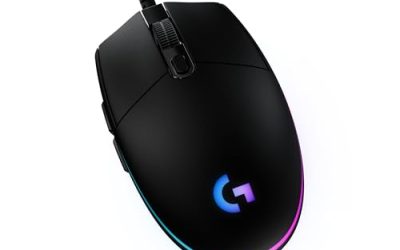
- Mouse: Redragon M602A-RGB Griffin, optical sensor up to 7,200 DPI

- Keyboard: 87-key tenkeyless layout, membrane switches
- Keyboard backlight: rainbow LED, adjustable brightness and breathing speed, can be switched off
- Keyboard extras: 19-key anti-ghosting, 12 multimedia shortcuts, swappable WASD, Windows key lock
- Mouse: optical sensor, four DPI levels at 800 / 1,600 / 2,400 / 3,200

- Keyboard: 61-key 60 percent layout, membrane-style keys
- Keyboard backlight: RGB across all 61 keys
- Mouse: lightweight wired optical mouse, up to 3,200 DPI
- Mouse shape: ambidextrous body
All 5 Picks at a Glance
| Product | Specs | Action |
|---|---|---|
| 1. Redragon K552-RGB-BA Mechanical Gaming Keyboard and Mouse Combo |
| Check price on Amazon |
| 2. CHONCHOW 87 Keys TKL Gaming Keyboard and Mouse Combo (White, M102-C) |
| Check price on Amazon |
| 3. Guiheng Wired 60% Gaming Keyboard and Mouse Combo |
| Check price on Amazon |
 4. CHONCHOW Gaming Keyboard and Mouse Combo (Full-Size Wired RGB) |
| Check price on Amazon |
 5. DGG Gaming Keyboard and Mouse Combo (4-in-1 Kit) |
| Check price on Amazon |
Key takeaways
- Five gaming keyboard and mouse combos for Fortnite compared on layout, switch speed, mouse buttons and sensors, from mechanical TKL sets to a 60% pair.
Fortnite on keyboard and mouse is a game of inputs per second. A single build fight can ask for a wall, a ramp, a cone, an edit and a weapon swap inside two seconds, and every one of those actions has to land on a key or a button that sits exactly where your fingers expect it. That is why the keyboard and mouse deserve to be chosen as a pair: the board decides how much room your aiming arm gets, and the mouse decides how many building pieces you can reach without leaving the movement keys.
A combo listing keeps that pairing simple. Both devices arrive in one box, share one design language and one connection style, and the weaker half cannot hide behind a strong partner the way it can when parts are bought separately. For Fortnite specifically, four things matter most. Compact layouts free desk space for the wide, low-sensitivity mouse sweeps that arm aiming needs. Fast, consistent switches make edit plays repeatable. Extra mouse buttons put building pieces under your thumb instead of stretching your keyboard hand. And anti-ghosting decides whether sprinting, strafing and jumping at the same time produces three inputs or two.
The five sets below are all sold as single gaming keyboard and mouse combos. They cover the main shapes the class takes: a mechanical tenkeyless set with a genuinely quick mouse, two compact wired sets for small desks and console corners, a full-size wired set with a number pad, and a four-piece kit that adds a headset and pad to the same box. Every specification is taken from the product’s own listing, and where a listing leaves a figure unstated, that gap is reported rather than filled in from another product’s page.
Disclosure: As an Amazon Associate, we earn from qualifying purchases made through links on this page, at no extra cost to you.
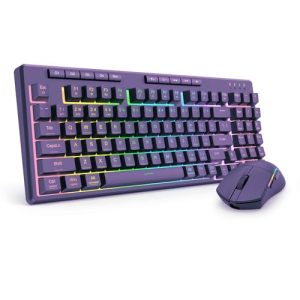
1. Redragon K552-RGB-BA Mechanical Gaming Keyboard and Mouse Combo
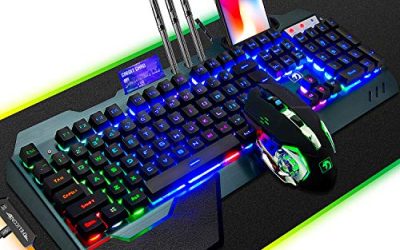
- Keyboard: 87-key tenkeyless layout, mechanical switches (custom Blue equivalent)
- Keyboard backlight: RGB LED, double-shot keycaps for shine-through legends
- Keyboard extras: 12 multimedia controls on the function row, Windows key lockout
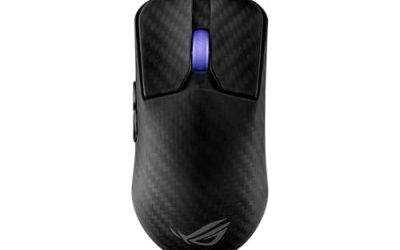
- Mouse: Redragon M602A-RGB Griffin, optical sensor up to 7,200 DPI
The K552-RGB-BA is the set in this group built around genuine mechanical hardware. The keyboard is the tenkeyless K552-RGB, an 87-key board with custom mechanical switches described in the listing as a Cherry Blue equivalent, so each press has a defined actuation point, a tactile bump and an audible click. For editing, that consistency is the point: a reset and confirm sequence feels identical every time, which makes fast edit courses a matter of muscle memory rather than key feel. The mouse is Redragon’s M602A-RGB Griffin, a wired gaming mouse with sensitivity steps up to 7,200 DPI and software support for button assignment, which is where building binds belong.
The tenkeyless frame is the right shape for Fortnite. Dropping the number pad pulls the mouse hand closer to the body and leaves a wide pad area for the low-sensitivity swings that track players through build fights. The Griffin mouse gives those swings a sensor with real headroom, and its programmable buttons are the natural home for wall and ramp, the two pieces most players need without moving a finger off the movement keys.
Two honest notes. The listing title calls the board 60 percent while its own specification fields state 87-key tenkeyless, and the board is the tenkeyless size. And the clicky switch character that makes edits feel crisp is audible, so anyone sharing a room should expect to hear fast building. Players who want the most mechanical, most configurable combo in this group should start here.
2. CHONCHOW 87 Keys TKL Gaming Keyboard and Mouse Combo (White, M102-C)
- Keyboard: 87-key tenkeyless layout, membrane switches
- Keyboard backlight: rainbow LED, adjustable brightness and breathing speed, can be switched off
- Keyboard extras: 19-key anti-ghosting, 12 multimedia shortcuts, swappable WASD, Windows key lock
- Mouse: optical sensor, four DPI levels at 800 / 1,600 / 2,400 / 3,200
CHONCHOW’s M102-C set takes the same tenkeyless idea in a membrane direction and adds the piece most starter desks still lack: a pad. The box holds an 87-key wired keyboard, a six-button wired mouse and a cloth mouse pad, so the whole input side of a setup lands at once. The keyboard is a membrane design with a rainbow LED backlight, adjustable brightness and breathing speed, 19-key anti-ghosting for the key clusters gaming actually uses, swappable WASD keys and a lockable Windows key so a stray press cannot pull you out of a match.
For Fortnite, the appeal is the complete, console-friendly package. The listing names PlayStation and Xbox support directly, which matters because Fortnite accepts keyboard and mouse input on consoles and many players make the switch there first. The mouse’s four DPI stages cover the range most players settle into, and the side buttons give a home to one building piece or an edit bind while the keyboard hand stays on movement.
Set expectations on the keyboard half: membrane keys feel softer than the mechanical switches in the Redragon set above, and the rainbow backlight is a fixed pattern rather than per-key colour control. What you get in return is a tidy white TKL desk with a pad included and nothing to install, which is exactly what a first Fortnite setup usually needs.
3. Guiheng Wired 60% Gaming Keyboard and Mouse Combo
- Keyboard: 61-key 60 percent layout, membrane-style keys
- Keyboard backlight: RGB across all 61 keys
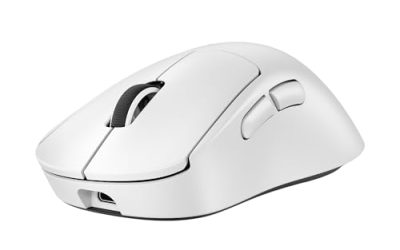
- Mouse: lightweight wired optical mouse, up to 3,200 DPI
- Mouse shape: ambidextrous body
The Guiheng set is the smallest combo here, and for Fortnite that smallness is a feature. A 60 percent keyboard keeps only the keys the game uses constantly — movement, building, editing, weapon slots and a function layer — and gives everything else back to the mouse. On a low sensitivity, that reclaimed width is the difference between lifting the mouse mid-fight and finishing the swing, which is why so many competitive players land on boards of this size.
The trade-offs of a 60 percent board are real and worth stating plainly. The function row, arrow keys and number pad live on a layer, so binds that reach for those keys need remapping, and everyday typing takes a short adjustment period. Fortnite’s default layout survives the shrink better than most games because its core actions cluster around the left hand, and the layer keys still cover menus and map checks.
The mouse keeps the same simple brief: a light ambidextrous shell and a 3,200 DPI ceiling that suits the low effective sensitivity most Fortnite players use, where huge DPI figures go untouched. Players whose desk is narrow, whose sensitivity is low, or who travel with their setup will get the most from this set; players who lean on a number pad for extra binds should look at the full-size option below instead.
4. CHONCHOW Gaming Keyboard and Mouse Combo (Full-Size Wired RGB)
- Keyboard: full-size layout with number pad and function row
- Keyboard backlight: RGB with multiple effects
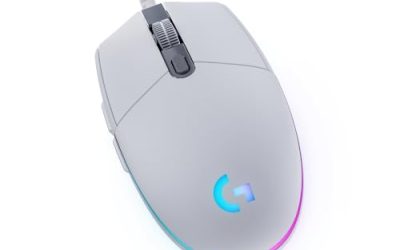
- Mouse: wired optical gaming mouse with side buttons
- Connection: wired USB for both devices
This second CHONCHOW set goes the opposite direction from its TKL sibling: a traditional full-size keyboard with the number pad and function row intact, paired with a wired mouse that carries side buttons. The full layout suits players who bind building pieces, emotes or inventory actions to the number pad, or whose desk also handles school and office work where the pad earns its keep between matches.
In play, the full-size frame gives up some of the mouse room the compact sets protect, so low-sensitivity players should measure their desk before choosing it. What it returns is bind space. Fortnite rewards players who spread actions across both hands, and between the number pad, the function row and the mouse’s side buttons, this set offers the most places to put building and editing commands of any combo here.
The mouse’s side buttons deserve emphasis because they change how the keyboard hand works. Moving wall and cone to the thumb frees the left hand to stay on movement and edit keys during a fight, which is the single change most players feel immediately after switching from a basic two-button mouse. If your play style is bind-heavy and your desk is wide enough, this is the set that fits it.
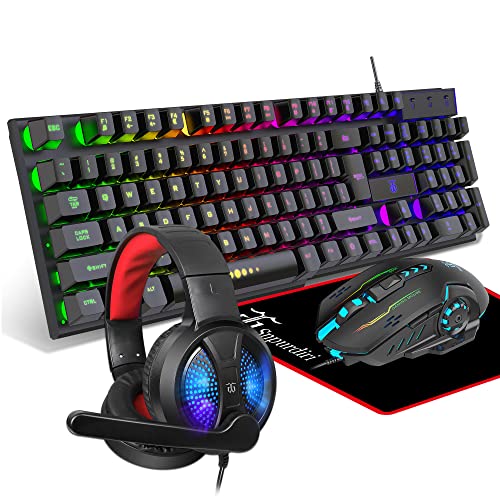
5. DGG Gaming Keyboard and Mouse Combo (4-in-1 Kit)
- Keyboard: 104-key full-size layout, membrane switches, floating-key design
- Keyboard backlight: RGB with three colour modes
- Mouse: gaming mouse with 7-colour breathing LED (the listing does not publish a DPI figure)
- Headset: 40 mm drivers, high-definition microphone, padded ear cups and adjustable headband
The DGG kit widens the definition of a combo: the box holds a full-size keyboard, a gaming mouse, a headset with a microphone and a mouse pad. For a player building a Fortnite station from nothing — a common situation for a first gaming PC or a bedroom console desk — that completeness is the argument. Voice chat is not optional in squad modes, and this is the only set here that covers it without a second purchase.
The keyboard’s floating keys leave the base open, which makes the crumbs and dust of a long season easy to clear out, and the three-mode backlight keeps the desk looking like a gaming setup in a dark room. The headset’s protein-style ear pads and adjustable band are built for long sessions, and its microphone covers callouts, which matter more to squad results than any single hardware figure.
The gaps should be stated as plainly as the strengths. The listing gives no sensitivity figure for the mouse, so players who tune their aim around a known DPI cannot confirm a match from the page, and the keyboard’s lighting is three set modes rather than per-key control. Judged as a complete first station in one box, though, the kit covers more of what a new Fortnite player needs than any other set here.
How to Choose a Gaming Keyboard and Mouse Combo for Fortnite
Layout decides your mouse room
Keyboard size is the first decision because it is really a decision about aiming. A full-size board keeps the number pad and pushes the mouse further right; tenkeyless and 75 percent boards remove the pad; a 60 percent board removes the function row and arrows as well. Fortnite aiming at low sensitivity uses broad arm movements, and every centimetre of keyboard width is a centimetre taken from those swings. Most players who switch from full-size to tenkeyless feel the improvement in their aim before they notice anything else. Choose the smallest layout whose missing keys you can live without.
Switches decide edit speed
Building and editing are repeated, timed actions, so switch consistency matters more than switch novelty. Mechanical switches actuate at a defined point with a tactile or linear feel that stays the same across the board, which is why the mechanical set in this group leads it. Membrane keys are quieter and softer, and plenty of players build quickly on them, but the press feels less defined at speed. If you play in a shared room at night, that quietness may be worth more than the last increment of edit precision.
Judge the mouse by its buttons, then its sensor
Sensitivity figures are the headline every listing prints, yet most Fortnite players use an effective DPI far below any modern sensor’s ceiling. What changes games is button placement: two side buttons under the thumb are the standard home for wall and ramp, and programmable buttons let you move an edit or reset bind off the keyboard entirely. Check the button count and whether software exists to assign them before you compare DPI numbers, and treat any listing that omits its mouse specification as a starter mouse you may later replace.
Anti-ghosting and rollover protect busy inputs
A build fight stacks inputs: sprint, strafe, jump, place, edit. Anti-ghosting and rollover figures describe how many simultaneous presses a keyboard registers correctly, and they decide whether that stack lands completely or drops a key. Full rollover is ideal, but the gaming-cluster coverage on the compact sets here — 19 to 26 keys around the movement area — covers the combinations real play produces. This is one figure worth reading in the specification table rather than the title.
Wired connections stay boring, and boring is good
Every set in this group is wired, which suits Fortnite well. A cable never needs charging before a session, never sleeps mid-match, and adds no wireless interference variables in a room full of devices. The trade is desk management: two cables to route, and a setup that stays where it is built. For a fixed gaming desk, that trade favours wired almost every time.
Console players should read compatibility word for word
Fortnite accepts keyboard and mouse input on PlayStation and Xbox, but combo listings state their platforms differently — some name a console directly, others say PlayStation generically, and some list only computers. Buy on wording that names your console, and remember that system menus and other games may treat the same devices differently even when Fortnite itself works well with them.
Frequently Asked Questions
Do these combos work with Fortnite on PlayStation and Xbox?
Fortnite itself accepts keyboard and mouse input on both console families, and several sets here name console platforms in their own listings — the CHONCHOW TKL set lists PS4, PS5 and Xbox One, and the Guiheng set lists PS5 and Xbox. Check the exact wording on the listing for your console before ordering, because compatibility claims differ between sets even inside one brand.
Is a mechanical keyboard better for building and editing in Fortnite?
Mechanical switches give a defined, repeatable actuation point, which helps edit timing feel identical on every attempt, and that is why the mechanical Redragon set leads this group for serious players. Membrane sets remain perfectly playable, especially for casual and younger players, and they run quieter in shared rooms. The gap shows most in fast edit plays, not in general movement or aiming.
Which mouse buttons should a Fortnite player bind first?
Start with the two building pieces you place under pressure: wall on one side button and ramp on the other covers most fights. As the layout settles, many players move the edit key or the scroll-wheel reset to the mouse as well, since the thumb is otherwise idle during a build sequence. Any set here with side buttons and assignment software can hold those binds.
Tenkeyless, 60 percent or full-size — which layout suits Fortnite best?
Tenkeyless is the balanced default: it keeps the function row and arrows, drops the number pad, and frees real mouse room. A 60 percent board frees the most space and suits low-sensitivity arm aiming, at the expense of layered keys. Full-size suits bind-heavy players who use the number pad and players whose desk doubles as a workspace. Match the layout to your sensitivity and your bind list, in that order.
Final Verdict
For most Fortnite players, the Redragon K552-RGB-BA is the combo to beat: a true mechanical tenkeyless board and a programmable 7,200 DPI mouse cover editing speed and building binds in one box. Small desks and console corners point to the CHONCHOW TKL set or the Guiheng 60 percent pair, bind-heavy players to the full-size CHONCHOW, and anyone starting from an empty desk to the DGG kit with its headset and pad included. Pick the set whose weaker half you would still be happy to use in a year — in a combo, that is always the half that decides.
FAQ
Do these combos work with Fortnite on PlayStation and Xbox?
Is a mechanical keyboard better for building and editing in Fortnite?
Which mouse buttons should a Fortnite player bind first?
Tenkeyless, 60 percent or full-size — which layout suits Fortnite best?
More from Amazon
Programs that pair well with the guide above. Offers and eligibility are set by Amazon and may change.
Free shipping on eligible items, Prime Video and more. Eligible new members can start with a free trial.
Start a Prime free trialA Prime membership for ages 18-24 with a trial period. Eligibility is set by Amazon.
See Prime for Young AdultsAudiobooks and podcasts to listen to on the go. Eligible new members can start with a free trial.
Try Audible freeAd-free music streaming. Eligible new subscribers can start with a free trial.
Try Music Unlimited freeAs an Amazon Associate we earn from qualifying purchases.