
Our Short List of 3

- Layout: 65% form factor with dedicated arrow keys plus Page Up/Down, Home and Delete
- Switches: HyperX mechanical switches, rated to 80 million keypresses
- Lighting: RGB backlit keys, exposed-LED switch design, per-key backlight customisation
- Software: HyperX NGENUITY (macros and lighting profiles)
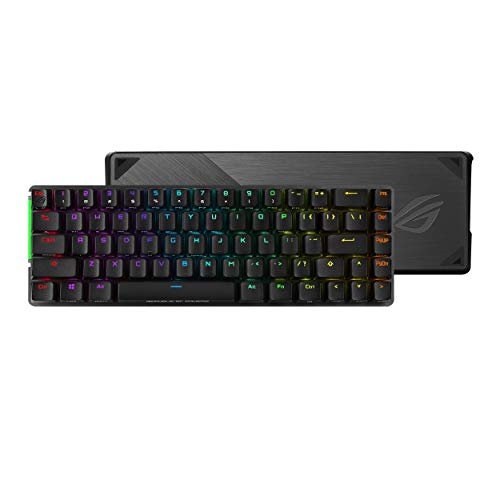
- Layout: 65% form factor, 306 mm length (near 60% footprint)
- Switches: ROG NX mechanical switches (this listing: NX Blue clicky)
- Lighting: wireless Aura Sync RGB, per-key plus touch-panel RGB
- Extra control: interactive touch panel (volume, shortcuts, macros)

- Layout: 65% mechanical keyboard
- Switches: hot-swappable Kailh Box V2 tactile Brown; extra Cherry MX Green switches included for modifier keys
- Lighting: RGB, 16.7 million colours
- Keycaps: PBT doubleshot
All 3 Picks at a Glance
| Product | Specs | Action |
|---|---|---|
| 1. HyperX Alloy Origins 65 — the brightest per-key RGB in a metal body |
| Check price on Amazon |
| 2. ASUS ROG Falchion NX — wireless Aura Sync RGB with a touch panel |
| Check price on Amazon |
| 3. Cooler Master CK720 — hot-swappable switches and a control dial |
| Check price on Amazon |
Key takeaways
- The best mechanical RGB keyboards ranked by lighting quality: per-key RGB, exposed LEDs and software control in three compact 65% boards.
Plenty of mechanical keyboards happen to glow. Far fewer are built around their lighting — per-key RGB you can assign colour by colour, software that stores real lighting profiles, and switch housings designed to let the light through instead of trapping it under the keycaps. If the lighting is why you are shopping, that distinction matters more than another row of function keys, and it is the criterion this roundup is built on: every pick below is a genuine mechanical keyboard whose manufacturer publishes per-key or full-spectrum RGB as a headline feature, not a single-colour backlight with a marketing name.
All three picks happen to be compact 65% boards, which is where the RGB-first mechanical market is strongest right now. Each one takes a different route to the same goal. The HyperX Alloy Origins 65 uses exposed-LED switches under double-shot PBT keycaps for maximum light spill. The ASUS ROG Falchion NX pairs per-key Aura Sync RGB with a wireless connection and an interactive touch panel. The Cooler Master CK720 goes the enthusiast route: hot-swappable switches, a control dial, and 16.7 million colour RGB you can retune without replacing the board. Read the lighting sections closely — the right choice depends on whether you want brightness, wireless freedom, or switch-level customisation.
As an Amazon Associate, we earn from qualifying purchases.
Quick answer
For most buyers, the HyperX Alloy Origins 65 is the mechanical RGB keyboard to get: its exposed-LED switch design and per-key backlight customisation through HyperX NGENUITY make it the brightest, most lighting-focused board here, wrapped in an aircraft-grade aluminium body. If you want that lighting without a cable, the ASUS ROG Falchion NX adds wireless Aura Sync RGB, a touch panel, and up to 450 hours of battery life with the lighting off — though that figure drops to 53 hours with default lighting on, which tells you exactly what RGB costs in power. If you want to tune the feel as well as the colour, the Cooler Master CK720 is hot-swappable, ships with spare switches in the box, and adds a three-way dial; note that its Amazon availability was unconfirmed at the time of checking, so confirm it is in stock before planning a build around it.
Key takeaways
- RGB is the deciding feature in this roundup: all three boards publish per-key or full-spectrum RGB with software control, not fixed single-colour backlights.
- The Alloy Origins 65 is the lighting showcase — exposed-LED switches, per-key customisation, and double-shot PBT keycaps that let legends shine through cleanly.
- The Falchion NX is the only wireless pick; its published battery figures (up to 450 hours lighting off, 53 hours with default lighting) quantify the real cost of running RGB on battery.
- The CK720 is the tinkerer’s pick: hot-swappable Kailh Box V2 switches, extra Cherry MX Green switches included, and 512 KB of on-board memory for stored profiles.
- All three are 65% layouts with dedicated arrow keys, so none of them asks you to give up navigation keys for the compact footprint.
- One caution: the CK720’s availability could not be confirmed from its listing at check time, so treat it as a check-stock-first option.
The picks
1. HyperX Alloy Origins 65 — the brightest per-key RGB in a metal body
- Layout: 65% form factor with dedicated arrow keys plus Page Up/Down, Home and Delete
- Switches: HyperX mechanical switches, rated to 80 million keypresses
- Lighting: RGB backlit keys, exposed-LED switch design, per-key backlight customisation
- Software: HyperX NGENUITY (macros and lighting profiles)
The Alloy Origins 65 is what an RGB-first keyboard looks like when a manufacturer designs the switch housing around the LED. HyperX uses an exposed-LED switch design, so the light source sits visibly open rather than buried under an opaque housing, and the result is stronger light spill around and through the keys. The backlighting is per-key and fully customisable, and the double-shot PBT keycaps matter more than they might seem: the legends are moulded through the cap rather than printed on it, so the characters stay crisp and let light pass evenly instead of fading or wearing smooth the way printed legends do. Secondary functions are printed on the keycap sides, which keeps the top face clean for the lighting to do its work.
Control runs through HyperX NGENUITY software, which handles macros and per-key lighting profiles, and the hardware underneath is built to a standard the lighting deserves. The body is aircraft-grade aluminium, the cable is a detachable braided USB-C lead, and the two-step feet offer three tilt angles. HyperX rates its mechanical switches to 80 million keypresses; note that this listing family covers more than one switch variant, so check which switch the specific listing configuration carries before ordering if switch feel is a priority for you. In the box you get a keycap puller, an extra Esc key, and an alternate spacebar — small touches that make cosmetic customisation easy. At 12.4 x 4.2 x 1.5 inches and 1.87 lb, it is compact without feeling flimsy, and HyperX lists compatibility with PC, PlayStation, and Xbox.
See the HyperX Alloy Origins 65 on Amazon
2. ASUS ROG Falchion NX — wireless Aura Sync RGB with a touch panel
- Layout: 65% form factor, 306 mm length (near 60% footprint)
- Switches: ROG NX mechanical switches (this listing: NX Blue clicky)
- Lighting: wireless Aura Sync RGB, per-key plus touch-panel RGB
- Extra control: interactive touch panel (volume, shortcuts, macros)
The Falchion NX answers the obvious objection to RGB keyboards: the cable. ASUS built this 65% board around wireless Aura Sync RGB — ASUS describes it as the first ROG keyboard with wireless Aura Sync — so the per-key lighting syncs with the rest of an Aura ecosystem without a wire tying the board to the desk. The connection is 2.4 GHz RF with a 1 ms report rate, with a wired USB mode as backup. The lighting extends beyond the keys: the comparison data ASUS publishes lists per-key RGB plus touch-panel RGB, because the interactive touch panel on the left flank — which handles volume, shortcuts, and macros — is lit as part of the design rather than bolted on as an afterthought.
The trade-off for wireless RGB is battery, and ASUS publishes honest numbers: up to 450 hours with the lighting off, and 53 hours with default lighting. Plan around the second figure if the lighting is why you are buying it. This listing carries ROG NX Blue clicky mechanical switches, with ROG PBT doubleshot keycaps on top. The board is unusually small for its layout class — ASUS describes a 306 mm length, close to a 60% footprint — and it weighs 1.1 lb. A two-way polycarbonate cover case is included, which doubles as protection for travel and a dust cover at home. Armoury Crate is the control software, and the board carries a 1-year warranty. If your desk is shared, hot-desking, or simply cable-averse, this is the RGB pick that fits.
See the ASUS ROG Falchion NX on Amazon
3. Cooler Master CK720 — hot-swappable switches and a control dial
- Layout: 65% mechanical keyboard
- Switches: hot-swappable Kailh Box V2 tactile Brown; extra Cherry MX Green switches included for modifier keys
- Lighting: RGB, 16.7 million colours
- Keycaps: PBT doubleshot
The CK720 is for the buyer who treats a keyboard as a starting point. Its Kailh Box V2 tactile Brown switches are hot-swappable, so you can pull and replace switches without soldering, and Cooler Master includes extra Cherry MX Green switches in the box for the modifier keys — an unusually generous touch that lets you run a firmer, clickier feel on the keys you strike deliberately while keeping the main cluster tactile. The RGB is specified at 16.7 million colours, and with 512 KB of on-board memory, profiles can live on the keyboard itself rather than depending on software staying open.
The supporting hardware is enthusiast-grade: PBT doubleshot keycaps, pre-lubed stabilizers for quieter large keys, silicone padding inside the case, and an aluminium-and-plastic construction. A three-way customisable dial gives you a physical control — the natural assignment on an RGB board is brightness or effect stepping, so you can tune the lighting from the board instead of opening software. The connection is wired USB Type-C, and Cooler Master lists compatibility with Windows 8 and later and Mac OS X 10.10 and later. At 13.15 x 4.65 x 1.46 inches and 2.09 lb, it is the largest and heaviest board here. One honest caution: availability for this listing could not be confirmed at the time of checking — there was no explicit buy-box confirmation in the listing copy — so verify it is in stock before you build plans around it.
See the Cooler Master CK720 on Amazon
How to choose
Start with the lighting architecture, because that is what separates these boards from any mechanical keyboard with a backlight. Per-key RGB — offered by the Alloy Origins 65 and the Falchion NX — lets you assign colours key by key, highlight a gaming cluster, or run reactive effects that ripple from each press. Full-spectrum RGB with strong software or on-board storage, as on the CK720, gives you the colour range and effects; the question is how granular the control is. Decide whether you will actually open the software — NGENUITY on the HyperX, Armoury Crate on the ASUS — or whether on-board memory like the CK720’s 512 KB matters more because you move between machines.
Next, be honest about brightness. Exposed-LED designs like the HyperX’s put more light into the room and onto the desk; enclosed housings look more restrained. Neither is better in the abstract, but if you play in a dark room and navigate by key glow, exposed LEDs earn their keep, and if the board sits in a shared or professional space, a dimmer, software-tamed profile matters more than peak output.
Then weigh connection against battery reality. A wired board like the Alloy Origins 65 or CK720 runs its lighting at full strength indefinitely. The Falchion NX’s published figures — up to 450 hours dark, 53 hours lit — are the honest maths of wireless RGB; if you will run the lighting constantly, expect to charge on roughly a weekly rhythm under heavy use, or drop brightness and stretch the interval.
Finally, think about whether you will ever change the switches. Hot-swappable sockets, as on the CK720, turn switch feel from a purchase decision into an experiment, and the included spare switches lower the cost of starting. Fixed-switch boards like the other two picks ask you to choose correctly once — which is fine if you already know your preference, and a reason to pause if you do not.
Who should skip
Skip this entire category if you type in a bright office and never look at your keyboard — a plain mechanical board will serve you identically, and the lighting premium buys you nothing. Skip the compact 65% layout if you depend on a number pad or a full function row for work; all three picks omit both, and no lighting effect compensates for missing keys you use hourly. Skip the Falchion NX if you want set-and-forget wireless: 53 hours of lit battery life means regular charging, and a wired board or a low-power wireless board without RGB fits that habit better. Skip the CK720 if you need a board this week and cannot confirm stock, since its availability was unconfirmed at check time — the other two picks are the safer immediate orders. And skip per-key RGB entirely if you will never open the software; zoned or single-effect lighting boards exist at lower effort, and unused customisation is just complexity.
FAQ
Does per-key RGB actually change anything besides looks?
Functionally, yes, in small ways. Per-key assignment lets you colour-code a gaming cluster, mark macro keys, or light only the keys a game uses, which helps in dark rooms and when learning a new layout. Reactive effects can also confirm keypresses visually. It does not change switch feel or performance — the mechanical switches do that — so treat lighting as a usability-and-style feature, not a speed upgrade.
How much battery does RGB really use on a wireless keyboard?
The Falchion NX’s own published figures give the clearest answer in this roundup: up to 450 hours with lighting off versus 53 hours with default lighting — roughly an eightfold difference. Brightness and animation speed drive the draw, so lowering brightness is the single most effective way to extend a wireless RGB board between charges.
Are double-shot PBT keycaps important for an RGB keyboard?
Yes, more than on a plain board. On backlit keycaps the legend is the window the light shines through; double-shot moulding means the legend is a separate piece of plastic running through the cap, so it cannot wear off and it transmits light evenly. PBT also resists the shine that smooths out cheaper caps over time, keeping both the feel and the lighting consistent.
Can I change the switches on these keyboards later?
Only on the CK720, which is hot-swappable and even includes spare Cherry MX Green switches for the modifiers. The Alloy Origins 65 and Falchion NX use fixed switches, so the switch you buy is the switch you keep — one more reason to confirm the switch variant on the HyperX listing before ordering.
Final verdict
If lighting is the reason you are buying a mechanical keyboard, buy the board designed around it: the HyperX Alloy Origins 65, with exposed-LED switches, per-key customisation, and an aluminium body, is the strongest all-round RGB pick here. Choose the ASUS ROG Falchion NX if the same per-key Aura Sync lighting needs to arrive without a cable and you accept the charging rhythm that wireless RGB demands. Choose the Cooler Master CK720 if your idea of customisation goes deeper than colour — hot-swappable switches, a control dial, and on-board profile memory — after confirming it is in stock. Any of the three gives you genuine mechanical switches under lighting that is a headline feature rather than an afterthought, which is exactly what this category should mean.
Product and ASIN Reference
| Product | ASIN | Layout | Lighting | Connection |
|---|---|---|---|---|
| HyperX Alloy Origins 65 | B09RBB2VJJ | 65% | Per-key RGB, exposed-LED switches | Wired USB-C (detachable) |
| ASUS ROG Falchion NX | B09GL76BFD | 65% | Per-key wireless Aura Sync RGB | 2.4 GHz RF / wired USB |
| Cooler Master CK720 | B0BHL7SK6S | 65% | RGB, 16.7 million colours | Wired USB Type-C |
More from Amazon
Programs that pair well with the guide above. Offers and eligibility are set by Amazon and may change.
Free shipping on eligible items, Prime Video and more. Eligible new members can start with a free trial.
Start a Prime free trialA Prime membership for ages 18-24 with a trial period. Eligibility is set by Amazon.
See Prime for Young AdultsAudiobooks and podcasts to listen to on the go. Eligible new members can start with a free trial.
Try Audible freeAd-free music streaming. Eligible new subscribers can start with a free trial.
Try Music Unlimited freeAs an Amazon Associate we earn from qualifying purchases.









