Key takeaways
- Looking for the best tablets for photo editing? Compare five tablets with color-accurate displays, stylus support, and photo apps to find your match.
As an Amazon Associate I earn from qualifying purchases.
The Short Answer
If you work in the Apple ecosystem, the Apple iPad Pro 11-inch (M4) is the strongest choice in this guide. Its Ultra Retina XDR display pairs tandem OLED technology with P3 wide color and ProMotion, giving you the deep contrast and smooth scrolling that make judging exposure and color feel natural. The M4 chip handles large RAW files and layered edits without slowing down, and Apple Pencil Pro support turns the tablet into a precise retouching tool.
If the iPad Pro sits beyond what you want to spend, the Apple iPad Air 11-inch (M3) is the pick for most people. It shares the same 11-inch display size, P3 wide color, and Apple Pencil Pro compatibility, with an M3 chip that handles photo work with ease. The Samsung Galaxy Tab S10 FE is the best Android option here, and it includes the S Pen in the box. The Apple iPad (A16) is the simplest entry point into iPad photo editing, while the Samsung Galaxy Tab S9 FE is a capable lower-cost Android alternative with an included S Pen.
Every tablet here has a color-capable display, stylus support, and full photo editing apps. The right choice depends on your editing apps, your operating system, and how much retouching you do with a stylus.
Our Top Picks
- Best overall: Apple iPad Pro 11-inch (M4), 256GB, Wi-Fi, Space Black — Ultra Retina XDR display, M4 chip, Apple Pencil Pro support.
- Best for most people: Apple iPad Air 11-inch (M3), 128GB, Wi-Fi, Space Gray — P3 wide color, M3 chip, Apple Pencil Pro support.
- Best Android tablet: Samsung Galaxy Tab S10 FE, 128GB, Wi-Fi, Gray — S Pen included, 90 Hz display, IP68 water resistance.
- Best entry-level iPad: Apple iPad 11-inch (A16), 128GB, Wi-Fi, Blue — Liquid Retina display, A16 chip, Apple Pencil (USB-C) support.
- Best value Android tablet: Samsung Galaxy Tab S9 FE, 128GB, Wi-Fi, Gray — S Pen included, expandable storage, IP68 water resistance.
Quick Comparison
| Tablet | Display | Chip | Storage | Stylus |
|---|---|---|---|---|
| iPad Pro 11-inch (M4) | 11-inch Ultra Retina XDR, 2420 x 1668, ProMotion | Apple M4 | 256GB | Apple Pencil Pro (sold separately) |
| iPad Air 11-inch (M3) | 11-inch Liquid Retina, 2360 x 1640, P3 wide color | Apple M3 | 128GB | Apple Pencil Pro (sold separately) |
| Galaxy Tab S10 FE | 10.9-inch, 2304 x 1440, 90 Hz | Exynos 1580 | 128GB | S Pen included |
| iPad 11-inch (A16) | 11-inch Liquid Retina, 2360 x 1640, True Tone | Apple A16 | 128GB | Apple Pencil (USB-C) (sold separately) |
| Galaxy Tab S9 FE | 10.9-inch, 2304 x 1440 | Exynos 1380 | 128GB | S Pen included |
How to Choose
Start with the display
The display is the single most important part of a photo editing tablet, because every editing decision you make is a judgment about what you see on screen. Look for wide color support, such as P3 wide color on the iPad models here, and a high resolution that keeps detail sharp when you zoom in. Brightness matters too: the iPad (A16) lists 500 nits of brightness, which helps when you edit near a window or outdoors. A high refresh rate, such as ProMotion on the iPad Pro or the 90 Hz display on the Galaxy Tab S10 FE, makes panning and zooming feel smoother, though it does not change the colors in your photos.
No tablet here is a calibrated reference monitor, and ambient light changes how colors look. If color-critical work is your job, confirm the display specifications on the listing and check edits on a second screen when you can.
Check stylus support before you buy
A stylus turns a tablet from a photo viewer into a retouching tool: local adjustments, masking, and skin retouching are far easier with a pen than with a fingertip. The two Samsung tablets include the S Pen in the box, while the Apple styluses are sold separately.
Not every stylus works with every tablet: the iPad Pro (M4) and iPad Air (M3) support Apple Pencil Pro, while the iPad (A16) supports Apple Pencil (USB-C) and the first-generation Apple Pencil. Confirm the exact stylus compatibility on the listing before you buy.
Match the tablet to your editing apps
Your apps decide which operating system makes sense. If you edit in Lightroom, Photoshop, or Affinity Photo on iPadOS, an iPad is the natural fit. If you edit in Lightroom for Android or Snapseed, a Galaxy tablet fits better. Switching systems mid-workflow means relearning shortcuts and moving your library, so pick the tablet that matches the apps you already use.
Think about storage and file handling
Photo libraries grow fast. A 256GB tablet holds far more RAW files and edited exports than a 128GB tablet, and the iPad Pro is the only pick here with 256GB as its listed configuration. The Samsung tablets support expandable storage with a microSD card, while the iPads do not. If you shoot RAW and keep your library on the tablet, lean toward more storage or a tablet with a card slot. If you store photos in the cloud, 128GB is workable.
Size, weight, and battery
All five tablets sit close to 11 inches, the sweet spot for photo editing. The iPad Pro is the thinnest and lightest of the Apple picks at 0.21 inches thick and 15.6 ounces. Every tablet here lists all-day battery life and charges over USB-C, and Wi-Fi 6 or Wi-Fi 6E support helps when you sync large photo libraries to the cloud. If you edit on location, check for USB-C card reader or direct camera support.
The Picks in Detail
1. Apple iPad Pro 11-inch (M4), 256GB, Wi-Fi, Space Black
Apple iPad Pro 11-inch (M4), 256GB, Wi-Fi, Space Black
The iPad Pro 11-inch (M4) is the most capable photo editing tablet in this guide. Its 11-inch Ultra Retina XDR display uses tandem OLED technology, a 2420 x 1668 resolution, P3 wide color, True Tone, and ProMotion up to 120 Hz. That combination gives you deep blacks, strong contrast, and accurate color. The M4 chip handles large RAW files, panorama merges, and layered Photoshop documents without hesitation. Storage is 256GB, the most of any tablet here. Wi-Fi 6E, Face ID, 12MP cameras with LiDAR, and a thin 0.21-inch body round out a portable package. It supports Apple Pencil Pro, though the pencil is sold separately.
One honest note: Apple has since released an M5 generation of the iPad Pro, so the M4 is the previous generation. Confirm on the listing that you are looking at the Wi-Fi model with model number MVV83LL/A and standard glass.
Pros:
- Ultra Retina XDR display with P3 wide color and ProMotion
- M4 chip handles large RAW files and layered edits smoothly
- 256GB of storage, the most in this guide
- Apple Pencil Pro support
- Thin and light at 15.6 ounces
Cons:
- Apple Pencil Pro is sold separately
- Previous-generation model now that an M5 iPad Pro exists
- No expandable storage
2. Apple iPad Air 11-inch (M3), 128GB, Wi-Fi, Space Gray
Apple iPad Air 11-inch (M3), 128GB, Wi-Fi, Space Gray
The iPad Air 11-inch (M3) is the best tablet for photo editing for most people. Its 11-inch Liquid Retina display has a 2360 x 1640 resolution, P3 wide color, True Tone, and an antireflective coating. The M3 chip runs Lightroom and Photoshop smoothly. Storage is 128GB, connectivity is Wi-Fi 6E, and Touch ID sits in the top button. It supports Apple Pencil Pro, so you get the same precise stylus experience as the iPad Pro.
The trade-off against the iPad Pro is the display: the Air uses a standard LED-backlit Liquid Retina panel rather than the tandem OLED panel in the Pro, so blacks are less deep, though the Air still shows accurate color. The pencil is sold separately, and there is no expandable storage.
Pros:
- P3 wide color Liquid Retina display with antireflective coating
- M3 chip runs Lightroom and Photoshop smoothly
- Apple Pencil Pro support
- Same screen size as the iPad Pro
- Wi-Fi 6E and Touch ID
Cons:
- Apple Pencil Pro is sold separately
- 128GB of storage fills up fast with RAW files
- No expandable storage
- Standard LED display rather than OLED
3. Samsung Galaxy Tab S10 FE, 128GB, Wi-Fi, Gray

Samsung Galaxy Tab S10 FE, 128GB, Wi-Fi, Gray
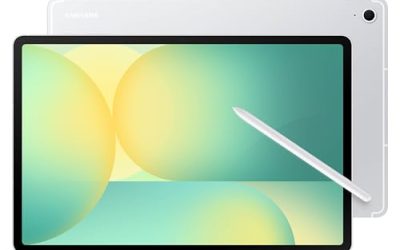
The Galaxy Tab S10 FE is the best Android tablet for photo editing in this guide, and the strongest reason to pick it is the S Pen. It comes in the box, so you can start masking, brushing, and retouching the moment the tablet arrives. The 10.9-inch display has a 2304 x 1440 resolution and a 90 Hz refresh rate, which makes scrolling and zooming feel smooth. The Exynos 1580 processor and 8GB of RAM keep Lightroom for Android and Snapseed responsive, and storage can be expanded with a microSD card. The tablet is IP68 water and dust resistant.
The LCD display cannot match the iPad Pro for contrast, and color accuracy depends on the display mode you choose in settings. Confirm on the listing the included accessories, because the S Pen is included and a keyboard cover is sold separately.
Pros:
- S Pen included in the box
- 90 Hz display with 2304 x 1440 resolution
- Expandable storage with a microSD card
- IP68 water and dust resistance
- 8GB of RAM for smooth multitasking
Cons:
- LCD display rather than OLED
- Keyboard cover sold separately
- Android photo apps differ from iPadOS apps in features and layout
4. Apple iPad 11-inch (A16), 128GB, Wi-Fi, Blue
Apple iPad 11-inch (A16), 128GB, Wi-Fi, Blue
The iPad 11-inch (A16) is the simplest and most affordable way into iPad photo editing. Its 11-inch Liquid Retina display has a 2360 x 1640 resolution at 264 ppi, True Tone, and 500 nits of brightness, with support for Apple Pencil (USB-C) and the first-generation Apple Pencil. The A16 chip handles Lightroom, Photoshop, and Affinity Photo well for everyday editing. Storage is 128GB, connectivity is Wi-Fi 6, and Touch ID is in the top button. At 1.05 pounds, it is easy to carry in a camera bag for checking shots on location.
The compromises are clear and worth understanding. The display does not list P3 wide color support, so check color-critical work on another screen. It supports Apple Pencil (USB-C) rather than Apple Pencil Pro, so you lose the squeeze gesture and barrel roll features. And 128GB with no card slot means planning for cloud storage or regular transfers to a computer.
Pros:
- Liquid Retina display with 500 nits of brightness
- A16 chip handles everyday RAW editing well
- Supports Apple Pencil (USB-C) and first-generation Apple Pencil
- Light at 1.05 pounds and easy to carry
- Full iPadOS photo apps, including Lightroom and Photoshop
Cons:
- No P3 wide color support listed for the display
- Apple Pencil (USB-C) is sold separately
- 128GB of storage with no expandable storage
5. Samsung Galaxy Tab S9 FE, 128GB, Wi-Fi, Gray

Samsung Galaxy Tab S9 FE, 128GB, Wi-Fi, Gray
The Galaxy Tab S9 FE is a capable lower-cost Android option, and like the Tab S10 FE it includes the S Pen in the box. Its 10.9-inch display has a 2304 x 1440 resolution, and the tablet pairs 6GB of RAM with 128GB of storage expandable with a microSD card. The 8MP rear camera is modest, but this is a portable screen with a stylus for editing photos from a real camera. IP68 water and dust resistance and a durable design make it a good travel companion.
The Tab S9 FE is an older generation than the Tab S10 FE, and the difference shows in the processor and the display refresh rate. Heavy users with very large RAW files or many layers should lean toward the Tab S10 FE or an iPad. Confirm the model number SM-X510NZAAXAR on the listing for this Gray Wi-Fi configuration.
Pros:
- S Pen included in the box
- Expandable storage with a microSD card
- IP68 water and dust resistance
- Durable design suited to travel
- 10.9-inch display with 2304 x 1440 resolution
Cons:
- Older generation than the Tab S10 FE
- 6GB of RAM is less than the Tab S10 FE
- 8MP rear camera is modest
- LCD display rather than OLED
Who Should Choose What
Choose the iPad Pro 11-inch (M4) if you edit professionally, work with large RAW files and layered documents, and want the most color-accurate display here. Choose the iPad Air 11-inch (M3) if you want the iPad editing experience with P3 wide color and Apple Pencil Pro support at a more approachable level. Choose the Galaxy Tab S10 FE if you prefer Android and want the S Pen included, expandable storage, and water resistance.
Choose the iPad 11-inch (A16) if you are new to tablet photo editing and already use Apple devices. Choose the Galaxy Tab S9 FE if you want the lowest-cost path to a tablet with an included stylus and expandable storage. If you already own a stylus, check compatibility first: an Apple Pencil Pro will not work with the iPad (A16), and an S Pen will not work with any iPad.
Common Mistakes
The most common mistake is buying for screen size alone and ignoring color support. A large, bright display that does not cover a wide color gamut will mislead you about saturation and skin tones, so check the color specifications on the listing before you buy. The second mistake is buying the wrong stylus: Apple Pencil models are not interchangeable across iPads, so confirm the exact pencil your tablet supports and budget for it if it is sold separately.
A third mistake is underestimating storage. RAW files are large, and a 128GB tablet fills up quickly once you add apps, cached cloud files, and edited exports. Plan for cloud storage, a card slot, or regular transfers to a computer. A fourth mistake is expecting a tablet to replace a desktop workstation: tablets are excellent for culling, color work, and retouching, but large merges, heavy exports, and print preparation are often faster on a computer. Finally, do not skip the case and screen protector, since a cracked screen ends your editing until it is repaired.
FAQ
Do I need a stylus for photo editing on a tablet?
You do not need one for basic edits such as exposure, white balance, and cropping, which work well with touch controls. A stylus becomes important for local adjustments, masking, and detailed retouching, where precision matters. If you plan to do that kind of work, pick a tablet with a supported stylus.
Is an iPad or a Samsung tablet better for photo editing?
It depends on your apps and ecosystem. iPads run the full iPadOS versions of Lightroom, Photoshop, and Affinity Photo, and the iPad Pro and iPad Air support P3 wide color and Apple Pencil Pro. Samsung tablets run Lightroom for Android and Snapseed, include the S Pen in the box, and support expandable storage. Pick the tablet that matches the apps and devices you already use.
How much storage do I need for photo editing?
For casual editing with cloud storage, 128GB is workable. For RAW shooting and keeping a library on the tablet, 256GB or expandable storage is safer.
Can a tablet replace my laptop for photo editing?
For culling, color work, and retouching, a tablet can handle the job well. For heavy batch exports, large merges, and print preparation, a laptop or desktop is usually faster and more flexible. Many photographers use a tablet as a portable companion and a computer as the main workstation.
Does display brightness matter for photo editing?
Yes. A brighter display is easier to judge in bright rooms and outdoors, and the iPad (A16) lists 500 nits of brightness. Brightness alone does not guarantee accurate color, though, so check the color specifications on the listing and compare your edits on a second screen when accuracy matters.
Should I buy the previous-generation iPad Pro?
The iPad Pro (M4) is the previous generation now that an M5 iPad Pro exists, but it remains strong for photo editing, with an Ultra Retina XDR display, P3 wide color, and Apple Pencil Pro support. Confirm the model number and configuration on the listing before you buy.
Conclusion
The best tablet for photo editing is the one with a color-capable display, a supported stylus, and the apps you already use. The iPad Pro 11-inch (M4) leads on display quality and performance, the iPad Air 11-inch (M3) is the best choice for most people, and the Galaxy Tab S10 FE is the best Android option with its included S Pen. The iPad (A16) and the Galaxy Tab S9 FE cover the entry level on each platform without giving up stylus support. Pick the tablet that matches your ecosystem and editing habits, confirm stylus compatibility and storage on the listing, and you will have a portable setup that travels with your camera.
FAQ
Do I need a stylus for photo editing on a tablet?
Is an iPad or a Samsung tablet better for photo editing?
How much storage do I need for photo editing?
Can a tablet replace my laptop for photo editing?
Does display brightness matter for photo editing?
Should I buy the previous-generation iPad Pro?
More from Amazon
Programs that pair well with the guide above. Offers and eligibility are set by Amazon and may change.
Free shipping on eligible items, Prime Video and more. Eligible new members can start with a free trial.
Start a Prime free trialA Prime membership for ages 18-24 with a trial period. Eligibility is set by Amazon.
See Prime for Young AdultsAudiobooks and podcasts to listen to on the go. Eligible new members can start with a free trial.
Try Audible freeAd-free music streaming. Eligible new subscribers can start with a free trial.
Try Music Unlimited freeAs an Amazon Associate we earn from qualifying purchases.