Our Short List of 3

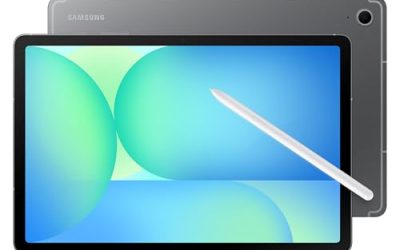
- Best overall: Samsung Galaxy Tab S10 FE 128GB WiFi, Silver — the newest FE model here, with an included S Pen, 90Hz display, and IP68 resistance.
- Best for a big screen on a mid-range budget: Samsung Galaxy Tab S9 FE+ 128GB WiFi, Gray — a 12.4-inch display and a 10,090mAh battery for split-screen work.
- Best all-rounder from the previous generation: Samsung Galaxy Tab S9 FE 128GB WiFi, Gray — a 10.9-inch display, an included S Pen, and the same IP68 build.
- Best for everyday use at the lowest entry point: Samsung Galaxy Tab A9+ 64GB WiFi, Graphite — an 11-inch 90Hz display, quad speakers, and expandable storage.

- Largest display here, ideal for split-screen work and reading
- Largest battery here at 10,090mAh
- S Pen included in the box
- IP68 water and dust resistance

- Same 10.9-inch display, S Pen, and IP68 build as the newer model
- Up to 18 hours of average battery life per the listing
- Solid aluminum build that feels more premium than its class
- Handles notes, streaming, and reading without fuss
All 4 Picks at a Glance
| Product | Specs | Action |
|---|---|---|
| Our Top Picks |
| Check price on Amazon |
| Samsung Galaxy Tab S9 FE+ 128GB WiFi, Gray — Best for a Big Screen |
| Check price on Amazon |
| Samsung Galaxy Tab S9 FE 128GB WiFi, Gray — Best All-Rounder from the Previous Generation |
| Check price on Amazon |
 Samsung Galaxy Tab A9+ 64GB WiFi, Graphite — Best for Everyday Use |
| Check price on Amazon |
Key takeaways
- Our guide to the best samsung tablets compares the Galaxy Tab S10 FE, S9 FE, S9 FE+, and Tab A9+ on screen, S Pen, battery, and everyday use for work and play.
As an Amazon Associate I earn from qualifying purchases.
The Short Answer
If you want one Samsung tablet that covers the widest range of uses, the Galaxy Tab S10 FE is the pick for most people. It pairs a sharp 10.9-inch display with an included S Pen, a current mid-range chip, and water and dust resistance most tablets in its class lack. It handles handwritten notes, streaming, reading, and light productivity with nothing extra to buy first.
If your budget is tighter, the Samsung Galaxy Tab A9+ is the sensible everyday choice. Its 11-inch screen is larger than the S10 FE, its quad speakers sound full for movies and calls, and its storage expands with a microSD card. It has no pen, and its processor sits below the FE models, so it suits streaming, browsing, reading, and schoolwork better than heavy multitasking.
For a bigger canvas, the S9 FE+ stretches the same formula across a 12.4-inch display with a larger battery for split-screen work and long sessions. The Samsung Galaxy Tab S9 FE sits between the two: the same 10.9-inch size as the S10 FE, the same included S Pen, and a slightly older chip. All four run Samsung’s One UI on Android with expandable storage, so whichever you choose, you stay inside one familiar system.
Our Top Picks
- Best overall: Samsung Galaxy Tab S10 FE 128GB WiFi, Silver — the newest FE model here, with an included S Pen, 90Hz display, and IP68 resistance.
- Best for a big screen on a mid-range budget: Samsung Galaxy Tab S9 FE+ 128GB WiFi, Gray — a 12.4-inch display and a 10,090mAh battery for split-screen work.
- Best all-rounder from the previous generation: Samsung Galaxy Tab S9 FE 128GB WiFi, Gray — a 10.9-inch display, an included S Pen, and the same IP68 build.
- Best for everyday use at the lowest entry point: Samsung Galaxy Tab A9+ 64GB WiFi, Graphite — an 11-inch 90Hz display, quad speakers, and expandable storage.
Quick Comparison
| Tablet | Display | Processor | RAM / Storage | Battery | S Pen included |
|---|---|---|---|---|---|
| Galaxy Tab S10 FE | 10.9-inch LCD, 2304 x 1440, 90Hz | Exynos 1580 | 8GB / 128GB | 8,000mAh, up to 20 hours per the listing | Yes |
| Galaxy Tab S9 FE+ | 12.4-inch LCD, 2560 x 1600, 90Hz | Exynos 1380 | 8GB / 128GB | 10,090mAh | Yes |
| Galaxy Tab S9 FE | 10.9-inch LCD, 2304 x 1440, 90Hz | Exynos 1380 | 6GB / 128GB | 8,000mAh, up to 18 hours per the listing | Yes |
| Galaxy Tab A9+ | 11-inch TFT LCD, 1920 x 1200, 90Hz | Snapdragon 695 | 4GB / 64GB | 7,040mAh | No |
A wall charger may not be included with every model, so confirm on the listing what ships with the tablet you choose.
How to Choose
Start with screen size, not the chip
Screen size decides how a tablet feels every single day. A 10.9-inch tablet fits in most bags and works well for reading and note-taking. An 11-inch display, like the Tab A9+, feels nearly identical in the hand but gives video a slightly larger frame. A 12.4-inch tablet shows two apps side by side without squeezing either one, and it makes handwriting feel closer to paper. The trade is portability. If the tablet travels in a small bag or is held one-handed, the 10.9-inch models are easier to live with. If it mostly stays on a desk or couch, the bigger screen earns its keep.
Decide whether the pen matters
Three of the four tablets in this guide include an S Pen in the box. A pen turns a tablet into a notebook, a sketchpad, and a markup tool, and buying one separately adds cost and a separate decision. If you take handwritten notes, annotate PDFs, or sketch, start with a model that includes the pen. If you only stream video, browse, and read, a pen adds little. The Tab A9+ does not list a pen as included, so confirm on the listing if pen support matters to you.
Match the chip to your multitasking
The Exynos 1580 in the Tab S10 FE is the strongest chip here, followed by the Exynos 1380 in the two S9 FE models and the Snapdragon 695 in the Tab A9+. In practice, all four handle streaming, browsing, email, and reading without trouble. The difference shows up when you split the screen, keep many apps open, or edit photos and video. If your day involves two apps at once, 8GB of RAM in the S10 FE and S9 FE+ helps more than the chip name alone suggests. The Tab A9+ with 4GB of RAM is best kept to one or two apps at a time.
Check the battery against your day
Battery capacity tracks screen size here: 7,040mAh in the Tab A9+, 8,000mAh in both 10.9-inch FE models, and 10,090mAh in the 12.4-inch S9 FE+. The S10 FE and S9 FE listings state up to 20 hours and up to 18 hours of average battery life, though real use with bright screens and video calls will land lower. Assume a full day of mixed use from any of these when charged overnight. If you spend long days away from a charger, the S9 FE+ battery is the safer choice.
Think about water resistance and durability
The three FE models carry IP68 water and dust resistance, which is unusual for tablets: a spill or a rainy commute is less likely to end the tablet. The Tab A9+ does not list IP68 resistance, so it needs more care around water. Whichever model you choose, a case and a screen protector are worth adding.
Storage and software support
Every tablet here starts at 64GB or 128GB and accepts a microSD card, so storage is rarely the deciding factor. The more useful question is how long the tablet will keep receiving software updates. The Tab S10 FE is the newest model here, released in 2025, with multi-year update support ahead of it, while the S9 FE models and the Tab A9+ date from 2023. If you plan to keep a tablet for four or five years, the newer model is the better pick.
The Picks in Detail
Samsung Galaxy Tab S10 FE 128GB WiFi, Silver — Best Overall
The Tab S10 FE is the most complete tablet here. Its 10.9-inch display runs at 2304 x 1440 with a 90Hz refresh rate, so text looks crisp and scrolling is smooth. The Exynos 1580 chip and 8GB of RAM keep split-screen work comfortable, and 128GB of storage leaves room for apps and downloaded video, with a microSD slot for more. The listing states up to 20 hours of average battery life from the 8,000mAh battery.
The S Pen is included, so note-taking and sketching work from day one, and IP68 resistance protects against spills and rain. It runs Samsung’s One UI with a desktop-style mode for keyboard use, and its 2025 release date puts it at the start of its supported software life. The rear camera is listed at 13MP; confirm on the listing if that matters to you.
Pros:
- Newest model here, with the longest software support ahead of it
- S Pen included in the box
- IP68 water and dust resistance
- Sharp 10.9-inch 90Hz display and 8GB of RAM
- Up to 20 hours of average battery life per the listing
Cons:
- LCD display rather than the richer AMOLED panel found on Samsung’s flagship tablets
- Only 128GB in this listing, so heavy media collectors will need a microSD card
- A wall charger may not be included; confirm on the listing
Samsung Galaxy Tab S9 FE+ 128GB WiFi, Gray — Best for a Big Screen
- Largest display here, ideal for split-screen work and reading
- Largest battery here at 10,090mAh
- S Pen included in the box
- IP68 water and dust resistance
The S9 FE+ is the tablet to choose when screen space matters. Its 12.4-inch display runs at 2560 x 1600 with a 90Hz refresh rate, which makes split-screen work practical: a document beside a browser, or lecture notes beside a video, without either side feeling cramped. The Exynos 1380 chip and 8GB of RAM handle that multitasking well, and the 10,090mAh battery is the largest in this guide.
Like its smaller sibling, the S9 FE+ includes an S Pen in the box and carries IP68 water and dust resistance. Its dual rear cameras are listed at 8MP plus 8MP, with a 12MP front camera. The trade is size: a 12.4-inch tablet is less comfortable held one-handed and needs a larger bag. The listing states up to 20 hours of battery life from the 10,090 mAh battery.
Pros:
Cons:
Samsung Galaxy Tab S9 FE 128GB WiFi, Gray — Best All-Rounder from the Previous Generation
- Same 10.9-inch display, S Pen, and IP68 build as the newer model
- Up to 18 hours of average battery life per the listing
- Solid aluminum build that feels more premium than its class
- Handles notes, streaming, and reading without fuss
The S9 FE is the middle of this lineup: the same 10.9-inch 2304 x 1440 display, IP68 build, included S Pen, and 8,000mAh battery as the S10 FE, with the listing stating up to 18 hours of average battery life. Where it differs is the chip — the Exynos 1380 rather than the newer Exynos 1580 — and 6GB of RAM rather than 8GB. For everyday use, that difference is small: streaming, notes, reading, and browsing run smoothly.
This is the right pick if you want the FE feature set — pen, water resistance, sharp display — and do not need the S10 FE’s newer chip. Its 2023 release date means less supported software life remains, so weigh that if you keep tablets for many years. Its rear camera is listed at 8MP with a 12MP front camera.
Pros:
Cons:
Samsung Galaxy Tab A9+ 64GB WiFi, Graphite — Best for Everyday Use
- Largest screen among the budget-friendly options here at 11 inches
- Quad speakers with Dolby Atmos support for movies and calls
- 90Hz display
- Slim, light metal body that is easy to carry
The Tab A9+ is the simplest tablet in this guide, and that is its strength. Its 11-inch display runs at 1920 x 1200 with a 90Hz refresh rate, and its quad speakers with Dolby Atmos support make it the nicest of the four for movies and calls without headphones. The Snapdragon 695 chip and 4GB of RAM are modest, but enough for streaming, browsing, reading, and schoolwork one app at a time.
Storage starts at 64GB, which fills faster than 128GB, so plan on a microSD card for downloaded video. The 7,040mAh battery carries a full day of light use for most people. It lacks the FE extras: no included pen, no IP68 resistance, and a less powerful chip. For a first tablet or a dedicated streaming and reading device, none of that matters much.
Pros:
Cons:
Who Should Choose What
- Choose the Galaxy Tab S10 FE if you want the newest tablet here, take handwritten notes, or plan to keep it for several years.
- Choose the Galaxy Tab S9 FE+ if you work in split-screen, read large documents, or want the biggest display and battery here.
- Choose the Galaxy Tab S9 FE if you want the pen and rugged build but do not need the newest chip.
- Choose the Galaxy Tab A9+ if the tablet is mainly for streaming, reading, browsing, and schoolwork. Its big screen and speakers suit media first and work second.
Common Mistakes
Buying for the chip instead of the screen. Processor differences here are real but small in daily use. Screen size, pen support, and battery shape the experience far more. Hold a 10.9-inch and a 12.4-inch tablet side by side before deciding, because the size gap feels bigger in the hand.
Assuming the pen is included. Only the three FE models list an S Pen in the box. The Tab A9+ does not. If note-taking is why you are buying a tablet, confirm pen inclusion on the listing of the exact model you choose.
Skipping the case. A tablet’s screen is its most breakable part, and its corners dent easily. A folio case and a tempered glass protector cost little compared with a screen repair. This matters most for the Tab A9+, which lacks the IP68 resistance of the FE models, but it applies to all four.
Choosing 64GB without a storage plan. The Tab A9+ starts at 64GB, and apps, cached video, and photos fill that fast. If you choose it, add a microSD card at the same time or plan to stream rather than download. The listings here state support for cards up to 2TB for the S10 FE and up to 1TB for the other three.
Expecting a laptop replacement. These tablets handle notes, reading, streaming, and light document work well with a keyboard case. They are not full laptop replacements for heavy photo editing or software that only runs on a desktop operating system. Check that any case is made for your exact model, since all four have different dimensions.
Ignoring the listing details. Color and storage variants sometimes sit on separate listings, and bundles can include a keyboard, a case, or a charger that changes what arrives in the box. Read the listing for the exact configuration — model number, storage, color, and included accessories — before ordering. Model numbers: SM-X520 for the S10 FE, SM-X610 for the S9 FE+, SM-X510 for the S9 FE, SM-X210 for the Tab A9+.
FAQ
Do Samsung tablets include a pen?
Three tablets here include an S Pen in the box: the Galaxy Tab S10 FE, the Galaxy Tab S9 FE+, and the Galaxy Tab S9 FE. The Galaxy Tab A9+ does not list a pen as included. If handwriting matters, choose an FE model and confirm pen inclusion on the listing.
Which Samsung tablet is best for students?
The Galaxy Tab S10 FE is the strongest student pick: it includes the S Pen for notes, has 8GB of RAM for split-screen study, and is the newest model, so it should stay supported the longest. The Galaxy Tab S9 FE is a close second, while the Tab A9+ suits students who mainly read and stream lectures.
Can I expand the storage on a Samsung tablet?
Yes. All four tablets accept a microSD card for extra storage; the S10 FE listing states support for cards up to 2TB and the other three up to 1TB. That makes the 64GB Tab A9+ more practical than it looks.
Are Samsung tablets good for watching movies?
Yes, and this is where the larger screens shine. The Tab A9+ pairs an 11-inch display with quad speakers, the S9 FE+ adds a 12.4-inch display, and all four support the major streaming apps. For the best movie experience, choose the largest screen you can carry comfortably.
Do Samsung tablets work with a keyboard?
Yes. Samsung sells a Book Cover Keyboard for the FE models, and third-party Bluetooth keyboards work with all four. Make sure the keyboard or case you buy matches your exact model, since each tablet has different dimensions.
How long will a Samsung tablet keep getting updates?
Samsung provides multi-year software support for its recent tablets, and the Tab S10 FE, as the newest model here, has the longest support window ahead of it. The S9 FE models and the Tab A9+, released in 2023, have fewer supported years remaining. If you plan to keep a tablet for four or five years, the S10 FE is the better choice.
Conclusion
The best Samsung tablets are not the ones with the longest spec sheets, but the ones that match how you will actually use them. The Galaxy Tab S10 FE is the pick for most people: a sharp 10.9-inch display, an included S Pen, water and dust resistance, and the newest chip and longest support window here. The Galaxy Tab S9 FE+ is the choice for a bigger canvas and battery, while the S9 FE delivers nearly the same experience in a smaller package. The Galaxy Tab A9+ keeps things simple for streaming, reading, and everyday use.
Whichever you choose, confirm the model number, storage, color, and included accessories on the listing before ordering, and add a case and a screen protector.
FAQ
Do Samsung tablets include a pen?
Which Samsung tablet is best for students?
Can I expand the storage on a Samsung tablet?
Are Samsung tablets good for watching movies?
Do Samsung tablets work with a keyboard?
How long will a Samsung tablet keep getting updates?
More from Amazon
Programs that pair well with the guide above. Offers and eligibility are set by Amazon and may change.
Free shipping on eligible items, Prime Video and more. Eligible new members can start with a free trial.
Start a Prime free trialA Prime membership for ages 18-24 with a trial period. Eligibility is set by Amazon.
See Prime for Young AdultsAudiobooks and podcasts to listen to on the go. Eligible new members can start with a free trial.
Try Audible freeAd-free music streaming. Eligible new subscribers can start with a free trial.
Try Music Unlimited freeAs an Amazon Associate we earn from qualifying purchases.