Our Short List of 3
All 3 Picks at a Glance
| Product | Specs | Action |
|---|---|---|
 ASUS TUF Gaming A15 FA507NV-EH74 | Check price on Amazon | |
 Lenovo LOQ 15 83DX00B2US | Check price on Amazon | |
 HP Victus 15 | Check price on Amazon |
Key takeaways
- Find gaming laptops that run The Sims 3 smoothly with expansions and mods, with the graphics, memory, and storage that keep big households loading fast.
The Sims 3 is an older game with modest official requirements, but anyone who has loaded a large household in a busy world knows the base requirements tell only part of the story. Expansion packs, stuff packs, custom content, and long-running save files all add load, and the open world design keeps the game working the processor, memory, and storage at the same time. A laptop that barely meets the minimum can still stutter when a Sim travels across town, when the camera sweeps over a crowded community lot, or when a save file has grown over many in-game weeks.
That is why a modern gaming laptop is such a comfortable match for this game, even though the game itself predates the hardware by many years. A dedicated graphics card, a fast solid-state drive, and generous memory remove the bottlenecks that make The Sims 3 feel heavy, while a good screen and keyboard make long building and decorating sessions more enjoyable. The four laptops in this guide all clear the game’s requirements with room to spare, and each one suits a slightly different kind of player, from someone who only plays The Sims to someone who wants one machine for a wider library as well.
As an Amazon Associate, we earn from qualifying purchases.
How to Choose a Gaming Laptop for The Sims 3
Start with the graphics card, because it shapes how smoothly the world renders at higher settings. The Sims 3 does not need a flagship graphics card, but a dedicated card such as a GeForce RTX model handles the game’s lighting, shadows, and high-detail lots far better than basic integrated graphics. Dedicated video memory also helps when several expansion packs are installed and the game is drawing large, detailed neighborhoods at a 1080p resolution.
Memory matters more than many players expect. The game itself is an older 32-bit program with limits on how much memory it can address, but the laptop around it still benefits from 16GB of system memory. That headroom lets Windows, launchers, browsers with guides open, and background apps run without competing with the game, and it keeps the whole system responsive when switching between the game and other tasks.
Storage is the third priority, and a solid-state drive makes the clearest day-to-day difference. Loading a saved game, traveling between lots, and opening Create a Style all read a lot of small files, and an SSD handles that work much faster than an older mechanical drive. Look for at least 512GB so the base game, expansions, custom content, and save backups can live alongside other games without constant cleanup.
Processor speed helps with simulation work. The game leans on the processor for routing, story progression, and the many background calculations of an open world, so a modern multi-core Intel Core or AMD Ryzen processor with strong single-core performance is a good fit. Every laptop in this guide uses a current gaming processor that is far beyond what the game originally expected.
Finally, consider the screen, cooling, and keyboard. A 15.6-inch Full HD display is the natural size for this game, and higher refresh panels make camera movement feel smoother even in an older title. Good cooling keeps performance steady during long sessions, and a backlit keyboard helps during evening play. None of these extras change whether the game runs, but together they decide how pleasant it feels to play for hours at a time.
Acer Nitro V 15 ANV15-52-73D8
The Acer Nitro V 15 in this configuration is the most powerful laptop in this guide, built around an Intel Core i7-13620H processor and an NVIDIA GeForce RTX 5060 laptop graphics card with 8GB of GDDR6 dedicated graphics memory. For The Sims 3, that combination is far more than the game requires, which is exactly the point for players who run many expansions at once. High graphics settings, detailed lots, and large worlds place little strain on hardware of this level, and the same machine is ready for far newer games as well.
The display is a 15.6-inch Full HD IPS panel with a 165Hz refresh rate, so panning across a neighborhood and scrolling through build mode feel fluid. The laptop carries 16GB of memory and a 1TB solid-state drive, giving plenty of room for the full expansion collection, custom content folders, and multiple save files with backups. Windows 11 is installed, and the backlit keyboard suits long evening sessions.
For Sims players, the appeal is headroom and longevity. The Sims 3 will not challenge this hardware, so performance stays consistent even in older, heavier save files where weaker machines begin to hesitate. Buyers who also play modern titles, record gameplay, or edit video of their builds get a laptop that covers those jobs without a second purchase.
Specs
| Item | Detail |
|---|---|
| Processor | Intel Core i7-13620H |
| Graphics | NVIDIA GeForce RTX 5060 Laptop GPU, 8GB GDDR6 |
| Display | 15.6-inch Full HD IPS, 165Hz |
| Memory | 16GB |
| Storage | 1TB SSD |
| Operating system | Windows 11 |
| Keyboard | Backlit keyboard |
| Connectivity | Wi-Fi 6 |
| ASIN | B0FRNMJGJR |
Who It Suits
This laptop suits players who want the strongest option in the guide and plan to keep one machine for many years. It fits households with every expansion installed, players who use large amounts of custom content, and anyone who also plays newer games or creates video and screenshots of their Sims. Players who only ever run The Sims 3 and nothing heavier can save by choosing a simpler model below, because this level of graphics power goes well beyond what the game can use.
ASUS TUF Gaming A15 FA507NV-EH74
The ASUS TUF Gaming A15 pairs an AMD Ryzen 7 7735HS processor with an NVIDIA GeForce RTX 4060 graphics card, a combination that handles The Sims 3 at high settings with ease. The RTX 4060 is a strong match for 1080p play, and in a game of this age it leaves performance in reserve for busy community lots, detailed custom homes, and worlds filled with active Sims. The TUF line is also known for sturdy construction, which matters for a laptop that gets opened, closed, and carried between rooms every day.
Its 15.6-inch Full HD display runs at 144Hz, keeping camera movement and scrolling smooth, and the listing describes a panel with full sRGB coverage, which helps colors in Create a Style and build mode look accurate. The configuration includes 16GB of DDR5 memory and solid-state storage, so loading screens, world travel, and save files move quickly compared with older machines that many Sims players are replacing.
In everyday terms, this is a balanced choice. It is powerful enough that The Sims 3 never feels limited by the hardware, yet it is also a sensible general gaming laptop for strategy games, life simulation titles, and everyday work. Players upgrading from an aging laptop will notice the shorter loading times first, then the steadier frame pacing in crowded areas of the world.
Who It Suits
The TUF Gaming A15 suits players who want a durable, well-rounded gaming laptop that treats The Sims 3 as an easy workload. It fits players with several expansions installed, builders who spend long sessions in build mode and want accurate screen colors, and anyone who wants one dependable machine for both play and daily tasks. It is also a good fit for a shared family laptop, where the same device needs to handle schoolwork, browsing, and games without fuss.
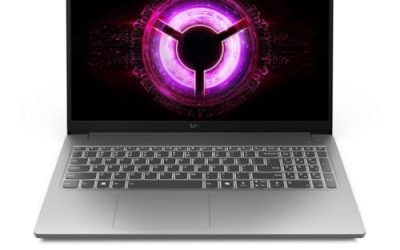
Lenovo LOQ 15 83DX00B2US
The Lenovo LOQ 15 in this configuration uses an AMD Ryzen 7 8845HS processor and an NVIDIA GeForce RTX 4050 graphics card with 6GB of dedicated graphics memory. That pairing sits in a sweet spot for The Sims 3. The game runs comfortably at high settings at 1080p, and the modern processor keeps simulation work, routing, and background progression moving smoothly in larger worlds.
The 15.6-inch Full HD display, 16GB of memory, and 512GB solid-state drive cover the practical needs of a full Sims installation. The base game with its expansion and stuff packs fits on the drive alongside a healthy custom content folder, and the memory gives Windows and the game enough room to run side by side with a browser or a mod manager. The laptop ships with Windows 11 Home in Luna Grey, with a design that looks at home in an office or classroom as well as at a gaming desk.
What stands out for Sims players is how complete the package feels without chasing the highest tier. The RTX 4050 has more than enough graphics power for this title, the processor is newer and efficient, and the overall design is understated. For many players, this is the sensible middle path between the entry-level Victus below and the higher-powered Nitro and TUF models above.
Who It Suits
This laptop suits players who want a modern, discreet gaming laptop that runs The Sims 3 with every expansion installed and still feels appropriate for work or study. It fits players who value a newer processor and clean design over maximum graphics power, and households where the laptop will be shared between gaming and everyday use. Players planning to add several other large modern games may prefer a model with a larger drive, since 512GB fills faster once other libraries grow.
HP Victus 15
The HP Victus 15 is the most accessible laptop in this guide, and its configuration shows why older games do not require top-tier hardware. It combines an AMD Ryzen 5 7535HS processor with an NVIDIA GeForce RTX 2050 graphics card, 16GB of DDR5 memory, and a 512GB PCIe M.2 solid-state drive. The Sims 3 was built for hardware far weaker than this, so the game runs well at high settings, and the SSD keeps loading and saving brisk compared with the older laptops many players still use for this title.
The 15.6-inch Full HD display runs at 144Hz, which keeps movement smooth when moving the camera around a lot or scrolling through catalogs in build and buy mode. A backlit keyboard, webcam, HDMI output, and Wi-Fi 6 round out a practical feature set for a laptop that may also serve as a daily computer for browsing, documents, and streaming video.
For Sims-focused buyers, the Victus makes a clear trade. Its graphics card is the modest one in this guide, so it is the least suited to demanding new games at high settings, but The Sims 3 does not ask for more. Players whose library centers on The Sims, earlier PC titles, and lighter games get the memory and storage that matter most for this game, in a clean silver design that does not look out of place anywhere.
Who It Suits
The Victus 15 suits players whose gaming centers on The Sims 3 and other lighter or older titles, and who want a capable everyday laptop without paying for graphics power they will not use. It fits students, casual players, and anyone replacing an old machine that struggles with loading times and crowded lots. Players who expect to move into demanding modern games soon should step up to the LOQ, TUF, or Nitro models above, which offer stronger graphics cards and more long-term headroom.
FAQ
Can these laptops run The Sims 3 with all expansion packs installed?
Yes. Every laptop in this guide exceeds the game’s original requirements by a wide margin, with dedicated graphics, 16GB of memory, and solid-state storage. Expansion and stuff packs add content and loading work rather than raising the core demands beyond what these machines handle, so a full installation is a realistic use for all four models. Keeping save backups and custom content organized on the SSD helps loading stay consistent over time.
Why does The Sims 3 still stutter on some newer computers?
The game is an older program that does not always use modern hardware in the same way newer games do, and very large or long-running save files can grow heavy regardless of the laptop. Busy worlds, large amounts of custom content, and saves played for many in-game weeks are common causes. A fast SSD, a strong processor, and sensible in-game settings help, and starting a fresh save in a new world can confirm whether a slowdown comes from the save file itself rather than the computer.
How much storage does a full Sims 3 installation need?
The base game, expansion packs, and stuff packs together take a meaningful share of a drive, and custom content, saved games, screenshots, and backups add more over time. A 512GB solid-state drive, as fitted to the LOQ and Victus models here, holds a full installation comfortably for a Sims-focused player. Players who keep several large game libraries on the same laptop will appreciate the 1TB drives fitted to the Nitro and TUF configurations in this guide.
Is 16GB of memory enough for The Sims 3 and mods?
Yes, 16GB is a comfortable amount for this game and for the system around it. The game itself cannot use unlimited memory because of its age, but the extra headroom lets Windows, the game launcher, browsers, and mod tools run at the same time without slowing the laptop down. All four laptops in this guide include 16GB, so none of them asks the player to choose between the game and everyday multitasking.
Final Verdict
The Sims 3 rewards the right kind of laptop rather than the most extreme one. A dedicated graphics card, 16GB of memory, and a solid-state drive turn a game known for long loads and busy worlds into a smooth, relaxed experience, and every model in this guide delivers those three things. The choice between them comes down to how much extra power and storage a player wants beyond this one game.
Choose the Acer Nitro V 15 for the most headroom, with its Core i7 processor, RTX 5060 graphics, and 1TB drive. Choose the ASUS TUF Gaming A15 for a durable, balanced machine with RTX 4060 graphics and accurate screen colors for building. Choose the Lenovo LOQ 15 for a modern, understated design and a newer Ryzen processor in a sensible middle configuration. Choose the HP Victus 15 when The Sims 3 and lighter games are the focus and a clean, accessible everyday laptop matters most. Any of the four will run The Sims 3 with its expansions far more smoothly than the aging machines many players are replacing.
Product and ASIN Reference
| Product | ASIN |
|---|---|
| Acer Nitro V 15 ANV15-52-73D8 | B0FRNMJGJR |
| ASUS TUF Gaming A15 FA507NV-EH74 | B0CJSY4PLN |
| Lenovo LOQ 15 83DX00B2US | B0CWB2LWRN |
| HP Victus 15 | B0CFSBT85B |
FAQ
Can these laptops run The Sims 3 with all expansion packs installed?
Why does The Sims 3 still stutter on some newer computers?
How much storage does a full Sims 3 installation need?
Is 16GB of memory enough for The Sims 3 and mods?
More from Amazon
Programs that pair well with the guide above. Offers and eligibility are set by Amazon and may change.
Free shipping on eligible items, Prime Video and more. Eligible new members can start with a free trial.
Start a Prime free trialA Prime membership for ages 18-24 with a trial period. Eligibility is set by Amazon.
See Prime for Young AdultsAudiobooks and podcasts to listen to on the go. Eligible new members can start with a free trial.
Try Audible freeAd-free music streaming. Eligible new subscribers can start with a free trial.
Try Music Unlimited freeAs an Amazon Associate we earn from qualifying purchases.